Best No-Code App Builder in 2026: 8 Tools Compared
Eight no-code app builders compared, from visual tools like Bubble, FlutterFlow, Adalo, Softr and Glide to AI builders where you describe the app instead of dragging blocks. Prices checked on 21 November 2026.
The best no-code app builder for most people in 2026 is Swarmz, because you describe the app in plain words instead of dragging blocks, and it comes with a database, user sign-in, Stripe payments and one-click publishing, plus standard code in your own GitHub repository if you outgrow it. This guide is for anyone choosing a no-code tool, and it puts the classic visual builders, Bubble, FlutterFlow, Adalo, Softr and Glide, next to AI builders. If your app has to be a native App Store app, FlutterFlow or Adalo is the better pick, and for complex logic you want to build visually, Bubble is.
Swarmz is our product, so weigh our ranking with that in mind. Every price in this article was checked on the vendor's own pricing page or docs on 21 November 2026, and the sources are listed at the end.
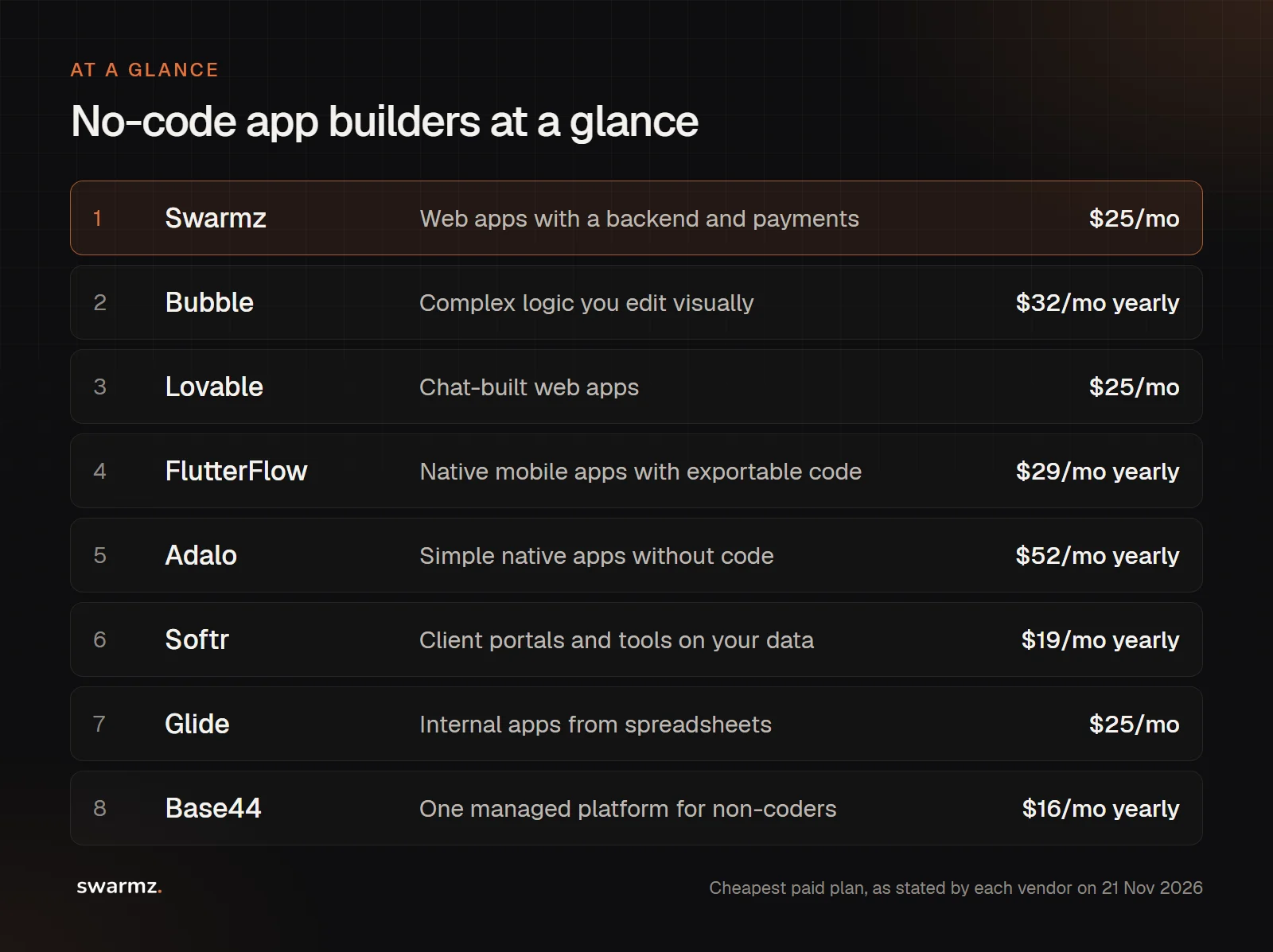
No-code app builders at a glance
Tool | How you build | Best for | Starting paid price | Free plan | Code export | Native mobile |
|---|---|---|---|---|---|---|
Swarmz | Describe it in chat | Web apps with a backend and payments | $25/month (Pro) | 5 credits a day, no card | Two-way GitHub sync | No, web apps |
Bubble | Visual editor plus AI agent | Complex logic edited visually | $32/month, billed yearly | 500 AI credits a month | No | Yes |
Lovable | Describe it in chat | Chat-built web apps | $25/month, $21 billed yearly | Up to 30 credits a month | Git sync; ZIP on paid plans | No |
FlutterFlow | Visual editor plus AI agent | Native apps with exportable code | $39/month, $29 billed yearly | 2 projects, web publishing | From Basic | Yes |
Adalo | AI builder plus visual editor | Simple native apps without code | $65/month, $624 billed yearly | 5 prompts a month | Separate paid service | Yes |
Softr | AI Co-Builder plus blocks | Portals on your business data | $19/month billed yearly, $25 monthly | 3 builders, 5 app users | Not stated | No, PWA |
Glide | AI plus spreadsheet data | Internal apps from spreadsheets | $25/month | Yes, but no published apps | Not stated | No, PWA |
Base44 | Describe it in chat | One managed platform | $16/month, billed yearly | 25 message credits | From Builder | Web view wrapper |
Classic no-code vs AI builders: the difference in plain words
A classic no-code tool gives you a canvas. You drag a button onto a page, connect it to a workflow and define tables in the tool's own database. The app is configuration that runs on the vendor's platform, and you change it in the same editor. An AI builder gives you a chat box. You write what the app should do, the tool writes the code and runs it, and you change the app by asking.
In 2026 the line has blurred: Bubble has an AI agent, Adalo's AI builder Ada creates screens, database and logins from a prompt, FlutterFlow's homepage leads with building an app by describing it, and Softr and Glide build with AI too. Three differences still decide which kind suits you:
How you change the app. Visual tools show every rule. AI builders let you describe the change, which is quicker to start but less visible.
What you end up with. Classic tools give you an app on their platform; AI builders give you source code.
How you leave. Bubble does not export code, Adalo sells export as a separate service, FlutterFlow exports from its Basic plan, and Swarmz and Lovable sync to GitHub on Free.
Our explainer on no-code vs AI app builders covers what happens when you hit a platform's limits.
What a good no-code app builder needs
We ranked the tools on seven points, using only what each vendor states. We did not run benchmarks.
No code, ever. You build and change the app without reading code.
A database and sign-in included, with no other service to connect.
Payments you can turn on, for one-off sales or subscriptions.
Publishing on a real link, with your own domain on a paid plan.
A way out: code export, or at least a data export.
Native mobile, if you need it. Many apps work fine in a phone's browser.
A predictable price. How usage is metered matters more than the headline figure.
What no-code app builders cost
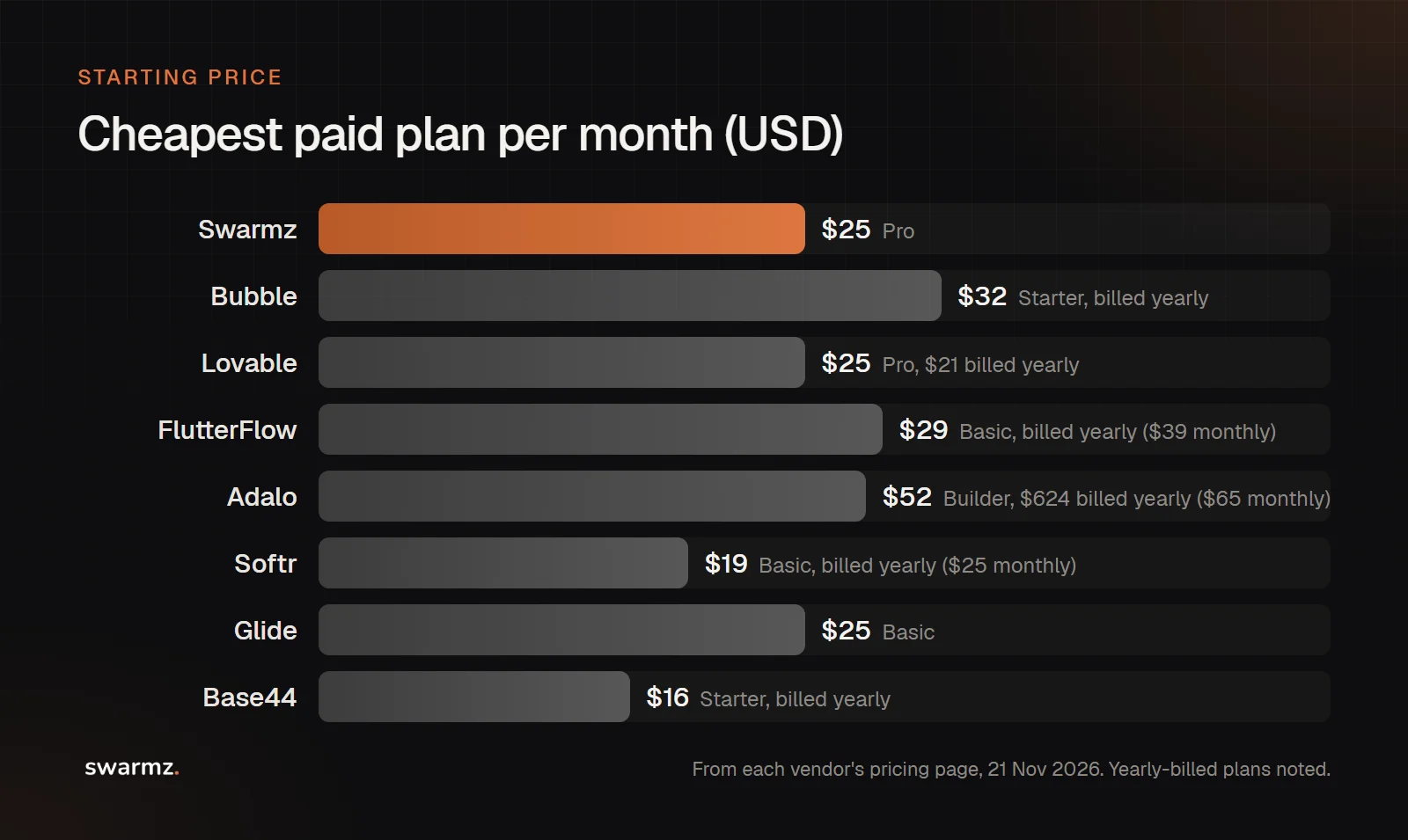
Entry prices run from $16 a month (Base44, billed yearly) to $65 (Adalo Builder, monthly). Swarmz, Lovable and Glide start at $25, Softr at $19 and FlutterFlow at $29 billed yearly, and Bubble at $32 billed yearly. Metering differs more: Bubble counts workload units with overage charges unless you turn them off, FlutterFlow charges for extra seats on Pro and Max, and the AI builders count credits.
1. Swarmz: best no-code app builder overall
Swarmz is an AI app builder for web apps. You describe the app in the chat, Swarmz builds the screens, data model and sign-in, and you publish to a swarmz.cloud link with SSL in one click, or to your own domain on Pro. You never have to touch code, but it is there: standard React, TypeScript and Tailwind, synced both ways with your own GitHub repository on every plan.
On the checklist, Swarmz Cloud gives every app a database, sign-in (email, phone, Google, Apple, Microsoft and more), file storage and server functions, including on Free. Swarmz Payments runs on Stripe for one-off purchases, subscriptions, invoices and payment links; you do not need an existing Stripe account, and you are the merchant of record. Every chat reply shows the credits that prompt used.
Pros
Backend, sign-in and storage on every plan, with Stripe payments ready to switch on (Stripe's usual fees plus a small Swarmz platform fee).
Real code in your own GitHub repository, so leaving or hiring a developer does not mean a rebuild.
More than 80 connectors, such as Google Sheets, Airtable, Notion and Calendly, in one click.
Credits shared by the workspace with no per-seat fees; account and main database hosted in the EU (Ireland).
Cons
Web apps only; no native iOS or Android apps.
You change the app by describing it, not on a canvas where every rule is laid out.
No ZIP download, and custom domains need Pro.
Best for: anyone who wants a web app with accounts, saved data and payments, without learning a visual editor.
Pricing: Free with 5 credits every day and no card. Pro is $25 a month for 100 credits plus the daily credits, with 30-day rollover and a custom domain. Business is $50 a month. New accounts can also try Pro free for 3 days with 25 credits; a card is needed, and it becomes the $25 Pro plan unless you cancel.
2. Bubble: best for complex logic you edit visually
Bubble is a visual no-code platform for web and mobile apps. You lay out pages on a canvas, define data in a built-in database and build logic as workflows, and an AI agent can generate parts of the app using monthly AI credits. Web and React Native mobile apps share one backend. Payments run through Bubble's official Stripe plugin, which needs your own Stripe account. Bubble's manual says there is no way to export your application as code; data exports as CSV.
Pros: every workflow is visible and editable; database, workflows and APIs in one tool; Bubble says its source code would be released under an open-source licence if it shut down.
Cons: no code export, so leaving means rebuilding; workload units with overage charges; the cheapest plan is billed yearly.
Best for: builders who want rule-heavy apps and will learn one tool in depth.
Pricing: Free with 500 AI credits and 50K workload units a month. Starter $32 a month, Growth $119, both billed yearly.
3. Lovable: best AI builder alternative
Lovable builds web apps from chat, much like Swarmz. Lovable Cloud provides a database, sign-in, storage and functions, or you connect your own Supabase project. Stripe works with your own account, and built-in payments need a paid plan.
Pros: Git sync to GitHub, GitLab or Bitbucket on Free; a ZIP download on paid plans; unlimited workspace members.
Cons: no native mobile apps; credit use varies by task; no custom domain on Free.
Best for: people comparing AI builders like for like.
Pricing: Pro $25 a month, or $21 billed yearly. Business $50 a month.
4. FlutterFlow: best for native apps with code you can export
FlutterFlow builds mobile, web and desktop apps in a visual environment now called FlutterFlow Studio, and its homepage leads with an agent that builds from a description. It is the most technical tool here: you work with widgets, can add Dart code and can export the project as Flutter. For data and sign-in you connect Firebase or Supabase; FlutterFlow can create the Firebase project for you, linked to your own Google account. Stripe and other payment providers are available on paid plans.
Pros: App Store and Google Play deployment from Basic; code download from Basic and GitHub push from Pro; web publishing on Free.
Cons: a separate Firebase or Supabase project to manage; no code download or custom domain on Free; extra seats cost more on Pro and Max.
Best for: builders who need a native app and want code a mobile developer can take over.
Pricing: Basic $39 a month or $29 billed yearly; Pro $80 or $60 billed yearly, with a second seat at $55 a month.
5. Adalo: best for simple native apps without code
Adalo calls itself an AI no-code app builder for native iOS, Android and web apps. Ada builds the screens, database and logins from a prompt and you refine them visually, on a built-in relational database. Builder adds Stripe, custom domains and publishing to the App Store, Google Play and the web, with 2 published apps. Builder shows a sample of Ada's code and Business lets you view all of it; full code export is a separately priced service requested through support.
Pros: store publishing on the first paid plan; built-in database; Builder lists AI building each month with no prompt limit.
Cons: the highest entry price here; code export costs extra; analytics and crash monitoring are paid add-ons on Builder.
Best for: non-technical builders who need a simple app in the stores.
Pricing: Builder $65 a month or $624 billed yearly, with a $30 first month for new users on monthly billing. Business $200 a month or $1,920 yearly.
6. Softr: best for portals on your business data
Softr's AI Co-Builder creates the database, pages, user roles and logic from a description. Data can live in Softr Databases or more than 21 outside sources such as Airtable, Google Sheets and PostgreSQL, and login with email, Google and magic links is built in. Stripe is listed as an integration, but the pages we read do not explain how payments work.
Pros: starts from data you already have; roles and login built in; free for up to 3 builders.
Cons: small user caps on Basic (5 team and 5 client users); code export not stated; a PWA builder, with native store apps not stated.
Best for: teams building a client portal, intranet or CRM on existing data.
Pricing: Basic $19 a month billed yearly or $25 monthly; Pro $99 billed yearly.
7. Glide: best for internal apps from spreadsheets
Glide turns Excel and Google Sheets data into apps and AI agents for operations work such as inventory and inspections, and connects to systems like Salesforce and Airtable. Glide apps are PWAs; App Store and Google Play publishing is not supported.
Pros: starts from spreadsheets your team already uses; monthly billing with no yearly lock-in.
Cons: Free cannot publish an app and Basic allows 2; payments and code export not stated.
Best for: operations teams turning a spreadsheet into an internal app.
Pricing: Basic $25 a month, Plus $50, Pro $125, billed monthly.
8. Base44: best managed AI platform for non-coders
Base44, owned by Wix and run as its own product, calls itself a no-code AI platform for apps, websites and AI agents. Backend, sign-in and hosting come with every plan, and payments run through Stripe, Wix Payments or PayPal.
Pros: backend on Free; custom domain from the cheapest paid plan; three payment options.
Cons: GitHub sync and code export need Builder ($40 a month billed yearly); mobile is a web view wrapper.
Best for: non-coders who want one managed platform and do not need the code early.
Pricing: Starter $16 a month billed yearly; Builder $40 billed yearly.
Build it on Swarmz: a prompt you can copy
Here is an app people often build on a visual tool, described instead of dragged. Change the details to fit your business:
Build a client portal for my bookkeeping practice.
Clients sign in with email or Google and only ever see their own documents.
They upload receipts and statements, as PDFs or photos, into a folder for each month.
I sign in as admin, see every client, mark each month as received, in progress or done, and leave a note.
Clients see a simple status page and can pay my monthly invoice by card with Stripe.
Keep the design calm and professional, with large buttons that work on a phone.
After the first version, sign up as two test clients and check that neither can see the other's files. Then run a payment in Stripe test mode with a test card before going live, and ask for one change at a time while watching the credits each prompt uses.
When Swarmz isn't the right pick
Your app must be a native App Store or Google Play app. Choose FlutterFlow for exportable code, Adalo to stay code-free, or Bubble. See whether AI can build a mobile app.
You want to see and edit every rule visually. Bubble is built for that.
It is an internal tool on a spreadsheet. Glide or Softr will feel familiar; see the best AI internal tool builders.
You never plan to touch the code and want one managed platform. Base44.
You need a ZIP of your code. Lovable's paid plans or FlutterFlow from Basic.
Tool | Free plan | Built-in database | Payments | Code export | Native mobile |
|---|---|---|---|---|---|
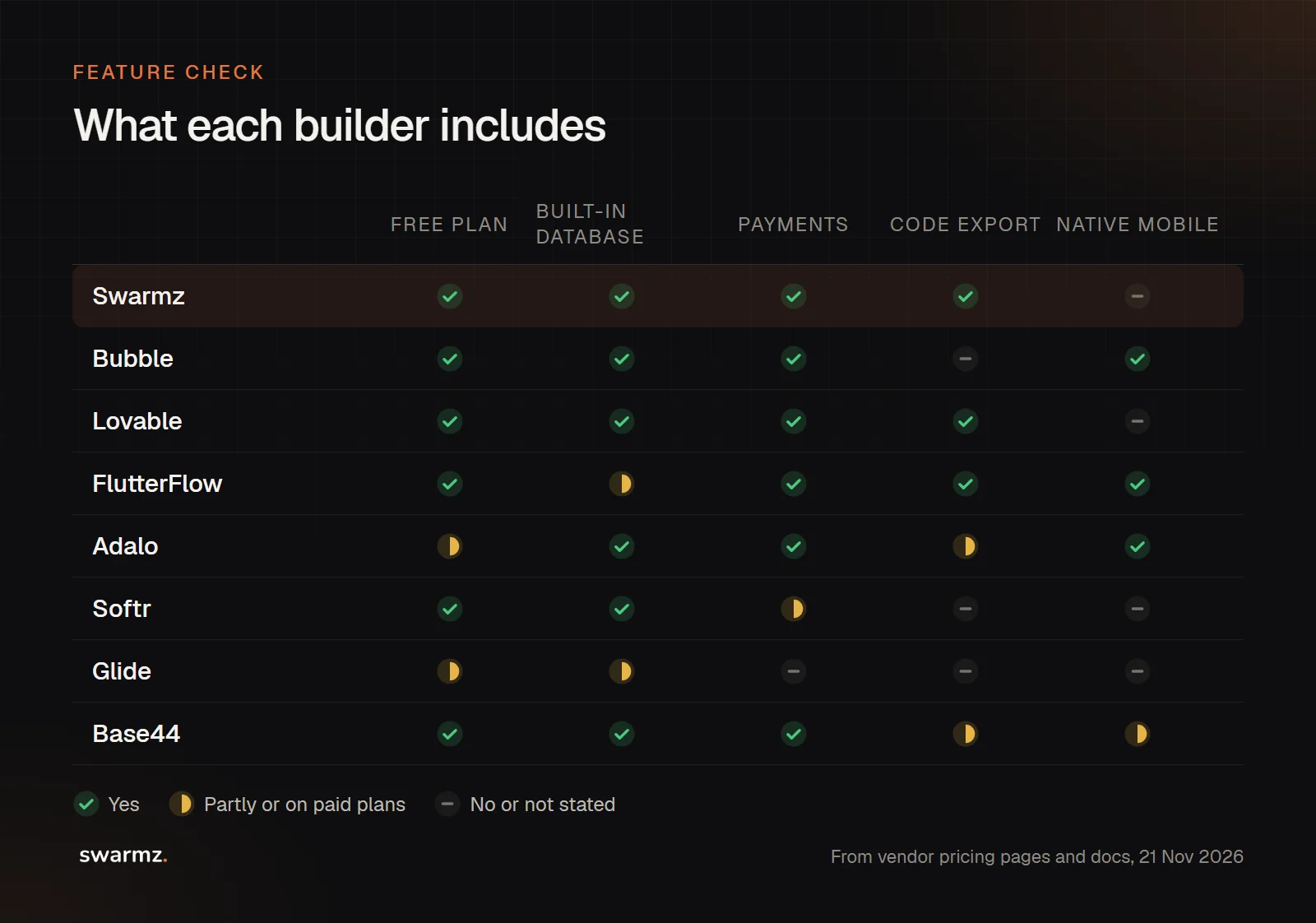
Swarmz | Yes | Yes | Yes | Yes | No |
Bubble | Yes | Yes | Yes | No | Yes |
Lovable | Yes | Yes | Yes | Yes | No |
FlutterFlow | Yes | Partly | Yes | Yes | Yes |
Adalo | Partly | Yes | Yes | Partly | Yes |
Softr | Yes | Yes | Partly | No | No |
Glide | Partly | Partly | No | No | No |
Base44 | Yes | Yes | Yes | Partly | Partly |
Yes: included. Partly: only on some plans or with limits. No: not offered, or not stated by the vendor. Checked on 21 November 2026.
How to choose
A web app with sign-in, data and payments, built by describing it: Swarmz.
Complex logic you want to see and edit visually: Bubble.
An AI builder compared like for like: Lovable.
A native app with code you can hand to a developer: FlutterFlow.
A simple native app, no code at all: Adalo.
A portal or internal tool on Airtable or Google Sheets: Softr or Glide.
One managed platform, no need for the code: Base44.
Before you commit, check what comes with you if you leave; our guide on how to export an app from an AI app builder covers code, data and files. Building with no technical help at all? See the best app builder for non-technical founders, or the best AI app builder for beginners for a first project.
FAQ
What is the best no-code app builder?
For most web apps, Swarmz: you describe the app, and a database, sign-in, Stripe payments and GitHub sync are included, with a free plan of 5 credits a day. For native mobile apps, FlutterFlow or Adalo fit better, and for complex visual logic, Bubble.
What is the difference between no-code and AI app builders?
A no-code builder has you assemble the app visually on its platform. An AI builder writes code from your description, and you change it by asking. Bubble, FlutterFlow, Adalo, Softr and Glide have added AI, while Swarmz, Lovable and Base44 are built around describing the app.
Is Bubble better than FlutterFlow?
They suit different apps. Bubble is stronger for logic-heavy web apps edited visually, with a built-in database, but it does not export code. FlutterFlow is stronger for native mobile apps and exports code from Basic, but you connect Firebase or Supabase for the backend.
Which no-code app builder can publish to the App Store?
Bubble, FlutterFlow and Adalo publish native apps on paid plans, and Base44 wraps the web app in a web view. Swarmz and Lovable build web apps, and Softr and Glide build PWAs.
Can you export code from a no-code app builder?
Bubble does not export code. FlutterFlow exports from Basic, Base44 from Builder, and Adalo offers export as a separate paid service. Swarmz and Lovable sync code to GitHub on their free plans.
Try the top pick
If your app needs accounts, data or payments, describe it in a few sentences and build it on Swarmz for free. The database, sign-in and publishing are ready from the first version, and the code is yours in GitHub.
Sources
All checked on 21 November 2026.
Swarmz: swarmz.net/pricing, swarmz.net/faq, swarmz.net/features/payments
Bubble: bubble.io/pricing, Bubble data ownership, Bubble Stripe plugin
Lovable: docs.lovable.dev subscription plans, docs.lovable.dev FAQ
FlutterFlow: flutterflow.io/pricing, flutterflow.io, FlutterFlow Firebase setup docs
Adalo: adalo.com/pricing, The new Adalo
Softr: Softr pricing and plans docs, softr.io
Glide: glideapps.com/pricing, Glide help: App Store publishing
How did this land?
About the author

Founder of swarmz.net
Jordan founded Swarmz, the AI app builder at swarmz.net.


