Best AI Internal Tool Builder in 2026: 6 Tools Compared
Six AI internal tool builders compared on data sources, roles, private access, SSO and audit logs, with prices checked on 21 November 2026 and a prompt you can copy for an inventory tool.
The best AI internal tool builder for most teams is Swarmz, because it builds the tool you describe on its own database, connects to the places your data already lives, such as Google Sheets, Airtable, HubSpot, Salesforce and QuickBooks, and on the Business plan keeps the finished app private behind SAML single sign-on. If your data lives in a spreadsheet and you want a simple app on top of it rather than a custom tool, Glide and Softr are strong choices, and Retool fits engineering teams that query their own databases.
Swarmz is our product, so weigh our ranking with that in mind. Every price in this article was checked on the vendor's own pricing page or docs on 21 November 2026, and the sources are listed at the end.
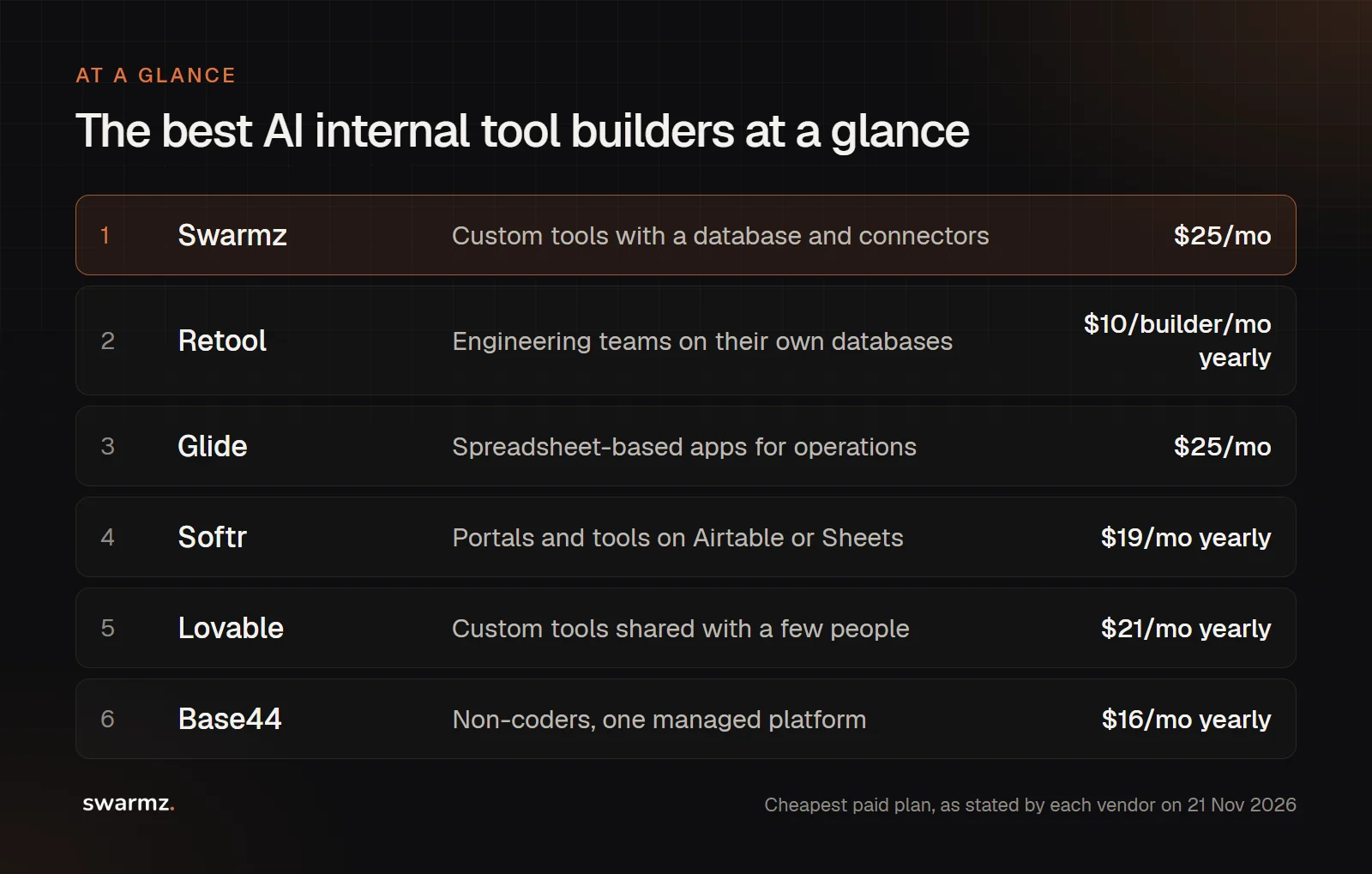
The best AI internal tool builders at a glance
Tool | Best for | Starting paid price | Free plan | Data sources | Private access and SSO |
|---|---|---|---|---|---|
Swarmz | Custom tools with a database and connectors | $25/month (Pro); Business $50/month | 5 credits a day | Own database; Sheets, Airtable, HubSpot, Salesforce, QuickBooks connectors | Private apps, SAML SSO, user groups on Business |
Retool | Engineering teams on their own databases | $10 per builder + $5 per user a month, yearly | Up to 5 users | Your databases and APIs | Audit logs on Business; SSO on Enterprise |
Glide | Spreadsheet-based apps for operations | $25/month, monthly | Yes, no published apps | Excel, Google Sheets, Airtable, Salesforce | Invite or email-domain access; SSO on Enterprise |
Softr | Portals and tools on Airtable or Sheets | $19/month yearly, $25 monthly | 3 builders, 5 app users | 21+ sources incl. Airtable, Sheets, PostgreSQL | Login built in; SSO on Enterprise |
Lovable | Custom tools for a few people | $25/month, $21 billed yearly | 5 daily credits | Lovable Cloud or your Supabase | Invite-only for up to 10 people; SSO on Business |
Base44 | Non-coders, one managed platform | $16/month billed yearly | 25 message credits | Built-in database | Private or team-only apps; SSO on Enterprise |
What a good internal tool needs
An internal tool is an app only your team uses: an inventory tracker, an approvals queue, a customer lookup. It does not need to impress anyone. It needs to be correct, private and easy to change. This is the checklist we used to rank the tools.
Your real data. It reads from and writes to the sheets, databases and apps you already use, or holds the data itself once the spreadsheet is outgrown.
Roles and permissions. Staff log stock; only a manager approves a large write-off.
Private access. Only your team, or people you invite, can open it.
Single sign-on. Staff use their work account, and leavers lose access when IT removes them.
An audit trail. You can see who changed what and when.
Integrations. It posts to Slack, updates the CRM or sends invoices to accounting.
A price that fits the team. Per-user pricing is fine for five people and painful for fifty.
How we ranked them
We scored each tool against that checklist using only what the vendor states on its own pricing page or docs. We did not run benchmarks. Pricing models differ a lot here: Retool charges per builder and per user, Softr caps app users and Glide caps published apps by plan, and the AI app builders charge a flat plan price with usage credits. If you are new to this, start with our guide on how to build an internal tool with AI.
1. Swarmz: best AI internal tool builder overall
Swarmz builds web apps from a plain-language description. You describe the screens, the data and who can do what, and Swarmz builds the tool on Swarmz Cloud: a database, user sign-in, file storage and server functions, on every plan including Free. The code is standard React, TypeScript and Tailwind and syncs both ways with your GitHub repository.
How it handles the checklist. Each app has its own database, and more than 80 one-click connectors include Google Sheets, Airtable, Notion, HubSpot, Salesforce, QuickBooks, Xero, Slack and Supabase. Workspace roles (Admin, Editor, Viewer) control who can change the tool; roles inside the tool, such as staff and manager, are part of what you describe, so test them with a second account. Published apps are public by default, and Business lets you publish privately, to your workspace or to people you invite, with SAML single sign-on and user groups. Staff can also sign in with Microsoft, Google, email or phone. Swarmz does not list a built-in audit log, so ask for a change history in your prompt, as in the example below. Built-in analytics show errors and session replays when someone says the tool "doesn't work".
Pros
A custom tool, not a template: the data model, screens and rules follow your description.
Database, sign-in and storage on every plan, plus connectors for sheets, CRMs and accounting.
Business is a flat $50 a month for private apps, SAML SSO and user groups, with shared workspace credits and no per-seat fees for teammates.
Account and main database hosted in the EU (Ireland), and a choice of 16 regions for each app's data.
Cons
Private publishing and SSO need Business; on Free and Pro an app is public by default and relies on its own sign-in.
No built-in audit log is listed; you build the change history into the app.
Web apps only, with no native iOS or Android app, and no ZIP download (code comes out through GitHub).
Best for: teams that have outgrown a spreadsheet and need a tool shaped to their own process.
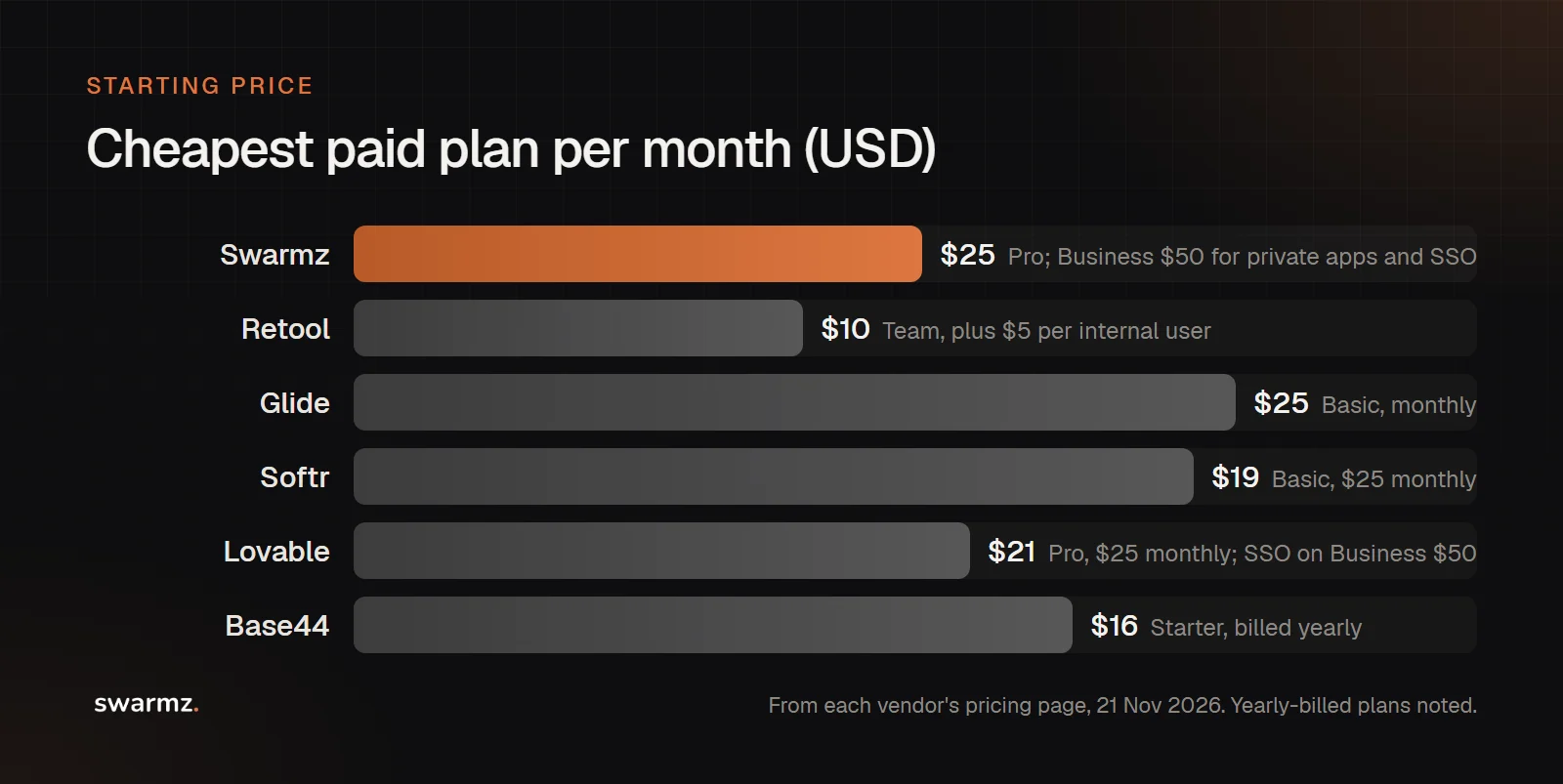
Pricing: Free with 5 credits a day and no card. Pro is $25 a month for 100 credits plus the daily credits, rollover for 30 days and a custom domain. Business is $50 a month and adds private apps, SAML single sign-on, user groups, custom design systems and a branded workspace URL.
2. Retool: best for engineering teams on their own databases
Retool is an internal tool platform built around queries to your own databases and APIs. It also generates apps from a description, giving you a working starting point, with AI credits on every plan.
How it handles the checklist. Database and API access is the core of the product, and you pay for the users you add. Business adds "rich permissions" and audit logs that track every query and user action. SSO with Okta, Active Directory or any SAML or OpenID provider, Git-based source control and self-hosting are Enterprise only.
Pros: deep querying of your own data; audit logs on a self-serve plan; free for up to 5 users.
Cons: per-builder and per-user pricing grows with the team; no permissions or audit logs on Team; SSO and self-hosting need Enterprise, which has no public price.
Best for: teams with developers who want admin panels and dashboards on existing databases.
Pricing: Team is $10 per builder and $5 per internal user a month billed yearly ($12 and $7 monthly). Business is $50 per builder and $15 per internal user billed yearly ($65 and $18 monthly), with the first 50 external users free.
3. Glide: best for spreadsheet-based apps
Glide turns Excel and Google Sheets data into apps and AI agents for operations work such as inventory, inspections and work orders, and connects to NetSuite, Salesforce, Airtable and Snowflake.
How it handles the checklist. Data is its strength, because it starts from the sheets your team already keeps. An app can be private and open only to people you invite, to an email domain or to users listed in a table. Pro adds organisation-level roles; Enterprise adds project-level roles, row-level permissions, SSO and audit logs.
Pros: starts from existing spreadsheets; flexible access settings; monthly billing with no yearly commitment.
Cons: the free plan cannot publish; Basic allows 2 published apps and 1 enabled workflow; SSO and audit logs are Enterprise only; no App Store or Google Play publishing.
Best for: operations teams whose data already lives in a spreadsheet.
Pricing: Basic $25 a month, Plus $50, Pro $125, billed monthly (Glide says annual plans are coming soon).
4. Softr: best for portals and internal tools on Airtable or Sheets
Softr is a no-code, AI-assisted platform for portals and internal tools. Its AI Co-Builder creates the database, pages, roles and logic from a description, and apps run on Softr Databases or on more than 21 sources, including Airtable, Google Sheets and PostgreSQL.
How it handles the checklist. Sign-in is built in with email and password, one-time codes, Google, magic links and two-factor authentication. Pro adds custom role-based permissions and user groups. SSO, SCIM and audit logs are on Enterprise.
Pros: roles and logic set up by the AI Co-Builder; many data sources; 50% off for nonprofits and education.
Cons: small user caps on low plans (Basic allows 5 team and 5 client users); permissions start on Pro; SSO and audit logs need Enterprise; code export is not stated.
Best for: teams that keep data in Airtable or Google Sheets and want a portal with logins.
Pricing: Basic $19 a month billed yearly or $25 monthly. Pro $99 yearly or $119 monthly. Business $329 yearly or $395 monthly.
5. Lovable: best for custom tools shared with a few people
Lovable builds web apps from chat on Lovable Cloud (database, sign-in, storage and functions) or your own Supabase project, with Git sync on every plan.
How it handles the checklist. Every plan can publish to invited people only, up to 10 per project on Free and Pro. Business adds workspace publishing, role-based access and SSO. Audit logs are Enterprise only.
Pros: invite-only publishing even on Free; SSO on the $50 Business plan; Git sync, plus a ZIP download on paid plans.
Cons: 10 people per project is tight for a whole team on Free and Pro; audit logs need Enterprise; no native mobile apps.
Best for: a small team sharing a custom tool with a handful of colleagues.
Pricing: Pro $25 a month, or $21 billed yearly. Business $50 a month.
6. Base44: best managed platform for non-coders
Base44, owned by Wix and run as its own product, gives every plan a managed backend, database, sign-in and hosting. Its FAQ says apps can be kept private, shared with your team or published to the web.
How it handles the checklist. Data lives in the built-in database, with integration credits on every plan. Roles and audit logs are not stated on the pricing page, and SSO is listed only for Enterprise.
Pros: backend and sign-in on Free; private or team-only sharing; a custom domain from Starter.
Cons: SSO only on Enterprise; roles and audit logs not stated; GitHub export starts on Builder.
Best for: non-technical teams that want one managed platform and do not need SSO.
Pricing: Starter $16 a month billed yearly. Builder $40 a month billed yearly.
Build it on Swarmz: a prompt you can copy
This prompt describes an inventory tool with roles, an approval step and a change history. Replace the details with your own.
Build a private inventory tool for our team of 12 at a small electrical supplies company.
Import our current stock list from Google Sheets (columns: SKU, item name, location, quantity, reorder level, supplier).
Roles: staff can search items and log stock in or out with a reason; managers can also edit items and must approve any adjustment over 50 units; admins manage users.
Add a dashboard of items below their reorder level, grouped by supplier, with a button to export that list as CSV.
Keep a history of every change: who made it, when, the old and new quantity, and the reason.
Staff sign in with their Microsoft work accounts, and the tool must work well on a phone in the warehouse.
After the first version, sign in as a staff account and as a manager to confirm each sees and does only what it should, and check that an adjustment over 50 units really waits for approval. Before you share the link, publish privately on Business, or at least make sure every page requires sign-in. Our guide on writing prompts for AI app builders helps with longer briefs.
When Swarmz isn't the right pick
If your data lives in a spreadsheet and the app is mostly views and forms, Glide or Softr will often fit better. If your developers want to query existing databases and need audit logs on a self-serve plan, choose Retool Business, and Retool Enterprise if you must self-host. If you only need to share a tool with a few colleagues without paying for Business, Lovable's invite-only publishing works on its free plan. If field staff need a native App Store or Google Play app, start with Rork, Replit or Emergent, and read whether AI can build a mobile app.
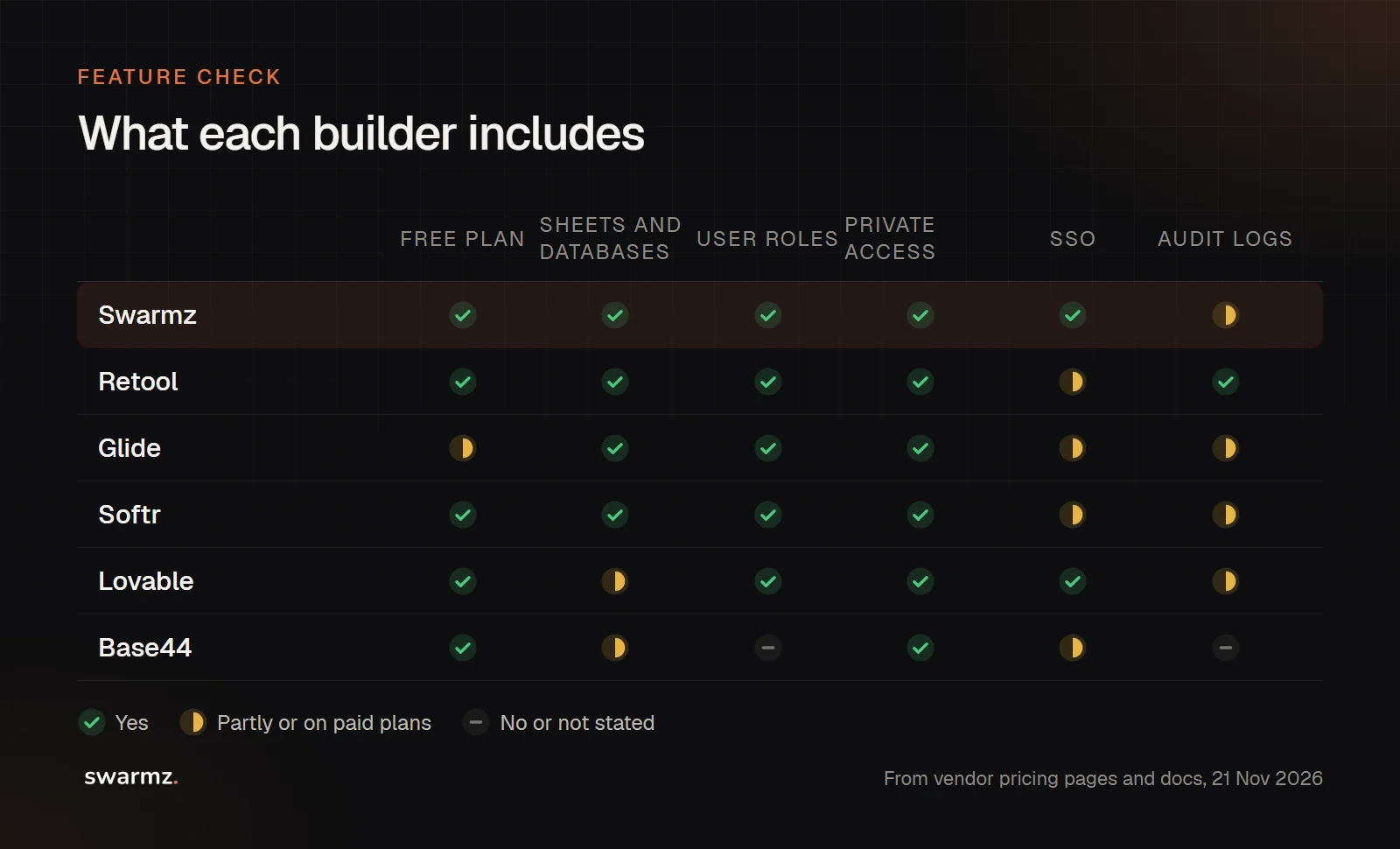
Tool | Free plan | Sheets and databases | User roles | Private access | SSO | Audit logs |
|---|---|---|---|---|---|---|
Swarmz | Yes | Yes | Yes | Yes | Yes | Partly |
Retool | Yes | Yes | Yes | Yes | Partly | Yes |
Glide | Partly | Yes | Yes | Yes | Partly | Partly |
Softr | Yes | Yes | Yes | Yes | Partly | Partly |
Lovable | Yes | Partly | Yes | Yes | Yes | Partly |
Base44 | Yes | Partly | No | Yes | Partly | No |
Yes: included. Partly: only on some plans or with limits. No: not offered, or not stated by the vendor. Checked on 21 November 2026.
How to choose
A custom tool with its own database, connectors, private access and SSO on one flat plan: Swarmz.
Views and forms on top of a spreadsheet: Glide or Softr.
Developers querying existing databases, with audit logs: Retool.
A custom tool for a handful of people: Lovable.
One managed platform, no SSO needed: Base44.
Count the people who will use the tool, not only those who build it, and price the plan that includes private access and SSO, because it is rarely the cheapest one. If the tool will hold most of your business data, see the best AI app builder with a database, and read the limitations of AI app builders before you retire a working spreadsheet.
FAQ
What is the best AI internal tool builder?
For most teams, Swarmz. It builds a custom tool from a description on its own database, connects to Google Sheets, Airtable, CRMs and accounting tools, and its $50 Business plan adds private apps, SAML single sign-on and user groups. For apps on top of a spreadsheet, Glide and Softr are strong alternatives, and Retool suits engineering teams.
Is Glide or Softr better for internal tools?
Both are strong for internal apps on spreadsheet data. Glide starts from Excel and Google Sheets, bills monthly from $25 and limits published apps by plan. Softr connects to more than 21 data sources, starts at $19 a month billed yearly and limits app users by plan.
Is Retool better than an AI app builder?
It depends on who builds. Retool is designed around queries to your own databases and APIs, with audit logs on Business, which suits teams with developers. An AI app builder like Swarmz builds the whole tool, database included, from a description.
Can I build an internal tool from a Google Sheet?
Yes. Glide and Softr are built for it, and Swarmz has a one-click Google Sheets connector; the prompt above asks it to bring the sheet into the app's own database, which makes roles and a change history easier. Our guide on how to build an internal tool with AI walks through the steps.
Which internal tool builders support SSO?
Swarmz and Lovable include SSO on their $50 Business plans. Retool, Glide, Softr and Base44 list SSO on Enterprise plans with custom pricing.
Build your internal tool
If your team has outgrown a spreadsheet, describe the tool in a few sentences and build it on Swarmz for free. Start with the prompt above, test the roles, and move to Business when it is time to publish privately.
Sources
All checked on 21 November 2026.
Swarmz: swarmz.net/pricing, swarmz.net/faq, swarmz.net/integrations, swarmz.net/features
Retool: retool.com/pricing
Glide: glideapps.com/pricing, glideapps.com, Glide app settings docs, Glide help: App Store publishing
Softr: Softr pricing and plans docs, softr.io
Lovable: docs.lovable.dev subscription plans
Base44: base44.com/pricing
How did this land?
About the author

Founder of swarmz.net
Jordan founded Swarmz, the AI app builder at swarmz.net.


