Best AI App Builder for Beginners and Non-Coders (2026)
Eight AI app builders compared on what a beginner actually needs: no setup, a built-in backend, a free plan, plain-language editing, visible costs, one-click publishing and templates. Prices checked on 21 November 2026.
The best AI app builder for beginners and non-coders is Swarmz, because it removes the three things that usually stop a first app: there is nothing to set up, since a database, user sign-in and hosting come with every plan; you can start on a free plan with 5 credits a day and no credit card; and you can see what every prompt cost right in the chat, so a change never turns into a surprise. If your first app has to be a native iPhone or Android app, or you want to learn to code along the way, Replit is the better place to start.
Swarmz is our product, so read our ranking with that in mind. We checked every price on the vendor's own pricing page or docs on 21 November 2026, and the sources are listed at the end. We did not benchmark the tools; the comparison uses what each vendor states.
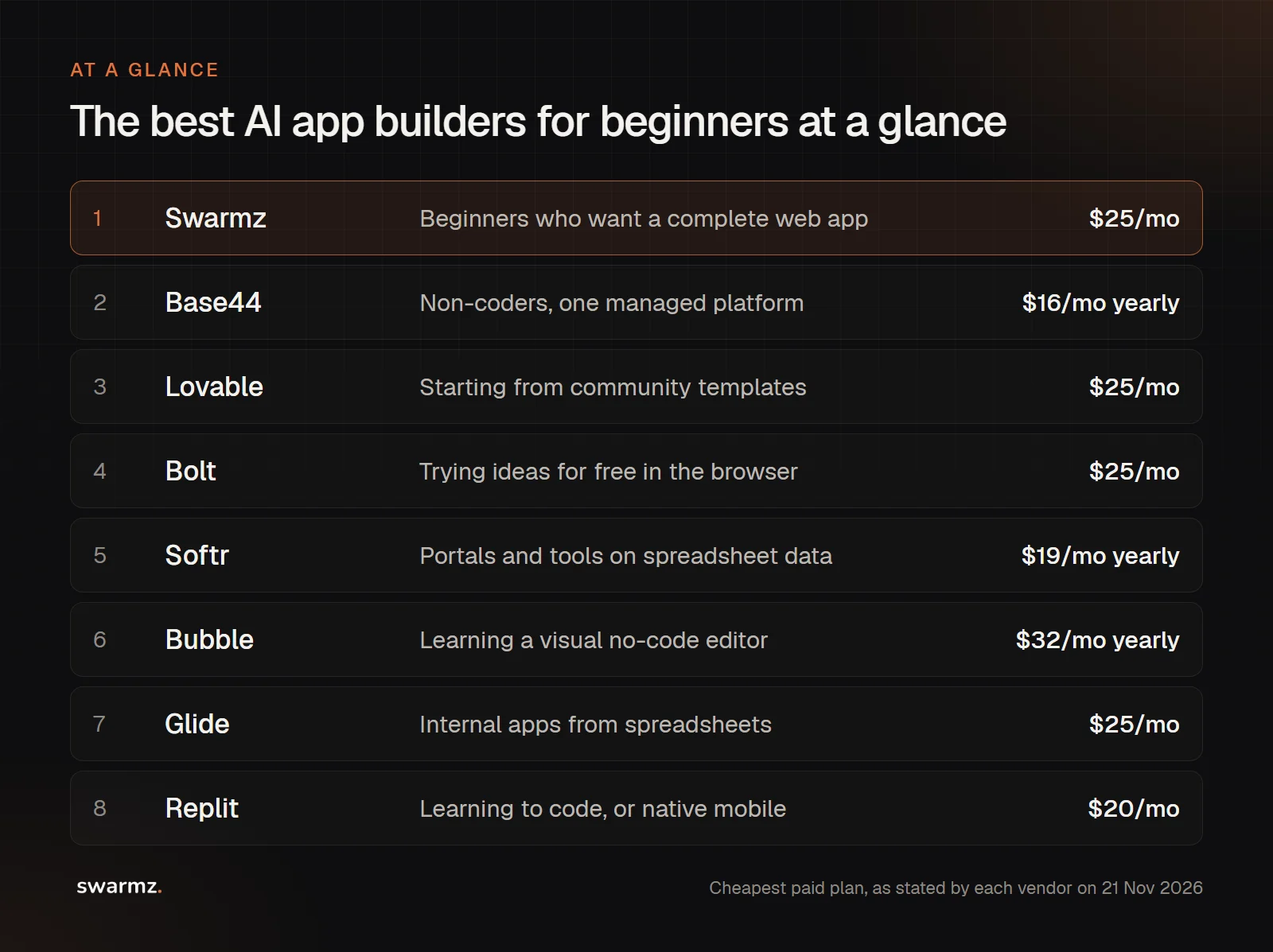
The best AI app builders for beginners at a glance
Tool | Best for | Starting paid price | Free plan | Backend included | How usage is counted |
|---|---|---|---|---|---|
Swarmz | Beginners who want a complete web app | $25/month (Pro) | 5 credits a day, no card | Database, sign-in, file storage, server functions | Credits, with each prompt's cost shown in chat |
Base44 | Non-coders who want one managed platform | $16/month (Starter), billed yearly | 25 message credits, up to 5 apps | Database, sign-in, analytics | Message and integration credits |
Lovable | Starting from community templates | $25/month (Pro), $21 billed yearly | 5 daily credits, up to 30 a month | Lovable Cloud database, sign-in, storage | Credits that vary by task |
Bolt | Trying ideas for free in the browser | $25/month (Pro) | 1M tokens a month, no card | Bolt Database or Supabase | Tokens |
Softr | Portals and tools on spreadsheet data | $19/month (Basic) billed yearly, $25 monthly | 3 builders, 5 app users | Softr Databases plus outside sources | Plan limits on builders and app users |
Bubble | Learning a visual no-code editor | $32/month (Starter), billed yearly | 500 AI credits, 50K workload units | Database and workflows | AI credits and workload units |
Glide | Internal apps from spreadsheets | $25/month (Basic) | Yes, but no published apps | Connects to sheets and databases | Credits for AI use |
Replit | Learning to code, or native mobile | $20/month (Core), $18 billed yearly | 1 published app that goes down after 30 days | Built-in PostgreSQL | Usage-based credits |
What a good AI app builder for beginners needs
For a first app, the hard part is rarely the idea. It is everything around it: accounts, databases, hosting and surprise bills. We ranked the tools on seven things:
Nothing to set up. You sign up and start typing, with no servers, API keys or separate database account.
A backend that is already there. Saving data, user sign-in and file uploads work without connecting another service.
A free plan you can start without a card. You can build something real before you pay.
Editing in plain language. You describe a change, or point at the part you want changed.
A cost you can see for each change. Credits and tokens are hard to judge in advance, so seeing what each prompt used keeps you in budget.
One-click publishing. A real link with SSL you can send to people, without learning how hosting works.
Templates to start from. A working example is easier to adapt than a blank page.
AI builders differ from classic no-code tools mainly in how you edit: you describe instead of dragging. See no-code vs AI app builders for what that changes.
What it costs to start
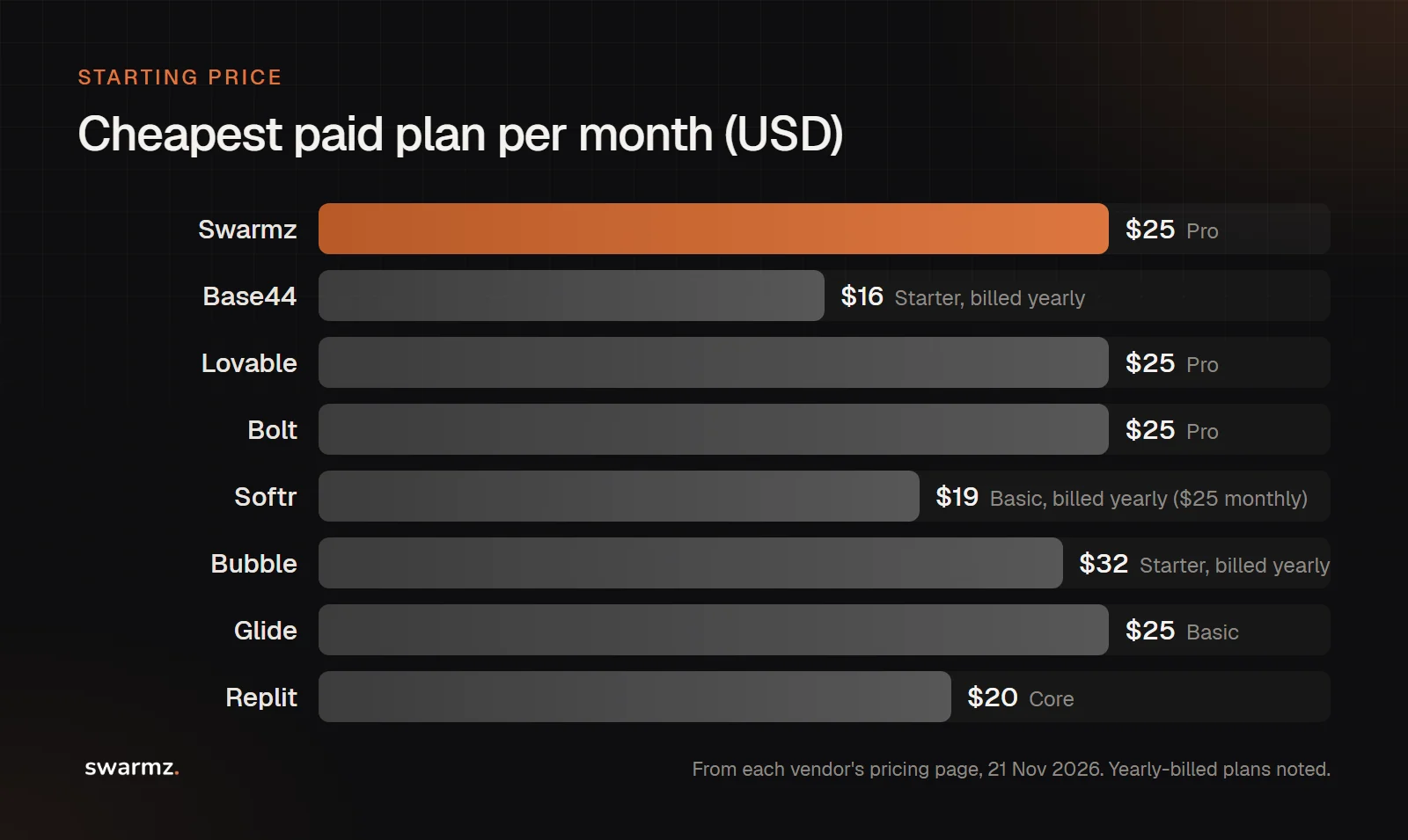
All eight tools have a free plan, though Glide's cannot publish an app and Replit's published app goes down after 30 days. Paid plans start between $16 a month (Base44, billed yearly) and $32 (Bubble, billed yearly), with Swarmz, Lovable, Bolt and Glide at $25. How usage is counted matters more than the plan price, so look at what one change costs.
1. Swarmz: best AI app builder for beginners overall
Swarmz builds web apps from a description. You type what you want into the prompt box, and Swarmz writes the screens, the data model and the sign-in. You do not need to code, and if you ever want to look, the code is standard React, TypeScript and Tailwind.
How it handles the beginner checklist:
Setup: no servers to rent and no services to connect. Swarmz Cloud gives every app a database, user sign-in, file storage and server functions on every plan, including Free.
Free plan: 5 credits every day, no card and unlimited projects. Free does not expire, and new accounts can also try Pro free for 3 days with 25 credits (a card is needed, and it becomes the $25 Pro plan unless you cancel).
Editing: you chat, or you click, draw or comment right on your live app, and the change lands in real code.
Cost per change: every prompt's cost is shown in the chat. Swarmz's FAQ says most edits cost less than half a credit and a new app usually takes about one, though the real figure depends on the change.
Publishing: one click puts the app live at your-name.swarmz.cloud with SSL.
Templates: 28 working templates, each a real app live on the web, that you can remix.
Later, Swarmz Payments adds Stripe checkout, 80+ connectors such as Google Sheets and Calendly connect in one click, and two-way GitHub sync is on Free if you bring in a developer.
Pros: backend on every plan, so nothing to connect; free plan with no card and no end date; the cost of every prompt shown; edit by chat or directly on the live app.
Cons: web apps only, no native iOS or Android (apps are responsive and work in a phone's browser); no ZIP download, code leaves through GitHub; custom domain and badge removal need Pro.
Best for: first-time builders who want a real web app, with accounts and saved data, live on a link without setting anything up.
Pricing: Free with 5 credits every day and no card. Pro $25 a month for 100 credits plus the daily credits, with 30-day rollover, top-ups, a custom domain and badge removal. Business $50 a month.
2. Base44: best managed platform for non-coders
Base44, owned by Wix and run as its own product, is a no-code AI platform for apps, websites and AI agents. Setup is light: authentication, a database and analytics come with every plan, including Free, and hosting is built in. You edit by chat, starting from a community template gallery if you like. Usage is counted in message credits (25 a month on Free) and integration credits.
Pros: backend and sign-in on Free; a custom domain from the cheapest paid plan; Stripe, Wix Payments and PayPal for payments.
Cons: GitHub sync and code export need the Builder plan ($40 a month billed yearly); prices are shown for yearly billing; the mobile app is a web view wrapper.
Best for: non-coders who want one managed platform and do not need the code early.
Pricing: Starter $16 a month billed yearly; Builder $40 a month billed yearly.
3. Lovable: best for starting from a community template
Lovable builds web apps from chat, with Lovable Cloud providing a database, sign-in, storage and functions. Its templates page lists more than 200 community templates, which helps if you like to start from someone else's example. The free plan gives 5 daily credits up to 30 a month. Credit use varies by task: Lovable's pricing FAQ gives examples from 0.5 credits for a small edit to 1.7 for a landing page with images.
Pros: a large template gallery; a built-in backend; Git sync on every plan.
Cons: no custom domain, code download or badge removal on Free; a 30-credit monthly cap on Free; no native mobile apps.
Best for: beginners who want to browse many examples before they build.
Pricing: Pro $25 a month, or $250 a year ($21 a month) billed yearly. Business $50 a month.
4. Bolt: best for trying ideas for free in the browser
Bolt builds websites, web apps and Expo mobile apps in the browser. Its free plan needs no card, includes hosting and gives 1M tokens a month with a 300K daily limit, and every project gets a managed Bolt Database, or you can connect Supabase. The catch for beginners is the unit: tokens are harder to translate into "how many changes" than credits, and when Bolt announced Bolt Cloud, sign-in, file storage and Stripe were listed as a private beta.
Pros: a free plan with hosting and no card; a route to mobile through Expo; a GitHub integration.
Cons: token-based usage with a daily cap on Free; Bolt branding on free sites; JavaScript-only backends.
Best for: curious beginners who want to try an idea at no cost and do not mind seeing code.
Pricing: Pro $25 a month billed monthly; Teams $30 per member a month.
5. Softr: best for portals and tools on spreadsheet data
Softr's AI Co-Builder creates the database, pages, user roles and logic from a description. Data can live in Softr Databases or in more than 21 outside sources such as Airtable, Google Sheets and PostgreSQL, and login with email, Google or magic links is built in. The free plan allows up to 3 builders and 5 app users, with no custom domain.
Pros: starts from data you already have; login and user roles built in; a free plan for up to 3 builders.
Cons: small app-user caps on low plans (5 team and 5 client users on Basic); code export is not stated; how payments work is not explained.
Best for: business users building a portal or internal tool on Airtable or Google Sheets.
Pricing: Basic $19 a month billed yearly or $25 monthly; Pro $99 billed yearly or $119 monthly.
6. Bubble: best if you want to learn a visual editor
Bubble is a visual no-code platform with a built-in database, workflows and an AI agent. You edit logic visually rather than only in chat, which takes learning but gives fine control. Its community library has free and paid templates. Usage is counted in AI credits and workload units, with overage charges unless you turn them off.
Pros: complex logic you can see and edit; free and paid templates; web and React Native mobile apps from one backend.
Cons: no code export, so leaving means rebuilding; workload units are hard to predict; the cheapest paid plan is billed yearly.
Best for: beginners willing to learn one tool in depth.
Pricing: Starter $32 a month billed yearly; Growth $119 a month billed yearly.
7. Glide: best for internal apps from spreadsheets
Glide turns Excel and Google Sheets data into apps and AI agents for operations work such as inventory and field inspections. The free plan allows 0 published apps and Basic allows 2. Publishing to the App Store or Google Play is not supported.
Pros: starts from spreadsheets your team already uses; monthly billing with no yearly lock-in.
Cons: no publishing on Free; no store apps; credit-based AI usage.
Best for: teams turning a spreadsheet into an internal app.
Pricing: Basic $25 a month, Plus $50, Pro $125, billed monthly.
8. Replit: best if you want to learn to code along the way
Replit pairs an AI Agent with a full online development environment, including a managed PostgreSQL database with no keys to set up and Replit Auth or Clerk for sign-in. If you want to learn, you can open and edit everything the Agent writes, and it builds native iOS and Android apps.
Pros: native mobile apps; built-in Postgres; a real code environment to learn in.
Cons: usage-based credits cover AI, publishing, data transfer and storage, so costs move with use; the free plan's published app goes down after 30 days.
Best for: beginners who want to learn to code, or who need a native app.
Pricing: Core $20 a month, or $18 billed yearly. Pro $100 a month.
Three tools to skip for a first project
Firebase Studio stopped taking sign-ups on 22 June 2026 and shuts down on 22 March 2027. Create.xyz is now Anything, and its docs say building requires a paid plan. Hostinger Horizons is now part of Hostinger's AI Builder, sold with hosting plans: you can try building without a card, but there is no free plan, and the lowest price shown needs a 48-month prepayment.
Build it on Swarmz: a prompt you can copy
A good first app is small, personal and saves data, so you see sign-in and the database working without much that can go wrong. Paste this into the prompt box and change the details:
Build a simple reading tracker for me.
I sign in with my email, and only I can see my books.
I can add a book with a title, author, a rating out of 5 and a short note.
Show my books as a list I can sort by rating or by date added.
Add a small page that shows how many books I finished this month.
Keep the design clean, with large text that is easy to read on a phone.
After the first version, sign in with a second email address to check that each person only sees their own books. Then ask for one change at a time, such as "add a cover photo to each book", and check the credits each prompt used before the next. Our guide on how to write prompts for AI app builders helps you word the next request.
When Swarmz isn't the right pick
Your first app must be in the App Store or Google Play. Swarmz builds web apps. Start with Replit, or with Rork or Emergent, which focus on native mobile. See whether AI can build a mobile app.
You want to learn to code. Replit puts the code in front of you.
Your data lives in a spreadsheet and the app is for your team. Glide or Softr will feel more familiar.
You want to learn visual logic. Bubble is built for that.
You only need a brochure website with no sign-in or saved data. A design-led website builder such as Wix or Framer fits better; see the best AI website builders.
You need a ZIP of your code. Lovable's paid plans offer a download.
Tool | Free plan | Backend included | One-click publish | Code export | Native mobile |
|---|---|---|---|---|---|
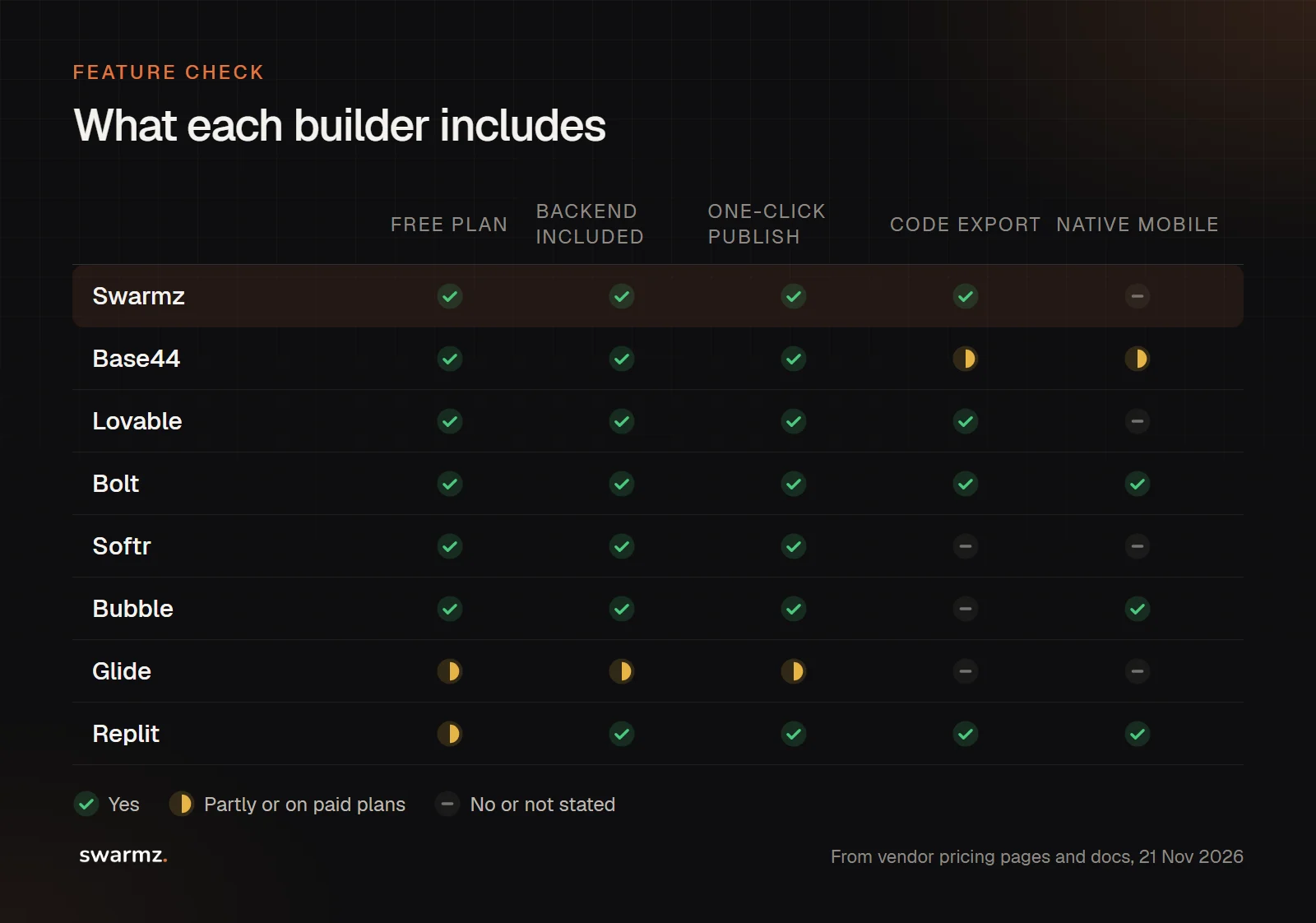
Swarmz | Yes | Yes | Yes | Yes | No |
Base44 | Yes | Yes | Yes | Partly | Partly |
Lovable | Yes | Yes | Yes | Yes | No |
Bolt | Yes | Yes | Yes | Yes | Yes |
Softr | Yes | Yes | Yes | No | No |
Bubble | Yes | Yes | Yes | No | Yes |
Glide | Partly | Partly | Partly | No | No |
Replit | Partly | Yes | Yes | Yes | Yes |
Yes: included. Partly: only on some plans or with limits. No: not offered, or not stated by the vendor. Checked on 21 November 2026.
How to choose
A working web app with sign-in and saved data, nothing to set up: Swarmz.
One managed platform, no need for the code yet: Base44.
A large gallery of community templates: Lovable.
Trying an idea at no cost, and tokens do not bother you: Bolt.
Your data lives in Airtable or Google Sheets: Softr or Glide.
Learning a visual editor in depth: Bubble.
Learning to code, or a native app: Replit.
Try one small app on a free plan before you pay. See the best free AI app builders for more free options, and the limitations of AI app builders before a launch.
FAQ
What is the easiest AI app builder for beginners?
For most beginners, Swarmz: nothing to set up, a database, sign-in and hosting on every plan, and the cost of each prompt shown in the chat. Base44 is also easy to start because its backend is managed for you.
Can I build an app with AI without knowing how to code?
Yes. With Swarmz, Base44, Lovable or Bolt, you describe the app in plain words and the tool writes the code. Softr and Glide build around your data, and Bubble uses a visual editor.
Is there a free AI app builder with no credit card?
Yes. Swarmz's free plan gives you 5 credits every day with no card and does not expire. Bolt's free plan also needs no card and includes 1M tokens a month.
How much does it cost to build an app with AI?
You can start free on all eight tools here. The cheapest paid plans run from $16 a month (Base44 Starter, billed yearly) to $32 (Bubble Starter, billed yearly), with Swarmz, Lovable and Bolt at $25. Beyond that, cost depends on how many changes you make.
Can a beginner build a mobile app with AI?
Yes, with the right tool. Replit builds native iOS and Android apps, Bolt uses Expo and Bubble uses React Native. Swarmz builds web apps that work on phones but are not native apps.
Build your first app
Pick one small idea, describe it in a few sentences and build it on Swarmz for free. The database, sign-in and publishing are ready, and each prompt shows what it cost.
Sources
All checked on 21 November 2026.
Swarmz: swarmz.net/pricing, swarmz.net/faq, swarmz.net/features
Base44: base44.com/pricing, Base44 payments docs, Base44 mobile experience docs
Lovable: docs.lovable.dev subscription plans, docs.lovable.dev plans and credits, lovable.dev/pricing, lovable.dev/templates
Bolt: bolt.new/pricing, Bolt Cloud announcement, Bolt supported technologies
Softr: Softr pricing and plans docs, softr.io
Bubble: bubble.io/pricing, bubble.io/templates, Bubble data ownership
Glide: glideapps.com/pricing, Glide help: App Store publishing
Firebase Studio: Google's migration page
Anything: anything.com/pricing, Anything FAQ
Hostinger AI Builder: hostinger.com/horizons
How did this land?
About the author

Founder of swarmz.net
Jordan founded Swarmz, the AI app builder at swarmz.net.


