Best App Builder for Non-Technical Founders (2026)
Seven app builders compared for a founder who cannot code and has no technical co-founder: no setup, a real backend, payments, code you own in GitHub, a predictable cost and a clean handover to your first developer. Prices checked on 21 November 2026.
The best app builder for a non-technical founder is Swarmz, because it covers the jobs a technical co-founder would normally do: there is nothing to set up, the database, sign-in and Stripe payments are built in, and the code lands in your own GitHub repository in a standard stack, so the developer you hire later picks it up instead of starting over. This guide is for founders who cannot code and are building alone; if you already have engineers, our comparison for startup MVP teams fits better. If your product must be a native App Store app, start with Rork or Adalo instead.
Swarmz is our product, so weigh our ranking with that in mind. Every price in this article was checked on the vendor's own pricing page or docs on 21 November 2026, and the sources are listed at the end.
App builders for non-technical founders at a glance
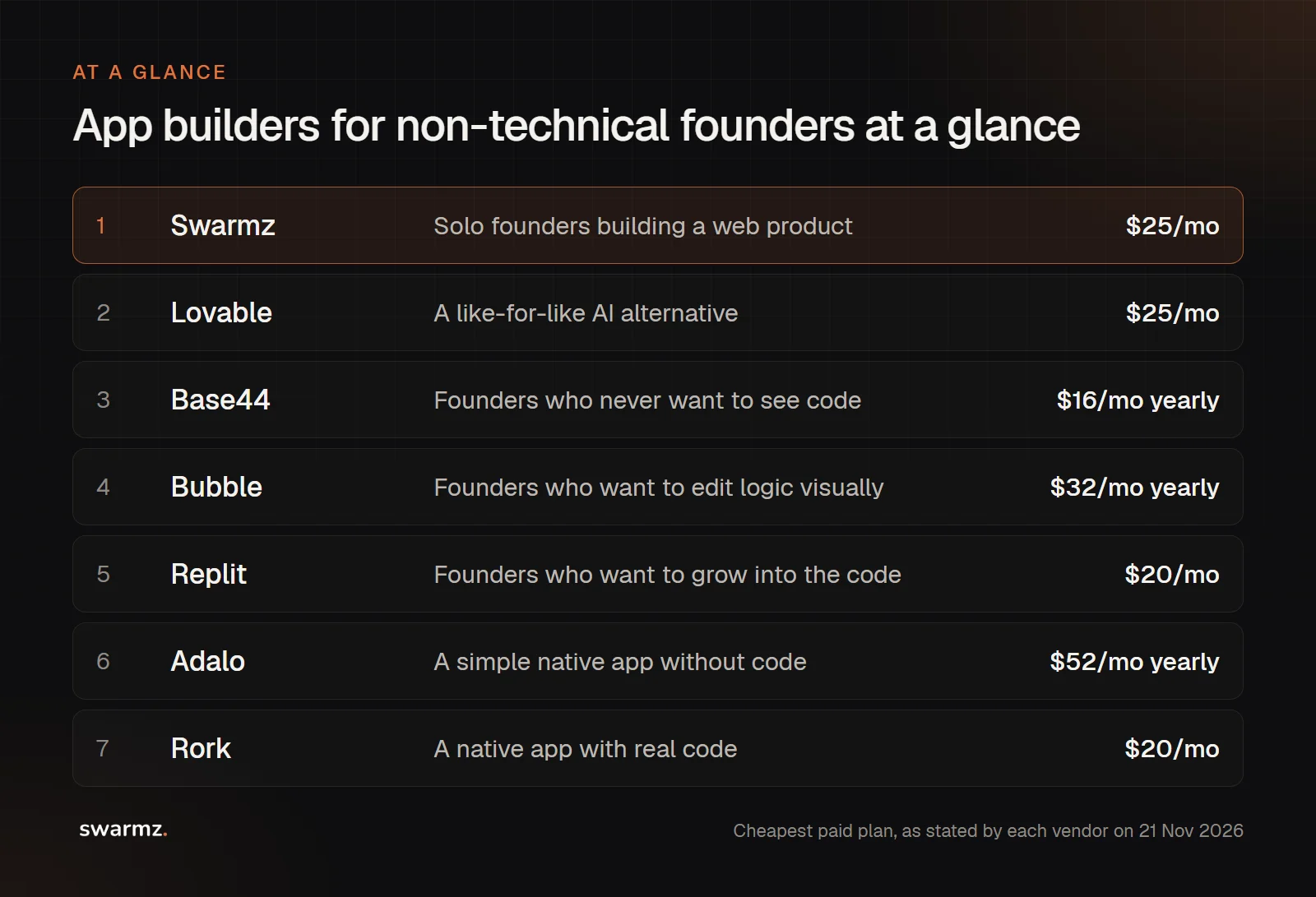
Tool | Best for | Starting paid price | Backend and payments | Code you can hand over | Native mobile |
|---|---|---|---|---|---|
Swarmz | Solo founders building a web product | $25/month (Pro) | Built in; Stripe payments, no Stripe account needed | Two-way GitHub sync, on Free too | No, web apps |
Lovable | A like-for-like AI alternative | $25/month, $21 billed yearly | Lovable Cloud; Stripe with your own account | Git sync; ZIP on paid plans | No |
Base44 | Founders who never want to see code | $16/month, billed yearly | Built in; Stripe, Wix Payments, PayPal | GitHub and ZIP from Builder ($40) | Web view wrapper |
Bubble | Founders who want to edit logic visually | $32/month, billed yearly | Built-in database; Stripe plugin | No code export | Yes |
Replit | Founders who want to grow into the code | $20/month, $18 billed yearly | Built-in Postgres; Stripe on paid plans | GitHub or GitLab | Yes |
Adalo | A simple native app without code | $65/month, $624 billed yearly | Built-in database; Stripe | Separate paid service | Yes |
Rork | A native app with real code | $20/month (Rork Max) | Functions; add Supabase or Firebase | Two-way GitHub on paid plans | Yes |
What a non-technical founder needs from an app builder
Without a technical co-founder, the builder has to stand in for one: set up the plumbing, keep the bill readable and leave something a developer can take over. We ranked the tools on six points, using only what each vendor states. We did not run benchmarks.
Nothing to set up. No servers, API keys or separate database account. Every extra account is something you have to understand, secure and pay for.
A real backend. A database, user accounts and file uploads, so real customers can sign up and their data is saved.
Payments you can switch on yourself. Subscriptions and one-off payments, with refunds, without wiring webhooks by hand.
Code you own, in GitHub. A standard stack in a repository you control, so the product is an asset, not a rental.
A cost you can predict. You will change the product every day, so you need to see what each change costs, and adding a freelancer should not add a seat fee.
Someone to hand over to. A freelancer, agency or first hire can join with the right access and continue in the code rather than rebuild it.
What no tool replaces is judgement: someone checking security, edge cases and when to rebuild. Read the limitations of AI app builders before you launch, and budget for a developer's review once money changes hands.
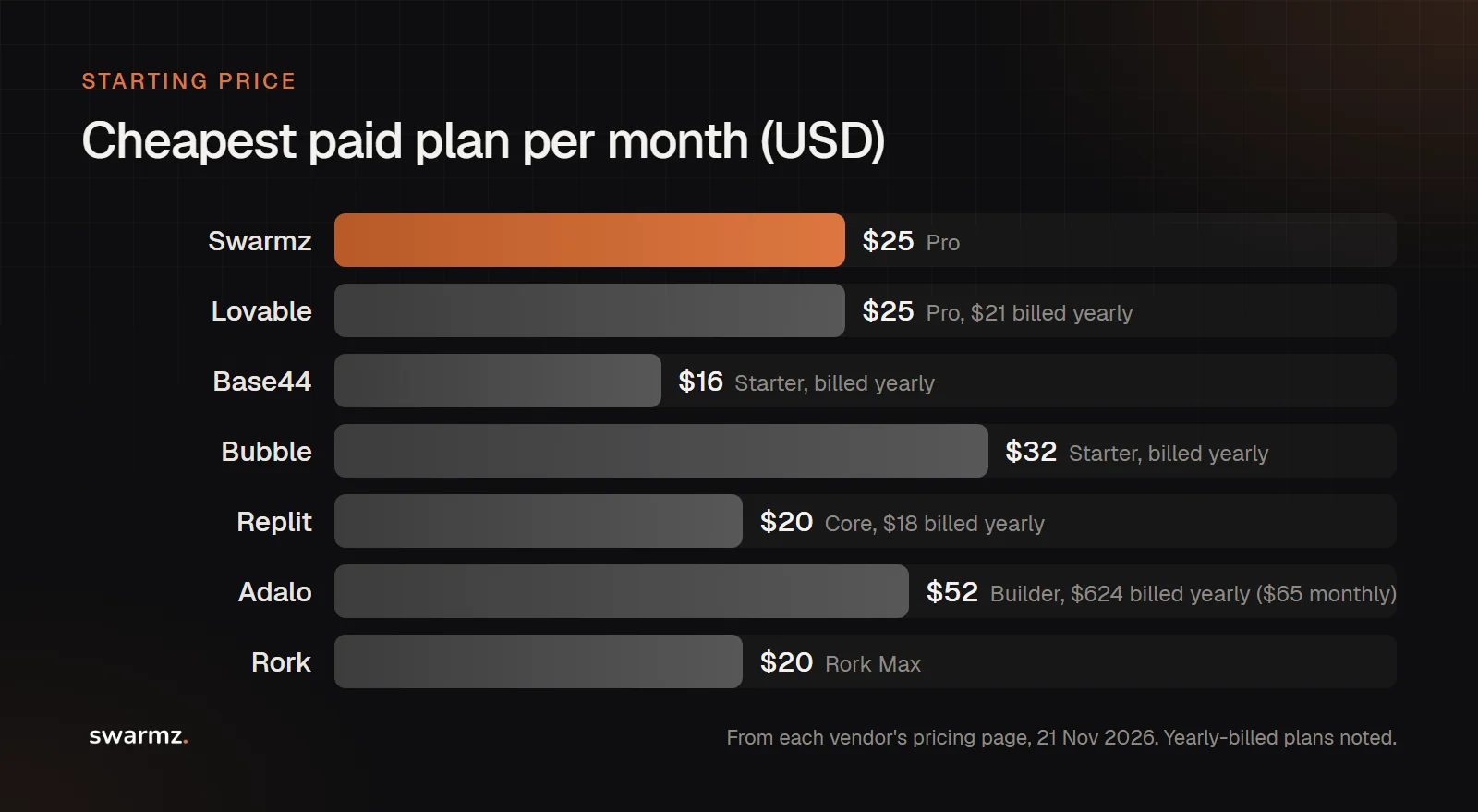
What it costs before you have revenue
Entry prices are close: $16 to $32 a month for most tools, and $65 for Adalo. What differs is the meter. Swarmz shows the credits each prompt used and shares credits across the workspace with no per-seat fees. Lovable's credit use varies by task, and Cloud and AI usage draw credits too. Base44 counts message and integration credits. Bubble meters workload units with overage charges unless you turn them off. Replit's usage-based credits cover AI, publishing, data transfer and storage, so the bill moves with traffic. Adalo charges a flat plan price, and its Builder plan lists AI building each month with no prompt limit. Rork runs from $20 for 100 credits to $1,800 for 10,000. Our comparison of an AI app builder vs hiring a developer puts these next to the cost of an agency.
1. Swarmz: best app builder for non-technical founders overall
Swarmz builds web apps from chat. You describe the product, Swarmz builds the screens, data model and sign-in, and you publish to a swarmz.cloud link with SSL in one click, or to your own domain on Pro.
How it handles the checklist:
Setup: none. Swarmz Cloud gives every app a database, user sign-in, file storage and server functions on every plan, including Free.
Sign-in for your customers: email, phone, Google, Apple, GitHub, Microsoft, Discord, X or SAML SSO.
Payments: Swarmz Payments runs on Stripe Connect, so each app gets its own connected Stripe account and you need no existing one. It handles one-off purchases, subscriptions, invoices and payment links, with test mode first and refunds and payouts in a Payments tab. You are the merchant of record, so refunds and chargebacks are yours. Stripe's usual fees apply, plus a small Swarmz platform fee on each payment.
Code you own: standard React, TypeScript and Tailwind, synced both ways with your GitHub repository, on Free too.
Predictable cost: every reply shows how many credits it used, and Pro credits roll over for 30 days.
Handover: invite a freelancer as an Editor (Admin, Editor and Viewer roles are on Free). Because sync is two-way, they can work in GitHub while you keep building in chat.
Analytics for visitors, sources, errors and session replays are on from the moment you publish, and your account and main database are hosted in the EU (Ireland).
Pros
Backend, sign-in and payments without a single extra account.
A normal React and TypeScript codebase in your GitHub, which most web developers can read.
Shared credits with no per-seat fees, and the cost of every prompt visible.
Cons
Web apps only; no native iOS or Android apps.
No ZIP download; the code comes out through GitHub.
Usage is credit-based, so a heavy week of changes may need a top-up.
Best for: solo founders building a web product, such as a SaaS, a booking service or a membership site, who want paying users before hiring.
Pricing: Free with 5 credits every day and no card. Pro is $25 a month for 100 credits plus the daily credits, with rollover, top-ups and a custom domain. Business is $50 a month. New accounts can also try Pro free for 3 days with 25 credits; a card is needed, and it becomes the $25 Pro plan unless you cancel.
2. Lovable: best like-for-like AI alternative
Lovable builds web apps from chat on Lovable Cloud (database, storage, sign-in and functions) or your own Supabase project. Stripe works with your own Stripe account, built-in payments need a paid plan, and webhooks are a manual step. Git sync creates a new repository on any plan, and the database exports separately, without stored files, Edge Function code or secrets, which your developer will need to know.
Pros: Git sync to GitHub, GitLab or Bitbucket on Free; a ZIP download on paid plans; unlimited members priced by credits, not seats.
Cons: no native mobile; credit use varies by task; you bring a Stripe account.
Best for: founders comparing AI builders like for like.
Pricing: Pro $25 a month, or $21 billed yearly. Business $50 a month.
3. Base44: best if you never want to see the code
Base44, owned by Wix and run as its own product, gives you a backend, sign-in and hosting on every plan, and takes payments through Stripe, Wix Payments or PayPal. It suits a founder who wants one managed platform. The catch is the handover: GitHub sync and code export start on the Builder plan, so on Starter a developer can only help inside Base44.
Pros: nothing to set up; three payment options; a custom domain from the cheapest paid plan.
Cons: code export needs Builder ($40 a month billed yearly); message and integration credits, with backend function runs drawing credits; mobile is a web view wrapper.
Best for: founders who want everything managed and do not need the code yet.
Pricing: Starter $16 a month billed yearly; Builder $40 billed yearly.
4. Bubble: best if you want to see and edit the logic yourself
Bubble is a visual no-code platform with a built-in database, workflows and an AI agent, and it builds web and React Native apps from one backend. Its official Stripe plugin handles charges, subscriptions and invoices with your own Stripe account. For handover, Bubble does not export code, so anyone you hire works inside Bubble: you are hiring for Bubble skills, not a common stack.
Pros: every rule is visible, which helps if you want to understand your product's logic; web and native mobile from one backend; Bubble says its source code would be released under an open-source licence if it shut down.
Cons: no code export; workload units are hard to predict; the cheapest plan is billed yearly.
Best for: founders willing to learn one visual tool in depth. Our no-code app builder comparison covers Bubble against the other visual tools.
Pricing: Starter $32 a month billed yearly; Growth $119 billed yearly.
5. Replit: best if you want to grow into the code
Replit pairs an AI Agent with a full development environment. The database is managed PostgreSQL with no keys to set up, sign-in is Replit Auth or Clerk, and a Stripe connector is available on paid plans. It also builds native iOS and Android apps. The trade-off for a non-technical founder is that you work closer to the code, and costs move with use.
Pros: native mobile; built-in Postgres; GitHub or GitLab connect; Core allows up to 5 collaborators.
Cons: usage-based billing; the free plan's published app goes down after 30 days.
Best for: founders who want to learn to read code as they build.
Pricing: Core $20 a month, or $18 billed yearly, per Replit's pricing page. Pro $100 a month.
6. Adalo: best no-code route to a native app
Adalo's AI builder, Ada, creates the screens, database and logins from a prompt, and you refine them visually on a built-in relational database. Builder includes Stripe and publishing to the App Store, Google Play and the web, with 2 published apps. Handover is the weak point: Builder shows a sample of Ada's code, Business lets you view all of it, and full code export is a separately priced service through support.
Pros: store publishing on the first paid plan; nothing to set up; a flat plan price.
Cons: the highest entry price here; code export costs extra; analytics and crash monitoring are paid add-ons on Builder.
Best for: founders whose product must be in the app stores and who will not touch code.
Pricing: Builder $65 a month or $624 billed yearly, with a $30 first month for new users on monthly billing. Business $200 a month.
7. Rork: best for a native app with real code
Rork generates native SwiftUI and Kotlin apps, compiles them in the cloud and submits iOS builds to App Store Connect, with RevenueCat for in-app purchases and subscriptions. Paid plans get two-way GitHub sync, so a mobile developer can take over. Setup is heavier: you add Supabase or Firebase for the database, upload Android builds by hand and need an Apple Developer membership.
Pros: real native code; subscriptions through RevenueCat; a direct App Store flow.
Cons: the free plan is design-only; the database is an extra account; credits get expensive at higher tiers.
Best for: founders whose product only works as a native phone app.
Pricing: Rork Max from $20 a month for 100 credits, up to $1,800 for 10,000.
Build it on Swarmz: a prompt you can copy
A realistic first product for a founder with industry knowledge and no developer. Replace the idea, the price and the roles with your own:
Build a web app called CoachDesk for personal trainers.
Trainers sign up with email or Google, add their clients and build weekly workout plans with sets, reps and notes.
Each trainer shares an invite link; clients sign in, see this week's plan on their phone, tick off sessions and upload a progress photo.
Trainers are free for up to 3 clients, then pay $15 a month by Stripe subscription, and can upgrade, cancel and see invoices on a billing page.
Each trainer only ever sees their own clients.
Add a founder dashboard, visible only to me, with sign-ups, active trainers and paying trainers.
Keep the code organised by feature with clear names, so a developer I hire later can take it over.
After the first version, sign up as two trainers and check that neither can see the other's clients. Run a subscription and a cancellation in Stripe test mode, then connect GitHub so the history is there when you hire.
When Swarmz isn't the right pick
Your product only works as a native app. Rork gives you native code, Adalo keeps you code-free, and Replit builds native apps too. See whether AI can build a mobile app.
You never want to see code and want one managed platform. Base44.
You want to see and edit every rule visually. Bubble.
You want to learn to code as you go. Replit puts the code in front of you.
You need a ZIP of your code. Lovable's paid plans offer one.
Your product handles sensitive regulated data. Whatever you build with, have an engineer review it before launch.
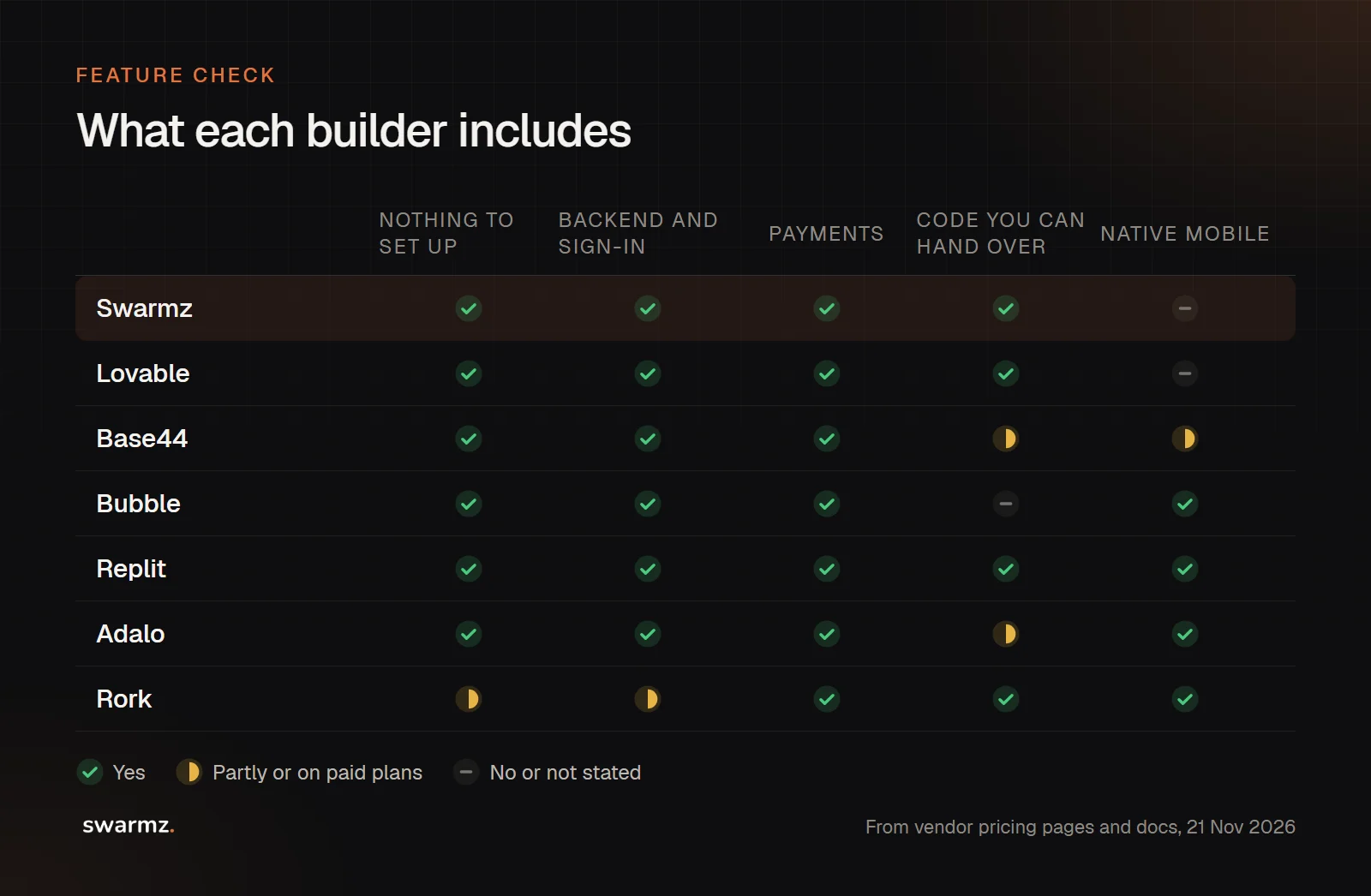
Tool | Nothing to set up | Backend and sign-in | Payments | Code you can hand over | Native mobile |
|---|---|---|---|---|---|
Swarmz | Yes | Yes | Yes | Yes | No |
Lovable | Yes | Yes | Yes | Yes | No |
Base44 | Yes | Yes | Yes | Partly | Partly |
Bubble | Yes | Yes | Yes | No | Yes |
Replit | Yes | Yes | Yes | Yes | Yes |
Adalo | Yes | Yes | Yes | Partly | Yes |
Rork | Partly | Partly | Yes | Yes | Yes |
Yes: included. Partly: only on some plans or with limits. No: not offered, or not stated by the vendor. Checked on 21 November 2026.
How to choose
A web product with sign-in, payments and code a developer can take over: Swarmz.
An AI builder compared like for like: Lovable.
Everything managed, code not needed yet: Base44.
Logic you want to see and edit visually: Bubble.
Learning to code along the way: Replit.
A native app, no code at all: Adalo.
A native app with code a mobile developer can inherit: Rork.
Whichever you pick, decide on day one how you would leave. Our guide on how to export an app from an AI app builder covers what comes with you and what can stay behind.
FAQ
What is the best app builder for non-technical founders?
For a web product, Swarmz: nothing to set up, a database, sign-in and Stripe payments built in, and two-way GitHub sync so a developer can take over. For a native app, Rork (with code) or Adalo (without) fits better.
Can I build a startup without a technical co-founder?
You can build and launch a first version of a web product with Swarmz, Lovable, Base44 or Bubble, and take real payments. Plan for a developer's review of security and data handling once customers pay.
Will a developer be able to take over my app later?
Yes, if the code is in a repository you control. Swarmz, Lovable, Replit and Rork (on paid plans) use GitHub, and Base44 from its Builder plan. Bubble does not export code, so your hire works inside Bubble, and Adalo sells code export separately.
How much does it cost to build an app without a developer?
The cheapest paid plans here run from $16 a month (Base44, billed yearly) to $65 (Adalo Builder), with Swarmz and Lovable at $25, and all except Rork let you build on a free plan first. Your bill then depends on how much you change the product.
Can I take payments in my app without a developer?
Yes. Swarmz Payments works without an existing Stripe account. Lovable and Bubble connect your own Stripe account, Base44 supports Stripe, Wix Payments and PayPal, and Rork uses RevenueCat for in-app purchases.
Build your first product
If your product is a web app, paste the prompt above or describe your own idea and start it on Swarmz for free. The database, sign-in and payments are there from the first version, and the code is in your GitHub when you hire.
Sources
All checked on 21 November 2026.
Swarmz: swarmz.net/pricing, swarmz.net/faq, swarmz.net/features/payments
Lovable: docs.lovable.dev subscription plans, docs.lovable.dev FAQ, Lovable Stripe docs, lovable.dev/pricing
Base44: base44.com/pricing, Base44 payments docs, Base44 mobile experience docs
Bubble: bubble.io/pricing, Bubble data ownership, Bubble Stripe plugin
Replit: replit.com/pricing, Replit Core docs, Replit Starter plan docs, Replit Stripe docs
Adalo: adalo.com/pricing, The new Adalo
How did this land?
About the author

Founder of swarmz.net
Jordan founded Swarmz, the AI app builder at swarmz.net.


