Best Free AI App Builders in 2026: 10 Free Plans Compared
Ten free AI app builder plans compared on what they actually let you do: credits, publishing, custom domains, code export and backend, plus what you pay when you outgrow free. Checked on 21 November 2026.
The best free AI app builder in 2026 is Swarmz, because its free plan gives you 5 credits every day with no card, and the backend, one-click publishing and two-way GitHub sync all work on Free, so you can build, publish and keep the code of a real web app before you pay anything. Lovable's free plan is the closest match, Bolt has the largest token allowance, and Dyad costs nothing beyond what you pay your own AI provider. Several other "free" plans cannot publish an app at all, and the table shows which.
Swarmz is our product, so weigh our ranking with that in mind. Every plan detail and price here was checked on the vendor's own pricing page or docs on 21 November 2026, and the sources are listed at the end.
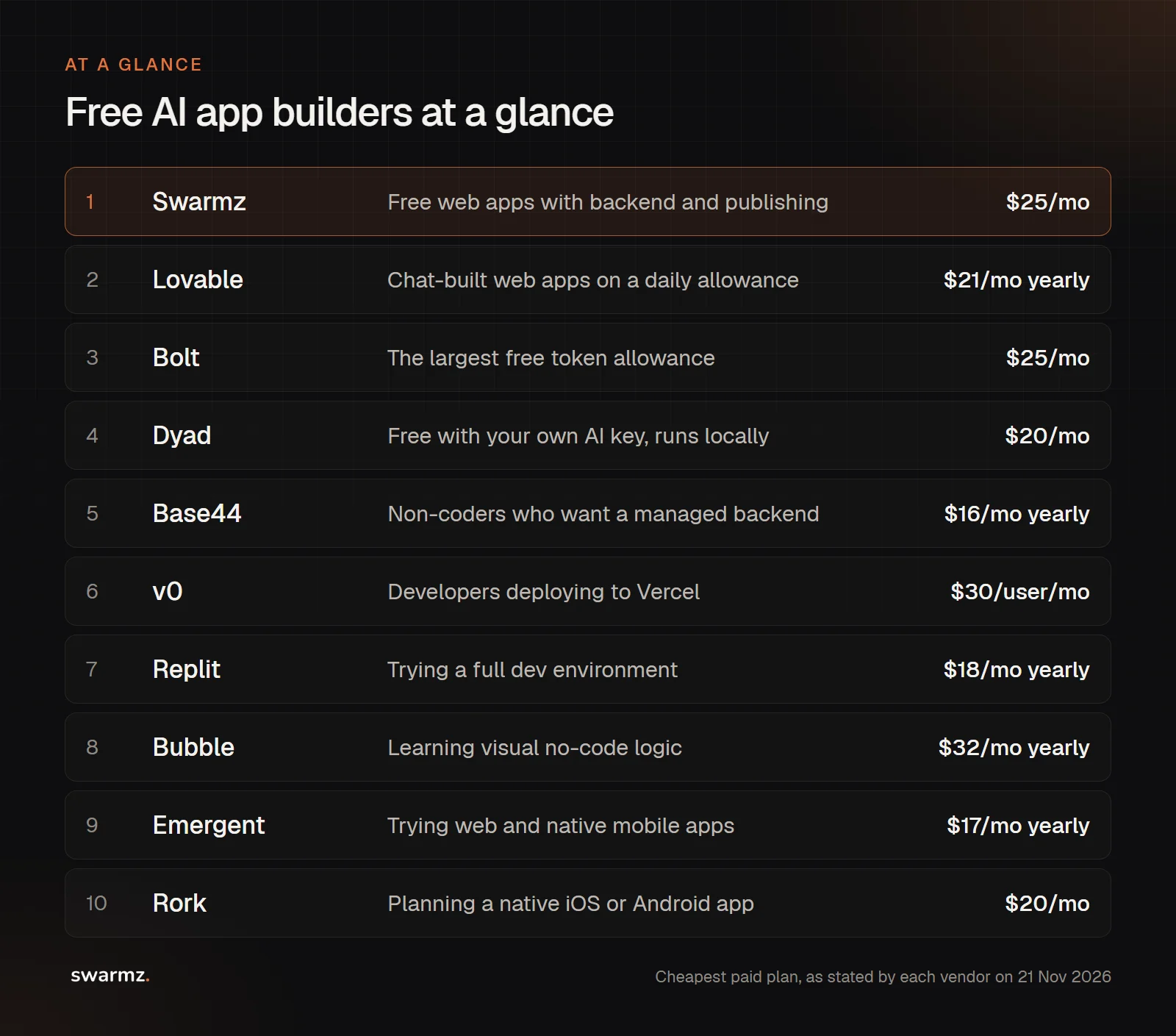
Free AI app builders at a glance
Tool | Free allowance | Publish on Free | Custom domain on Free | Code on Free | When you outgrow free |
|---|---|---|---|---|---|
Swarmz | 5 credits a day, no card | Yes, swarmz.cloud link with SSL | No, Pro | Two-way GitHub sync | $25/month (Pro) |
Lovable | 5 credits a day, up to 30 a month | Yes, lovable.app link | No | Git sync; no download | $25/month, $21 billed yearly |
Bolt | 1M tokens a month, 300K a day | Yes, with Bolt branding | No, Pro | GitHub integration | $25/month (Pro) |
Dyad | Free app; you pay your AI provider | You host it yourself | Up to your host | Plain Next.js files | Pro $20/month for credits |
Base44 | 25 message credits a month, up to 5 apps | Not spelled out | No, Starter | No, Builder plan and up | $16/month, billed yearly |
v0 | 7 messages a day, $5 one-time credit | Deploy to Vercel | Not stated | Two-way GitHub sync | $30 per user/month (Plus) |
Replit | Daily credits up to a monthly cap | 1 app, goes down after 30 days | Not stated | GitHub or GitLab | $20/month, $18 billed yearly |
Bubble | 500 AI credits, 50K workload units a month | No, a paid plan is needed to go live | No, Starter | No code export on any plan | $32/month, billed yearly |
Emergent | 10 credits | No production publishing | No | No, GitHub push is paid | $20/month, $17 billed yearly |
Rork | Design mode, up to 5 design credits a day | No, cannot build or publish | No | No, paid plans only | $20/month (Rork Max) |
How we compared the free plans
A free plan is only useful if you can finish something on it. For each tool we asked: how the allowance refreshes, whether you can publish and whether the app stays up, whether a database and sign-in are included, whether you can take the code with you, and what the first paid plan costs. We used only what each vendor states on its own pages and ran no benchmarks. If you also care about paid features, our full list of the best AI app builders covers those.
1. Swarmz: best free AI app builder overall
Swarmz builds web apps from chat. You describe the app, Swarmz builds the screens, data model and sign-in, and you publish to a swarmz.cloud link with SSL in one click. The code is standard React, TypeScript and Tailwind.
What sets the free plan apart is how little is held back. You get 5 credits every day with no credit card and unlimited projects. Swarmz Cloud, with a database, user sign-in, file storage and server functions, is included on every plan including Free, with 20 Cloud credits and 4 AI credits a month. Two-way GitHub sync works on Free, so the code is yours from the first day. Teams work on Free with Admin, Editor and Viewer roles, and 28 templates are ready to remix.
Pros
Backend, sign-in, storage and publishing on the free plan.
Two-way GitHub sync on Free, with standard React and TypeScript code.
Credits refresh every day.
Shared team credits with no per-seat fees; account and main database in the EU (Ireland).
Cons
Web apps only; no native iOS or Android apps.
No ZIP download; your code comes out through GitHub.
A custom domain and removing the Swarmz badge need Pro.
Best for: founders, small businesses and side projects that want a complete web app live before spending money.
Pricing: Free with 5 credits every day. Pro is $25 a month for 100 credits plus the daily credits, with 30-day rollover, top-ups and a custom domain. Business is $50 a month.
2. Lovable: best free plan for chat-built web apps
Lovable's free plan works much like Swarmz's: 5 build credits a day, but the daily refresh stops once your workspace has used 30 in a calendar month. You also get 20 Cloud credits, 4 AI credits and 1 connector credit a month, workspace-private projects, and Git sync to GitHub, GitLab or Bitbucket. You can publish to a lovable.app address.
Pros: publishing and Git sync on Free; a built-in backend through Lovable Cloud; private projects.
Cons: a 30-credit monthly cap on Free; no custom domain or code download; the "Edit with Lovable" badge stays until Pro; inactive free projects can be unpublished after about a year.
Best for: people who want a chat builder and will build a few times a week.
Pricing: Pro is $25 a month, or $250 a year ($21 a month).
3. Bolt: best free token allowance
Bolt builds web apps and Expo mobile apps in the browser. Free gives 1M tokens a month with a 300K daily limit, hosting, unlimited databases, private projects and up to 3 collaborators.
Pros: the largest stated free allowance here; hosting and databases on Free; an Expo route to mobile.
Cons: Bolt branding on free sites; tokens do not roll over; a 10MB file upload limit; custom domains start on Pro.
Best for: tinkerers who want long prototyping sessions on a free plan.
Pricing: Pro is $25 a month billed monthly.
4. Dyad: best free option if you have your own AI key
Dyad is a free, open-source desktop app that builds standard Next.js apps on your computer. You bring your own AI API key or run a local model, so the only cost is what your AI provider charges. You connect Supabase or Neon for data and sign-in, and deploy wherever you like.
Pros: no sign-up; code and data stay on your machine; plain code with no lock-in.
Cons: a desktop install; no built-in hosting, domains or payments; you set up the database and host yourself.
Best for: developers who already pay for an AI API and want full control.
Pricing: the app is free. Pro is $20 a month for 200 AI credits if you would rather not use your own key.
5. Base44: best free all-in-one for non-coders
Base44, owned by Wix, includes a database, sign-in and analytics on its free plan, with 25 message credits and 100 integration credits a month and up to 5 apps. The pricing page says you can ship complete apps on Free but does not spell out publishing limits.
Pros: backend and sign-in on Free; a managed platform with little setup; a custom domain from the cheapest paid plan.
Cons: 25 message credits a month goes quickly; GitHub sync and code export need the Builder plan ($40 a month billed yearly).
Best for: non-technical builders who want to try a managed platform.
Pricing: Starter is $16 a month billed yearly.
6. v0: best free plan for developers on Vercel
v0's free plan allows 7 messages a day, with $5 of one-time credits for new users. It includes GitHub sync and deploys to Vercel.
Pros: GitHub sync and deploys on Free; a normal Git workflow with branches and pull requests.
Cons: 7 messages a day is tight; database, payments and domains not stated on the pages we read; per-user paid plans.
Best for: developers who want generated code in a GitHub repository.
Pricing: Plus is $30 per user a month.
7. Replit: best for trying a full dev environment
Replit's Starter plan gives daily Agent credits up to a monthly cap and monthly cloud credits for databases and publishing. You get one free published app, but that link goes down after 30 days, and it carries a "Made with Replit" badge.
Pros: a full online code environment; built-in PostgreSQL; native mobile apps from the same agent.
Cons: the 30-day limit on the free published app; the Stripe connector needs a paid plan; usage-based billing once you pay.
Best for: trying Replit's agent and editor before committing.
Pricing: Core is $20 a month, or $18 billed yearly.
8. Bubble: best free plan for learning visual no-code
Bubble's free plan includes 500 AI credits and 50K workload units a month, the API connector, a development version, a debugger and on-device mobile testing. Bubble's FAQ says a paid plan is needed to deploy a live version.
Pros: a generous allowance for learning; visual logic; web and React Native mobile from one backend.
Cons: you cannot go live on Free; no code export on any plan; no overages or workload tiers on Free.
Best for: people who want to learn a visual builder before paying.
Pricing: Starter is $32 a month billed yearly.
9. Emergent: free credits to try web and mobile
Emergent builds web apps and React Native apps with Expo. Its pricing page lists 10 free monthly credits, while its help center says 10 credits on the first day. Free users cannot publish to production, and custom domains need a paid plan.
Pros: try web and native mobile output; backend set up for you.
Cons: no production publishing on Free; GitHub push is paid, with no download button; its two official pages disagree on the allowance.
Best for: testing whether Emergent's mobile output suits you.
Pricing: Standard is $20 a month, or $17 billed yearly.
10. Rork: free design mode for native mobile ideas
Rork builds native SwiftUI and Kotlin apps. Its free plan is design mode only: up to 5 design credits a day and 35 a month in major markets, or 5 a month elsewhere. You cannot build or publish on Free.
Pros: no card needed; a way to plan screens for a native app; private projects.
Cons: no building or publishing on Free; code export and GitHub sync need a paid plan; App Store publishing needs an Apple Developer membership ($99 a year in most countries).
Best for: sketching a native mobile app before paying to build it.
Pricing: Rork Max starts at $20 a month for 100 credits.
Free plans with a catch
Anything (formerly Create.xyz): its docs say building requires a paid plan. Pro 20k is $19 a month billed yearly.
Glide: the free plan allows 0 published apps. Basic is $25 a month.
Hostinger AI Builder (formerly Horizons): no free plan, but you can try building with 250 free credits. Premium is $1.99 a month as a promotion on a 48-month prepay ($12.99 list, $10.99 at renewal).
Rocket.new: 20 one-time credits, not a monthly allowance. Pro is $25 a month.
Figma Make: 150 AI credits a day up to 500 a month on Figma's free Starter plan, shared across all Figma AI features. A Professional seat is $16 a month.
Firebase Studio: closed to new sign-ups on 22 June 2026 and shuts down on 22 March 2027. If you have a project there, see our Firebase Studio alternatives.
What you pay when you outgrow free
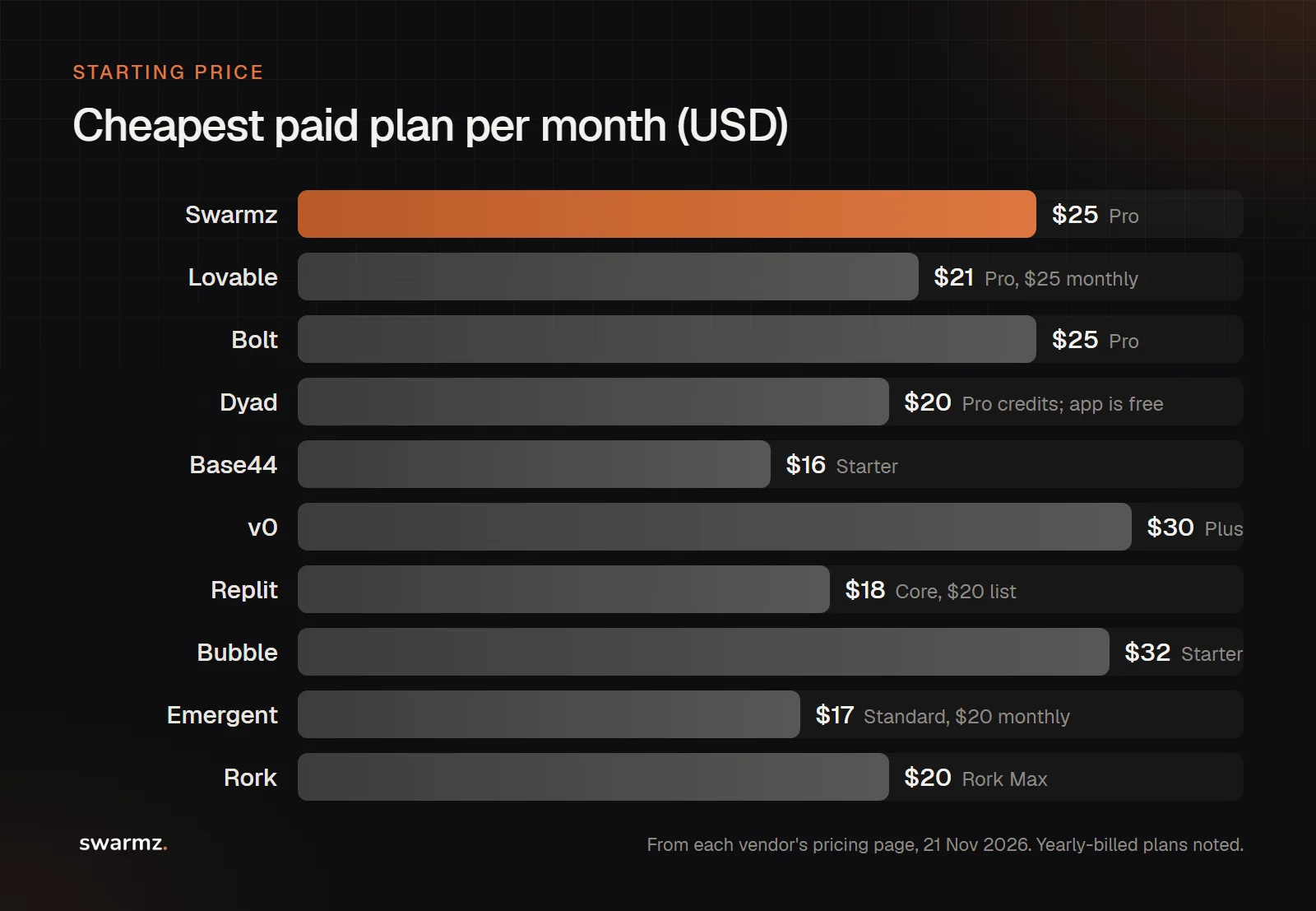
Most first paid plans cost $16 to $32 a month. Swarmz, Lovable and Bolt start at $25 billed monthly; Lovable drops to $21 and Replit to $18 billed yearly; Base44's $16 and Bubble's $32 are yearly prices; v0 is $30 per user. Compare what the plan adds as well as the price: on Swarmz, Pro adds 100 monthly credits on top of the daily 5, credit rollover and a custom domain, while the backend and GitHub sync are already on Free.
When Swarmz isn't the right pick
For a native App Store or Google Play app, look at Rork, Replit or Emergent, and read whether AI can build a mobile app first. If you already pay for an AI API and want no subscription, Dyad fits better. To learn visual, hand-edited logic, Bubble's free plan is generous, though going live costs money. If you need plain files instead of a GitHub repository, Dyad writes them to your computer.
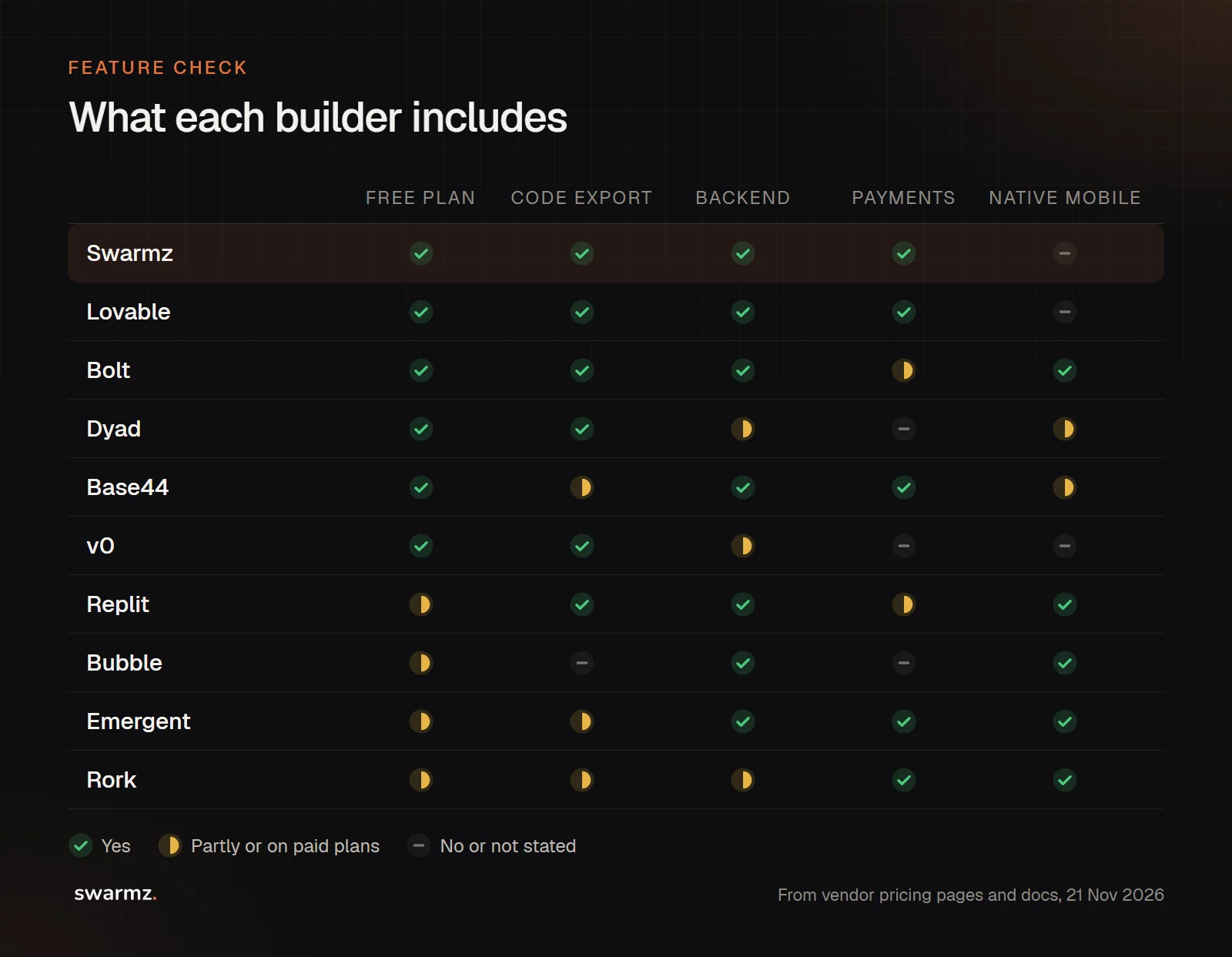
Tool | Free plan | Code export | Backend | Payments | Native mobile |
|---|---|---|---|---|---|
Swarmz | Yes | Yes | Yes | Yes | No |
Lovable | Yes | Yes | Yes | Yes | No |
Bolt | Yes | Yes | Yes | Partly | Yes |
Dyad | Yes | Yes | Partly | No | Partly |
Base44 | Yes | Partly | Yes | Yes | Partly |
v0 | Yes | Yes | Partly | No | No |
Replit | Partly | Yes | Yes | Partly | Yes |
Bubble | Partly | No | Yes | No | Yes |
Emergent | Partly | Partly | Yes | Yes | Yes |
Rork | Partly | Partly | Partly | Yes | Yes |
Yes: included. Partly: only on some plans or with limits. No: not offered, or not stated by the vendor. Checked on 21 November 2026.
How to choose
You want to publish a real app for free: Swarmz, Lovable or Bolt.
You build a little every day: a daily allowance (Swarmz, Lovable, v0) suits you better than one monthly bucket.
You want the code from day one: Swarmz, Lovable and v0 sync with GitHub on Free, and Dyad writes local files.
You already pay for an AI API: Dyad.
You need native mobile: Rork or Replit, though Rork's free plan cannot build apps.
Test two tools with the same small brief; our guide to writing prompts for AI app builders helps you write one. Before you commit, check how to export an app from an AI app builder and read the limitations of AI app builders.
Making a personal or hobby site? Our guide to the best website builder for personal sites compares the free options.
FAQ
What is the best free AI app builder?
For most people, Swarmz: 5 credits every day with no card, plus the backend, one-click publishing and two-way GitHub sync on Free. Lovable is the closest alternative, and Dyad is free with your own AI key.
Is there a completely free AI app builder?
Dyad is free and open source, and you pay only your AI provider. Every other tool here has a free plan with limits, such as daily credits or monthly tokens.
Which free AI app builder lets you publish your app?
Swarmz, Lovable and Bolt publish on Free, and v0 deploys to Vercel. Replit's free published app goes down after 30 days. Bubble, Emergent and Rork need a paid plan to go live.
Can I use a custom domain on a free AI app builder?
Not on most. Swarmz, Lovable, Bolt, Base44, Bubble and Emergent all need a paid plan for a custom domain. With Dyad you host the app yourself, so the domain depends on your host.
Can I export my code on a free plan?
Yes, with Swarmz, Lovable and v0 through GitHub sync, and with Dyad, which writes files to your computer. Base44, Emergent and Rork only export on paid plans, and Bubble does not export code.
Does Swarmz have a free trial?
Yes. New accounts can try Pro free for 3 days with 25 credits; the trial needs a card and becomes the $25 Pro plan unless you cancel. You can also stay on the free plan, which does not expire and gives you 5 credits every day.
Start building for free
Describe the app you want in one sentence and build it on Swarmz with 5 free credits a day. The database, sign-in, publishing and GitHub sync are ready on the free plan.
Sources
All checked on 21 November 2026.
Swarmz: swarmz.net/pricing, swarmz.net/faq
Lovable: docs.lovable.dev subscription plans, Lovable plans and credits, Lovable publishing docs
Bolt: bolt.new/pricing
Dyad: dyad.sh
Base44: base44.com/pricing
Bubble: bubble.io/pricing, Bubble data ownership
Emergent: emergent.sh/pricing, Emergent plans and credits
Anything: anything.com/pricing, Anything FAQ
Glide: glideapps.com/pricing
Hostinger AI Builder: hostinger.com/horizons
Rocket.new: rocket.new/pricing
Figma Make: figma.com/pricing
Firebase Studio: Google's migration guide
How did this land?
About the author

Founder of swarmz.net
Jordan founded Swarmz, the AI app builder at swarmz.net.


