Best Website Builder for Personal and Hobby Sites (2026)
Seven website builders for personal pages, hobby projects, clubs, family sites and blogs, compared on free plans, own-domain cost, editing and small databases, with prices checked on 21 November 2026.
The best website builder for a personal or hobby site is Swarmz when the site needs to keep something: a family recipe list, a club calendar or a catalogue of your collection. You describe it in plain words, and Swarmz builds the pages, a small database, sign-in for the people who may add things and storage for photos, on a free plan of 5 credits a day that does not expire. This guide is for personal pages, hobby projects, clubs, family sites and blogs. If you mainly want to write, a blogging platform such as WordPress.com is the better pick, and for a free family or club page, Google Sites is hard to beat.
Swarmz is our product, so read our ranking with that in mind. We checked every price on the vendor's own pricing page or help pages on 21 November 2026, and the sources are listed at the end.
The best website builders for personal sites at a glance
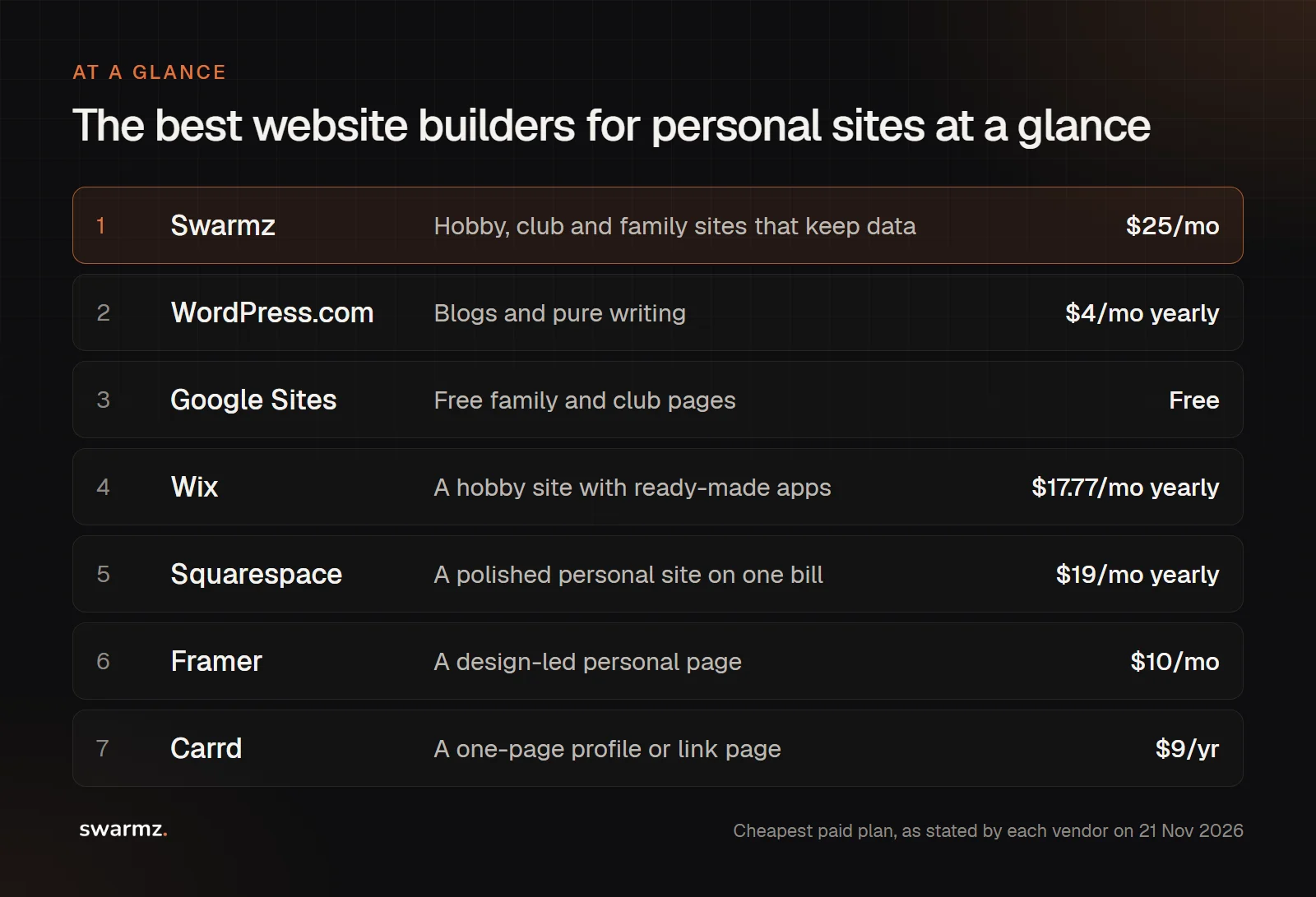
Tool | Best for | Cheapest paid plan | Free plan | Own domain | Blog or small database |
|---|---|---|---|---|---|
Swarmz | Hobby, club and family sites that keep data | $25/month (Pro) | 5 credits a day, no card, does not expire | Pro, $25/month | Built-in database, sign-in and file storage |
WordPress.com | Blogs and pure writing | $4/month billed yearly (Personal) | Yes, with ads, on a wordpress.com address | Personal; free domain for the first year on yearly billing | Posts and pages; no plugins on Free |
Google Sites | Free family and club pages | No paid plan listed | Yes, with a Google account | Connect a domain you already own | Embed Google Sheets, Calendar and Forms |
Wix | A hobby site with ready-made apps | $17.77/month billed yearly (Light) | Yes, with a Wix banner ad | Premium plans; free domain for the first year | Wix Blog with an optional Members Area; CMS collections |
Squarespace | A polished personal site on one bill | $19/month billed yearly (Basic) | No, a trial of 14 days | Basic; domain free for the first year on annual billing | Blog pages on Basic |
Framer | A design-led personal page | $10/month (Basic) | Yes, on a Framer domain | Basic, $10/month | CMS with 2 collections and 1,000 items on Basic |
Carrd | A one-page profile or link page | $9/year (Pro Lite) | Up to 3 sites | Pro Standard, $19/year | Single pages only |
What a good personal or hobby site needs
A personal site runs for years on little money, edited by you, a relative or a club volunteer. We ranked on these needs, using only what each vendor states:
A free plan that lasts: no deadline, so a hobby site can sit quietly for years.
Your own domain later, at a fair price: start free, add yourname.com when it matters.
Simple editing, ideally by more than one person, so family or a club committee can help.
Somewhere to keep things: a recipe list, a club calendar or a collection works best as data you can search and sort.
Control over who sees it: public for a club, private for family photos.
Writing tools, if you blog: posts, drafts, comments or subscribers.
Most personal sites need the first three. The rest split the field: blogging platforms are strongest at writing, and Swarmz at keeping data. If your personal site is really a portfolio, also read our guide on building a portfolio site with AI.
What a personal site costs in a year
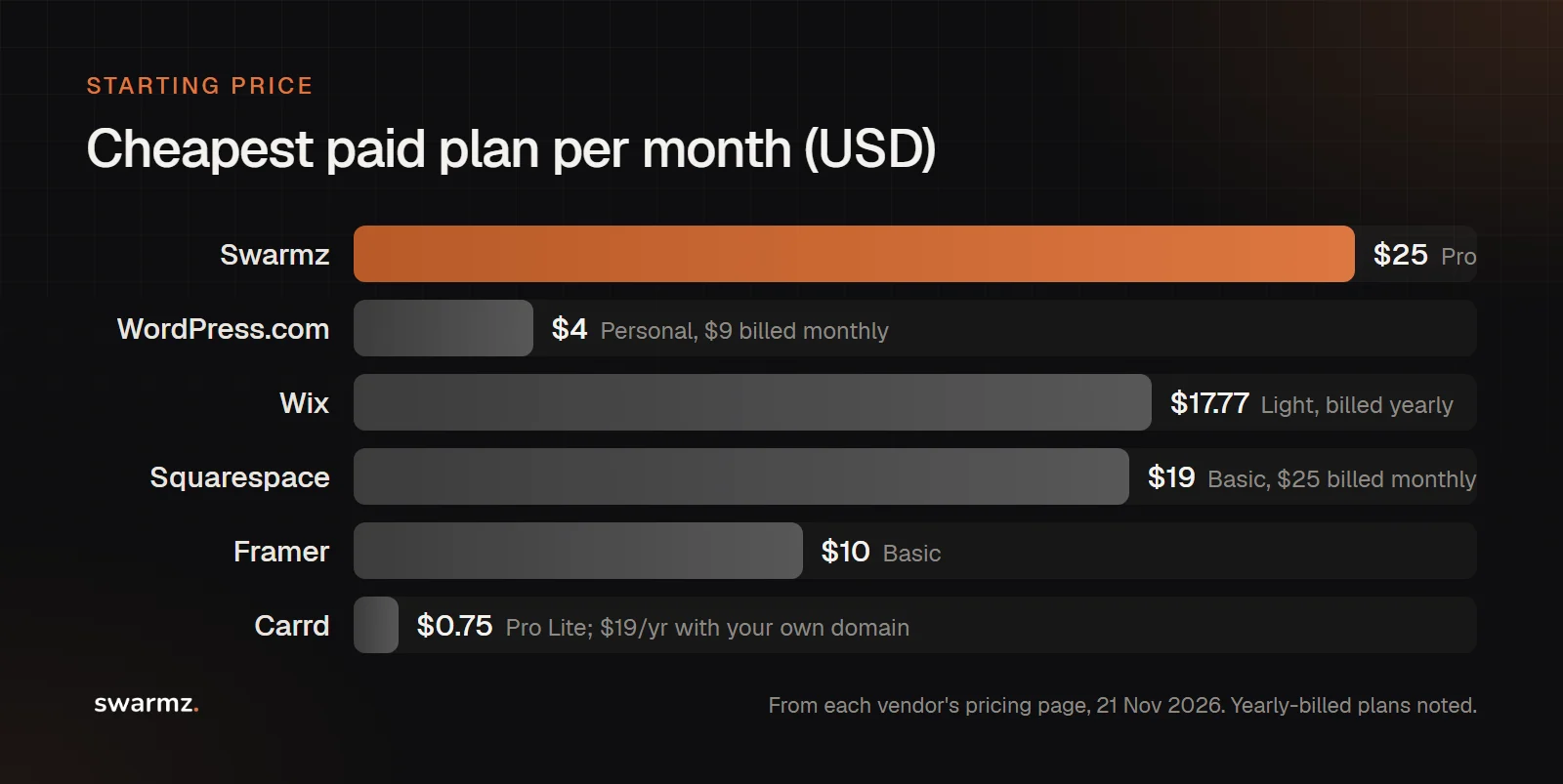
On your own domain, the cheapest suitable plan costs nothing on Google Sites (you pay only a registrar), $19 a year on Carrd, $48 on WordPress.com Personal, $120 on Framer, about $213 on Wix, $228 on Squarespace and $300 on Swarmz. WordPress.com, Framer, Wix and Squarespace include a domain for the first year on yearly billing.
For a blog or an "about me" page, Swarmz Pro is the most expensive way to get your own domain. Most hobby sites fit the free plan, which does not expire and publishes to a swarmz.cloud link with a Swarmz badge. Pay for Pro when you want your own domain, no badge or more credits.
1. Swarmz: best overall for hobby, club and family sites that keep data
Swarmz is an AI app builder for web apps. You describe the site in chat, Swarmz builds the pages and the data behind them, and you publish to a swarmz.cloud link with SSL in one click, or start from one of 28 remixable templates.
How it handles the checklist: Swarmz Cloud gives every site a database, user sign-in, file storage and server functions on every plan, including Free, so you can describe a recipe list with photos or a club calendar that members add to and have it built. Sign-in works with email, phone, Google, Apple and more, so some pages can be for signed-in family members only. Several people can build in one workspace with Admin, Editor or Viewer roles, even on Free. Your account and main database are hosted in the EU (Ireland).
Pros
Database, sign-in and file storage on every plan, so lists, calendars and galleries are real data you can search and sort.
A free plan that does not expire, with 5 credits every day.
Workspace roles and shared credits with no per-seat fees, so a club committee can build together.
Two-way GitHub sync on Free, with standard React, TypeScript and Tailwind code.
Cons
No ready-made blog editor or visual CMS listed; you shape the site in chat, and each change uses credits. For pure writing, WordPress.com is easier.
Your own domain needs Pro at $25 a month.
Making the whole app private, rather than putting pages behind sign-in, is a Business feature.
Best for: hobbyists, clubs and families who want a site that stores things, not only pages.
Pricing: Free with 5 credits every day and no card. Pro is $25 a month for 100 credits plus the daily credits, with rollover for 30 days, a custom domain and no badge. New accounts can try Pro free for 3 days with 25 credits; a card is needed, and it becomes the $25 plan unless you cancel. Business is $50 a month and adds private apps.
2. WordPress.com: best for blogs and pure writing
WordPress.com is a hosted platform for blogs and websites. If you will mostly write, it is a better pick than Swarmz, because it is built around posts.
How it handles the checklist: the free plan has no expiration date and gives unlimited pages and posts on a yoursite.wordpress.com address, but shows ads and cannot install plugins. Personal connects your own domain, with a free domain for the first year on yearly plans. Paid reader subscriptions work even on Free, with a 10% platform fee that falls to 8% on Personal. Payment buttons through PayPal and Stripe start on Premium.
Pros: built for writing; at $48 a year, the cheapest plan here that includes a first-year domain; paid reader subscriptions from Free.
Cons: ads on Free; no plugins on Free; platform fees on subscriptions and payments, on top of payment provider fees.
Best for: personal blogs, travel diaries, hobby writing and newsletters.
Pricing: Free. Personal is $4 a month billed yearly or $9 monthly; Premium is $8 billed yearly or $18 monthly, in US dollars excluding taxes.
3. Google Sites: best free option for family and club sites
Google Sites is Google's site builder for personal or business sites, used with a Google account. Google's help pages list no fee for it.
How it handles the checklist: you invite editors by email, and people with Google accounts can edit straight away. The published site can be public or restricted to specific people, which suits a family site. For things to keep, you insert a Google Calendar for club dates, a Sheet for a list or a Form for sign-ups. You can connect a domain you already own, but the address needs a subdomain such as www, and the site must then be public.
Pros: no fee for the site; a private option for specific people; lists kept in Google tools your family or club may already use.
Cons: a custom domain means a public site; editors without a Google account can only view drafts; your lists live in separate Google files, not in the site.
Best for: family pages, a club's fixtures and notices, or a reunion page.
Pricing: no paid plan for personal accounts on the pages we read. You pay only for a domain.
4. Wix: best for a hobby site with ready-made apps
Wix is a general website builder whose Harmony editor includes Aria, an AI agent for pages, content and design. AI creation tools are on every plan, including Free.
How it handles the checklist: free sites show a Wix banner ad, which a premium plan removes, and your own domain needs a premium plan too, with a free domain for the first year. Wix Blog comes from the App Market and offers to install a Members Area where members log in, keep a profile and comment. Wix Forms stores entries in a submissions table. For a small database, the Wix CMS can save visitor input into collections, though Wix says those input elements are not available in the Harmony editor.
Pros: a blog with members and comments added by clicking; forms with a submissions table; AI tools on Free.
Cons: a banner ad on Free; yearly plans paid upfront, with prices that vary by location; no CMS input forms in the Harmony editor.
Best for: a hobby site that wants a blog, members and forms without building anything.
Pricing: Free with a banner ad. Light is $17.77 a month and Core $29.77, shown for yearly plans paid in full.
5. Squarespace: best for a polished personal site on one bill
Squarespace sells templates, hosting and a domain together. It has no free plan; every site starts with a free trial of 14 days, with no card needed.
How it handles the checklist: Squarespace describes Basic as suited to personal sites, portfolios and simple business pages, and its plan guide lists a blog, paywalled content and memberships among the things Basic covers. Basic includes a domain free for the first year on annual billing, SSL and basic analytics. Form blocks send entries to your email and can fill a Google Drive spreadsheet.
Pros: a blog on the entry plan; a first-year domain included; site, hosting and SSL on one bill.
Cons: no free plan; $228 a year on Basic, or $25 a month billed monthly; Mailchimp and Zapier on forms need Core.
Best for: someone who wants a good-looking personal site or blog and is happy to pay for it.
Pricing: Basic is $19 a month billed yearly, or $25 monthly. Core is $29 a month billed yearly, or $39 monthly.
6. Framer: best for a design-led personal page
Framer is a website builder with an AI design agent on a visual canvas, plus hosting, a CMS and analytics.
How it handles the checklist: the free plan publishes on a Framer domain, and a custom domain needs a paid plan. Basic, at $10 a month, is pitched at "creative personal sites" and gives your own domain, 30 pages and a CMS with 2 collections and 1,000 items, enough for a list of posts or projects. Native forms send submissions to email, Google Sheets or a webhook.
Pros: strong design control; a small CMS on Basic; a domain included on yearly billing.
Cons: no custom domain on Free; more CMS collections cost $40 per 10; no visitor sign-in stated on the pages we read.
Best for: designers, photographers and anyone whose personal site is part of their creative work.
Pricing: Free. Basic is $10 a month and Pro $30, billed on the cycle you choose at checkout.
7. Carrd: best for a one-page profile or link page
Carrd builds simple, single-page sites. A free account can build up to three sites with Carrd's core features.
How it handles the checklist: Pro Lite ($9 a year) removes the "Made with Carrd" branding but has no custom domain. Pro Standard ($19 a year) adds your own domain with SSL, up to 10 sites, contact and signup forms and widgets from services such as PayPal and Gumroad. Each site is one page, so a blog or a growing list does not fit.
Pros: the lowest yearly cost here for your own domain; quick to build; up to three free sites.
Cons: one page per site; forms and custom domains need Pro Standard; posts and records need another tool.
Best for: an "about me" page, a link page for your social profiles, or a page for a band or a side project.
Pricing: Free for up to 3 sites. Pro Lite is $9 a year, Pro Standard $19 and Pro Plus $49.
Build it on Swarmz: a prompt you can copy
Build a family recipe website called "Grandma's Kitchen".
Each recipe has a title, a photo, ingredients, steps, cooking time and tags such as "dessert" or "vegetarian".
Family members sign in with Google or email to add and edit recipes; visitors who are not signed in can only read.
Add search and a filter by tag on the home page.
Give me an admin page where I approve new family members before they can add recipes.
Use a warm, simple design with large text that is easy to read on a phone in the kitchen.
After the first version, add a few real recipes, sign in as a family member on another device, and open the site signed out to see what strangers see. A club calendar works the same way: describe the events and who may add them. For more on what a small database can do, see the best AI app builder with a database.
When Swarmz isn't the right pick
Swarmz fits personal sites that store things or need sign-in. For other personal sites:
Mostly writing, such as a blog, travel diary or newsletter: WordPress.com.
A free family or club page where everyone uses Google: Google Sites.
A blog with members and comments added by clicking: Wix.
A polished personal site or blog on one bill: Squarespace.
A visual portfolio or creative showcase: Framer.
A single "about me" or link page on your own domain: Carrd.
A one-off page for an event or a menu: see the best website builder for a simple website.
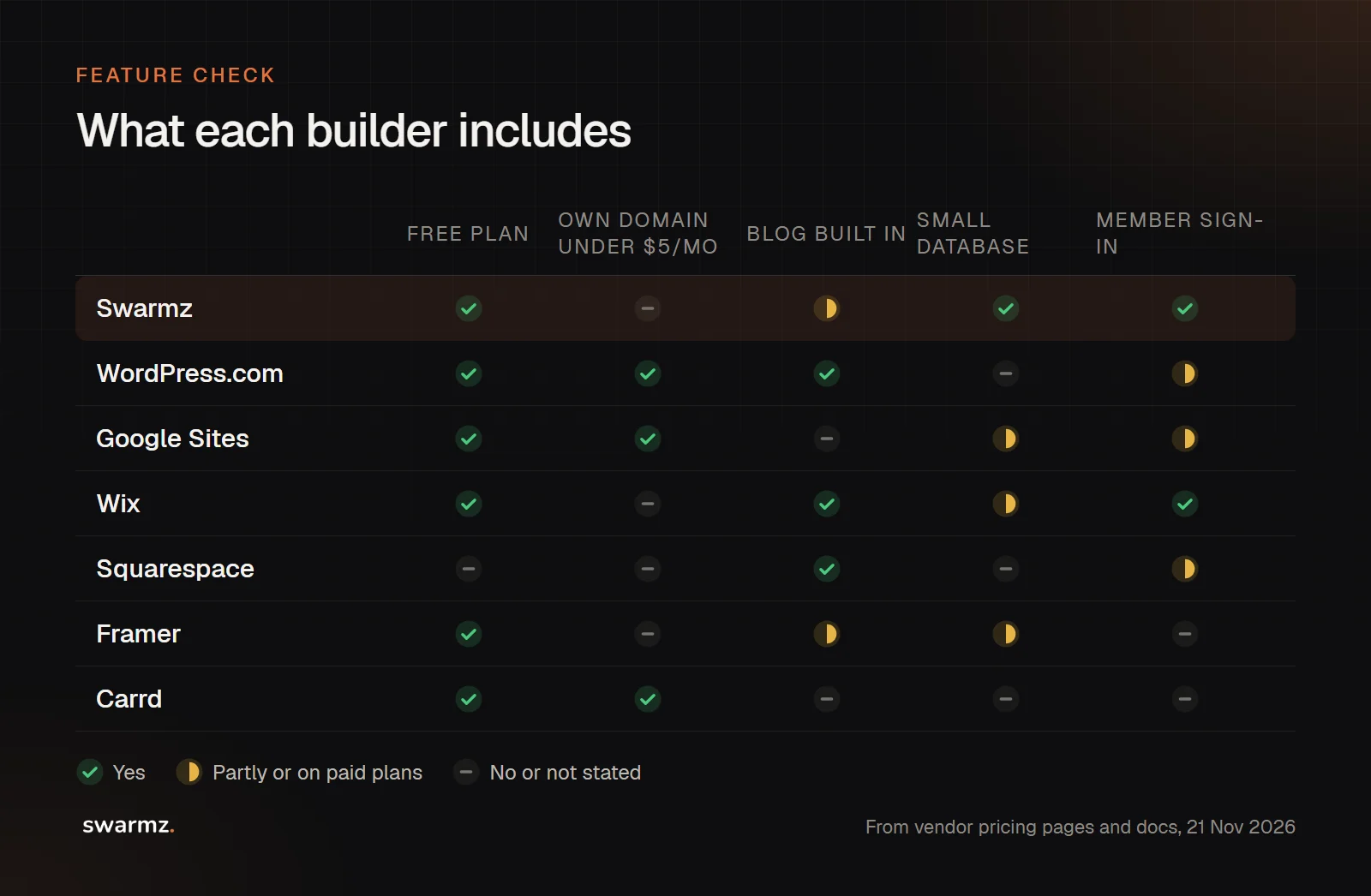
Tool | Free plan | Own domain under $5/mo | Blog built in | Small database | Member sign-in |
|---|---|---|---|---|---|
Swarmz | Yes | No | Partly | Yes | Yes |
WordPress.com | Yes | Yes | Yes | No | Partly |
Google Sites | Yes | Yes | No | Partly | Partly |
Wix | Yes | No | Yes | Partly | Yes |
Squarespace | No | No | Yes | No | Partly |
Framer | Yes | No | Partly | Partly | No |
Carrd | Yes | Yes | No | No | No |
Yes: included. Partly: only on some plans or with limits. No: not offered, or not stated by the vendor. Checked on 21 November 2026.
How to choose
Your site keeps a list, a calendar or a collection, with sign-in: Swarmz.
You mostly write: WordPress.com.
Free, and your group already uses Google: Google Sites.
A blog, members and forms added by clicking: Wix.
A polished template you will pay for: Squarespace.
Design is the point: Framer.
One page is all you need: Carrd.
Whichever you pick, check the cost after any free first year of the domain. On Swarmz, our guide to writing prompts for AI app builders helps.
FAQ
What is the best website builder for a personal website?
For a personal or hobby site that keeps data, such as recipes, a club calendar or a collection, Swarmz: it builds a database, sign-in and photo storage from a description, on a free plan that does not expire. For a site that is mostly writing, WordPress.com is better.
What is the best free website builder for a personal site?
Google Sites lists no fee and can be private to specific people. Swarmz's free plan gives 5 credits a day and does not expire. WordPress.com's free plan has no expiration date but shows ads, Wix's shows a banner ad, and Framer and Carrd also have free plans. Squarespace has only a trial.
Should I use a blogging platform or a website builder for a personal blog?
If the site is mostly posts, use a blogging platform such as WordPress.com, from $4 a month billed yearly with your own domain. Choose Wix or Squarespace if you want a blog alongside other pages, or Swarmz if the site also needs to store data or sign people in.
How much does it cost to put a personal site on my own domain?
From $19 a year on Carrd plus the domain, or $48 a year on WordPress.com Personal with a free first-year domain. Google Sites lists no fee to connect a domain you own. Swarmz Pro is $300 a year.
Can I make a private family website?
Yes. Google Sites can restrict the published site to specific people. Swarmz can build pages that only signed-in family members see, and Business ($50 a month) adds fully private apps. Wix's Members Area adds member log-ins.
Make a site that keeps things
If your personal site needs a list, a calendar or a place for family members to add things, describe it in a few sentences and start building on Swarmz for free. The free plan does not expire, so the site can grow at its own pace.
Sources
All checked on 21 November 2026.
Swarmz: swarmz.net/pricing, swarmz.net/features, swarmz.net/faq
WordPress.com: wordpress.com/pricing
Google Sites: Create a site, Share your site, Add Google files and other content, Use a custom domain
Wix: wix.com/plans, Wix Harmony AI tools, Removing Wix banners and ads, Adding Wix Blog, Wix Forms submissions table, Wix CMS input forms
Squarespace: squarespace.com/pricing, Squarespace pricing summary (USD), Choose the right Squarespace plan, Set up form and newsletter storage
Framer: framer.com/pricing, Framer help: adding a contact form
Carrd: carrd.com, Carrd Pro plans
How did this land?
About the author

Founder of swarmz.net
Jordan founded Swarmz, the AI app builder at swarmz.net.


