Best AI App Builders in 2026: 10 Tools Compared
Ten AI app builders compared on price, free plan, backend, payments, code export and mobile, with prices checked on 21 November 2026 and a plain answer for each kind of builder.
The best AI app builder for most people in 2026 is Swarmz, because it turns a plain-language description into a working web app with the backend already in place: a database, user sign-in, file storage, Stripe payments, one-click publishing and two-way GitHub sync, starting with a free plan of 5 credits a day. Lovable and Bolt are close alternatives at the same $25 Pro price. For native iPhone and Android apps, Replit, Emergent and Rork are the stronger choices.
Swarmz is our product, so read our ranking with that in mind. We checked every price on the vendor's own pricing page or docs on 21 November 2026, and list the sources at the end.
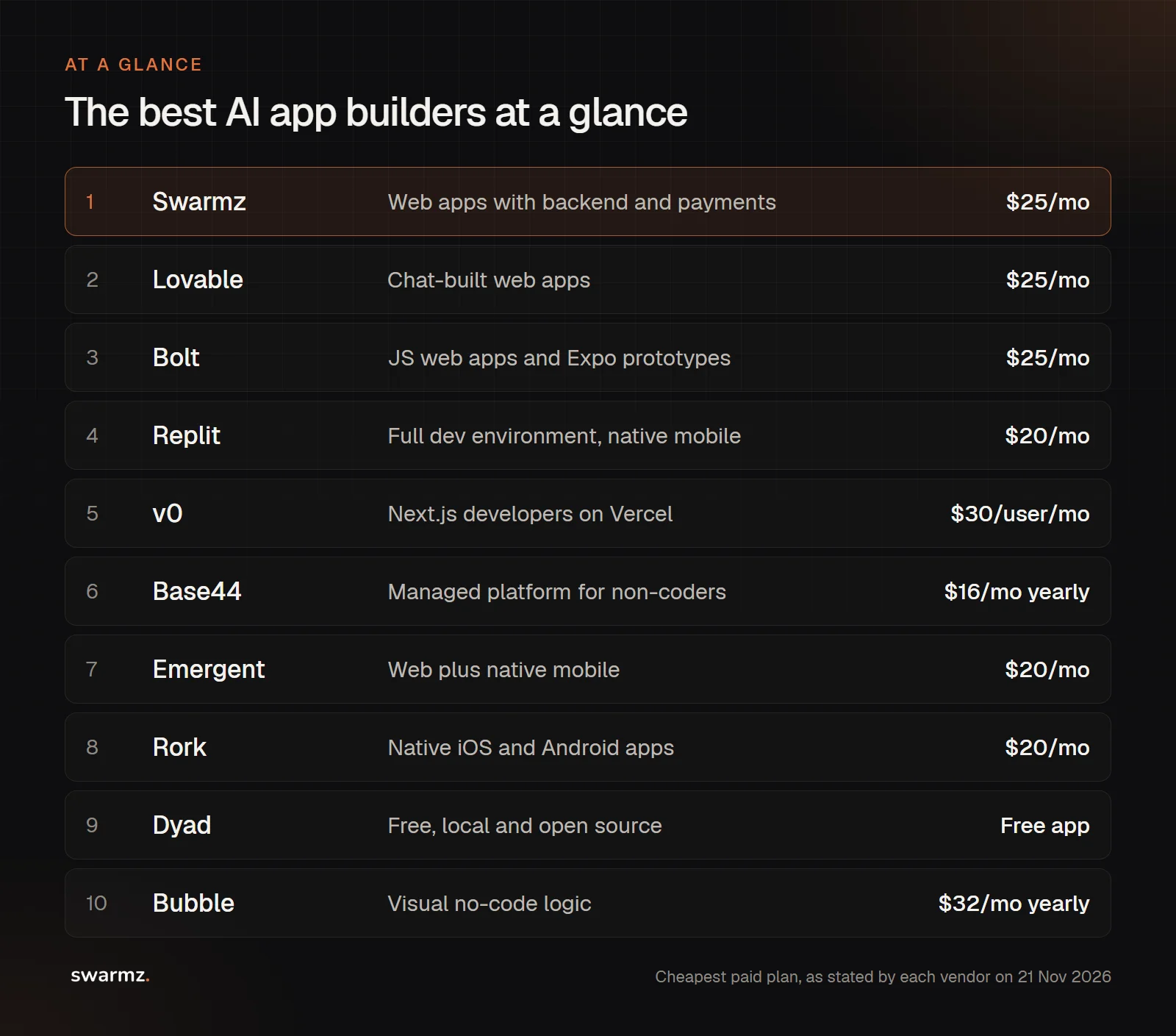
The best AI app builders at a glance
Tool | Best for | Starting paid price | Free plan | Native mobile | Code export |
|---|---|---|---|---|---|
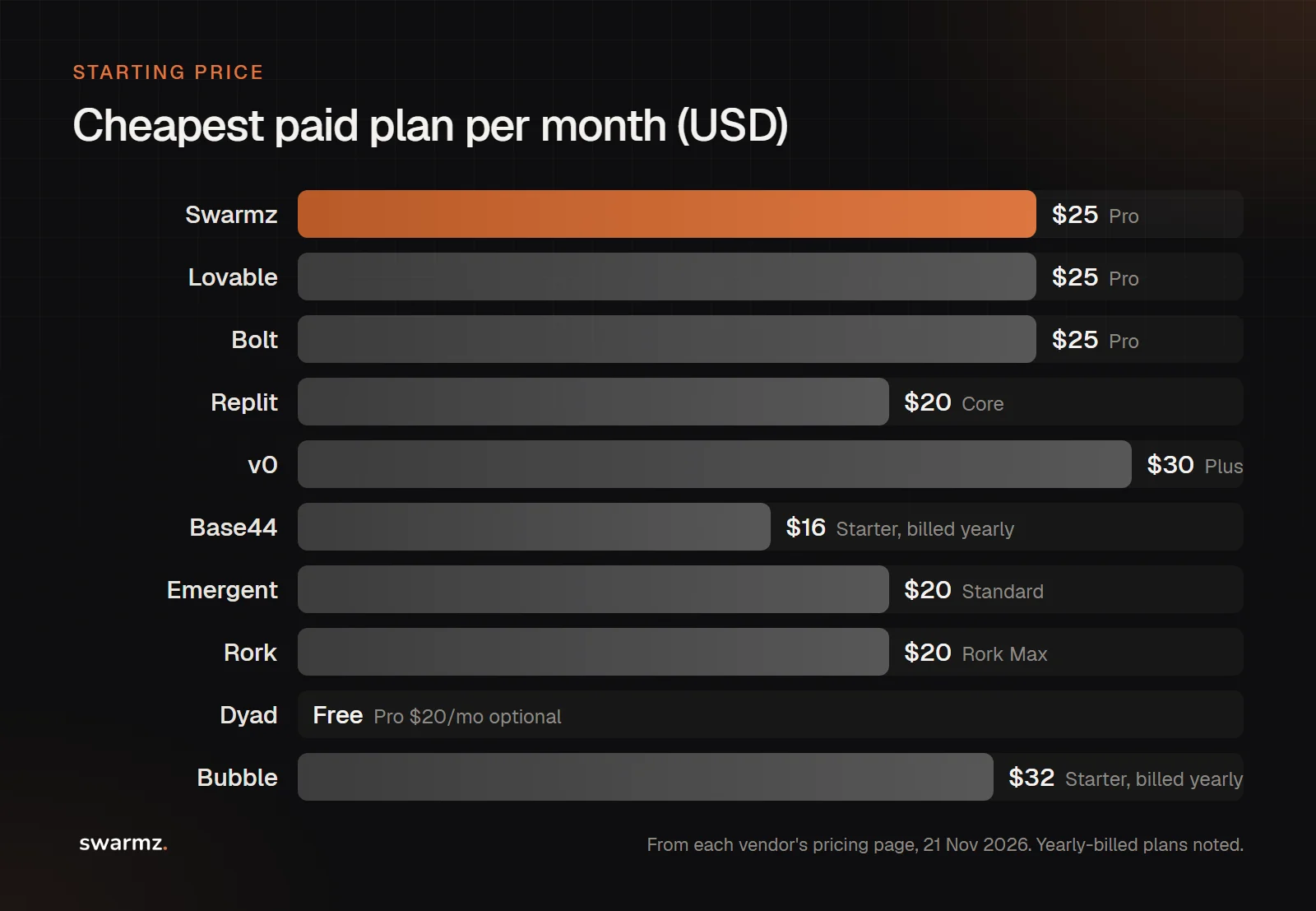
Swarmz | Most people: web apps with a backend and payments | $25/month | 5 credits a day | No, web apps | Two-way GitHub sync |
Lovable | Chat-built web apps | $25/month | 5 daily credits, up to 30 a month | No | Git sync; ZIP on paid plans |
Bolt | JavaScript web apps and Expo prototypes | $25/month | 1M tokens a month | Yes, via Expo | GitHub integration |
Replit | A full dev environment with native mobile | $20/month ($18 billed yearly) | Yes, limited | Yes | GitHub or GitLab |
v0 | Next.js developers on Vercel | $30 per user/month | 7 messages a day | Not stated | Two-way GitHub sync |
Base44 | Non-coders who want one managed platform | $16/month, billed yearly | 25 message credits | Web view wrapper | From the Builder plan |
Emergent | Web plus native mobile, Python backend | $20/month ($17 billed yearly) | 10 credits | Yes, via Expo | GitHub on paid plans |
Rork | Native iOS and Android apps | $20/month | Design mode only | Yes, SwiftUI and Kotlin | Two-way GitHub on paid plans |
Dyad | Free, local, open source | Free app; Pro $20/month | Yes, own API key | Capacitor wrapper | Plain Next.js code |
Bubble | Visual no-code logic | $32/month, billed yearly | Yes | Yes, React Native | No |
How we ranked them
We looked at what a non-developer or a small team needs to get a real app live: a free way to start, a backend that does not need separate accounts, a way to take payments, a way to get the code out, and a clear price. We used only what each vendor states on its own pricing page or documentation. We did not run benchmarks, and where a vendor does not state something, the table says so.
1. Swarmz: best AI app builder overall
Swarmz builds web apps from chat. You describe the app, Swarmz builds the screens, data model and sign-in, and you publish to a swarmz.cloud link with SSL in one click, or to your own domain on Pro. The code is standard React, TypeScript and Tailwind and syncs both ways with your GitHub repository on every plan.
The reason it ranks first is how much is already included. Swarmz Cloud gives each app a database, sign-in with email, phone, Google, Apple and more, file storage and server functions. Swarmz Payments runs on Stripe for checkout, subscriptions, invoices and payment links. More than 80 connectors, from Stripe and Shopify to Notion, Airtable, HubSpot and Calendly, connect in one click. Every chat reply shows the credits that prompt used, and credits are shared across your workspace with no per-seat fees.
Pros: backend and sign-in on every plan; Stripe payments built in (Stripe's fees plus a small Swarmz platform fee); GitHub sync on Free; transparent per-prompt cost; account data hosted in the EU (Ireland).
Cons: web apps only, no native iOS or Android; no ZIP download; custom domains start on Pro.
Best for: founders, small businesses and agencies who want a complete web app without wiring services together.
Pricing: Free with 5 credits a day and no card. Pro $25 a month (100 credits, rollover for 30 days, custom domain). Business $50 a month.
2. Lovable: best for chat-built web apps if you already know it
Lovable builds web apps from chat, with Lovable Cloud for the database, sign-in, storage and functions, or your own Supabase project. Git sync works on every plan, and paid plans can download the code as a ZIP.
Pros: Git sync to GitHub, GitLab or Bitbucket on Free; built-in backend; unlimited workspace members.
Cons: no native mobile apps; credit use varies by task; no custom domain or code download on Free.
Pricing: Pro $25 a month, or $21 a month billed yearly. Business $50 a month.
3. Bolt: best for JavaScript web apps and Expo prototypes
Bolt runs in the browser and builds websites, web apps and Expo mobile apps, with Bolt Database through Bolt Cloud or Supabase.
Pros: free plan with hosting; Expo mobile route; two-way GitHub integration.
Cons: 300K daily token cap on Free and Bolt branding on sites; JavaScript-only backends.
Pricing: Pro $25 a month billed monthly. Teams $30 per member a month.
4. Replit: best full dev environment with native mobile
Replit pairs an AI Agent with a full online development environment. It builds web apps and native iOS and Android apps, with built-in PostgreSQL and a Stripe connector on paid plans.
Pros: native mobile; managed Postgres with no setup; real code editing when you want it.
Cons: usage-based billing; the free plan's published app goes down after 30 days.
Pricing: Core $20 a month, or $18 billed yearly. Pro $100 a month.
5. v0: best for Next.js developers on Vercel
v0 by Vercel generates code and full-stack apps that land in a normal Git workflow, with branches, pull requests and Vercel previews.
Pros: strong GitHub and pull request flow; one-click Vercel deploys.
Cons: 7 messages a day on Free; new users start at $30 per user a month; database, payments and domains are not stated on the pages we read.
Pricing: Plus $30 per user a month. Business $100 per user a month.
6. Base44: best managed platform for non-coders
Base44, owned by Wix and run as its own product, gives you a backend, sign-in and hosting on every plan, with Stripe, Wix Payments or PayPal for payments.
Pros: backend on Free; custom domain from the cheapest paid plan; three payment options.
Cons: code export and GitHub need the $40 Builder plan; mobile is a web view wrapper.
Pricing: Starter $16 a month billed yearly. Builder $40 a month billed yearly.
7. Emergent: best for web plus native mobile with a Python backend
Emergent builds web apps and React Native apps with Expo, can submit to the App Store and Google Play, and provisions a FastAPI or Next.js backend with MongoDB.
Pros: native mobile; backend set up for you; GitHub push and custom domain on the $20 plan.
Cons: no download button; MongoDB only; Free cannot publish to production.
Pricing: Standard $20 a month, or $17 billed yearly.
8. Rork: best for native iOS and Android apps
Rork generates native iOS apps in SwiftUI and Android apps in Kotlin, compiles them in the cloud and submits iOS builds to App Store Connect. In-app purchases run through a built-in RevenueCat integration.
Pros: real native code; two-way GitHub sync on paid plans; a direct App Store submission flow.
Cons: the free plan is design-only and cannot build or publish; you add Supabase or Firebase for a database; Android uploads are manual; you need an Apple Developer membership.
Pricing: Rork Max from $20 a month for 100 credits.
9. Dyad: best free and open-source builder
Dyad is a desktop app that builds standard Next.js apps on your own machine with your own AI key or a local model. You connect Supabase or Neon for data and deploy where you like.
Pros: free and open source; code and data stay local; no lock-in.
Cons: desktop install; no built-in hosting, domains or payments.
Pricing: free with your own key. Pro $20 a month for 200 AI credits.
10. Bubble: best for visual no-code logic
Bubble is a visual builder with a database, workflows, an AI agent and React Native mobile apps from the same backend.
Pros: complex logic you can edit visually; web and mobile from one backend.
Cons: no code export; usage metered in workload units; yearly billing on the cheapest plan.
Pricing: Starter $32 a month billed yearly.
Tools that changed in 2026
Firebase Studio stopped taking new sign-ups on 22 June 2026 and shuts down on 22 March 2027, according to Google's migration page.
Create.xyz is now Anything, and its docs say building requires a paid plan.
Hostinger Horizons was folded into Hostinger's AI Builder in August 2026, sold with hosting plans.
Glide and Softr are good fits for internal tools built on spreadsheets and business data rather than customer-facing apps.
When Swarmz isn't the right pick
If your app must be a native App Store or Google Play app, start with Rork, Replit or Emergent. If you want to keep everything on your own computer with your own model keys, use Dyad. If you prefer editing every rule visually instead of in chat, Bubble suits you better. If you need a ZIP of the code rather than a GitHub repository, Lovable's paid plans or Dyad give you one.
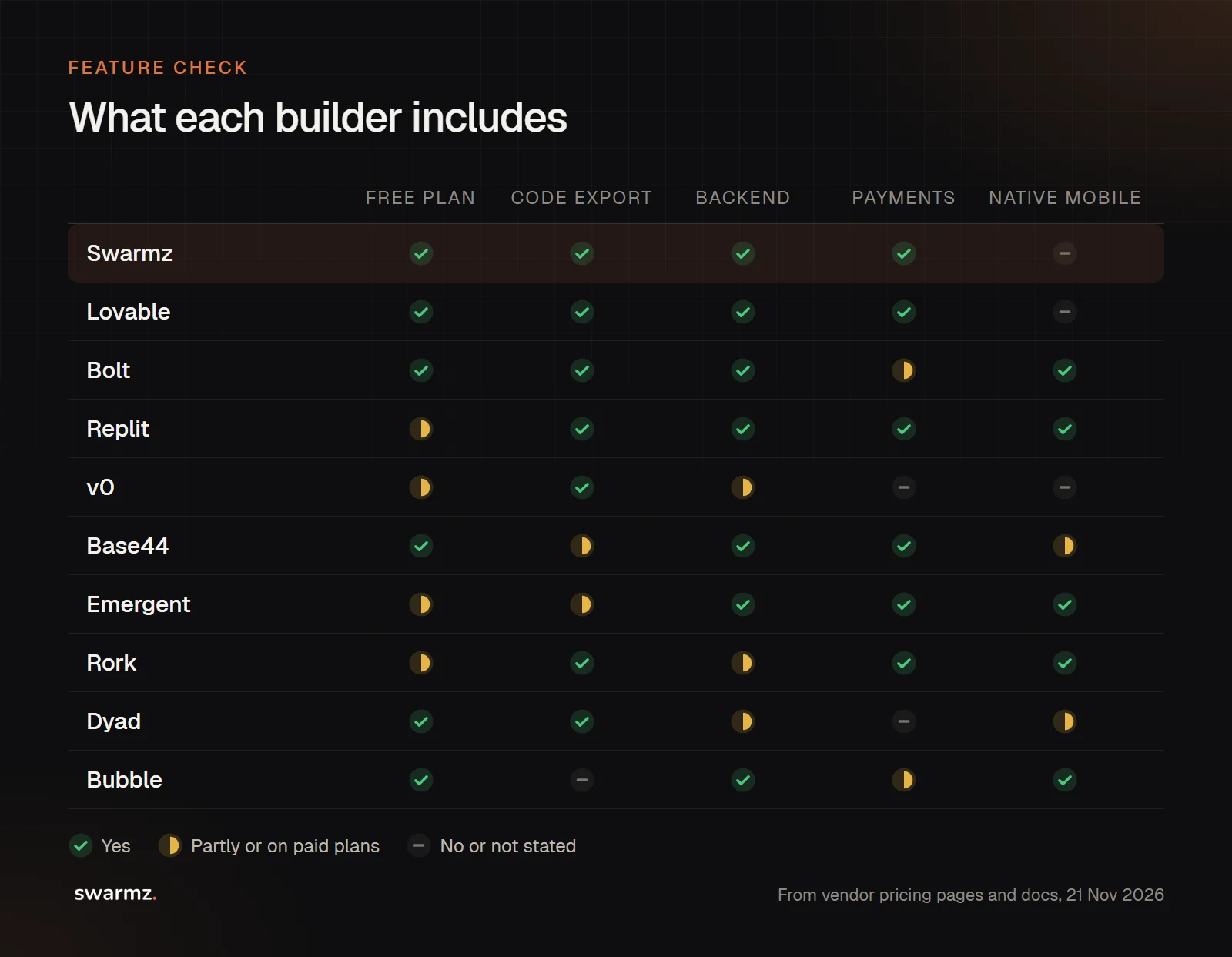
Tool | Free plan | Code export | Backend | Payments | Native mobile |
|---|---|---|---|---|---|
Swarmz | Yes | Yes | Yes | Yes | No |
Lovable | Yes | Yes | Yes | Yes | No |
Bolt | Yes | Yes | Yes | Partly | Yes |
Replit | Partly | Yes | Yes | Yes | Yes |
v0 | Partly | Yes | Partly | No | No |
Base44 | Yes | Partly | Yes | Yes | Partly |
Emergent | Partly | Partly | Yes | Yes | Yes |
Rork | Partly | Yes | Partly | Yes | Yes |
Dyad | Yes | Yes | Partly | No | Partly |
Bubble | Yes | No | Yes | Partly | Yes |
Yes: included. Partly: only on some plans or with limits. No: not offered, or not stated by the vendor. Checked on 21 November 2026.
How to pick the right AI app builder
Decide web or native. Most business apps work well as web apps that run on phones. If you need App Store features, filter to Rork, Replit, Emergent or Bolt.
Check what the backend includes. A database, sign-in and payments on the same platform saves you separate accounts and bills.
Check how you would leave. GitHub sync or a code download keeps your options open. See how to export an app from an AI app builder.
Start on a free plan with a real task. Build the same small app in two tools and compare. Our guide on writing prompts for AI app builders helps you write one brief you can reuse.
If you are still deciding between a builder and a coding agent, read AI coding agents vs AI app builders. For one industry in detail, see the best AI app builder for restaurants, and if you are coming from Lovable, our list of Lovable alternatives goes deeper.
For the wider field, including established no-code tools such as FlutterFlow and Adalo, see the best app builder in 2026.
FAQ
What is the best AI app builder in 2026?
For most people, Swarmz: it builds web apps from plain language with a database, sign-in, Stripe payments and GitHub sync included, and it has a free plan with 5 credits a day. For native mobile apps, Rork, Replit or Emergent fit better.
Is there a free AI app builder?
Yes. Swarmz, Lovable, Bolt, Replit, v0 and Bubble all have free plans with limits, and Dyad is free and open source if you use your own AI API key. Rork's free plan is design-only.
Which AI app builder is best for beginners and non-coders?
Swarmz and Base44 suit non-coders best because the backend, sign-in and hosting are set up for you. Bubble suits people who want to learn a visual builder rather than describe changes in chat.
Can an AI app builder make a mobile app?
Some can. Rork builds native SwiftUI and Kotlin apps, Replit and Emergent build native apps, and Bolt uses Expo. Swarmz and Lovable build web apps that work on phones but are not native apps. Our guide on whether AI can build a mobile app explains the trade-offs.
Do AI app builders let you export your code?
Most do, in different ways. Swarmz, Lovable, Bolt, v0 and Rork sync with GitHub, Lovable's paid plans also offer a download, Dyad writes plain Next.js files, and Bubble does not export code.
Start with the top pick
Describe the app you want in one sentence and build it on Swarmz for free. The database, sign-in and publishing are ready when you are.
Sources
All checked on 21 November 2026.
Swarmz: swarmz.net/pricing, swarmz.net/faq
Lovable: docs.lovable.dev subscription plans
Bolt: bolt.new/pricing
Replit: replit.com/pricing
v0: v0.app/pricing
Base44: base44.com/pricing
Emergent: emergent.sh/pricing
Dyad: dyad.sh
Bubble: bubble.io/pricing
Firebase Studio: Google's migration page
Anything: anything.com/pricing
Hostinger AI Builder: hostinger.com/horizons
How did this land?
About the author

Founder of swarmz.net
Jordan founded Swarmz, the AI app builder at swarmz.net.


