Firebase Studio Alternatives: Where to Move Before Shutdown
Firebase Studio closed to new users on 22 June 2026 and shuts down on 22 March 2027. Here is how to export your project, where Google suggests you move it, and eight alternatives compared on price, free plan, code export and backend.
The best Firebase Studio alternative for most people who want to keep growing a web app is Swarmz, because it builds a working app from a plain-language description with the database, user sign-in, file storage, Stripe payments, one-click publishing and two-way GitHub sync already included, starting with a free plan of 5 credits a day. If you would rather carry your existing code and Firebase project across, Google's own tools, Google AI Studio and Google Antigravity, are the direct routes. Either way, move before 22 March 2027, when Google shuts Firebase Studio down and deletes what is left in it.
Swarmz is our product, so weigh our ranking with that in mind. Every price here was checked on the vendor's own pricing page or docs on 21 November 2026, and the sources are listed at the end.
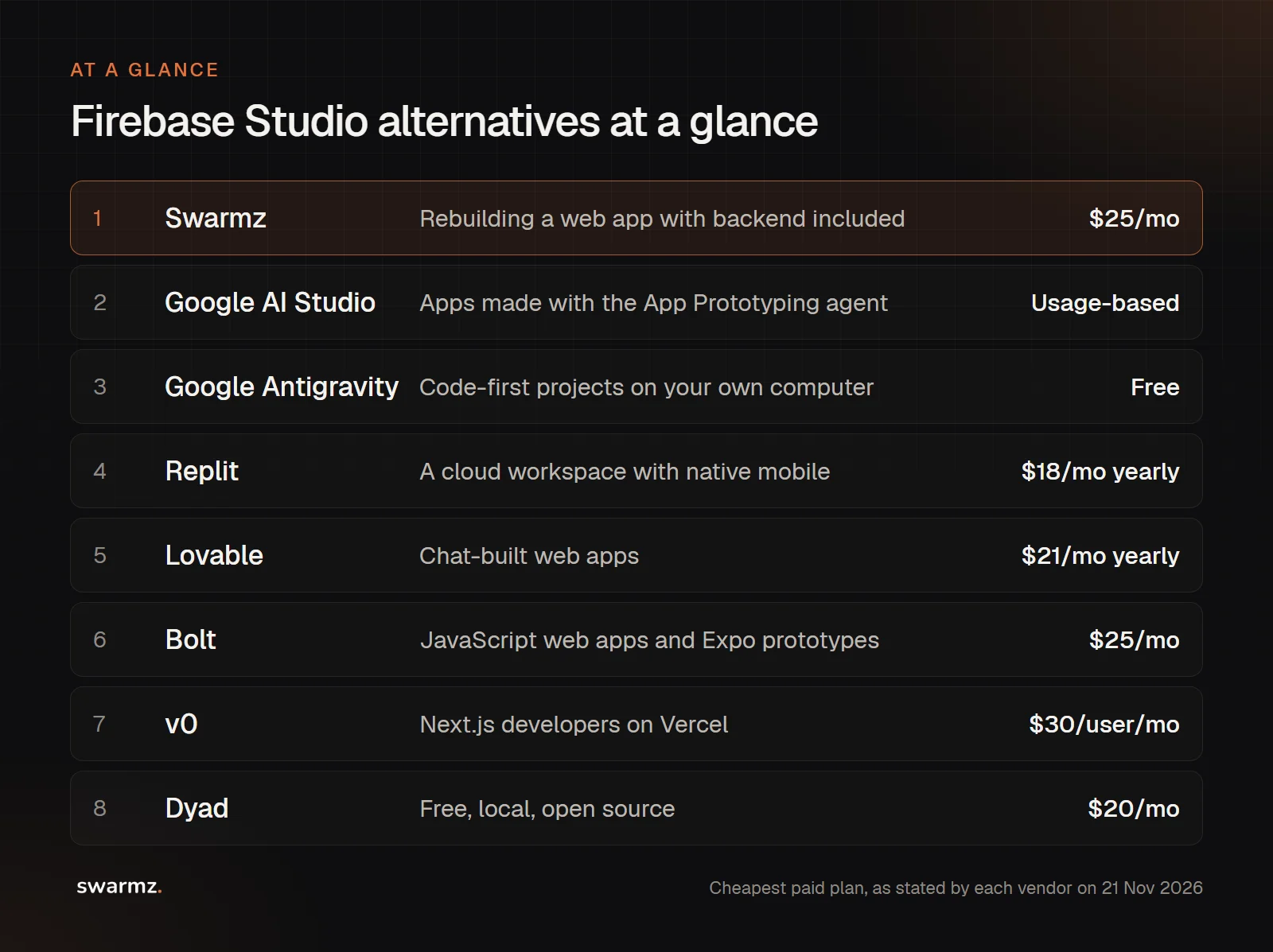
Firebase Studio alternatives at a glance
Tool | Best for | Starting paid price | Free plan | Code export | Backend and payments |
|---|---|---|---|---|---|
Swarmz | Rebuilding a web app with the backend included | $25/month (Pro) | 5 credits a day, no card | Two-way GitHub sync | Built-in database, sign-in, storage; Stripe payments |
Google AI Studio | Apps made with the App Prototyping agent | Usage-based (paid models, Cloud Run) | Yes, free tier | ZIP or two-way GitHub sync | Firestore and Firebase Authentication; payments not stated |
Google Antigravity | Code-first projects on your own computer | Free for individuals; more quota with Google AI Pro | Yes, weekly agent quota | Code stays in local files | Uses your existing Firebase project |
Replit | A cloud workspace with native mobile | $20/month (Core), $18 billed yearly | Yes, 1 published app that goes down after 30 days | GitHub or GitLab | Built-in PostgreSQL; Stripe on paid plans |
Lovable | Chat-built web apps | $25/month (Pro), $21 billed yearly | 5 credits a day, up to 30 a month | Git sync; ZIP on paid plans | Lovable Cloud or Supabase; Stripe |
Bolt | JavaScript web apps and Expo prototypes | $25/month (Pro) | 1M tokens a month, 300K daily cap | GitHub integration | Bolt Database or Supabase; Stripe in private beta |
v0 | Next.js developers on Vercel | $30 per user/month (Plus) | 7 messages a day | Two-way GitHub sync | Your own APIs and databases; payments not stated |
Dyad | Free, local, open source | Free app; Pro $20/month | Yes, with your own AI key | Plain Next.js code | Connect Supabase or Neon |
Why you have to move: the shutdown dates
Firebase Studio was Google's cloud environment for AI-assisted, full-stack apps, with a Prototyper mode and a Code View. Google's timeline:
19 March 2026: sunset announced; migration tools start rolling out.
22 June 2026: new workspace creation and new sign-ups disabled. Existing workspaces still open.
22 March 2027: Firebase Studio shuts down, and "all remaining data is permanently deleted and cannot be recovered."
Existing workspaces get security patches and Gemini updates until then. Only the development environment is going away: Cloud Firestore, Authentication and App Hosting keep working outside Firebase Studio, so your database and users stay where they are.
So the decision is: keep editing your code in another tool, or rebuild in a builder that includes more of the stack. Our comparison of AI coding agents vs AI app builders explains the difference.
How to move your project out of Firebase Studio
Do these first, whichever tool you choose. They come from Google's migration guide.
Download your code. Click Move now at the top of the workspace, choose Zip and Download, and extract the archive. GitHub export is also offered. If nothing happens, a pop-up blocker is the usual cause. If the export stalls, remove `node_modules`, large media, build files and old logs, then retry.
Save your agent chat history. It is not in the zip. Zip the `/home/user/.idx/ai` folder by hand. Prototyper prompts also appear in the git log.
Copy your secrets. Gemini API keys in `.env` are not stored in GitHub, so set them as environment variables wherever the app runs next.
Check ownership. Only the workspace creator can use Move now. A shared workspace must be duplicated or exported by hand and pointed at a new Firebase project.
Decide on your URL. App Hosting with GitHub sync keeps your `*.hosted.app` address or custom domain. Cloud Run gives a new `*.run.app` address, and remapping a custom domain can take up to 24 hours.
Where Google suggests you go
Google AI Studio for browser-based work, recommended if you built with the App Prototyping agent. Click Move now, then Prepare for AI Studio, then Move to Google AI Studio.
Google Antigravity for code-first work, recommended if your app came from a template or an imported repository, or you mostly used Code View. You need the Antigravity IDE, Node.js 20+ and Firebase CLI 15.10.0+.
Any other platform. The export is a standard web app: deploy it with the Firebase CLI (`firebase init apphosting`, link the existing "studio" backend to keep your URL, then `firebase deploy`), host it elsewhere under a new URL, or keep working locally with the Firebase Local Emulator Suite.
For what usually comes with you when you leave any builder, see how to export an app from an AI app builder.
1. Swarmz: best Firebase Studio alternative overall
Swarmz is an AI app builder for web apps. You describe what you want in chat, and Swarmz builds the screens, data model and sign-in, then publishes to a swarmz.cloud link with SSL in one click, or to your own domain on Pro. The code is standard React, TypeScript and Tailwind, and syncs both ways with your GitHub repository on every plan, Free included.
For someone leaving Firebase Studio, the difference is that the backend comes with the builder. Swarmz Cloud gives every app a database, sign-in (email, phone, Google, Apple, GitHub, Microsoft and more), file storage and server functions on every plan. Swarmz Payments runs on Stripe for checkout, subscriptions, invoices and payment links, and more than 80 connectors, including Shopify, Notion, Airtable, Google Sheets and HubSpot, connect in one click.
Google's Move now button only targets Google's tools, so moving to Swarmz is a rebuild. Describe the app in a few sentences and use your exported code, chat history and screenshots as the reference. Our guide to writing prompts for AI app builders shows how to turn an existing app into one brief.
Pros
Database, sign-in, storage and server functions on every plan, including Free.
Stripe payments and more than 80 one-click connectors.
Two-way GitHub sync on Free, with standard React and TypeScript code.
Shared team credits with no per-seat fees; account and main database in the EU (Ireland).
Cons
Web apps only; no native iOS or Android apps.
No ZIP download; your code comes out through GitHub.
Custom domains need Pro, and Google's migration tools do not cover Swarmz, so plan a rebuild.
Best for: founders, small businesses and agencies whose prototype should become a full web app with sign-in and payments, without managing a separate backend.
Pricing: Free with 5 credits every day and no card. Pro is $25 a month for 100 credits plus the daily credits, with 30-day rollover and custom domains. Business is $50 a month with private apps, SAML single sign-on and custom design systems.
2. Google AI Studio: best for App Prototyping agent apps
Build mode in Google AI Studio is Google's browser-based vibe-coding environment. An agent writes the code with a live preview, and you deploy to Cloud Run. Web apps use React and a Node.js server runtime by default, and it can also build Android apps in Kotlin. The agent can set up Firestore and Firebase Authentication, including Sign in with Google.
Pros: a direct Move now path; it links to your existing Firebase project; ZIP export and two-way GitHub sync.
Cons: usage-based costs from Cloud Run and paid models; after moving, Google Sign-In needs the new domain added to Firebase Authentication's authorized domains; payments are not covered in the Build mode docs.
Best for: App Prototyping agent users who want to stay in the browser.
Pricing: a free tier, then Cloud Run and paid-model usage.
3. Google Antigravity: best for code-first projects
Antigravity is Google's agent-first developer tool: a desktop IDE, a CLI, IDE extensions, a Python SDK and a web app. Migration runs through an agent-driven export or the `studio:export` command, your code then lives on your computer, and you keep deploying to Firebase with the Firebase CLI.
Pros: free for individuals with a weekly agent quota; parallel background agents; models beyond Gemini; you keep the same codebase.
Cons: you install and maintain the IDE, Node.js and Firebase CLI; no hosted backend of its own; the Google AI Pro price is not shown on Antigravity's pricing page.
Best for: developers who want to keep their code and work locally with an agent.
Pricing: Individuals $0 a month. Google AI Pro and Ultra subscriptions raise quotas. Business plans through Google Cloud start at $30 per seat a month.
4. Replit: best cloud workspace with native mobile
If you liked having a full workspace in the browser, Replit is the nearest match. Its AI Agent builds web apps and native iOS and Android apps, with managed PostgreSQL, Replit Auth or Clerk, and GitHub or GitLab connections.
Pros: native mobile from the same agent; built-in Postgres; a real code editor.
Cons: usage-based billing for AI, publishing, data transfer and storage; the free published app goes down after 30 days; Stripe needs a paid plan.
Best for: a browser workspace like Firebase Studio's, or native mobile apps.
Pricing: Core $20 a month, or $18 billed yearly. Pro $100 a month, or $90 billed yearly.
5. Lovable: best for chat-built web apps
Lovable builds web apps from chat, with Lovable Cloud or your own Supabase for the backend and Git sync on every plan.
Pros: Git sync on Free; a built-in backend; publishing to lovable.app on every plan.
Cons: no native mobile; Git sync creates a new repository rather than connecting an existing one, so it is also a rebuild; no custom domain or code download on Free.
Best for: people who already know Lovable's chat workflow.
Pricing: Pro $25 a month, or $250 a year ($21 a month). Business $50 a month.
6. Bolt: best for JavaScript prototypes and Expo
Bolt builds websites, web apps and Expo mobile apps in the browser, with Bolt Database or Supabase and a two-way GitHub integration.
Pros: free hosting; an Expo route to mobile; GitHub branches.
Cons: a 300K daily token cap and Bolt branding on Free; JavaScript backends only; Stripe announced as a private beta.
Best for: quick JavaScript prototypes, including mobile.
Pricing: Pro $25 a month billed monthly. Teams $30 per member a month.
7. v0: best for Next.js developers on Vercel
v0 is Vercel's AI agent for code and full-stack apps, with two-way GitHub sync, pull requests and a Vercel preview for every branch.
Pros: a clean pull request flow; one-click Vercel deploys; GitHub sync on Free.
Cons: 7 messages a day on Free; per-user pricing; database, payments and custom domains not stated on the pages we read.
Best for: developers already working on Vercel.
Pricing: Plus $30 per user a month. Business $100 per user a month.
8. Dyad: best free, local and open-source option
Dyad is an open-source desktop builder that uses your own AI key or a local model, writes standard Next.js code, and connects to Supabase or Neon for data.
Pros: free and open source; code stays on your machine; no lock-in.
Cons: desktop install; no built-in hosting, domains or payments; mobile only through a Capacitor wrapper.
Best for: developers who want privacy and full control.
Pricing: free with your own key. Pro $20 a month for 200 AI credits.
What the move will cost
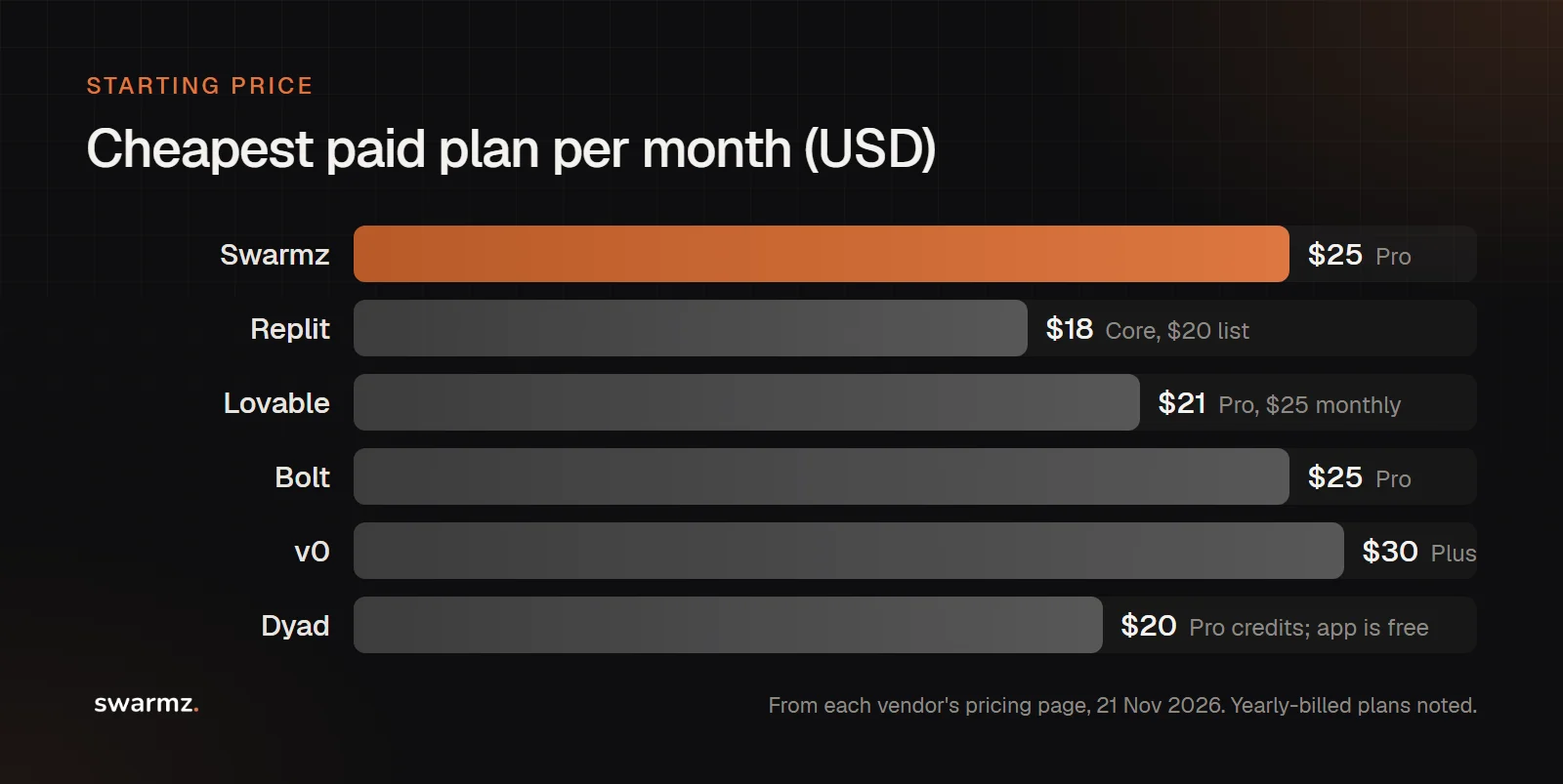
Most entry plans here cost $18 to $30 a month: Swarmz, Lovable and Bolt at $25 billed monthly, Replit Core at $18 billed yearly, v0 at $30 per user. AI Studio bills by usage, and Antigravity is free for individuals. If you also leave Firebase services, count database and hosting, which Swarmz, Lovable, Replit and Bolt include and Antigravity and Dyad do not.
When Swarmz isn't the right pick
To keep editing the same codebase, use Google Antigravity, or Google AI Studio in a browser. To keep Firestore and Firebase Authentication untouched, Google's tools are shorter because they link to your existing Firebase project. For a native app, Replit builds iOS and Android and AI Studio builds Android; see whether AI can build a mobile app. To keep everything on your own machine, use Dyad. For a ZIP instead of a GitHub repository, AI Studio, Dyad and Lovable's paid plans fit better.
Tool | Free plan | Code export | Backend | Payments | Native mobile |
|---|---|---|---|---|---|
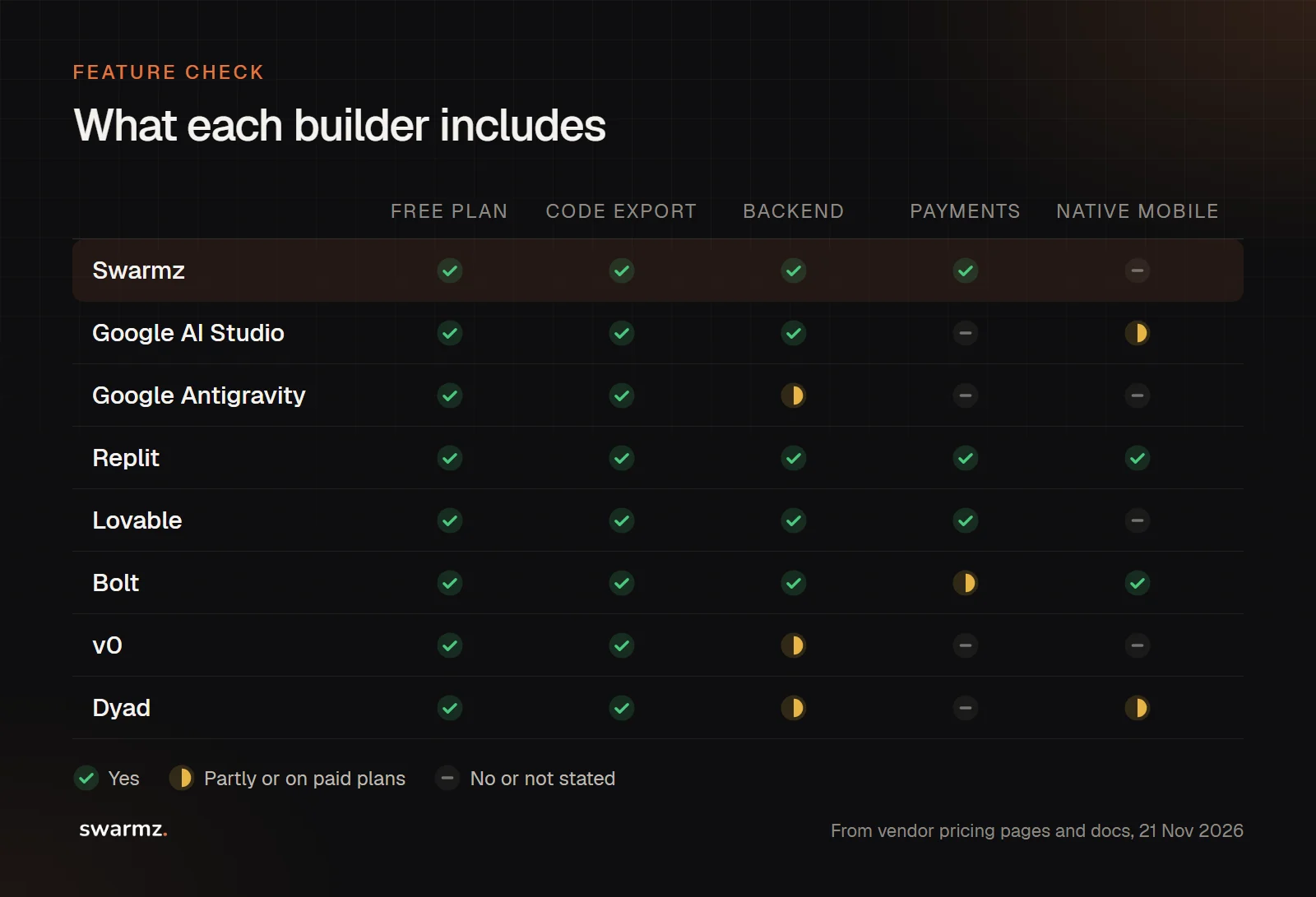
Swarmz | Yes | Yes | Yes | Yes | No |
Google AI Studio | Yes | Yes | Yes | No | Partly |
Google Antigravity | Yes | Yes | Partly | No | No |
Replit | Yes | Yes | Yes | Yes | Yes |
Lovable | Yes | Yes | Yes | Yes | No |
Bolt | Yes | Yes | Yes | Partly | Yes |
v0 | Yes | Yes | Partly | No | No |
Dyad | Yes | Yes | Partly | No | Partly |
Yes: included. Partly: only on some plans or with limits. No: not offered, or not stated by the vendor. Checked on 21 November 2026.
How to choose
Your prototype should become a full web app with sign-in and payments: Swarmz.
You built with the App Prototyping agent and want the fastest transfer: Google AI Studio.
You worked in Code View or from a template or repository: Google Antigravity.
You want a browser workspace or native mobile: Replit.
You live in Vercel and pull requests: v0.
You want free, local and open source: Dyad.
Whatever you choose, do the export steps this week, not in March 2027.
FAQ
Is Firebase Studio shutting down?
Yes. New sign-ups and workspaces stopped on 22 June 2026, and Firebase Studio shuts down on 22 March 2027, when all remaining data in it is permanently deleted.
What is the best Firebase Studio alternative?
For most people rebuilding a web app, Swarmz, because the database, sign-in, Stripe payments and GitHub sync are included and Free gives 5 credits a day. To keep your exact code, use Google AI Studio or Google Antigravity.
What does Google recommend instead of Firebase Studio?
Google AI Studio for browser-based work and Google Antigravity for code-first work on your own computer, both with a migration path.
Will my Firebase database and users be deleted?
No. Only the Firebase Studio environment is closing. Cloud Firestore, Authentication and App Hosting keep working.
Can I export my Firebase Studio project?
Yes. Click Move now and choose Zip and Download, or export to GitHub. Zip the `.idx/ai` folder separately for your chat history, and copy API keys from `.env` by hand.
Is there a free alternative to Firebase Studio?
Yes. Swarmz has a free plan with 5 credits every day, Antigravity is free for individuals, AI Studio has a free tier, and Dyad is free with your own key. Our list of the best free AI app builders compares the free plans.
Move your app before March 2027
If your Firebase Studio project is a web app you want to keep growing, export a copy today and rebuild it on Swarmz for free, with the database, sign-in and publishing ready from the first prompt.
Sources
All checked on 21 November 2026.
Firebase Studio: Google's migration guide
Swarmz: swarmz.net/pricing, swarmz.net/faq
Google AI Studio: Build mode docs, AI Studio pricing
Google Antigravity: antigravity.google/pricing
Lovable: docs.lovable.dev subscription plans, docs.lovable.dev FAQ
Dyad: dyad.sh
How did this land?
About the author

Founder of swarmz.net
Jordan founded Swarmz, the AI app builder at swarmz.net.


