Best AI App Builder With a Built-in Database (2026)
Eight AI app builders compared on their database and backend: what is built in, sign-in options, data export, where data lives and who can see it, with prices checked on 21 November 2026.
The best AI app builder with a built-in database is Swarmz because every app that uses Swarmz Cloud gets its own dedicated backend, with a database, user sign-in, file storage and server functions set up and wired in for you; you choose where your app's data lives from 16 regions; and Swarmz Cloud is included on every plan, Free too. If you want to query and copy your data with standard SQL tools, Replit is the better fit, because its managed PostgreSQL accepts connections from any PostgreSQL client.
Swarmz is our product, so weigh our ranking with that in mind. We checked every price and backend feature on the vendor's own pricing page or docs on 21 November 2026, and the sources are listed at the end.
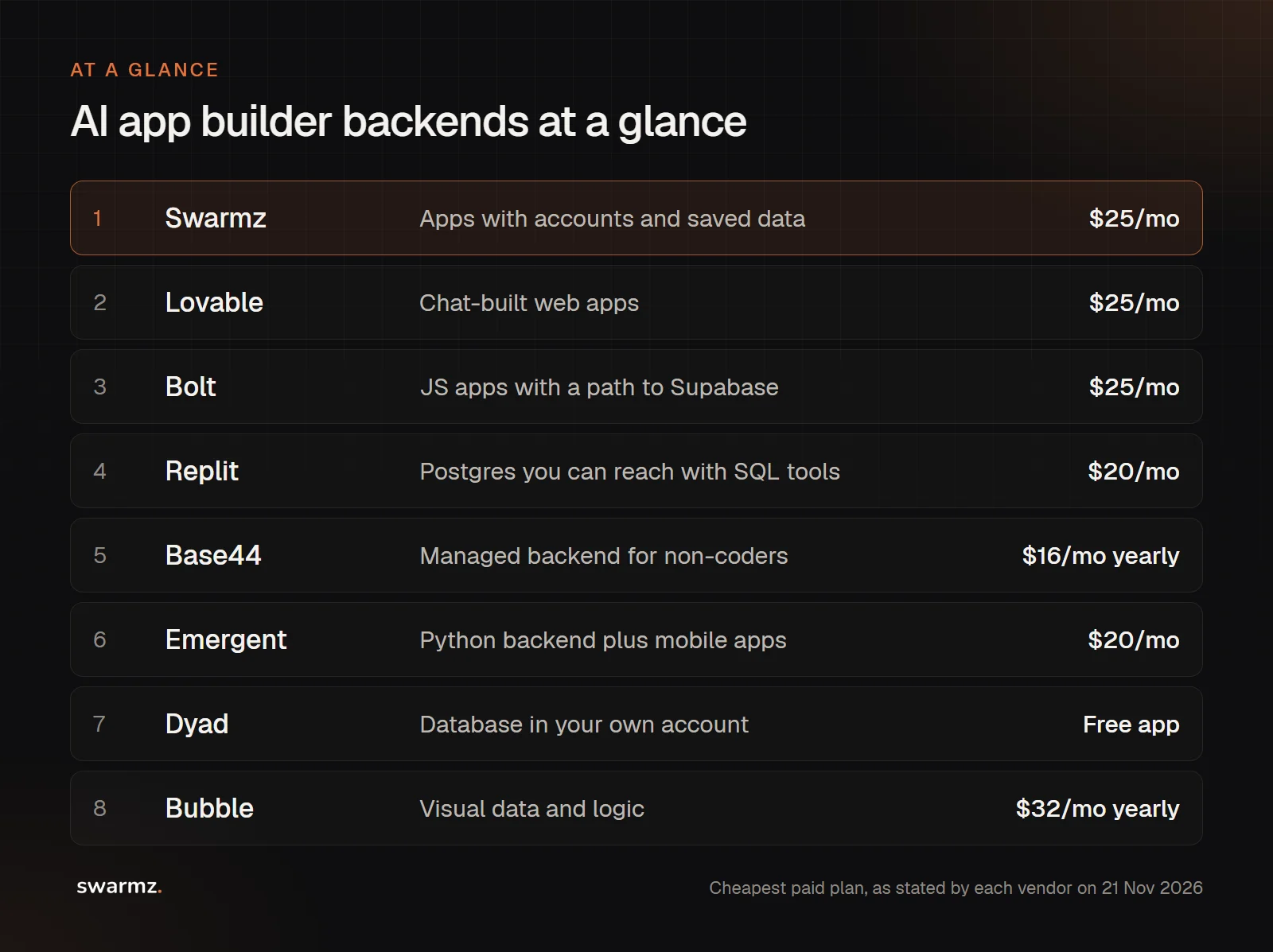
AI app builder backends at a glance
Tool | Best for | Starting paid price | Database | Sign-in options | Data export |
|---|---|---|---|---|---|
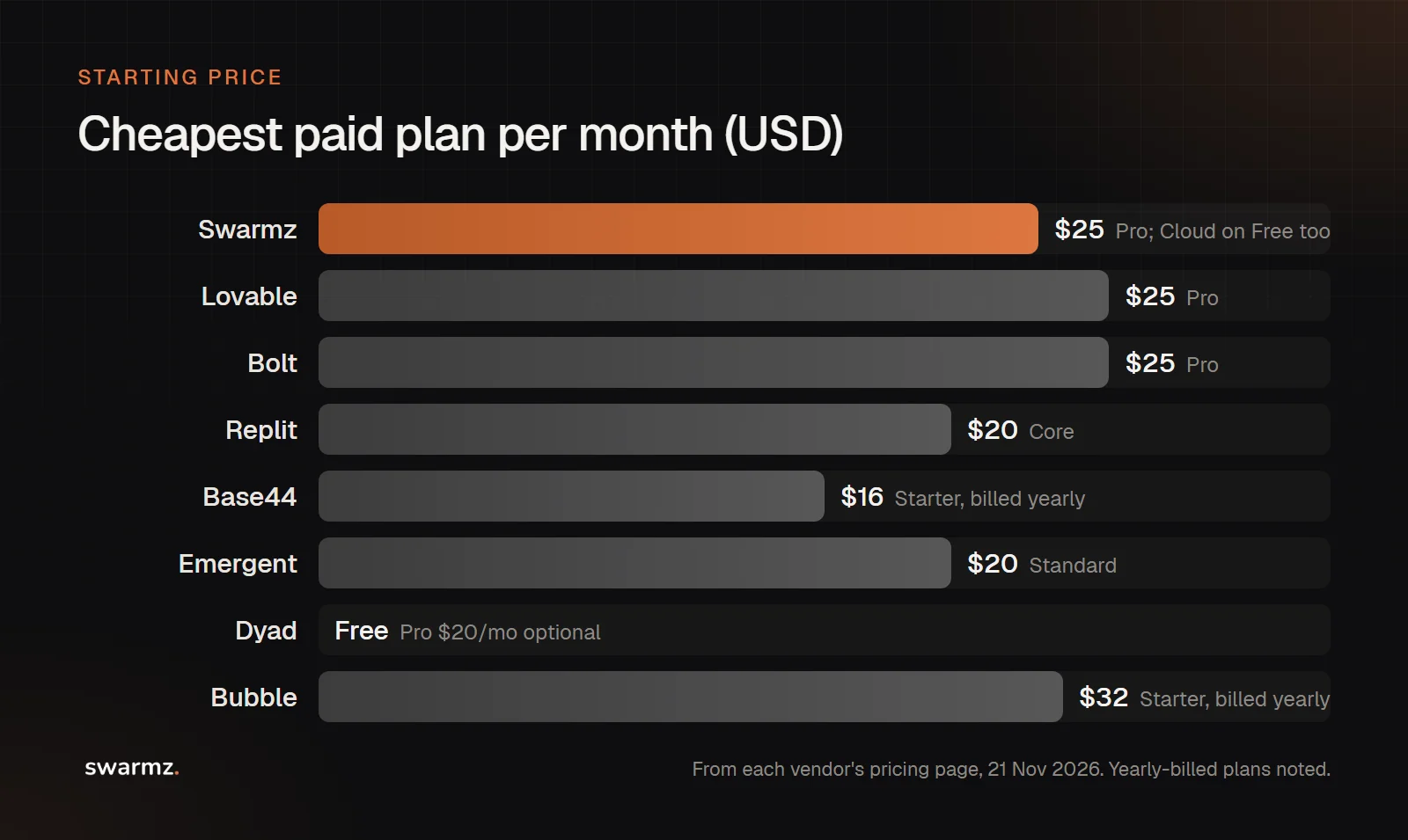
Swarmz | Apps with accounts and saved data | $25/month (Pro); Cloud also on Free | Swarmz Cloud, dedicated per app, 16 regions, or your own Supabase | Email, phone, Google, Apple, GitHub, Microsoft, Discord, X, SAML SSO | Code via GitHub; own Supabase for data |
Lovable | Chat-built web apps | $25/month (Pro) | Lovable Cloud on Supabase's foundation, 3 regions | Email, phone, Google, Apple, Microsoft, SAML SSO, OIDC | Database export, files separately |
Bolt | JavaScript web apps | $25/month (Pro) | Bolt Database on every plan, or Supabase | Email, Google | Rows as CSV or JSON; claim into Supabase |
Replit | Postgres you can reach with SQL tools | $20/month (Core) | Managed PostgreSQL, separate development and production | Clerk or Replit Auth; Google, GitHub, Apple, X | Any PostgreSQL client |
Base44 | Non-coders on one managed platform | $16/month, billed yearly | Built-in tables with per-table access rules | Email, Google, Microsoft, Facebook, Apple, SSO | CSV per table |
Emergent | Python backends plus mobile | $20/month (Standard) | MongoDB Atlas per project, stored in the US and India | Email, Google, phone code; Auth0, Clerk, Firebase | Not self-serve for production |
Dyad | Data in your own account | Free app; Pro $20/month | Your own Supabase or Neon | Supabase or Neon auth | Lives in your own account |
Bubble | Visual no-code logic | $32/month, billed yearly | Built-in database and workflows | Email, Google, Facebook, LinkedIn, X, magic links, 2FA | CSV and API; no code export |
What a good built-in backend needs
We ranked on these requirements, using only what each vendor documents:
A database the builder sets up for you and keeps in step with the screens as the app changes.
Sign-in methods your users expect: email, Google and Apple, SSO for business customers, ideally without developer setup.
File storage and server functions for uploads, emails and API keys that must stay off the browser.
Access rules so each user sees only their own records, enforced by the backend.
A way out for your data: an export, a direct database connection, or a database in your own account.
A choice of where data lives, if your customers or contracts need a region.
Clear usage limits, and a plain answer to what happens when you run out.
We did not benchmark speed or load. Code export and data export are separate; our guide on how to export an app from an AI app builder covers both.
1. Swarmz: best AI app builder with a built-in database overall
Swarmz builds web apps from chat, and Swarmz Cloud is the backend behind them: a database, user accounts and sign-in, file storage and server functions. Each app that uses it gets its own dedicated backend, set up and wired in by Swarmz, with no separate account or keys.
You pick a home for your app's data from 16 regions across the US, Europe and Asia-Pacific, and turn on sign-in from the Cloud tab: email, phone, Google, Apple, GitHub, Microsoft, Discord, X or SAML SSO. Google and Apple sign-in work with no developer setup. If you would rather hold the database in your own account, you can connect your own Supabase project instead. Your project and its code are visible only to your workspace, and support access by the Swarmz team is logged. Your Swarmz account and Swarmz's main database are hosted in the EU (Ireland), while your app's data sits in the region you choose. Business adds private, invite-only apps.
Pros: a dedicated backend per app; nine sign-in options, with Google and Apple ready without setup; 16 data regions; your own Supabase as an option; included on every plan.
Cons: web apps only, no native iOS or Android; Swarmz's public pages do not describe a one-click export of a Swarmz Cloud database, so connect your own Supabase if you want the data in your account from day one; a Cloud backend pauses if your credits run out, until credits are back.
Best for: founders, small businesses and agencies building apps with accounts, records and uploads.
Pricing: Free with 5 credits a day and no card. Every plan includes 20 Cloud and 4 AI credits a month, with further use paid from your credit balance. Pro $25 a month with a custom domain; Business $50 a month with private apps and SAML SSO.
2. Lovable: best if you already build with Lovable
Lovable Cloud gives each project a database, storage, authentication, realtime and functions, built on Supabase's open-source foundation, or you connect your own Supabase project. Sign-in covers email, phone, Google, Apple, Microsoft, Sign in with Lovable, SAML SSO and OIDC; Google, Apple and Microsoft need no setup in managed mode, and phone sign-in needs your own SMS provider.
Projects use one of three regions, Americas, Europe or Asia Pacific, set when the backend is enabled and fixed afterwards. The database exports separately from your code, without stored files, function code or secrets. Moving between Lovable Cloud and your own Supabase is manual one way and unsupported the other.
Pros: the broadest sign-in list here, including OIDC; region choice; your own Supabase as an option.
Cons: region is fixed once set; migration is manual or unsupported; backend use draws on credits.
Best for: teams already on Lovable who want the backend in the same tool.
Pricing: Pro $25 a month, or $21 a month billed yearly. Business $50 a month.
3. Bolt: best for JavaScript apps with a path to Supabase
Bolt Database is the built-in database on every Bolt plan, and on Pro or Teams you can use your own Supabase account instead. Authentication covers email and Google sign-in, password rules and reset emails. You can export rows as CSV or JSON from the Tables view, or claim a Bolt Database into your own Supabase account, data included. A security audit flags issues such as an open permission or a missing row-level security policy.
Pros: a database on every plan; row export plus a claim-to-Supabase path; a built-in security audit.
Cons: fewer documented sign-in methods; region not stated; JavaScript-only backends.
Best for: developers who want a managed start and a clean move into their own Supabase later.
Pricing: Pro $25 a month billed monthly. Teams $30 per member a month.
4. Replit: best for direct SQL access to your data
Replit runs PostgreSQL with separate development and production databases, on its Helium infrastructure for development and Neon for production. Any PostgreSQL-compatible SQL client can connect to the production database with the connection string from its settings. For sign-in, Clerk is the default on Starter, Core and Pro, and Replit Auth on Enterprise, with Google, GitHub, Apple and X documented.
Pros: standard PostgreSQL you can reach with normal tools; separate development and production data; native mobile apps.
Cons: region not stated; usage-based billing includes database storage; the free plan's published app goes down after 30 days.
Best for: builders who want to work with their data in SQL.
Pricing: Core $20 a month, or $18 a month billed yearly. Pro $100 a month.
5. Base44: best managed backend for non-coders
Base44 includes a database, sign-in and user management on every plan. Data sits in tables, each with its own read and write access settings, and any table exports as a CSV file from the dashboard. Sign-in options are email and password, Google, Microsoft, Facebook, Apple and SSO, with SSO on the Business and Enterprise plans. Database size per app starts at 200 MB on Free.
Pros: backend on Free; per-table access rules without code; CSV export.
Cons: region not stated; SSO needs a higher plan; code export needs the Builder plan.
Best for: non-technical builders who want access rules they can click through.
Pricing: Starter $16 a month billed yearly. Builder $40 a month billed yearly.
6. Emergent: best for a Python backend with mobile apps
Emergent provisions a MongoDB Atlas database per project, on a shared cluster by default, with a dedicated database as a paid upgrade. The Database Manager edits live data with no undo. External MongoDB clients are not supported, there is no Postgres-style row-level security, so per-user rules live in your API code, and production data export is not currently self-serve. Emergent Auth supports email and password, Google and phone codes, or you can use Auth0, Clerk or Firebase Auth. Data is stored in the US and India, and EU-only hosting is not self-serve.
Pros: a FastAPI or Next.js backend set up for you; built-in auth with Google and phone; native mobile apps.
Cons: no self-serve production export; no external database connections; no region choice.
Best for: builders who want a Python backend and a mobile app from one project.
Pricing: Standard $20 a month, or $17 a month billed yearly.
7. Dyad: best for keeping the database in your own account
Dyad has no hosted backend of its own. You connect your own Supabase or Neon account,, and Dyad says only you can access those resources through it. Supabase gives you a database with row-level security, email and password sign-in by default and server functions; Neon gives you serverless Postgres with built-in auth and branches, for Next.js and Vite projects.
Pros: the data sits in an account you own from day one; plain Next.js code you can take anywhere; free and open source.
Cons: you set up and pay for Supabase or Neon yourself; no built-in hosting; desktop install.
Best for: developers who want full ownership and are happy to run their own stack.
Pricing: free with your own AI key. Pro $20 a month for 200 AI credits.
8. Bubble: best for visual data and logic
Bubble has a built-in database and workflows for web and mobile apps. Sign-in covers email and password, OAuth providers such as Google, Facebook, LinkedIn and X, magic login links and two-factor authentication, with SSO through a plugin or the API Connector. You own your data and can export it as CSV or reach it through the Bubble API, but the app cannot be exported as code. Enterprise lets you choose the hosting location.
Pros: a visual database and logic editor; many sign-in options; CSV and API access to data.
Cons: no code export; region choice only on Enterprise; usage metered in workload units.
Best for: teams who want to see and edit their data model visually.
Pricing: Starter $32 a month billed yearly.
Who can see your data, and where it lives
Swarmz keeps each project and its code visible only to your workspace, logs support access by its team, and offers 16 regions for your app's data. Lovable sets one of three regions per project, and Base44 gives every table its own read and write rules. On Bolt, only editors, co-owners and team admins can change rows, and viewers cannot export or copy them. Emergent stores data in the US and India and says customer data is not used to train AI models. Dyad connects you to your own Supabase or Neon account, so where the data lives depends on the project you pick there. Bubble offers a hosting location choice on Enterprise, and Replit and Bolt do not state a region on the pages we read.
Build it on Swarmz: a prompt you can copy
Build a recipe box web app where people save and organise their own recipes.
Users sign up with email, Google or Apple, and each user sees only their own recipes.
A recipe has a title, a photo upload, an ingredients list, steps, cooking time and tags.
Add search by title or ingredient, a filter by tag and a favourites list.
Users can share a single recipe with a public link; everything else stays private.
Add an account page where users can change their name and delete their account.
After the first version, sign in as two test users and confirm neither can see the other's recipes. Then pick the region for your app's data and check which sign-in methods are on in the Cloud tab before you invite real users. Our guide on writing prompts for AI app builders helps you change the brief.
When Swarmz isn't the right pick
If you want to work with your data in SQL from day one, Replit's PostgreSQL fits better. If the database must live in an account you own and run yourself, Dyad with Supabase or Neon is built for that. If you need a native iPhone or Android app, Replit, Emergent or Rork are better choices, since Swarmz builds web apps. If your data already lives in spreadsheets and the app is for your own team, Glide and Softr are strong options; see our best AI internal tool builder guide. And if you want to edit your data model visually, Bubble suits you better.
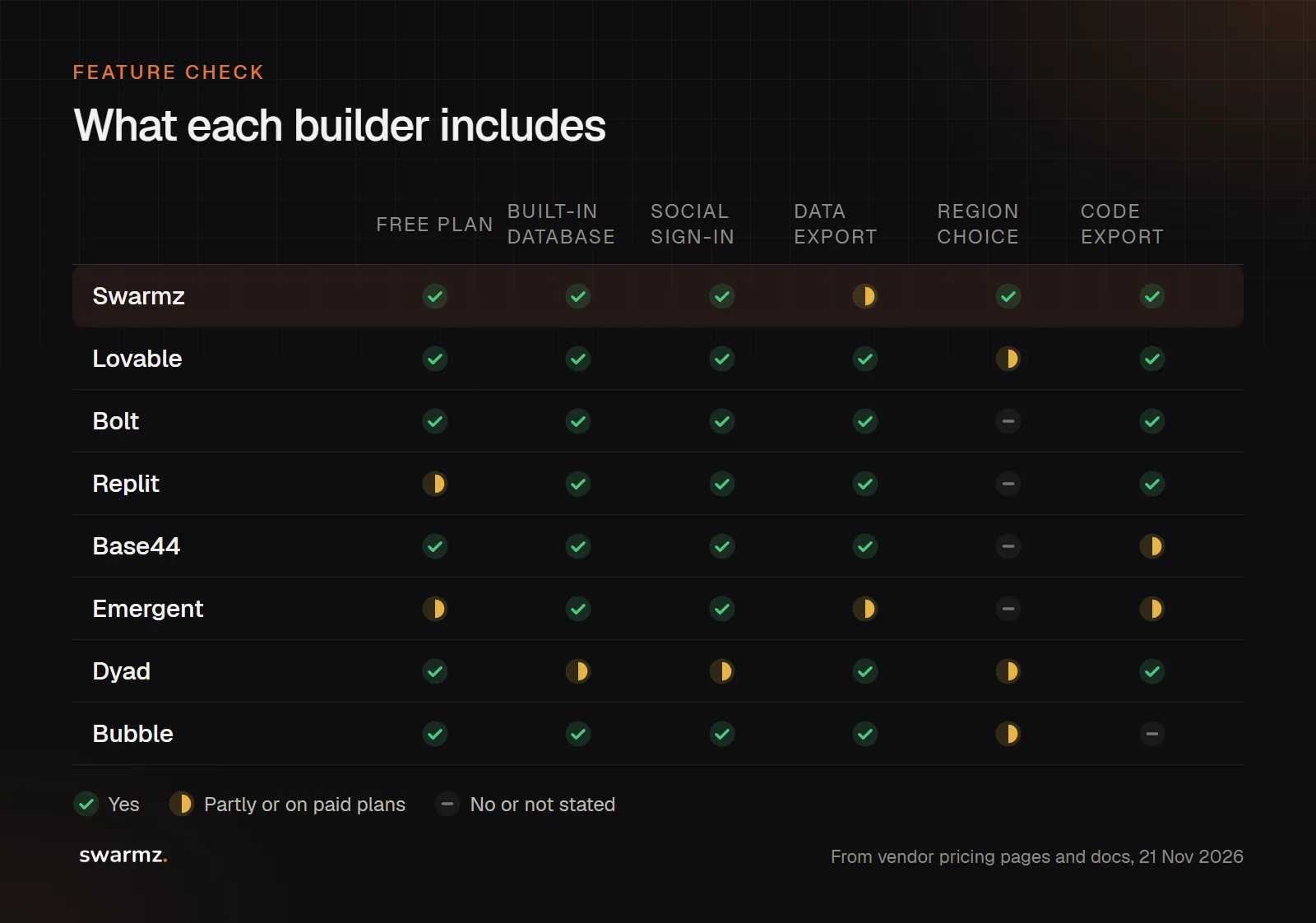
Tool | Free plan | Built-in database | Social sign-in | Data export | Region choice | Code export |
|---|---|---|---|---|---|---|
Swarmz | Yes | Yes | Yes | Partly | Yes | Yes |
Lovable | Yes | Yes | Yes | Yes | Partly | Yes |
Bolt | Yes | Yes | Yes | Yes | No | Yes |
Replit | Partly | Yes | Yes | Yes | No | Yes |
Base44 | Yes | Yes | Yes | Yes | No | Partly |
Emergent | Partly | Yes | Yes | Partly | No | Partly |
Dyad | Yes | Partly | Partly | Yes | Partly | Yes |
Bubble | Yes | Yes | Yes | Yes | Partly | No |
Yes: included. Partly: only on some plans or with limits. No: not offered, or not stated by the vendor. Checked on 21 November 2026.
How to choose
Accounts, saved data and uploads without opening other accounts: Swarmz.
You already build on Lovable: Lovable Cloud.
A managed start with a path into your own Supabase: Bolt.
Standard PostgreSQL you can query directly: Replit.
Click-through access rules and CSV export: Base44.
A Python backend and a mobile app: Emergent.
The database in your own account from the start: Dyad.
Before you commit, ask how you would get your users and records out. Our pages on the limitations of AI app builders and on taking payments in an AI-built app cover the next questions.
FAQ
Which AI app builder has a built-in database?
Swarmz, Lovable, Bolt, Replit, Base44, Emergent and Bubble all include one. Swarmz Cloud gives each app its own dedicated backend with a database, sign-in, storage and server functions, on every plan. Dyad connects to your own Supabase or Neon instead.
Does Lovable have a database?
Yes. Lovable Cloud includes a database, storage, authentication, realtime and functions, built on Supabase's open-source foundation, and you can connect your own Supabase project instead.
Can I export my data from an AI app builder?
Usually. Bolt exports rows as CSV or JSON and can move a database into your Supabase, Base44 and Bubble export CSV, Replit accepts any PostgreSQL client, and Lovable exports the database separately from files. Emergent's production export is not self-serve, and on Swarmz you can connect your own Supabase so the data sits in your account.
Can I use my own Supabase with an AI app builder?
Yes, with Swarmz, Lovable, Bolt on Pro or Teams, and Dyad.
Where is my app's data stored?
Swarmz lets you choose from 16 regions across the US, Europe and Asia-Pacific, and Lovable uses one of three. Emergent stores data in the US and India, Bubble offers a choice on Enterprise, and Replit, Bolt and Base44 do not state a region on the pages we read.
Start with the top pick
Describe the app and the data it should keep, and build it on Swarmz for free. The database, sign-in and storage are set up as part of the first version.
Sources
All checked on 21 November 2026.
Swarmz: swarmz.net/pricing, swarmz.net/faq
Lovable: docs.lovable.dev subscription plans, Lovable Cloud, Lovable authentication, docs.lovable.dev FAQ
Bolt: bolt.new/pricing, Bolt Database, Bolt database tables, Bolt supported technologies
Replit: replit.com/pricing, Replit database, Replit connection details, Replit users and auth, Replit Starter plan docs
Base44: base44.com/pricing, Base44 login and registration, Base44 app data
Emergent: emergent.sh/pricing, Emergent FAQ
Dyad: dyad.sh, Dyad Supabase integration, Dyad Neon integration
Bubble: bubble.io/pricing, Bubble user accounts, Bubble data ownership
Rork: rork.com/faq
How did this land?
About the author

Founder of swarmz.net
Jordan founded Swarmz, the AI app builder at swarmz.net.


