Best Website Builder for a Simple Website (2026)
Seven website builders for one-page and small sites, such as an event, a menu, a club or a product page, compared on free plans, own-domain cost, forms and upkeep, with prices checked on 21 November 2026.
The best website builder for a simple website is Swarmz when the page has to collect something, such as RSVPs for an event, sign-ups for a club or pre-orders for a product. It saves every entry to a database that comes with the site, publishes with SSL in one click and leaves nothing for you to install or update. This guide is for one-page and small sites: an event, a café menu, a club or a single product. If your page only shows information, a free or cheap plan elsewhere is enough: Carrd costs $19 a year with your own domain, and Google Sites works with an ordinary Google account and lists no fee.
Swarmz is our product, so read our ranking with that in mind. We checked every price on the vendor's own pricing page or help pages on 21 November 2026, and the sources are listed at the end.
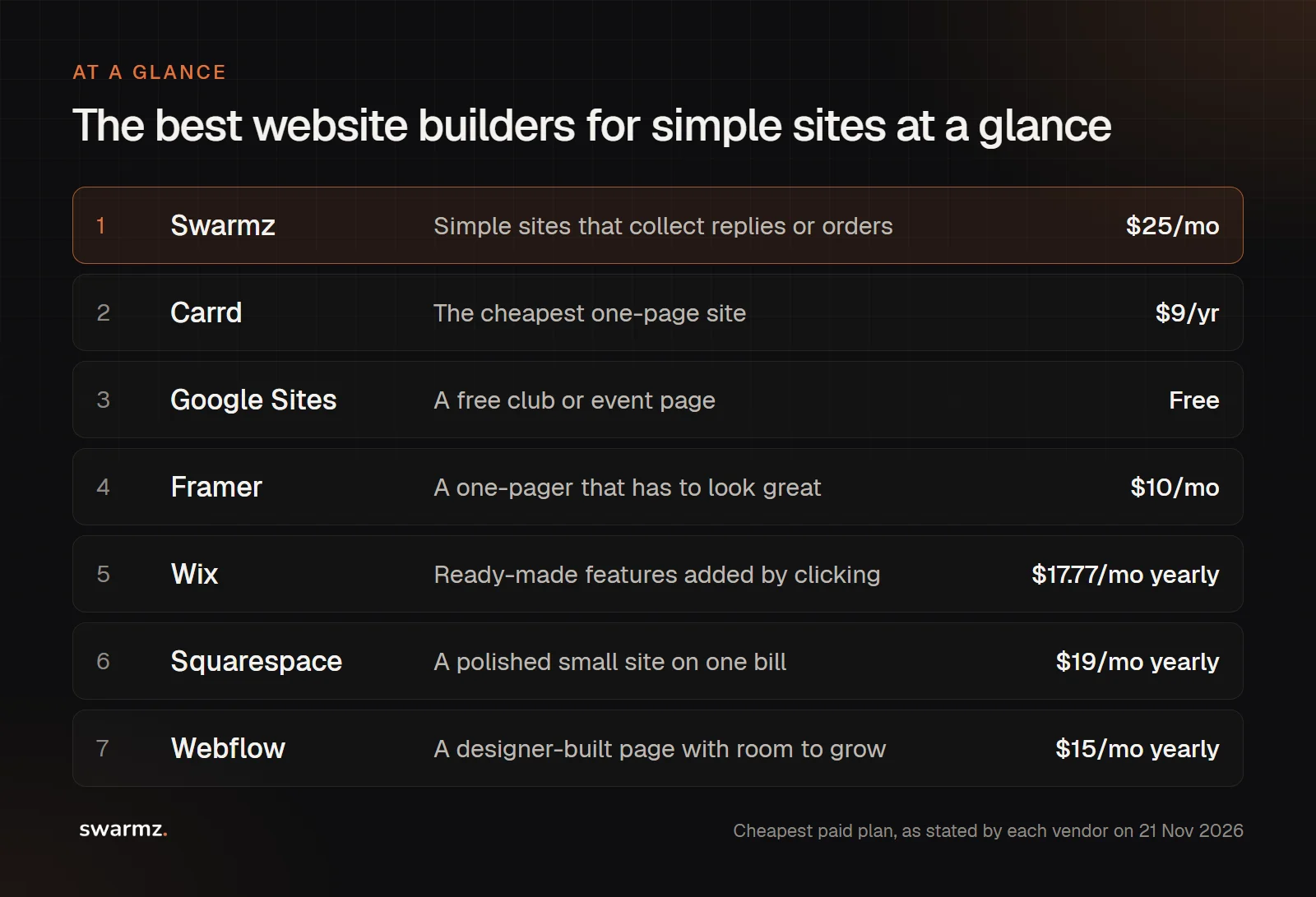
The best website builders for simple sites at a glance
Tool | Best for | Cheapest paid plan | Free plan | Own domain | Forms |
|---|---|---|---|---|---|
Swarmz | Simple sites that collect RSVPs, sign-ups or orders | $25/month (Pro) | 5 credits a day, no card, swarmz.cloud link | Pro, $25/month | Saved to the site's own database |
Carrd | The cheapest one-page site | $9/year (Pro Lite) | Up to 3 sites | Pro Standard, $19/year | Contact and signup forms from Pro Standard |
Google Sites | A free club or event page | No paid plan listed | Yes, with a Google account | Connect a domain you already own | Embed a Google Form |
Framer | A one-pager that has to look great | $10/month (Basic) | Yes, on a Framer domain | Basic, $10/month | Native forms to email, Google Sheets or a webhook |
Wix | Adding ready-made features by clicking | $17.77/month billed yearly (Light) | Yes, with a Wix banner ad | Premium plans | Wix Forms with a submissions table |
Squarespace | A polished small site on one bill | $19/month billed yearly (Basic) | No, a trial of 14 days | Basic, domain free for a year on annual billing | Form blocks to email, the site or a Google spreadsheet |
Webflow | A designer-built page with room to grow | $15/month billed yearly (Basic) | Yes, 2 static pages | Basic, $15/month billed yearly | 50 submissions on Free, unlimited from Basic |
What a good simple website needs
A simple site is one page, or a handful, that tells people something and perhaps asks them for one thing. We ranked on these needs, using only what each vendor states on its own pages:
Free or cheap to run: a free plan you can publish on, and a low yearly cost if you pay.
Fast to publish: a live link with SSL the same day, with no hosting to set up.
A fair price for your own domain: the plan that allows one often costs more than the entry plan, and the domain is a separate yearly fee unless a plan includes it.
Forms that land somewhere useful: RSVPs, sign-ups and order requests kept where you can find and export them.
Quick edits: changing a date, a price or the opening hours should take a minute.
No maintenance: no plugins, updates or servers to look after.
Payments, only if you need them: tickets, deposits or pre-orders.
Most simple sites need the first five. Forms and payments are where the tools split. If your page is really a campaign page for paid ads, the best AI landing page builders covers split testing instead.
What a simple site costs in a year
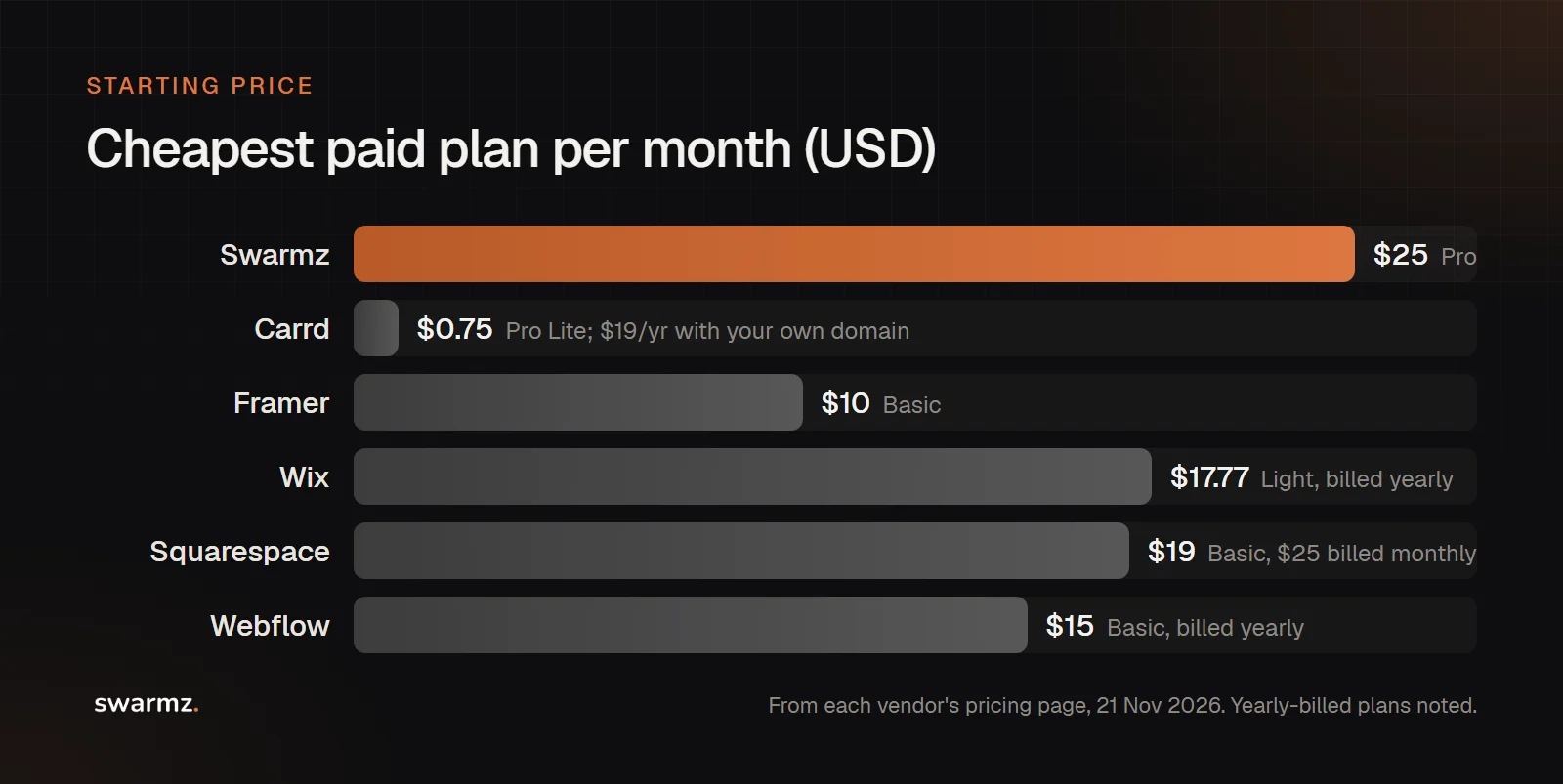
On your own domain, the cheapest suitable plan costs nothing on Google Sites (you pay only a registrar), $19 a year on Carrd, $120 on Framer, $180 on Webflow, about $213 on Wix, $228 on Squarespace and $300 on Swarmz. Framer, Wix and Squarespace include a domain for the first year on yearly billing.
For a page that only shows information, Swarmz is the most expensive way to get your own domain, and we would not pay for Pro just for that. Pro makes sense when the site works for you: it stores replies, takes payments or changes often. On the free plan, the site stays on a swarmz.cloud link with a Swarmz badge. Building a one-page site for a client? Our guide on how to price a one-page website with AI covers what to charge.
1. Swarmz: best overall for simple sites that collect something
Swarmz is an AI app builder for web apps. For a simple site, you describe the page in a few sentences, Swarmz builds it, and you publish to a swarmz.cloud link with SSL in one click, or start from one of 28 remixable templates.
How it handles the checklist: the free plan gives 5 credits every day with no card and does not expire. Forms save to the site's own database through Swarmz Cloud, so RSVPs or order requests sit in a table you control, with an admin page if you ask for one. Edits happen in chat, such as "move the fair to 2pm". Built-in analytics shows visitors and traffic sources from the moment you publish, and Swarmz Payments runs on Stripe for tickets or pre-orders. Published sites run on Cloudflare's network, with nothing for you to install or patch.
Pros
Forms save to a real database on every plan, including Free, with visitor sign-in if people need accounts.
Stripe checkout for tickets, deposits or pre-orders (Stripe's fees plus a small Swarmz platform fee apply).
Two-way GitHub sync on Free, with standard React, TypeScript and Tailwind code.
Cons
Your own domain needs Pro at $25 a month, far more than Carrd or Google Sites cost for an information-only page.
No ready-made visual CMS listed; you change content in chat, and each change uses credits.
The free plan shows a Swarmz badge.
Best for: event organisers, clubs and small makers whose page has to collect replies, sign-ups or payments.
Pricing: Free with 5 credits every day and no card. Pro is $25 a month for 100 credits plus the daily credits, with rollover for 30 days, a custom domain and no badge. New accounts can try Pro free for 3 days with 25 credits; a card is needed, and it becomes the $25 plan unless you cancel. Business is $50 a month.
2. Carrd: best for the cheapest one-page site
Carrd builds simple, single-page sites. A free account can build up to three sites with Carrd's core features, and paid plans are priced per year.
How it handles the checklist: Pro Lite ($9 a year) removes the "Made with Carrd" branding but has no custom domain or forms. Pro Standard ($19 a year) adds your own domain with SSL, up to 10 sites, contact and signup forms, and Stripe or PayPal widgets; contact messages go to your account email. Pro Plus ($49 a year) adds custom forms that send data to Airtable or Zapier and can take payments through Stripe Checkout.
Pros: the lowest yearly cost here for your own domain; quick to build; up to 10 sites on Pro Standard.
Cons: forms and custom domains need Pro Standard; keeping entries in a table means a Pro Plus custom form; a larger site outgrows one page.
Best for: an event page, a menu or a product teaser that mostly shows information.
Pricing: Free for up to 3 sites. Pro Lite is $9 a year, Pro Standard $19 and Pro Plus $49, renewing yearly. You can try Pro for 7 days without a card.
3. Google Sites: best free option for a club or event page
Google Sites is Google's site builder for personal or business sites, used with a Google account. Google's help pages list no fee for it.
How it handles the checklist: the site publishes on a sites.google.com address, and you can connect a domain you already own (buying one through Google needs a Workspace plan). Instead of its own forms, you insert a Google Form, Calendar, Sheet or map, which covers RSVPs, a fixture list or directions. Editors with Google accounts work on the site together. Payments are not a feature on the pages we read.
Pros: no fee for the site itself; Google's Forms, Calendar and Sheets slot straight in; easy shared editing.
Cons: on a custom domain the site must be public and use a www-style address; Google notes some fonts and Google Groups embeds do not work on custom domains; no payments.
Best for: clubs, school groups and one-off events where everyone already has a Google account.
Pricing: no paid plan for personal accounts on the pages we read. You pay only for a domain.
4. Framer: best for a one-pager that has to look great
Framer is a website builder with an AI design agent on a visual canvas, plus hosting, a CMS and analytics.
How it handles the checklist: the free plan publishes on a Framer domain, and a custom domain needs a paid plan. Basic, at $10 a month, is pitched at "creative personal sites" and gives your own domain, 30 pages and 50 GB of bandwidth. Native forms send submissions to email, Google Sheets or a webhook. Payments are not stated on the pages we read.
Pros: strong visual design control; your own domain from $10 a month; forms that can feed a Google Sheet.
Cons: no custom domain on Free; no payments stated; about six times Carrd's yearly price.
Best for: a product or launch page where the look matters most.
Pricing: Free. Basic is $10 a month and Pro $30, billed on the cycle you choose at checkout.
5. Wix: best for adding ready-made features by clicking
Wix is a general website builder whose Harmony editor includes Aria, an AI agent for pages, content and design. AI creation tools are on every plan, including Free.
How it handles the checklist: free sites show a Wix banner ad at the top, which a premium plan removes, and your own domain needs a premium plan too, with a free domain for the first year. Wix Forms stores every entry in a submissions table you can export as CSV. Accepting payments starts on Core.
Pros: forms with a submissions table; bookings, members and a store available as Wix apps later; a free domain for a year.
Cons: a banner ad on Free; no payments on Light; yearly plans paid upfront, with prices that vary by location.
Best for: a small site that may later need bookings, members or a small shop.
Pricing: Free with a banner ad. Light is $17.77 a month and Core $29.77, shown for yearly plans paid in full.
6. Squarespace: best for a polished small site on one bill
Squarespace sells templates, hosting and a domain together. It has no free plan; every site starts with a free trial of 14 days, with no card needed.
How it handles the checklist: Squarespace describes Basic as suited to personal sites, portfolios and simple business pages, with a domain free for the first year on annual billing. Form blocks send entries to your email and can fill a Google Drive spreadsheet. Without a required email field, Squarespace keeps each entry for only 30 days, so connect the spreadsheet as a backup.
Pros: a domain included for the first year; forms that can feed a Google spreadsheet; site, hosting and SSL on one bill.
Cons: no free plan; $228 a year on Basic; form emails are switched off on trial sites.
Best for: a café, studio or club that wants a polished site and is happy to pay for it.
Pricing: Basic is $19 a month billed yearly, or $25 monthly. Core is $29 a month billed yearly, or $39 monthly.
7. Webflow: best for a designer-built page with room to grow
Webflow is a visual site builder with a CMS, hosting and Webflow AI, aimed at designers.
How it handles the checklist: the free Starter plan publishes on a webflow.io address with 2 static pages and 50 form submissions, enough for a one-page site. Basic, "for simple sites that don't need a CMS", adds your own domain, unlimited form submissions (downloadable as CSV) and password protection. Selling needs a separate ecommerce plan, from $29 a month billed yearly.
Pros: precise design control; a usable free plan for one or two pages; room to grow into a CMS on Premium.
Cons: the editor is built for designers; Basic has no CMS; ecommerce is a separate plan.
Best for: designers making a one-page site that may grow into a bigger one.
Pricing: Free Starter plan. Basic is $15 a month and Premium $25, both billed yearly, in USD per site.
Build it on Swarmz: a prompt you can copy
Build a one-page website for our village summer fair on 14 June, 11am to 5pm, on the school field.
Show the date, the programme, a map link, parking tips and a short FAQ.
Add an RSVP form (name, email, number of guests, helping or just visiting) that saves each reply to the database.
Add an admin page only I can open, with all replies and a running guest count.
Use bright, friendly colours and large text that reads well on phones.
After the first version, send yourself a test RSVP and check it appears on the admin page, then read every line and fix dates and times. If you sell stalls or tickets, add Stripe checkout next. Our guide on writing prompts for AI app builders helps with briefs like this one.
When Swarmz isn't the right pick
Swarmz earns its place when the site has to store replies, take payments or change often. Otherwise a cheaper tool is enough:
An information-only page on your own domain: Carrd, at $19 a year.
A free page for a club or a one-off event: Google Sites, with an embedded Google Form or Calendar.
A launch page where the design is the point: Framer.
A small site that may need bookings, members or a shop added by clicking: Wix, or Squarespace for a polished template.
A restaurant menu with online ordering: see the best AI app builder for restaurants.
A personal blog or hobby site you will keep for years: see the best website builder for personal and hobby sites.
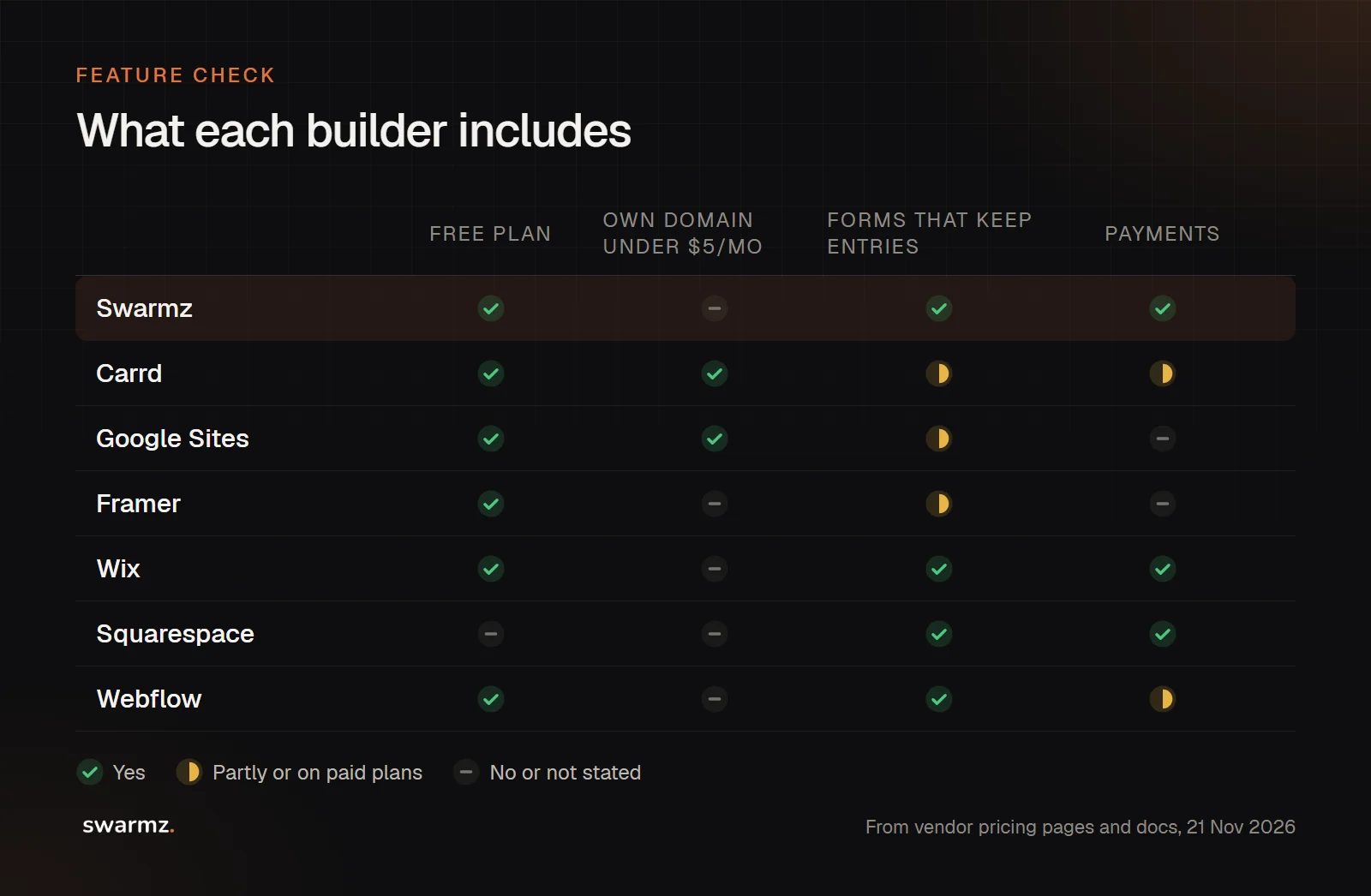
Tool | Free plan | Own domain under $5/mo | Forms that keep entries | Payments |
|---|---|---|---|---|
Swarmz | Yes | No | Yes | Yes |
Carrd | Yes | Yes | Partly | Partly |
Google Sites | Yes | Yes | Partly | No |
Framer | Yes | No | Partly | No |
Wix | Yes | No | Yes | Yes |
Squarespace | No | No | Yes | Yes |
Webflow | Yes | No | Yes | Partly |
Yes: included. Partly: only on some plans or with limits. No: not offered, or not stated by the vendor. Checked on 21 November 2026.
How to choose
The page has to collect RSVPs, sign-ups or orders in one place: Swarmz.
The lowest cost with your own domain: Carrd.
No cost at all, and your group uses Google: Google Sites.
The look matters most: Framer.
You may add bookings, members or a shop later: Wix.
A polished template on one managed bill: Squarespace.
You are a designer and the site may grow: Webflow.
Before you pay, add up the whole year: the plan, the domain after any free first year, and any upgrade you need for forms or payments.
FAQ
What is the best website builder for a simple website?
For a simple site that has to collect RSVPs, sign-ups or orders, Swarmz: forms save to a database, publishing is one click, and the free plan gives 5 credits a day. For a page that only shows information, Carrd or Google Sites is enough and costs less.
What is the cheapest way to get a simple website on my own domain?
Carrd Pro Standard costs $19 a year and connects a domain you register elsewhere. Google Sites lists no fee and can connect a domain you already own, as long as the address uses a subdomain such as www. Either way, you still pay a registrar for the domain.
Is there a free website builder for a one-page site?
Yes. Google Sites, Carrd (up to 3 sites), Swarmz (5 credits a day), Framer and Webflow (2 static pages) all let you publish for free on their own address. Wix's free plan shows a banner ad, and Squarespace has only a trial.
Do I have to maintain a simple website?
Not with any of these seven. Each one hosts the site for you, so there is no server or plugin to update. What you look after is the content, the plan and the domain renewal.
Is Carrd better than Wix for a one-page site?
For a page that only shows information, Carrd is cheaper: $19 a year with your own domain, against $17.77 a month on Wix Light. Wix is the better choice if you expect to add bookings, members or a shop later.
Start with one page
If your page needs to collect replies or take payments, describe it in a few sentences and start building on Swarmz for free. Publish on a swarmz.cloud link today, and add your own domain later if the site earns it.
Sources
All checked on 21 November 2026.
Swarmz: swarmz.net/pricing, swarmz.net/features, swarmz.net/features/payments, swarmz.net/faq
Carrd: carrd.com, carrd.com/pro, Carrd Pro plans, Carrd contact forms
Google Sites: Create a site, Use a custom domain, Add Google files and other content, Share your site
Framer: framer.com/pricing, Framer help: adding a contact form
Wix: wix.com/plans, Wix Harmony AI tools, Removing Wix banners and ads, Wix Forms submissions table
Squarespace: squarespace.com/pricing, Squarespace pricing summary (USD), Set up form and newsletter storage, Form blocks
Webflow: webflow.com/pricing
How did this land?
About the author

Founder of swarmz.net
Jordan founded Swarmz, the AI app builder at swarmz.net.


