Best App Builder in 2026: 8 Tools Compared
Eight app builders, AI and classic no-code, compared on free plan, database and sign-in, payments, native mobile and code export, with prices checked on 21 November 2026 and a plain answer for each kind of app.
The best app builder in 2026 is Swarmz if you need a web app with real user accounts, saved data and payments: you describe the app in plain words, and Swarmz builds it with a database, user sign-in, file storage and Stripe payments already connected, then publishes it in one click. This guide is for anyone choosing an app builder, web or mobile, AI or classic no-code, so it ranks Swarmz against Bubble, FlutterFlow, Adalo, Glide and Softr as well as AI builders such as Lovable and Rork. If your app has to be a native App Store or Google Play app, FlutterFlow or Adalo is the better pick, and if you want to design every rule in a visual editor, Bubble is.
Swarmz is our product, so read our ranking with that in mind. We checked every price on the vendor's own pricing page or docs on 21 November 2026, and the sources are listed at the end.
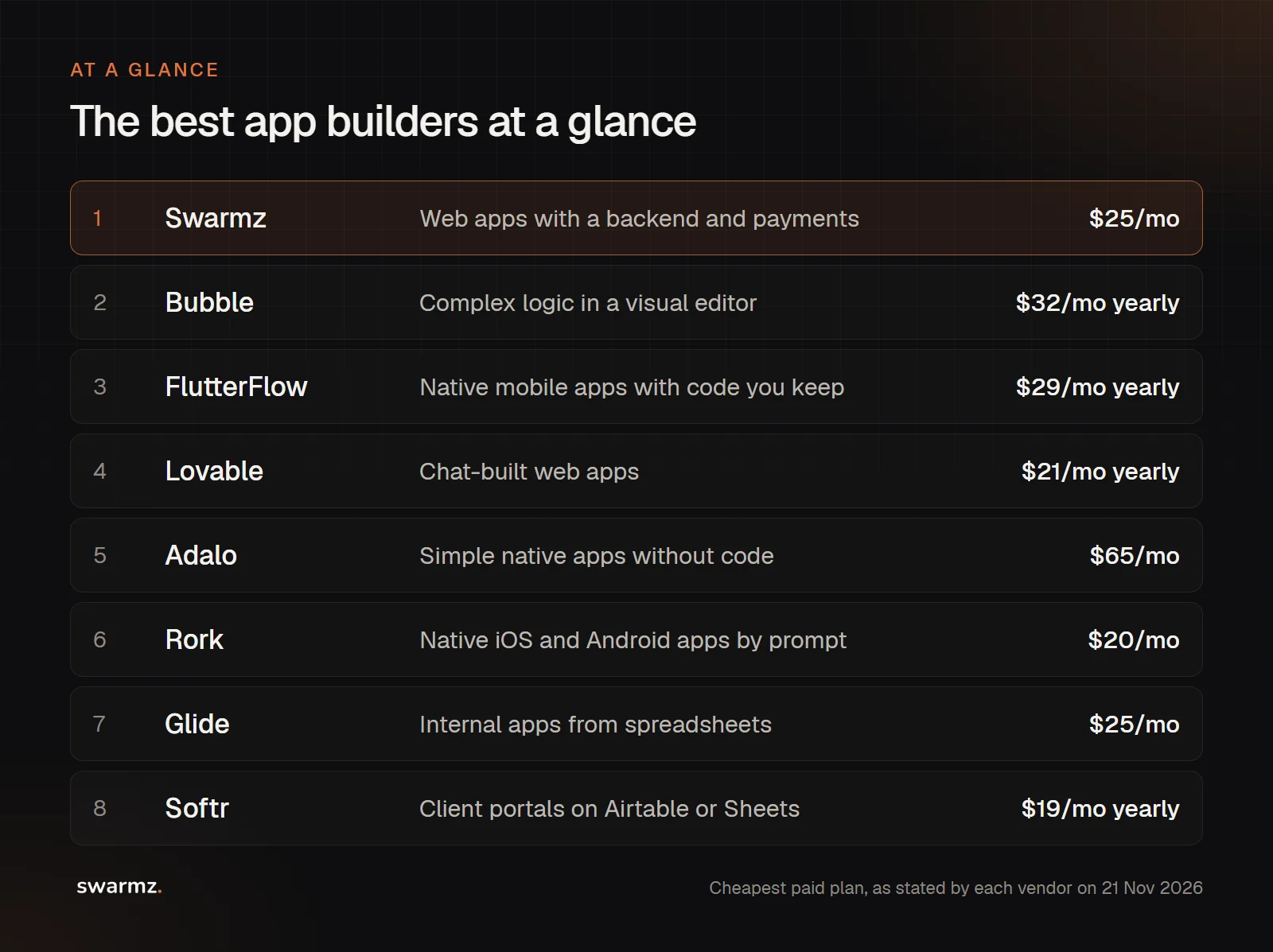
The best app builders at a glance
Tool | Best for | Starting paid price | Free plan | Native mobile | Code export |
|---|---|---|---|---|---|
Swarmz | Web apps with a backend and payments | $25/month (Pro) | 5 credits a day, no card | No, web apps | Two-way GitHub sync |
Bubble | Complex logic in a visual editor | $32/month billed yearly (Starter) | 500 AI credits a month | Yes, React Native | No |
FlutterFlow | Native mobile apps with code you keep | $39/month, or $29 billed yearly (Basic) | 2 projects, no store publishing | Yes, App Store and Google Play | Download from Basic, GitHub from Pro |
Lovable | Chat-built web apps | $25/month, or $21 billed yearly (Pro) | 5 daily credits, up to 30 a month | No | Git sync; ZIP on paid plans |
Adalo | Simple native apps without code | $65/month (Builder) | Build and test, no publishing | Yes, App Store and Google Play | Separate paid service |
Rork | Native iOS and Android apps by prompt | $20/month (Rork Max) | Design mode only | Yes, SwiftUI and Kotlin | Two-way GitHub on paid plans |
Glide | Internal apps from spreadsheets | $25/month (Basic) | Yes, but no published apps | No, web app only | Not stated |
Softr | Client portals on Airtable or Sheets | $19/month billed yearly, $25 monthly (Basic) | 3 builders, 5 app users | No, web app only | Not stated |
What a good app builder needs
We ranked on seven things, using only what each vendor states on its own pricing page or docs. We did not run benchmarks.
The right kind of app. A web app that runs in any browser and on phones, or a native app in the App Store and Google Play. This one choice removes half the list.
A database and sign-in built in, so accounts and data need no separate service.
Payments that fit the app: checkout, subscriptions, invoices or in-app purchases.
A way to change the logic, by describing changes in chat or by editing rules visually.
Publishing: hosting, a custom domain at a fair price, and store submission if you need it.
A way out: code export or GitHub sync, so the app is not locked to one platform.
A price you can predict. Credits, workload units, seats and per-app limits all change what you pay.
AI builders and classic no-code builders differ most on the fourth point. Our guide to no-code vs AI app builders explains the difference.
A note on prices
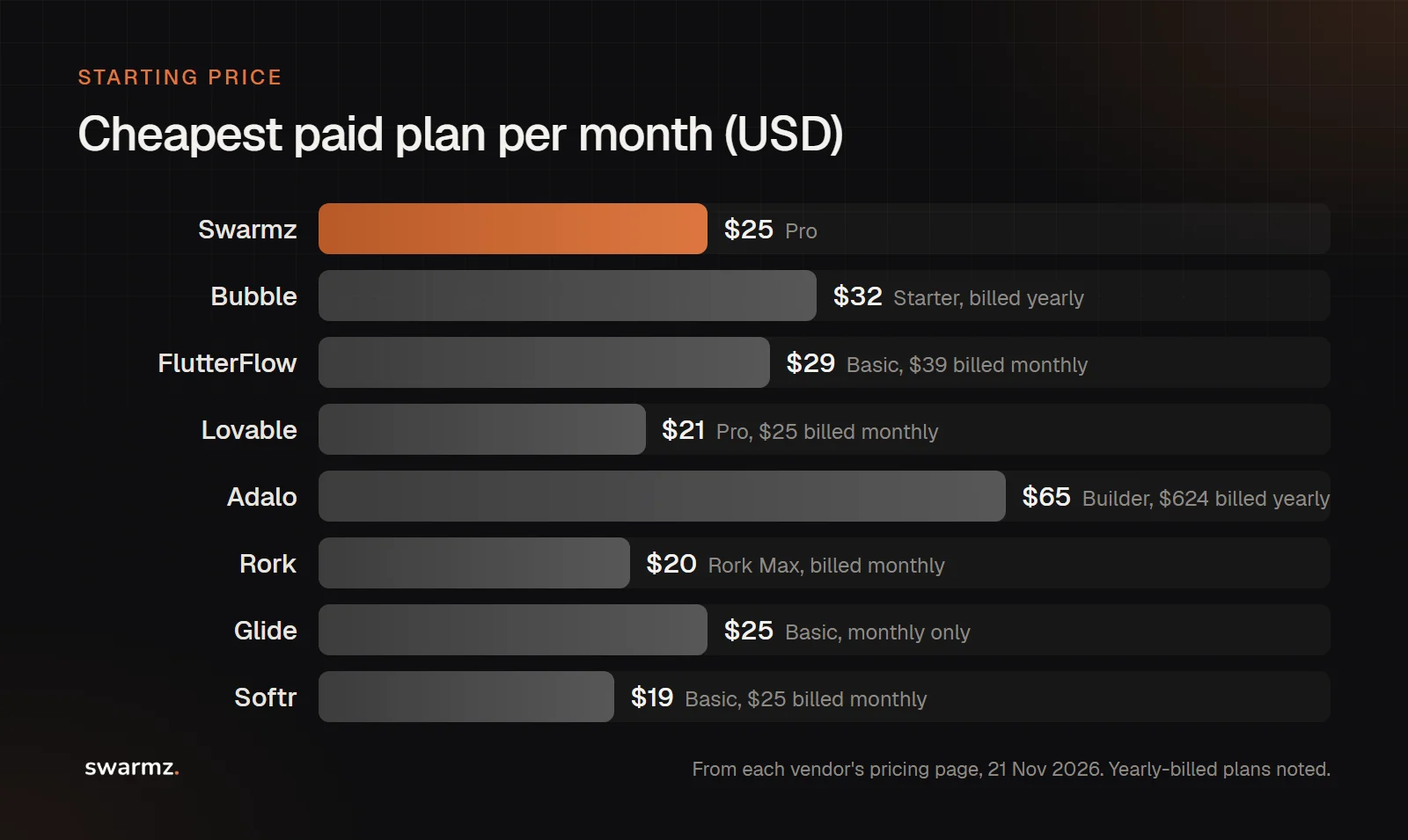
Entry prices are not like for like. Bubble and Softr show their lowest price for yearly billing, and Glide bills monthly only. Adalo's page showed a "regional discount" label when we checked, so your price may differ. Usage matters too: Swarmz, Lovable and Rork run on credits, Bubble meters workload units with overage charges unless you turn them off, FlutterFlow charges for extra seats, and Adalo caps published apps per plan.
1. Swarmz: best app builder overall for web apps
Swarmz is an AI app builder. You describe the app in chat, and Swarmz builds the screens, the data model and the sign-in, then publishes it to a swarmz.cloud link with SSL in one click, or to your own domain on Pro.
How it handles the checklist. Swarmz builds web apps that work on phones, not native apps. Swarmz Cloud gives every app a database, sign-in with email, phone, Google, Apple, Microsoft and more, file storage and server functions, on every plan including Free. Swarmz Payments runs on Stripe for one-off purchases, subscriptions, invoices and payment links, starting in test mode. Changes happen in chat, and each reply shows the credits it used. The code is standard React, TypeScript and Tailwind and syncs both ways with GitHub, and more than 80 connectors, such as Shopify, HubSpot and Google Sheets, connect in one click.
Pros
Database, sign-in, storage and server functions on every plan.
Stripe payments built in, no Stripe account needed (Stripe's fees plus a small Swarmz platform fee apply).
Two-way GitHub sync on Free, with standard code you own.
Shared workspace credits with Admin, Editor and Viewer roles and no per-seat fees.
Account and main database hosted in the EU (Ireland).
Cons
Web apps only, no native iOS or Android apps.
Changes are described in chat, which suits some people less than a visual editor.
No ZIP download; custom domains need Pro.
Best for: founders, small businesses and agencies who need a customer-facing web app with accounts, data and payments.
Pricing: Free with 5 credits every day and no card. Pro is $25 a month for 100 credits plus the daily credits, with rollover for 30 days and a custom domain. New accounts can try Pro free for 3 days with 25 credits; a card is needed, and it becomes the $25 Pro plan unless you cancel. Business is $50 a month and adds private apps and SAML single sign-on.
2. Bubble: best for complex logic in a visual editor
Bubble is a visual no-code platform for web and mobile apps. You design pages and workflows on top of a built-in database and API connector, and an AI agent helps using monthly AI credits. Web apps and React Native mobile apps share one backend.
How it handles the checklist. The database and user accounts are built in, and Bubble's official Stripe plugin charges cards, subscribes users to plans and creates draft invoices. Logic is edited visually, which takes learning but gives fine control. Live mobile app versions and store publishing need a paid plan. Bubble's manual says there is no way to export an app as code, though Bubble will release its source under an open-source licence if the company shuts down.
Pros: complex logic you can see and edit; web and mobile apps from one backend; an official Stripe plugin.
Cons: no code export, so leaving means rebuilding; usage metered in workload units; the cheapest paid plan is billed yearly.
Best for: teams willing to learn one tool in depth to build complex web apps.
Pricing: Free with 500 AI credits and 50K workload units a month. Starter $32 a month and Growth $119 a month, both billed yearly.
3. FlutterFlow: best for native mobile apps with code you keep
FlutterFlow now leads with an AI builder that creates an app from a description, and keeps FlutterFlow Studio, its visual builder for Flutter apps. One build targets both stores, and the pricing page lists web deployment on every plan.
How it handles the checklist. FlutterFlow says every app comes with sign-in and a place for its data, and Studio connects to Firebase or Supabase. Stripe in Studio needs a Firebase project on the Blaze plan, because payments run through Firebase Cloud Functions. Code download and one-click store deployment start on Basic, GitHub push on Pro, and Studio accepts custom Dart code.
Pros: native apps for both stores; Flutter code you can download from the first paid plan; visual control on top of the AI draft.
Cons: no code download or store publishing on Free; Stripe depends on Firebase's Blaze plan; extra seats cost $55 a month on Pro.
Best for: founders and developers who need a native mobile app and want to keep the code.
Pricing: Free with 2 projects. Basic $39 a month, or $29 a month billed yearly ($351). Pro $80, or $60 billed yearly. Max $150, or $113 billed yearly.
4. Lovable: best AI alternative for chat-built web apps
Lovable builds web apps from chat, much like Swarmz, with Lovable Cloud for the database, sign-in, storage and functions, or your own Supabase project.
How it handles the checklist. Lovable's FAQ says it does not build native apps. Stripe works with your own Stripe account, and built-in payments need a paid plan. Git sync to GitHub, GitLab or Bitbucket works on every plan, and paid plans can download the code as a ZIP. Custom domains start on Pro.
Pros: built-in backend; Git sync on Free; unlimited workspace members with no per-seat pricing.
Cons: no native mobile apps; credit use varies by task; no custom domain or code download on Free.
Best for: people who already use Lovable or want a ZIP of their code.
Pricing: Free with 5 daily credits, up to 30 a month. Pro $25 a month, or $21 billed yearly. Business $50 a month.
5. Adalo: best for simple native apps without code
Adalo calls itself an AI no-code app builder for native iOS, Android and web apps. Its AI assistant, Ada, creates the screens, database and logic from a description, and you keep editing visually or in plain language.
How it handles the checklist. Every project includes a hosted Postgres database. Stripe, push notifications, custom domains and publishing to the App Store, Google Play and the web come with Builder. Builder shows a sample of the generated code and Business all of it, but a full code export is a separate service, priced on its own. Free lets you build and test apps, with 500 records per app, but not publish.
Pros: native store apps and a web app from one project; a database included; visual editing after the AI draft.
Cons: no publishing on Free; Builder allows 2 published apps; code export costs extra.
Best for: small businesses and creators who want a simple app in the stores without writing code.
Pricing: Builder $65 a month, or $624 billed yearly. Business $200 a month, or $1,920 billed yearly.
6. Rork: best AI builder for native iOS and Android code
Rork generates native iOS apps in SwiftUI and Android apps in Kotlin from prompts, compiles them in the cloud and submits iOS builds to App Store Connect. Android builds are uploaded to Google Play by you.
How it handles the checklist. Rork Backend provides serverless functions, and for a database you add Supabase or Firebase. In-app purchases run through a built-in RevenueCat integration, and two-way GitHub sync is on paid plans.
Pros: real native code; a direct App Store submission flow; GitHub sync.
Cons: the free plan is design-only and cannot build or publish; the database comes from a service you add; you need an Apple Developer membership ($99 a year in most countries).
Best for: founders whose product is a native mobile app.
Pricing: Rork Max from $20 a month for 100 credits, billed monthly.
7. Glide: best for internal apps from spreadsheets
Glide turns Excel and Google Sheets data into apps and AI agents for operations work such as inventory and inspections, and connects to tools like Salesforce and Airtable.
How it handles the checklist. Data is its strength, because it starts from the sheets your team already keeps. Glide apps run in the browser, and publishing to the App Store or Google Play is not supported. Payments are not stated on the pages we read. Free cannot publish, and Basic allows 2 published apps.
Pros: starts from existing spreadsheets; monthly billing with no yearly lock-in; SSO, row-level permissions and audit logs on Enterprise.
Cons: no publishing on Free; no store apps; payments and code export not stated.
Best for: operations teams turning a spreadsheet into an internal app.
Pricing: Basic $25 a month, Plus $50, Pro $125, billed monthly.
8. Softr: best for client portals on Airtable or Sheets
Softr is a no-code, AI-assisted platform for client portals, internal tools and workflows. Its AI Co-Builder creates the database, pages, user roles and logic from a description.
How it handles the checklist. Data lives in Softr Databases or in more than 21 outside sources, including Airtable, Google Sheets and PostgreSQL. Login with email, Google, magic links and two-factor authentication is built in. Stripe is listed as an integration, but Softr's homepage does not explain how payments work. Code export is not stated.
Pros: a free plan for up to 3 builders; many data sources; login and roles built in; 50% off for nonprofits and education.
Cons: small user caps on low plans (5 team and 5 client users on Basic); payments not explained; no store apps.
Best for: business teams building a portal on data they already keep.
Pricing: Basic $19 a month billed yearly or $25 monthly. Pro $99 billed yearly or $119 monthly.
Build it on Swarmz: a prompt you can copy
Build a client portal for my bookkeeping firm.
Clients sign in with email or Google and see only their own documents and invoices.
Let clients upload receipts (PDF or photo) into a folder for each month.
Add an admin area for my team to see all clients, mark documents as reviewed and add notes.
Let me create an invoice for a client, and let the client pay it by card through Stripe.
Show each client a dashboard with open invoices and months that are missing receipts.
Use a clean, professional design that works well on phones.
After the first version, sign in as two test clients and check that neither can see the other's files, then pay a test invoice with a Stripe test card. Payments go live after Stripe verifies your account. Our guide on writing prompts for AI app builders helps you refine a brief like this.
When Swarmz isn't the right pick
Swarmz fits web apps that need accounts, saved data or payments. Otherwise:
A native App Store or Google Play app: FlutterFlow if you want visual control and the code, Adalo for a simple app without code, or Rork for native code from prompts. Read whether AI can build a mobile app first.
Complex logic you want to see and edit visually: Bubble.
An internal tool on an existing spreadsheet: Glide. A client portal on Airtable or Google Sheets: Softr.
A ZIP of your code rather than a GitHub repository: Lovable's paid plans, or FlutterFlow's code download from Basic.
A content website rather than an app: see our guide to the best website builder.
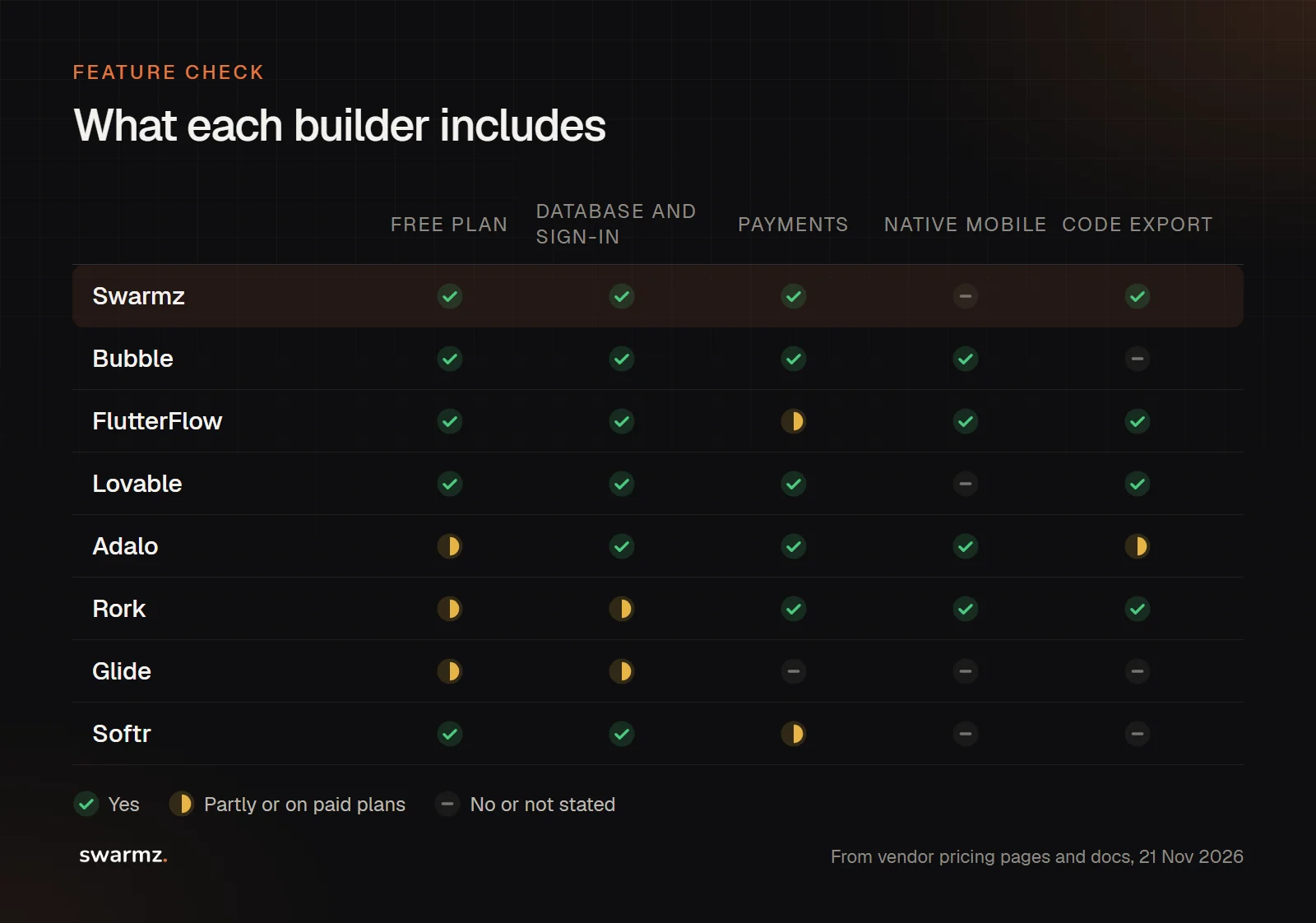
Tool | Free plan | Database and sign-in | Payments | Native mobile | Code export |
|---|---|---|---|---|---|
Swarmz | Yes | Yes | Yes | No | Yes |
Bubble | Yes | Yes | Yes | Yes | No |
FlutterFlow | Yes | Yes | Partly | Yes | Yes |
Lovable | Yes | Yes | Yes | No | Yes |
Adalo | Partly | Yes | Yes | Yes | Partly |
Rork | Partly | Partly | Yes | Yes | Yes |
Glide | Partly | Partly | No | No | No |
Softr | Yes | Yes | Partly | No | No |
Yes: included. Partly: only on some plans or with limits. No: not offered, or not stated by the vendor. Checked on 21 November 2026.
How to choose
A web app with accounts, saved data and payments: Swarmz.
Complex rules you want to edit visually: Bubble.
A native app in both stores, with the code: FlutterFlow.
A simple native app without code: Adalo.
Native SwiftUI and Kotlin code from a prompt: Rork.
You already use Lovable or need a ZIP: Lovable.
A spreadsheet that should become an internal app: Glide.
A portal on Airtable or Google Sheets: Softr.
Before you commit, check how you would leave: our guide on how to export an app from an AI app builder covers what comes with you. If you want a visual tool rather than chat, see the best no-code app builder.
FAQ
What is the best app builder in 2026?
For web apps with accounts, data and payments, Swarmz: it builds the database, sign-in and Stripe payments from a description and has a free plan with 5 credits a day. For native mobile apps, FlutterFlow or Adalo fits better, and for complex logic edited visually, Bubble.
What is the best free app builder?
Swarmz's free plan gives 5 credits a day with no card, database and sign-in included. Bubble, FlutterFlow, Lovable and Softr also have free plans. Adalo's and Glide's cannot publish, and Rork's is design-only.
Is Bubble better than FlutterFlow?
They suit different apps. Bubble is strongest for complex web apps with visual logic, but it does not export code. FlutterFlow focuses on native iOS and Android apps, with Flutter code download and store publishing from the $39 Basic plan.
Can I build an app without coding?
Yes, with every tool here. Swarmz, Lovable and Rork work from plain-language chat; Bubble, FlutterFlow, Adalo, Glide and Softr are visual builders, most now with an AI assistant for the first draft.
Which app builder is best for mobile apps?
For native App Store and Google Play apps, FlutterFlow, Adalo and Rork, or Bubble's React Native apps. Swarmz, Lovable, Glide and Softr build web apps that work on phones but are not native store apps.
Build your app on the top pick
If your app needs accounts, saved data or payments, describe it in a sentence and start building on Swarmz for free. The database, sign-in and publishing are ready when you are.
Sources
All checked on 21 November 2026.
Swarmz: swarmz.net/pricing, swarmz.net/features, swarmz.net/features/payments, swarmz.net/faq
Bubble: bubble.io/pricing, Bubble Stripe plugin, Bubble data ownership
FlutterFlow: flutterflow.io/pricing, flutterflow.io, FlutterFlow Stripe docs
Lovable: docs.lovable.dev subscription plans, docs.lovable.dev FAQ, Lovable Stripe docs
Adalo: adalo.com/pricing, adalo.com, The new Adalo
Glide: glideapps.com/pricing, glideapps.com, Glide help: App Store publishing
Softr: Softr pricing and plans docs, softr.io
How did this land?
About the author

Founder of swarmz.net
Jordan founded Swarmz, the AI app builder at swarmz.net.


