Best Website Builder in 2026: 7 Options Compared
Seven website builders compared, from Squarespace, Wix and WordPress.com to Webflow, Framer, Hostinger and Swarmz, with prices checked on 21 November 2026 and a clear pick for brochure sites, blogs, design-led sites and sites that need app features.
The best website builder in 2026 is Swarmz when your website has to do things, not only show pages: you describe the site in plain words, and Swarmz builds it with forms that save to a database, customer sign-in, member areas, bookings and Stripe payments, then publishes it in one click. This guide is for anyone choosing a website builder, with or without AI, so it ranks Swarmz against Squarespace, Wix, WordPress.com, Webflow, Framer and Hostinger. For a classic brochure site, Squarespace or Wix is the simpler pick; for a blog, WordPress.com; and for a design-led site, Framer or Webflow.
Swarmz is our product, so read our ranking with that in mind. We checked every price on the vendor's own pricing page or docs on 21 November 2026, and the sources are listed at the end.
The best website builders at a glance
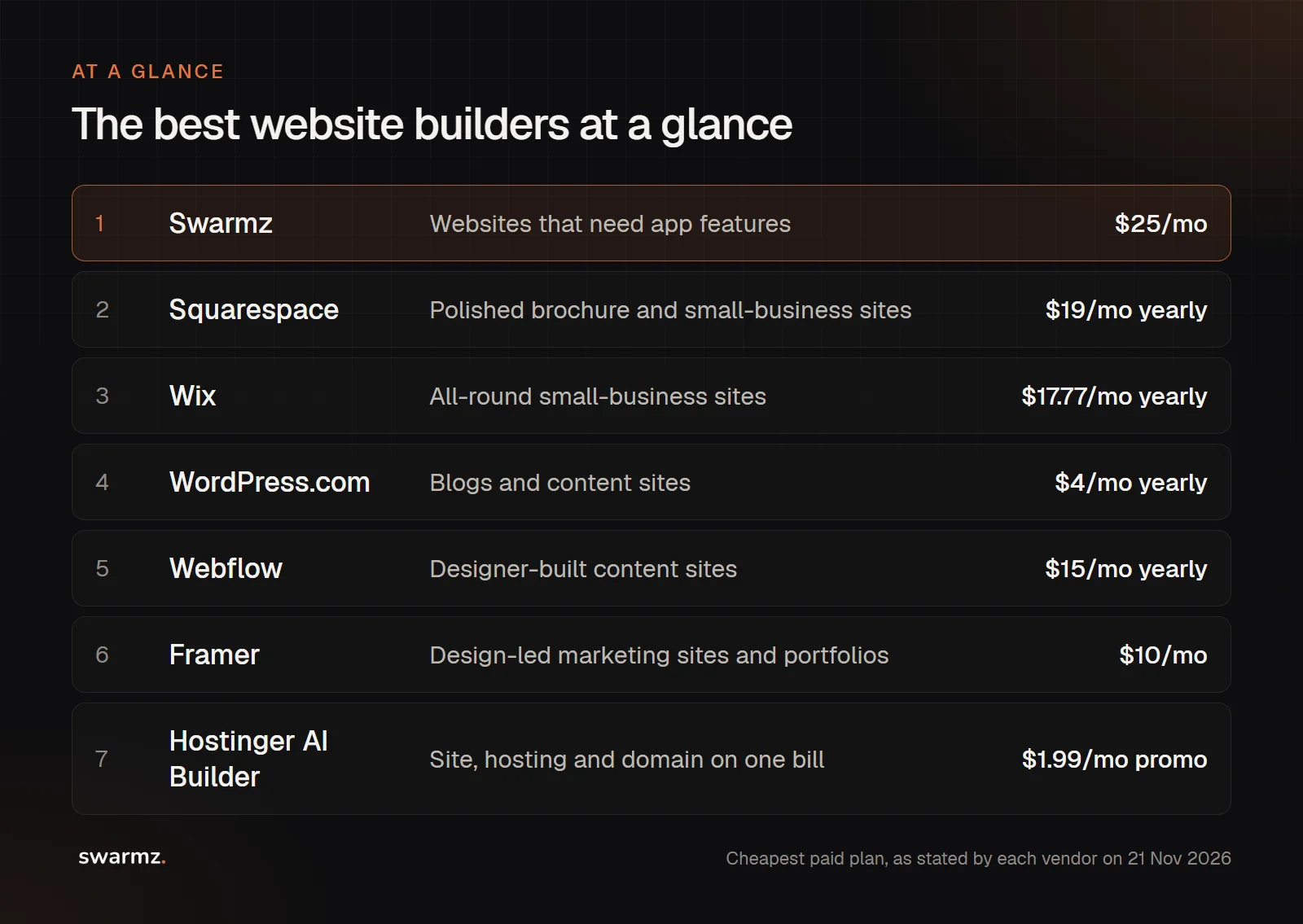
Tool | Best for | Starting paid price | Free plan | Sign-in and payments | Export |
|---|---|---|---|---|---|
Swarmz | Websites that need app features | $25/month (Pro) | 5 credits a day, no card | Built-in sign-in and database; Stripe payments | Two-way GitHub sync |
Squarespace | Polished brochure and small-business sites | $19/month billed yearly, $25 monthly (Basic) | No, a free trial of 14 days | Customer accounts; courses and memberships with a fee | XML file of some content |
Wix | All-round small-business sites | $17.77/month billed yearly (Light) | Yes | Members Area; payments from Core | Not stated |
WordPress.com | Blogs and content sites | $4/month billed yearly, $9 monthly (Personal) | Yes, with ads | Payments with a fee on every plan; plugins from Personal | Content export; full backup from Business |
Webflow | Designer-built content sites | $15/month billed yearly (Basic) | Yes, 2 static pages | Forms; ecommerce plans; sign-in not stated | HTML and CSS, no CMS content |
Framer | Design-led marketing sites and portfolios | $10/month (Basic) | Yes, on a Framer domain | Forms; sign-in and payments not stated | Not stated |
Hostinger AI Builder | Site, hosting and domain on one bill | $1.99/month promo, 48-month prepay | No, a building trial | User accounts in agentic mode; Stripe per FAQ | Code, without database records |
What a good website builder needs
We ranked on seven things, using only what each vendor states on its own pricing page or docs. We did not run benchmarks.
Design that looks professional without a designer: good templates or a flexible canvas.
Content editing: a blog or CMS for pages you update often.
Forms that save entries where you can find and export them, not only an email notification.
Sign-in and member areas, if customers need accounts, paid content or a portal.
Bookings, payments or a shop, and the fees each plan adds.
A custom domain at a fair price, including what the plan costs at renewal.
A way out: export or code ownership, so the site is not stuck on one platform.
A brochure site needs the first two and a domain. A site that needs sign-in, bookings or payments that follow your own process is closer to a web app, which is where Swarmz is strongest. Our guide to no-code vs AI app builders explains the difference.
A note on prices
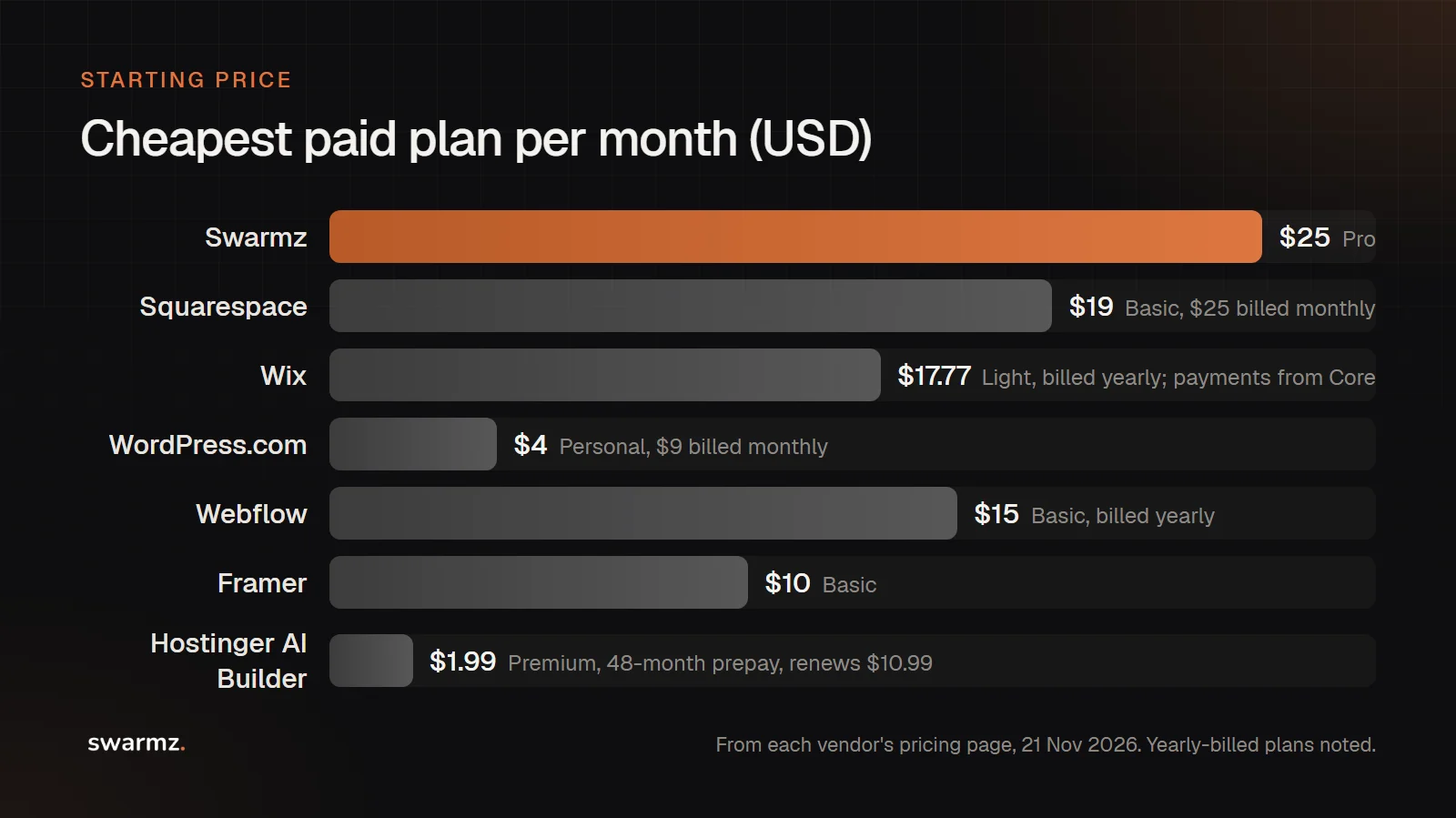
The plan you need often costs more than the entry price. Squarespace's Basic plan adds a transaction fee on sales that falls on higher plans. Wix payments start on Core at $29.77 a month billed yearly. WordPress.com's fee on payments falls from 10% on Free to 0% on Commerce. Webflow's Basic plan has no CMS, so a blog needs Premium at $25 a month billed yearly. Hostinger's $1.99 needs a 48-month prepayment and renews at $10.99.
1. Swarmz: best website builder for sites that need app features
Swarmz is an AI app builder, so the websites it makes are web apps. You describe the site and what it should do in chat, Swarmz builds the pages, the data model and the sign-in, and you publish to a swarmz.cloud link with SSL in one click, or to your own domain on Pro. You can also start from one of 28 remixable templates.
How it handles the checklist. Forms save to the site's own database through Swarmz Cloud, which also provides file storage and server functions on every plan. Visitors can sign in with email, phone, Google, Apple, Microsoft and more, which covers member areas and client portals. Swarmz Payments runs on Stripe for one-off purchases, subscriptions, donations, invoices and payment links, and Swarmz can build a storefront with cart, checkout and an order admin. Analytics for visitors, errors and speed is on from the first publish. No ready-made visual CMS is listed, so you change content by describing the change in chat.
Pros
Forms, database and sign-in on every plan, plus Stripe payments (Stripe's fees and a small Swarmz platform fee apply).
Two-way GitHub sync on Free, with standard React code you own.
More than 80 one-click connectors, including Calendly, HubSpot and Google Sheets.
Account and main database hosted in the EU (Ireland).
Cons
No blog editor or visual CMS listed; content changes go through chat.
For a simple brochure site, a template builder needs less thought.
No ZIP download; custom domains and badge removal need Pro.
Best for: small businesses, studios, coaches and agencies whose site needs bookings, sign-ups, member areas or payments that fit their own process.
Pricing: Free with 5 credits every day and no card. Pro is $25 a month for 100 credits plus the daily credits, with rollover for 30 days, a custom domain and no badge. New accounts can try Pro free for 3 days with 25 credits; a card is needed, and it becomes the $25 Pro plan unless you cancel. Business is $50 a month.
2. Squarespace: best for polished brochure and small-business sites
Squarespace is a template-based website builder. Every plan includes hosting, unlimited bandwidth, SEO tools and built-in AI tools, plus selling for products, services, courses and memberships.
How it handles the checklist. You pick a template and fill it in, which gets a brochure site to a finished look with little setup. Customers can create accounts and sign in for faster checkout, and courses, memberships and digital content can be sold on every plan, with a transaction fee that is highest on Basic. Appointment booking comes from Acuity Scheduling, a separate Squarespace product. Export is limited: Squarespace creates an XML file for WordPress that includes layout pages and one blog, but not store pages, product blocks or more than one blog.
Pros: a finished look with little setup; hosting and bandwidth included; a free domain for a year on annual plans.
Cons: no free plan, only a free trial of 14 days; transaction fees on Basic; limited export; plans and prices vary by region.
Best for: small businesses, creatives and service providers who want a good-looking site with standard selling.
Pricing: in US dollars, Basic is $25 a month, or $19 a month billed yearly ($228); Core is $39, or $29 billed yearly. Squarespace says annual billing saves up to 36%.
3. Wix: best all-round builder for small businesses
Wix's Harmony editor includes Aria, an AI agent for pages, content, design, SEO and settings, and AI creation tools are on every plan, including Free.
How it handles the checklist. Wix covers standard business features with its own apps. Wix Forms saves every entry to a submissions table, the Members Area adds sign-up and login, and the Wix CMS can store form input in collections. Payments, basic ecommerce, and scheduling and services start on the Core plan. Code export is not stated on the pages we read.
Pros: forms, members, bookings and a store from one vendor; AI tools on Free; a free domain for a year on paid plans.
Cons: payments start on Core, not Light; prices are yearly plans paid upfront and vary by location; code export not stated.
Best for: small businesses that want bookings, a members area or a shop added by clicking.
Pricing: Free plan. Light is $17.77 a month and Core $29.77 a month, shown for yearly plans paid in full.
4. WordPress.com: best for blogs and content sites
WordPress.com is hosted WordPress. The free plan has no expiry date, and paid plans open the plugin directory and premium themes.
How it handles the checklist. Content is its strength: unlimited pages and posts, even on Free. Every paid plan can install any of over 60,000 plugins, which is how you add features such as forms or bookings, though each plugin is one more thing to keep updated. Payments carry a WordPress.com fee of 10% on Free, 8% on Personal, 4% on Premium, 2% on Business and 0% on Commerce, plus Stripe's fees, and WooCommerce runs on any paid plan. A members area is not described on the pricing page, so plan on a plugin. Personal adds a guided AI website builder, with usage limits. Posts, pages and comments export as an XML file, and Business and Commerce add a full backup download.
Pros: built around posts and pages; more than 60,000 plugins on paid plans; content export, and a full backup from Business.
Cons: WordPress.com ads on Free and no custom domain there; fees on payments below Commerce; plugins add upkeep.
Best for: bloggers, writers, publishers and content-led businesses.
Pricing: Personal is $4 a month billed yearly or $9 monthly; Premium $8 or $18; Business $25 or $40; Commerce $45 or $70 (USD). Yearly plans include a free domain for the first year.
5. Webflow: best for designer-built content sites
Webflow is a visual site builder with a CMS, hosting and Webflow AI, plus Webflow Cloud for app hosting with SQLite, key-value and object storage.
How it handles the checklist. Design control is detailed, and the CMS holds up to 20,000 items on Premium. Form submissions download as a CSV, 50 on Free and unlimited from Basic. Ecommerce plans start at $29 a month billed yearly, with a 2% transaction fee. Code export gives HTML and CSS but not CMS content and needs a paid Workspace plan. Visitor sign-in is not stated.
Pros: precise design control; a large CMS on Premium; a real ecommerce option; HTML and CSS export.
Cons: Basic has no CMS; CMS content cannot be exported; site plans and Workspace seats are priced separately.
Best for: designers, marketing teams and agencies that publish a lot of content.
Pricing: Free Starter plan. Basic $15 a month and Premium $25 a month, both billed yearly, in USD per site.
6. Framer: best for design-led marketing sites and portfolios
Framer describes itself as a pro website builder with a design agent that works on a visual canvas, plus a CMS agent for content and built-in hosting.
How it handles the checklist. Design control is its strength. The CMS covers 2 collections and 1,000 items on Basic, and 10 collections and 2,500 items on Pro. Native forms send submissions to email, Google Sheets or a webhook. Visitor sign-in, payments and code export are not stated on the pages we read.
Pros: strong visual control with an AI design agent; hosting and CMS included; a custom domain from $10 a month.
Cons: no custom domain on Free; payments, sign-in and code export not stated; localization costs $20 per locale.
Best for: designers, startups and creative businesses whose site has to look exceptional.
Pricing: Free with 500 AI credits a month. Basic is $10 a month and Pro $30 a month, billed on the cycle you pick at checkout.
7. Hostinger AI Builder: best budget bundle with hosting and a domain
Hostinger merged its Website Builder and Horizons into AI Builder in August 2026. Manual mode is drag and drop and uses no AI credits; agentic mode generates the code and a backend.
How it handles the checklist. Agentic mode builds databases, user accounts and file storage. The FAQ says every plan includes Stripe, but the comparison table lists ecommerce as not available on Premium, so check before you buy. A blog editor is not described on the page we read. Code export is on all plans, without database records or user accounts, and a custom domain is free for the first year.
Pros: hosting, domain, SSL and CDN on one bill; up to 3 websites on Premium; code export on all plans.
Cons: no free plan; the headline price needs a 48-month prepay; if the hosting plan expires, the project is deleted.
Best for: people who want one provider for site, hosting and domain for years.
Pricing: Premium is $1.99 a month as a promotion with a 48-month prepay ($95.52); list price $12.99, renewal $10.99.
Build it on Swarmz: a prompt you can copy
Build a website for my pottery studio with Home, Classes, Gallery, About and Contact pages.
Show a class schedule from the database with date, price and seats left.
Let visitors sign in with email or Google, book a seat and pay by card through Stripe.
Add a members area with a monthly membership that gives members 10% off classes.
Add a contact form that saves each message to the database.
Give me an admin page, only for me, to add classes and see bookings and messages.
Use a warm, earthy design with large photos that reads well on phones.
After the first version, book a test seat and check that the seats-left number drops, sign in as a member to see the discount, and pay with a Stripe test card while payments are in test mode. Then add your own domain on Pro. Our guide on writing prompts for AI app builders helps you refine a brief like this.
When Swarmz isn't the right pick
Swarmz fits when the site has to store data, sign people in or take payments in your own way. Otherwise:
A classic brochure site with a few pages, a contact form and a map: Squarespace or Wix, where a template gets you there with less thought.
A blog or content site: WordPress.com, or Webflow Premium for designer-led teams.
A design-led site or portfolio where every pixel matters: Framer, or Webflow. Our guide to building a portfolio site with AI covers the content side.
A large online store: WordPress.com Commerce with WooCommerce, or Wix's ecommerce plans. See the best AI ecommerce app builders for custom stores.
Site, hosting and domain from one provider: Hostinger AI Builder.
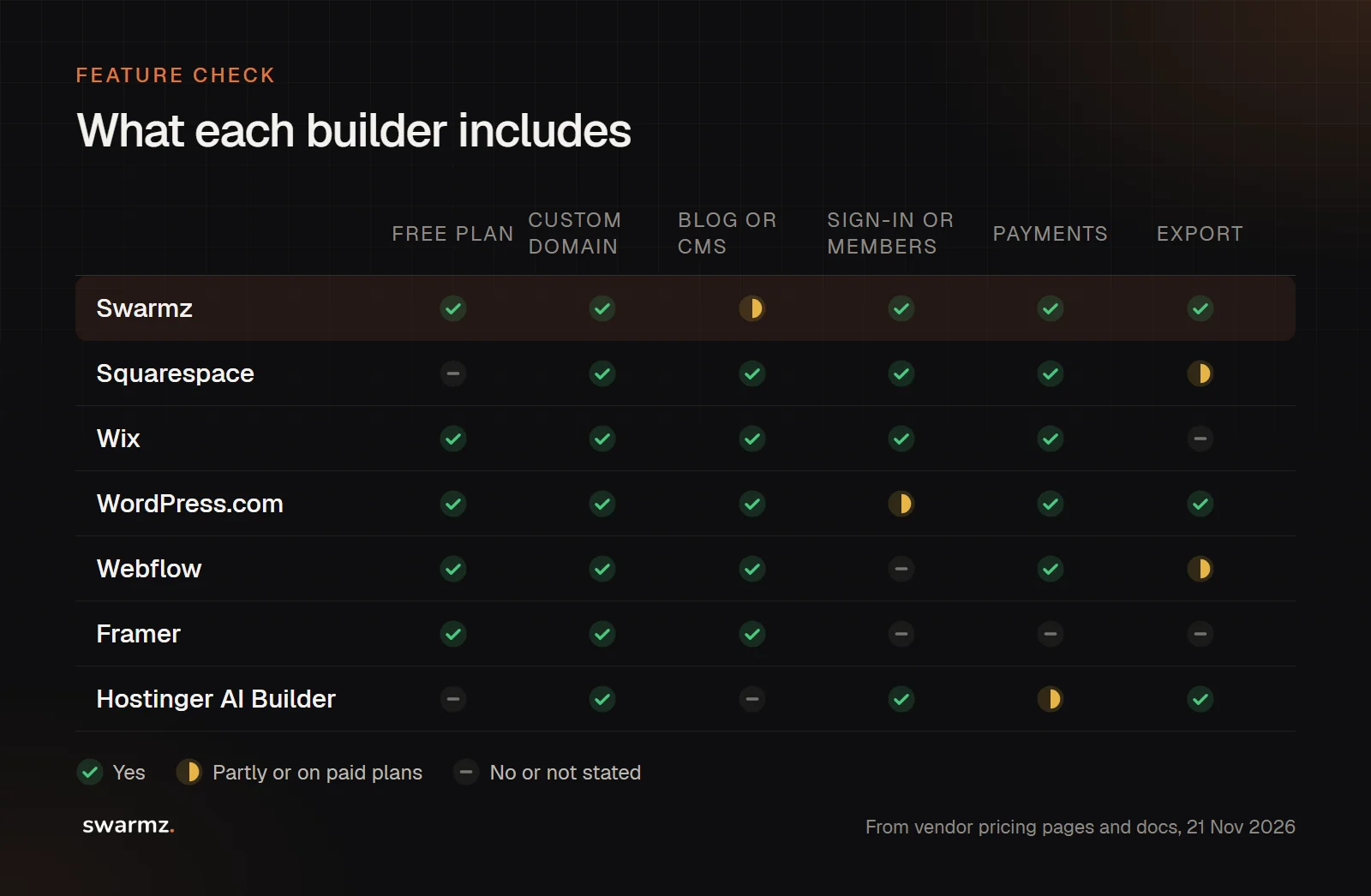
Tool | Free plan | Custom domain | Blog or CMS | Sign-in or members | Payments | Export |
|---|---|---|---|---|---|---|
Swarmz | Yes | Yes | Partly | Yes | Yes | Yes |
Squarespace | No | Yes | Yes | Yes | Yes | Partly |
Wix | Yes | Yes | Yes | Yes | Yes | No |
WordPress.com | Yes | Yes | Yes | Partly | Yes | Yes |
Webflow | Yes | Yes | Yes | No | Yes | Partly |
Framer | Yes | Yes | Yes | No | No | No |
Hostinger AI Builder | No | Yes | No | Yes | Partly | Yes |
Yes: included. Partly: only on some plans or with limits. No: not offered, or not stated by the vendor. Checked on 21 November 2026.
How to choose
Bookings, sign-ups, a member area or payments that follow your own process: Swarmz.
A good-looking brochure site, fast: Squarespace.
Standard business features added by clicking: Wix.
A blog or lots of articles: WordPress.com.
Precise design plus a big CMS: Webflow.
Design is the product: Framer.
Everything on one hosting bill: Hostinger AI Builder.
For AI-first tools only, see the best AI website builders. If your site is really a product with users and data, read the best app builder guide.
FAQ
What is the best website builder in 2026?
For websites that need app features, Swarmz: it builds forms that save to a database, customer sign-in and Stripe payments from a description, with a free plan of 5 credits a day. For a classic brochure site, Squarespace or Wix is simpler; for a blog, WordPress.com; for a design-led site, Framer or Webflow.
What is the easiest website builder for beginners?
Squarespace and Wix are the easiest for a standard site, because you start from a template and fill it in. Swarmz is easiest when the site needs features a template does not have, since you describe them in plain words instead of configuring apps.
Is Squarespace better than Wix?
For a polished brochure site with little setup, Squarespace is often the simpler choice, though it has no free plan, only a trial of 14 days. Wix has a free plan and adds forms, members, bookings and a store through its own apps, with payments from Core.
Which website builder is best for a blog?
WordPress.com: unlimited posts and pages even on Free, more than 60,000 plugins from the Personal plan, and an XML export of your content on every plan. Webflow Premium and Framer also have a CMS for article pages.
Is there a free website builder?
Yes. Swarmz, Wix, WordPress.com, Webflow and Framer all have free plans with limits, and on each of them your own domain needs a paid plan. Squarespace offers a free trial instead, and Hostinger AI Builder a building trial.
Can I move my website to another builder later?
Partly, and it depends on the builder. Swarmz syncs the code with GitHub, WordPress.com exports posts and pages as XML, Webflow exports HTML and CSS without CMS content, Squarespace exports some pages and one blog as XML for WordPress, and Hostinger exports code without database records. Wix and Framer do not state code export.
Build a website that does more than show pages
If your site needs forms that save, sign-in, bookings or payments, describe it in a sentence and start building on Swarmz for free. Publish the first version on a swarmz.cloud link and move to your own domain when you upgrade.
Sources
All checked on 21 November 2026.
Swarmz: swarmz.net/pricing, swarmz.net/features, swarmz.net/features/payments, swarmz.net/faq
Squarespace: squarespace.com/pricing, Squarespace pricing file (USD prices), Squarespace help: exporting your site
Wix: wix.com/plans, Wix Harmony AI tools, Wix Forms submissions table, Wix Members Area, Wix CMS form input
WordPress.com: wordpress.com/pricing, WordPress.com support: export your content
Webflow: webflow.com/pricing
Framer: framer.com/pricing, Framer help: adding a contact form
Hostinger AI Builder: hostinger.com/horizons
How did this land?
About the author

Founder of swarmz.net
Jordan founded Swarmz, the AI app builder at swarmz.net.


