Best AI CRM Builder: Build Your Own CRM with AI (2026)
Six AI app builders compared for building your own CRM on contacts, pipeline, notes, roles, CSV imports, integrations and data ownership, plus an honest look at when an off-the-shelf CRM is the better choice.
The best AI CRM builder is Swarmz, because it builds the CRM around how your team actually works: your own contacts, companies and pipeline stages in a database whose region you choose, team sign-in on every plan with pricing per workspace instead of per seat, and one-click connectors for Gmail, Google Sheets, Airtable, HubSpot and Salesforce. If your customer data already lives in Airtable or Google Sheets, Softr or Glide may get you there faster, and if a standard sales pipeline is all you need, an off-the-shelf CRM such as HubSpot is the quicker choice.
Swarmz is our product, so read our ranking with that in mind. We checked every price on the vendor's own pricing page or docs on 21 November 2026, and the sources are listed at the end.
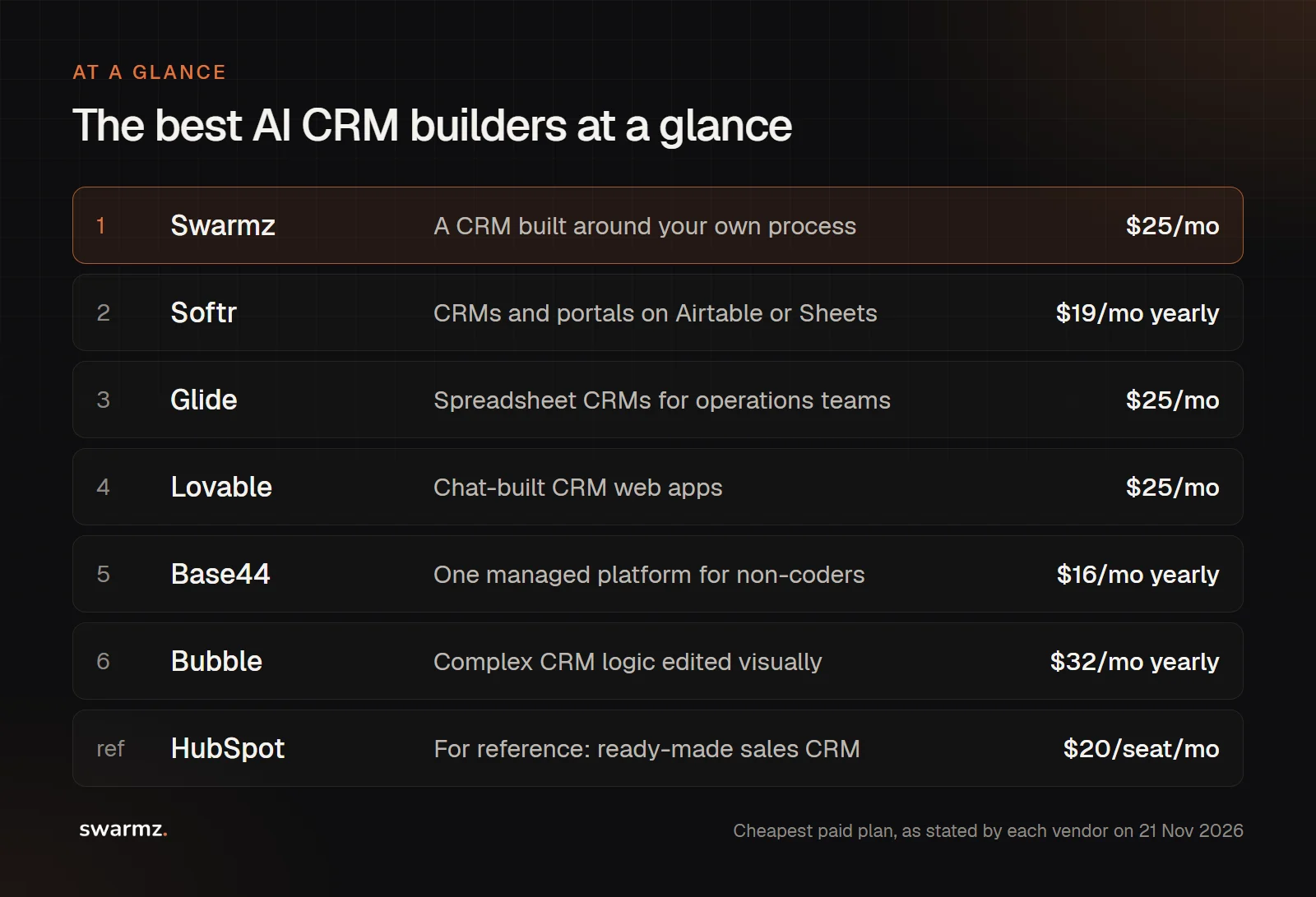
The best AI CRM builders at a glance
Tool | Best for | Starting paid price | Free plan | Database | Connectors | Code export |
|---|---|---|---|---|---|---|
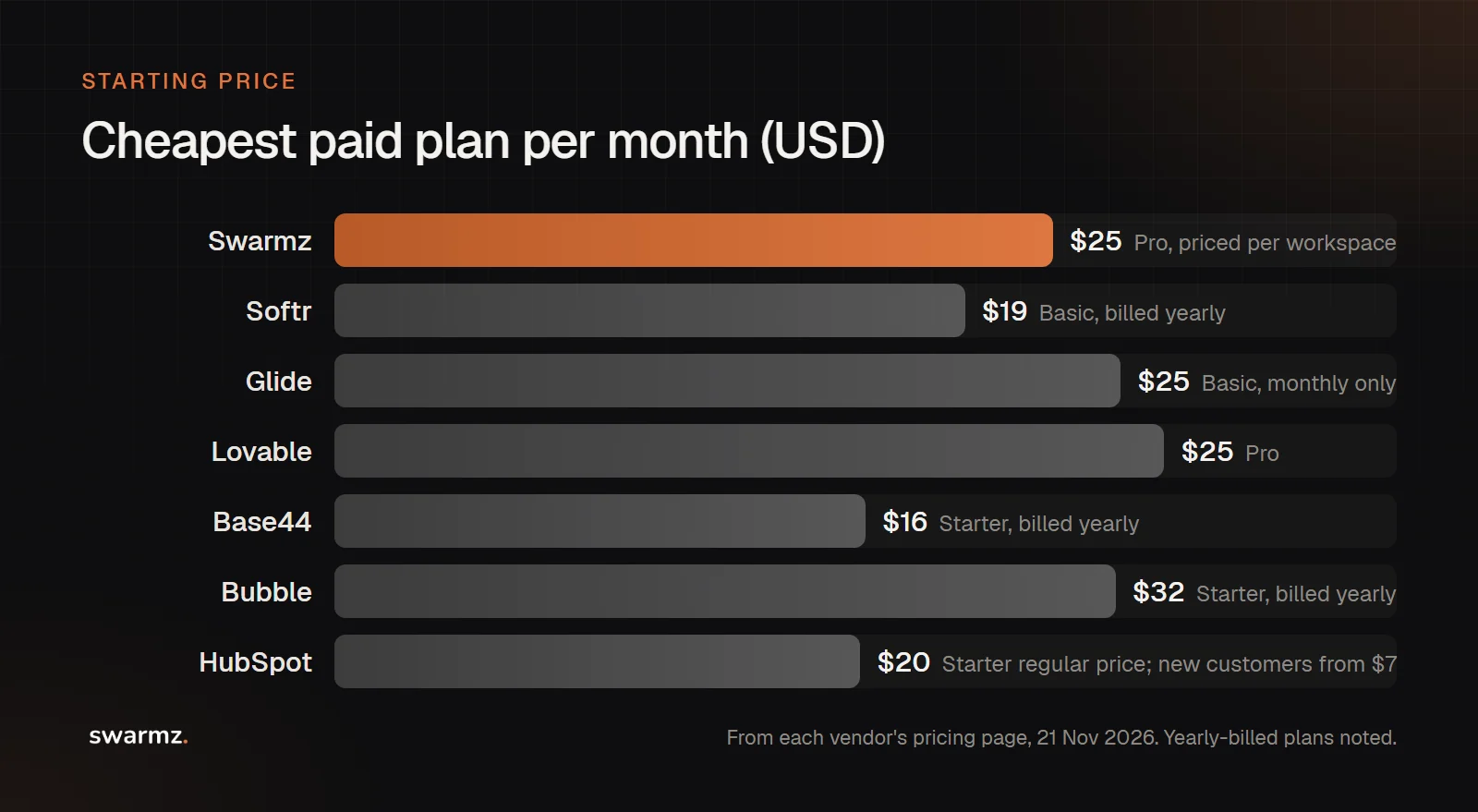
Swarmz | A CRM built around your own process | $25/month (Pro) | 5 credits a day, no card | Built in, region you choose, or your own Supabase | Gmail, Google Sheets, Airtable, HubSpot, Salesforce | Two-way GitHub sync |
Softr | CRMs and portals on Airtable or Sheets | $19/month billed yearly, $25 monthly | 3 builders, 5 app users | Softr Databases plus 21+ sources | Airtable, Google Sheets, PostgreSQL and more | Not stated |
Glide | Spreadsheet CRMs for operations teams | $25/month, monthly only | Yes, no published apps | Works on sheets and databases | Excel, Google Sheets, Airtable, Salesforce and more | Code and project files on Enterprise |
Lovable | Chat-built CRM web apps | $25/month (Pro) | 5 daily credits, up to 30 a month | Lovable Cloud or your own Supabase | Connector credits, details not covered | Git sync; ZIP on paid plans |
Base44 | One managed platform for non-coders | $16/month, billed yearly | 25 message credits | Built in | Integration credits | From the Builder plan |
Bubble | Complex CRM logic edited visually | $32/month, billed yearly | 500 AI credits a month | Built in, with privacy rules | API connector | No |
HubSpot (ready-made, for reference) | A standard sales CRM, no building | $20 per seat/month (Starter), new customers from $7 | 2 users, 1,000 contacts | HubSpot's own records | Gmail and Outlook | Not applicable |
What a good CRM needs
A CRM is a simple idea that gets complicated in the details. We ranked the tools on these seven points, using only what each vendor states on its own pages; we did not run benchmarks. For the build itself, our guide on how to build a simple CRM with AI walks through it step by step.
Contacts and companies. People linked to their companies, with the fields your business needs rather than the ones a vendor chose.
Pipeline stages. Deals, projects or jobs moving through your own stages, with a value, an owner and a close date.
Notes and activity. Calls, emails, meetings and next steps on each record, so anyone can pick up where a colleague left off.
Roles and permissions. Who can see, edit, delete and export which records. A sales rep and an owner rarely need the same access.
Imports. A CSV import from your current spreadsheet or old CRM, with column mapping and a duplicate check.
Integrations. Email, spreadsheets, and any CRM you already pay for.
Data ownership. Where the data lives, who can reach it, and how you get it out again.
Should you build a CRM or buy one?
Answer this before you build anything. If your process is a standard sales pipeline, an off-the-shelf CRM is usually the faster and safer choice: it works on day one, comes with support, and someone else maintains it. HubSpot's free tools allow up to 2 users and 1,000 contacts with no time limit and connect to Gmail and Outlook. Starter is normally $20 a month per seat; new customers currently pay $7 per seat with an annual payment, or $10 month to month. It adds automation, payments, meeting scheduling and up to 15 pipelines.
Building your own makes sense when the CRM is really a picture of how you operate, such as a recruiting agency tracking placements or an installer tracking quotes, site visits and jobs. It also makes sense when per-seat prices outgrow your budget, or when you want customer data in a database you choose. You can also do both: Swarmz lists a HubSpot connector that can "search, read, and update contacts, companies, and deals", so a custom tool can sit next to the HubSpot account you already have.
1. Swarmz: best AI CRM builder overall
Swarmz builds web apps from a plain-language description, and a CRM is a natural fit: a database with sign-in in front of it. You describe your records, stages and who does what, and Swarmz builds the screens, data model and sign-in, then publishes the app to a swarmz.cloud link with SSL, or your own domain on Pro.
How it handles the checklist:
Contacts, pipeline and notes: tables in the app's own database on Swarmz Cloud, so the fields and stages are the ones you describe. Each app gets its own dedicated backend.
Roles and permissions: sign-in is built in, with email, Google, Microsoft, SAML SSO and more. Rules such as "reps edit only their own deals" are part of what you ask Swarmz to build, so test them with a second account. Published apps are public by default, so the sign-in and those rules keep records private; on Business, apps can be invite-only.
Imports: you can attach up to 10 files to a chat message, spreadsheets included, so Swarmz sees the sheet you work from. Ask for a CSV import screen and try it on a small file first.
Integrations: one-click connectors for Gmail, which can "search, read, label, and send mail", Google Sheets, Airtable, HubSpot and Salesforce, among more than 80.
Data ownership: pick where the app's data lives from 16 regions across the US, Europe and Asia-Pacific, or connect your own Supabase project. The React, TypeScript and Tailwind code syncs both ways with your GitHub repository.
Pros: database and sign-in on every plan, including Free; priced per workspace, not per person; Gmail, Sheets, Airtable, HubSpot and Salesforce connectors; your choice of data region; GitHub sync on Free.
Cons: you describe and test access rules yourself rather than getting a finished permission system; invite-only apps need Business; Cloud usage beyond the monthly allowance comes from your credits, and backends pause if the balance runs out; no ZIP download; web apps only.
Best for: small teams whose process does not fit a standard CRM, and businesses that want customer data in a database they choose.
Pricing: Free with 5 credits every day and no card. Pro is $25 a month for 100 credits, with 30-day rollover and a custom domain. Business is $50 a month and adds invite-only apps, SAML single sign-on and user groups.
2. Softr: best for a CRM on top of Airtable or Google Sheets
Softr builds portals and internal tools on business data, and its homepage names CRMs among its main uses. Its AI Co-Builder creates the database, pages, user roles and logic from a description, on Softr Databases or more than 21 outside sources, including Airtable, Google Sheets and PostgreSQL. Login options include email and password, one-time codes, Google and magic links, with SSO on Enterprise.
Pros: roles and sign-in built in; starts from the Airtable base or sheet you already have; free for up to 3 builders.
Cons: small user caps on low plans, with Basic allowing 1 builder and 5 team plus 5 client users; code export not stated.
Best for: teams whose customer data already lives in Airtable or Google Sheets.
Pricing: Basic is $19 a month billed yearly, or $25 monthly. Pro is $99 billed yearly, or $119 monthly.
3. Glide: best for spreadsheet CRMs used by operations and field teams
Glide turns Excel and Google Sheets data into apps for business operations and connects to Salesforce, Airtable, NetSuite, Snowflake and more. Its homepage lists CRM next to inventory, field inspections and work orders. Glide apps are progressive web apps that run on phones, which suits teams who update records on the move. Org-level roles and permissions start on Pro; row-level permissions, SSO and audit logs come with Enterprise.
Pros: starts from spreadsheets your team already uses; monthly plans with no annual lock-in; unlimited guests from Basic.
Cons: the free plan cannot publish apps; Basic includes 2 team members and 2 published apps; org-level roles need the $125 Pro plan.
Best for: operations teams who live in spreadsheets and want a phone-friendly CRM.
Pricing: Basic is $25 a month, monthly only. Plus is $50 and Pro $125.
4. Lovable: best if you already build in Lovable
Lovable builds web apps from chat, with Lovable Cloud for the database, authentication, storage and functions, or your own Supabase project. As with Swarmz, access rules are something you ask for and test. Plans include connector credits, but which CRM and email tools they cover is not in the docs we read.
Pros: Git sync to GitHub, GitLab or Bitbucket on every plan; a ZIP download on paid plans; unlimited workspace members.
Cons: the database exports separately and leaves out stored files, Edge Function code and secrets; moving from your own Supabase to Lovable Cloud is not supported.
Best for: people who already know Lovable.
Pricing: Pro is $25 a month, or $21 billed yearly. Business is $50 a month.
5. Base44: best managed CRM platform for non-coders
Base44, owned by Wix and run as its own product, includes a database, sign-in and user management on every plan, covering contacts, deals and team access. Integrations draw on integration credits: 100 on Free and 2,000 on Starter.
Pros: backend and user management on Free; a custom domain from Starter; building and hosting in one place.
Cons: GitHub sync and code export need the Builder plan; yearly prices only; specific CRM and email integrations not covered on the pages we read.
Best for: non-technical owners who do not need the code yet.
Pricing: Free with 25 message credits and up to 5 apps. Starter is $16 a month and Builder $40 a month, both billed yearly.
6. Bubble: best for complex CRM logic edited visually
Bubble is a visual no-code builder with a built-in database, workflows, an API connector and an AI agent. For a CRM, its privacy rules matter most: conditions on each data type that decide which logged-in users can view or change which records, down to single fields, checked on the server before data reaches the browser.
Pros: detailed, server-checked privacy rules; workflows you edit visually; web and mobile from one backend.
Cons: no code export, so leaving means rebuilding the logic; usage metered in workload units.
Best for: teams with complex rules who are comfortable staying on Bubble.
Pricing: Starter is $32 a month and Growth $119 a month, both billed yearly.
Build it on Swarmz: a prompt you can copy
Paste this into Swarmz and change the records and stages to match your business.
Build a CRM for my 6-person agency. The team signs in with Google.
Records: companies, contacts (linked to a company) and deals with value, owner, stage and expected close date.
Pipeline stages: Lead, Qualified, Proposal sent, Negotiation, Won, Lost. Show deals as a board I can drag between stages.
Every contact and deal has an activity timeline for notes, calls and meetings, each with a next step and due date.
Roles: Admins see and edit everything and can export. Sales reps see all contacts but edit only their own deals.
Add a CSV import for contacts and companies with column mapping and a duplicate check on email.
Add a dashboard with pipeline value by stage and the deals expected to close this month.
After the first version, sign in with a second account as a sales rep and check that you cannot edit a colleague's deal or export data. Import a small CSV with one duplicate row before you load your full list. Then decide whether to connect Gmail, Google Sheets or HubSpot, and test any connector on a few records first.
When Swarmz isn't the right pick
A standard sales pipeline, ready on day one: HubSpot's free tools or Starter plan, or another off-the-shelf CRM.
Customer data already in Airtable or Google Sheets: Softr gives it a front end with roles.
A field team working from phones on spreadsheet data: Glide.
Complex rules you want to edit visually: Bubble.
A ZIP of the code instead of a GitHub repository: Lovable's paid plans.
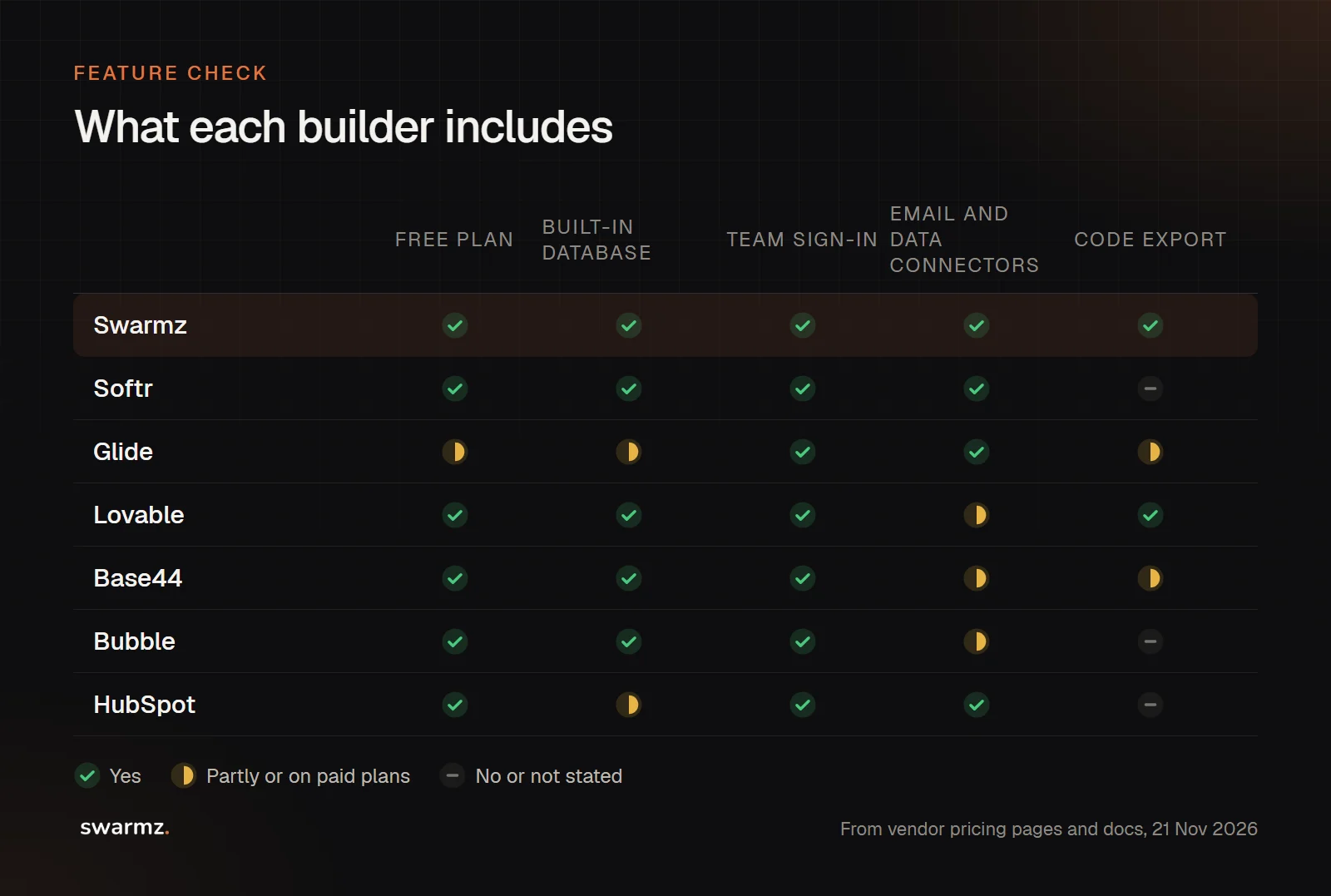
Tool | Free plan | Built-in database | Team sign-in | Email and data connectors | Code export |
|---|---|---|---|---|---|
Swarmz | Yes | Yes | Yes | Yes | Yes |
Softr | Yes | Yes | Yes | Yes | No |
Glide | Partly | Partly | Yes | Yes | Partly |
Lovable | Yes | Yes | Yes | Partly | Yes |
Base44 | Yes | Yes | Yes | Partly | Partly |
Bubble | Yes | Yes | Yes | Partly | No |
HubSpot (reference) | Yes | Partly | Yes | Yes | No |
Yes: included. Partly: only on some plans or with limits. No: not offered, or not stated by the vendor. Checked on 21 November 2026.
How to choose
Standard sales pipeline: buy an off-the-shelf CRM such as HubSpot.
Your own process, data in a database you choose: Swarmz.
Data already in Airtable or Google Sheets: Softr, or Glide for phone-first teams.
One managed platform and no code: Base44.
Complex logic you edit by hand: Bubble.
Before you move real customer data into any AI-built app, read the honest limitations of AI app builders and check how to export an app from an AI app builder. For other back-office apps, see the best AI internal tool builder and the best AI app builder with a database.
FAQ
What is the best AI CRM builder?
For most small teams with their own way of working, Swarmz. It builds the CRM with a database and team sign-in, connects to Gmail, Google Sheets and HubSpot, and prices plans per workspace rather than per seat. If your data already lives in Airtable or Google Sheets, Softr and Glide are strong alternatives.
Can I build my own CRM with AI?
Yes. AI app builders such as Swarmz, Lovable and Base44 build a CRM from a description, including the database and sign-in. Test access rules and imports yourself before your team relies on it.
Is it cheaper to build a CRM than to pay for HubSpot?
It depends on team size and how much you customise. HubSpot Starter is priced per seat, normally $20 a month, while Swarmz plans are priced per workspace from $25 a month. Count your time to build and maintain it too; if HubSpot's free tools cover you, they cost nothing.
Can I import contacts from a spreadsheet or another CRM?
Usually, yes. In Swarmz you can attach your spreadsheet to the chat and ask for a CSV import screen with column mapping, and Softr and Glide start directly from Airtable or Google Sheets. Try a small file with a duplicate row first.
Do I own the data in an AI-built CRM?
Check where the data is stored and how you get it out. Swarmz lets you choose the data region from 16, or connect your own Supabase project, and your code syncs to GitHub. Lovable exports the database separately from the code, and Bubble exports user data as CSV but not the app's logic.
Build the CRM your team will actually use
If an off-the-shelf CRM does not fit how you work, build your own CRM on Swarmz for free. Start with the prompt above, test it with a second account, and move your contacts across once the rules hold.
Sources
All checked on 21 November 2026.
Swarmz: swarmz.net/pricing, swarmz.net/faq, swarmz.net/integrations
HubSpot: hubspot.com/pricing/crm
Softr: Softr pricing and plans docs, softr.io
Glide: glideapps.com/pricing, glideapps.com
Lovable: docs.lovable.dev subscription plans, docs.lovable.dev FAQ, Lovable Cloud docs
Base44: base44.com/pricing
Bubble: bubble.io/pricing, Bubble data ownership, Bubble privacy rules
How did this land?
About the author

Founder of swarmz.net
Jordan founded Swarmz, the AI app builder at swarmz.net.


