Best AI App Builder With Payments (Stripe) in 2026
Eight AI app builders compared on how they take payments: built in or bolted on, one-time and subscriptions, invoices, payment links, in-app purchases, test mode and plan requirements, with prices checked on 21 November 2026.
The best AI app builder with payments is Swarmz because payments are part of the platform rather than something you wire up: Swarmz Payments runs on Stripe and covers checkout, subscriptions, invoices and payment links, pays sales out to your own bank account, and needs no Stripe account before you start. Stripe's usual processing fees apply, plus a small Swarmz platform fee on each payment. If you are building a native iPhone or Android app that sells digital content, Rork is the better pick, because its built-in RevenueCat integration handles in-app purchases and Swarmz builds web apps only.
Swarmz is our product, so weigh our ranking with that in mind. We checked every price and payments feature on the vendor's own pricing page or docs on 21 November 2026, and the sources are listed at the end.
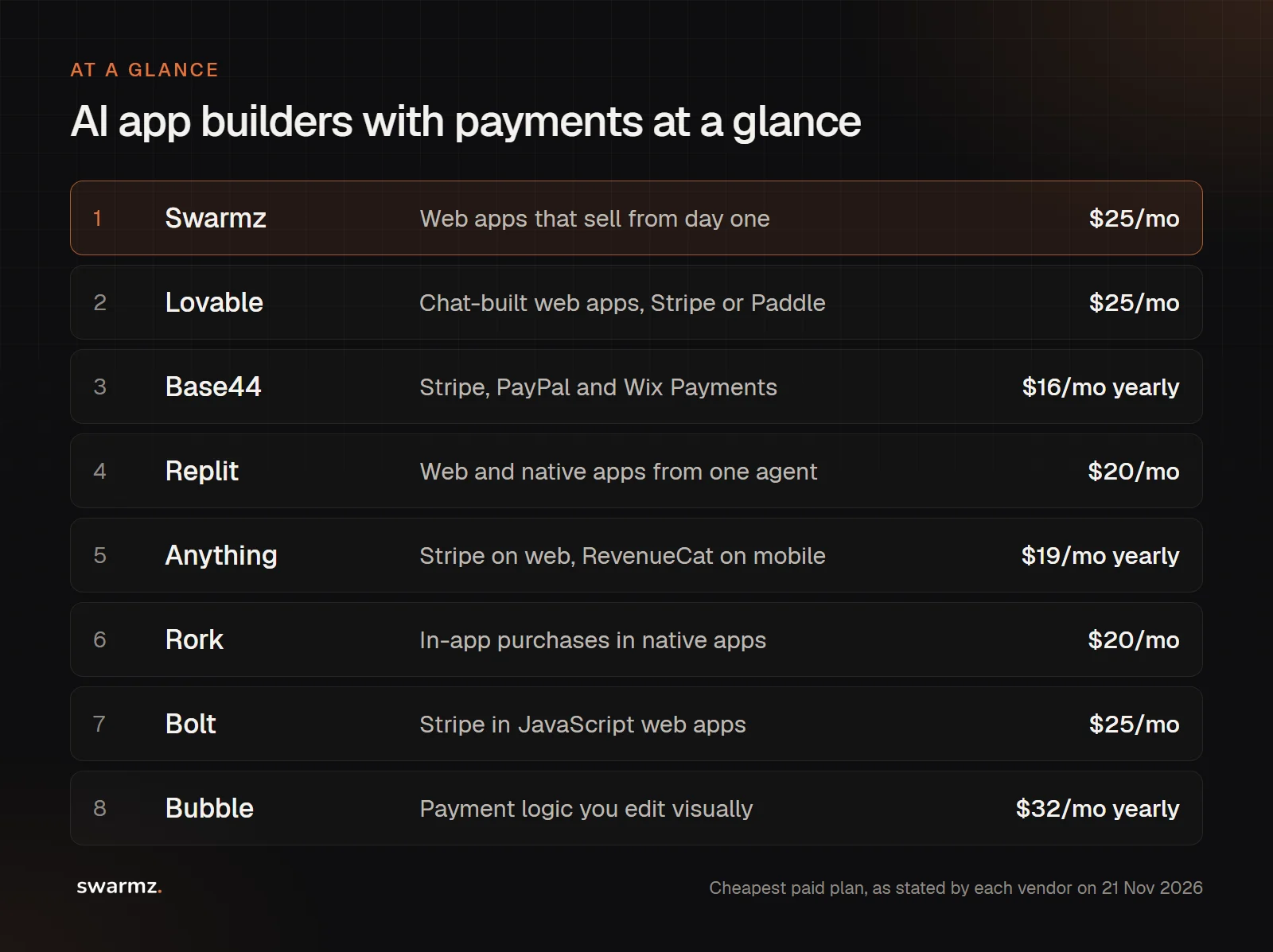
AI app builders with payments at a glance
Tool | Best for | Starting paid price | How payments work | Subscriptions and invoices | Mobile in-app purchases |
|---|---|---|---|---|---|
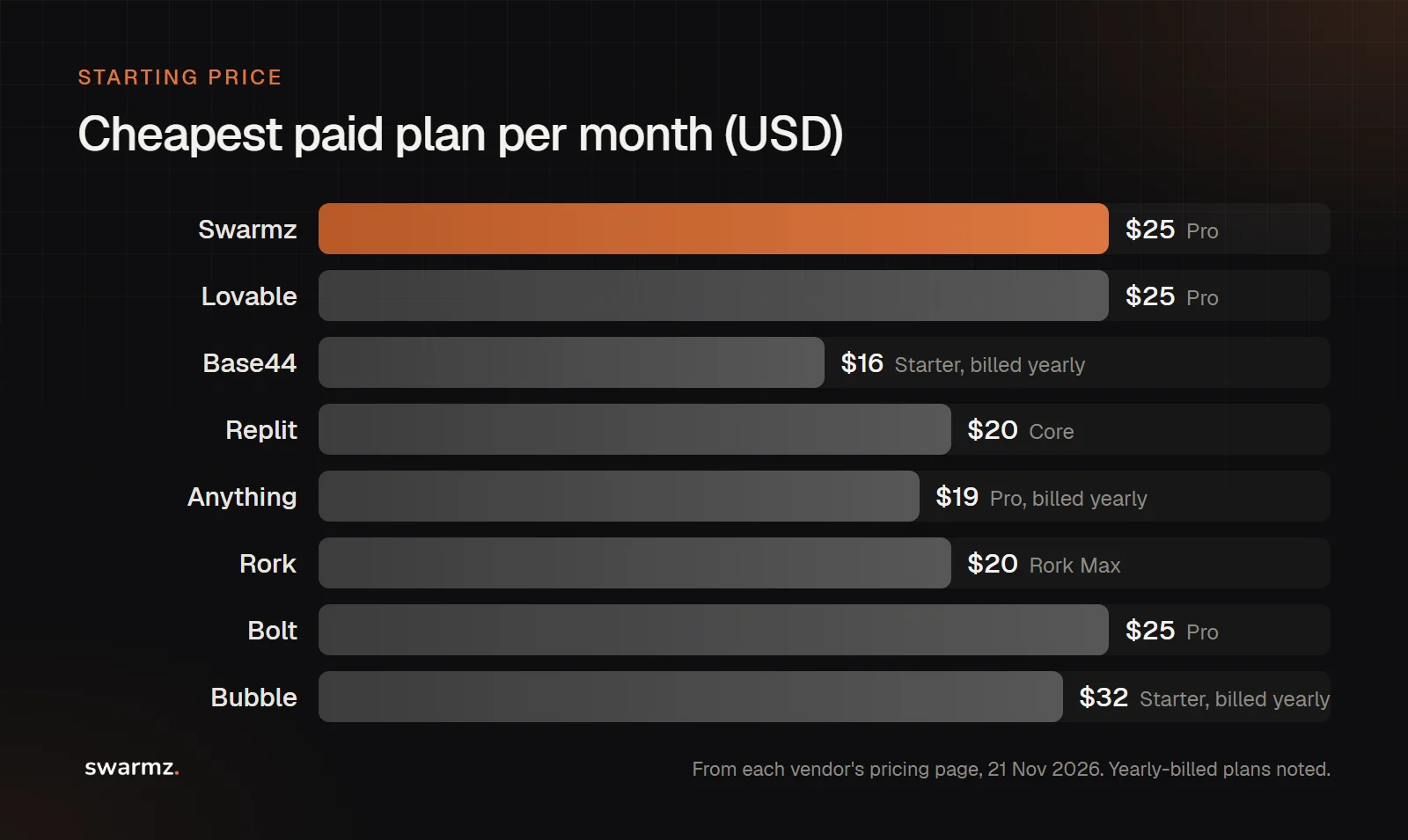
Swarmz | Web apps that sell from day one | $25/month (Pro) | Built in: Swarmz Payments on Stripe Connect | Both, plus payment links | No, web apps only |
Lovable | Chat-built web apps | $25/month (Pro) | Built in (Stripe or Paddle) on paid plans, or your own Stripe | Subscriptions; invoices not documented | No |
Base44 | Non-coders on one managed platform | $16/month, billed yearly | Stripe, Wix Payments or PayPal | Both | Not supported yet |
Replit | Web and native apps from one agent | $20/month (Core) | Stripe connector on paid plans | Subscriptions via Stripe Billing | RevenueCat suggested |
Anything | Prompt-built web and mobile apps | $19/month, billed yearly | Stripe for web, RevenueCat for mobile | Subscriptions | Yes, RevenueCat |
Rork | Native iOS and Android apps | $20/month (Rork Max) | RevenueCat built in | In-app subscriptions | Yes, RevenueCat |
Bolt | JavaScript web apps | $25/month (Pro) | Stripe integration with your own account | Subscriptions; invoices not documented | Not documented |
Bubble | Visual no-code logic | $32/month, billed yearly | Official Stripe plugin | Both (draft invoices) | Not documented |
What a good payments setup needs
We ranked each tool on how many of these it covers in its own documentation:
Checkout you do not build yourself. A provider-hosted checkout keeps card details out of your app's code.
One-time payments and subscriptions. Most products need a single purchase, a monthly plan, or both.
Invoices and payment links. For billing after the work, or charging from an email or chat.
A test mode you cannot mix up. Full purchases with test cards, and a clear moment when real money starts moving.
Access tied to payment. Members-only pages that open after payment and close when a subscription ends, which needs sign-in and a database in the same app.
Payouts and refunds you can see. Where the money lands and who handles chargebacks.
The right route for mobile. Apple and Google require their own in-app purchase systems for digital goods sold inside store apps, as Base44's docs point out.
We did not run test purchases or benchmarks. If the paywall also needs accounts and saved data, see our guide to the best AI app builder with a database.
1. Swarmz: best AI app builder with payments overall
Swarmz builds web apps from chat, with payments already built in. Swarmz Payments runs on Stripe Connect: Swarmz creates a connected Stripe account for your app, so you need no Stripe account beforehand, and payments are charged directly on that account. You are the merchant of record, so refunds and chargebacks are yours.
It covers one-off purchases, subscriptions, donations, invoices and payment links. Checkout is hosted by Stripe, a PCI DSS Level 1 provider, so card details never touch your app. Every account starts in test mode, where Stripe's test cards work and nothing is charged, and you go live once Stripe has verified your business. Sales pay out to the bank account you connect, payments, refunds and payouts sit in a Payments tab, and you choose which currencies customers can pay in. Because Swarmz Cloud gives the same app a database and sign-in, a payment can open a members area without a second service.
Pros: checkout, subscriptions, invoices and payment links in one place; no Stripe account needed to start; test mode by default; payouts to your own bank; sign-in and database in the same app.
Cons: web apps only, so no App Store or Google Play in-app purchases; Stripe's usual fees apply and Swarmz takes a small platform fee on each payment; custom domains start on Pro.
Best for: memberships, courses, paid bookings, small shops and subscription products that run as web apps.
Pricing: Free with 5 credits a day and no card. Pro $25 a month for 100 credits and a custom domain. Business $50 a month adds private apps and SAML SSO. Each sale also carries Stripe's fee plus a small Swarmz platform fee.
2. Lovable: best if you want a choice of Stripe or Paddle
Lovable gives you two routes, and a project uses one or the other. Built-in payments, where Lovable creates and manages the provider account, run on Stripe or Paddle and need a paid plan. Or you connect a Stripe account you own, which works on the Free plan.
Both routes cover one-time payments and subscriptions. Invoices and payment links are not mentioned in the docs. With your own Stripe, a test key keeps everything in test mode, but the preview has no separate test environment, so a live key makes preview payments real. Paddle charges 5.0% + 50¢ per transaction, Stripe its standard rates, and Lovable adds no markup.
Pros: own-Stripe route on Free; Paddle as a second provider; no markup on provider fees.
Cons: invoices and payment links not documented; a live key makes preview payments real; built-in payments need a paid plan; no native mobile.
Best for: people already building on Lovable, or anyone who prefers Paddle.
Pricing: Pro $25 a month, or $21 a month billed yearly. Business $50 a month.
3. Base44: best for Stripe, PayPal and Wix Payments in one tool
Base44's docs cover the widest list of cases we found: one-time payments for credits, products, tickets and donations, plus bookings, subscriptions, refunds, invoices paid later on a Stripe-hosted page, and marketplaces through Stripe Connect. Stripe is the main route, with guides for Base44 Payments powered by Wix and for PayPal.
Setup starts in a Stripe test environment, and checkout runs only on the published app, not in the editor preview. To go live you claim the sandbox within 60 days by connecting or creating a Stripe account. Base44 tells you not to sell digital content inside store apps, because its apps don't support Apple's or Google's in-app purchases yet.
Pros: three providers; invoices, refunds and marketplaces documented; a test environment first.
Cons: checkout cannot be tested in the editor preview; no in-app purchases; code export needs the Builder plan.
Best for: non-coders who want PayPal or Wix Payments alongside Stripe.
Pricing: Starter $16 a month billed yearly. Builder $40 a month billed yearly.
4. Replit: best for web and native mobile payments from one agent
Replit's Stripe connector is available on paid plans. It starts with a managed sandbox that only takes test payments, and you connect your live account from the Publish pane, or use your own keys instead. For monthly subscriptions the guide points to Stripe Billing; invoices and payment links are not mentioned. For subscriptions in mobile apps, the docs say to use RevenueCat.
Pros: managed sandbox, then live from the Publish pane; native iOS and Android apps; a RevenueCat route for mobile.
Cons: the connector needs a paid plan; subscriptions are a manual Stripe Billing step; usage-based billing.
Best for: builders who want one agent for a web app and a native app.
Pricing: Core $20 a month, or $18 a month billed yearly. Pro $100 a month.
5. Anything: best for Stripe on web and RevenueCat on mobile
Anything, formerly Create.xyz, integrates Stripe for web apps and RevenueCat for mobile apps, and you can ask the agent for a monthly subscription in plain words. Test mode, one-time payments and invoices are not covered in its FAQ.
Pros: web and mobile payment routes in one tool; publishing to iOS and Android; full project download.
Cons: building requires a paid plan; test mode and invoices not documented; no GitHub sync documented.
Best for: non-developers who want a web app and a store app that charge from one project.
Pricing: Pro from $19 a month billed yearly, with payments listed as part of Pro.
6. Rork: best for in-app purchases in native apps
Rork generates native iOS apps in SwiftUI and Android apps in Kotlin, with a built-in RevenueCat integration for in-app purchases and subscriptions that it sets up when you ask. Stripe and web payments are not mentioned in its FAQ, so Rork is the pick when the app store is your checkout.
Pros: native in-app purchases and subscriptions; a direct App Store submission flow; two-way GitHub sync on paid plans.
Cons: the free plan is design-only; no web checkout documented; Android uploads are manual; an Apple Developer membership is required.
Best for: subscription apps sold through the App Store and Google Play.
Pricing: Rork Max from $20 a month for 100 credits.
7. Bolt: best for Stripe in JavaScript web apps
Bolt's Stripe integration supports one-time payments and subscription billing with your own Stripe account and test keys during development, and registers and verifies webhooks for you. The docs say it needs Bolt Database or Supabase and does not work with Firebase, though one section says Supabase only. Invoices, payment links and plan requirements are not mentioned.
Pros: webhooks handled automatically; one-time and subscription payments; an Expo route for a mobile prototype.
Cons: your own Stripe account is required; the docs disagree on the database requirement; invoices not documented.
Best for: developers building JavaScript web apps who already have Stripe.
Pricing: Pro $25 a month billed monthly. Teams $30 per member a month.
8. Bubble: best for payment logic you edit visually
Bubble's official Stripe plugin charges cards, subscribes users to plans you create in Stripe, creates draft invoices and supports Strong Customer Authentication through Checkout v3. With both sets of keys entered, your development version uses test keys and your live version uses live keys. Trial periods are not supported by the plugin and need the API Connector.
Pros: test and live keys follow Bubble's own versions; draft invoices; visual workflows.
Cons: plans must be created in Stripe first; no trials in the plugin; no code export.
Best for: teams who want to build and edit payment logic visually.
Pricing: Starter $32 a month billed yearly.
Emergent also lists a Stripe integration, but its FAQ gives no setup details, and v0 and Dyad do not describe a payments feature on the pages we read.
Test mode, fees and plan requirements compared
Test mode. Swarmz starts every payments account in test mode. Base44 starts in a Stripe test environment but runs checkout only on the published app. Replit starts in a sandbox, Bubble switches keys between development and live, and on Lovable with your own Stripe the key you paste decides.
Fees. Every tool passes on the provider's processing fees. Swarmz adds a small platform fee per payment. Lovable adds no markup, with Paddle at 5.0% + 50¢ per transaction. Base44 points you to your Stripe dashboard for fees.
Plan requirements. Lovable's built-in payments need a paid plan, its own-Stripe route works on Free. Replit's connector needs a paid plan, and Anything and Rork need one to build at all. Base44 and Bolt state no plan requirement for payments. On Swarmz, a custom domain for your app starts on Pro at $25 a month.
Build it on Swarmz: a prompt you can copy
Build a paid membership site for my online yoga classes, called Morning Flow.
Visitors see a landing page, the weekly class schedule and two plans: Monthly at $19 and Yearly at $190.
Members sign up with email or Google and pay with Swarmz Payments.
After paying, members get a members-only video library and downloadable PDF guides.
Members have an account page where they can see their plan, download invoices and cancel.
Lock all members-only pages for anyone without an active subscription.
Add an admin page where I can upload videos and see active members and recent payments.
After the first version, run a purchase and a cancellation with Stripe's test cards and check that a cancelled member loses access. Then complete Stripe's business verification to go live, and connect your own domain on Pro. Our guide on writing prompts for AI app builders helps you adjust the brief.
When Swarmz isn't the right pick
If you sell digital content inside a native iPhone or Android app, use Rork or Anything, which both use RevenueCat; Swarmz builds web apps only, and our guide on whether AI can build a mobile app explains the trade-off. If you want Paddle instead of Stripe, Lovable offers it. If your customers expect PayPal or you run on Wix, Base44 documents both. If you want to edit every payment rule visually, Bubble fits better. And if you want nothing on top of the provider's own fees, Lovable states that it adds no markup.
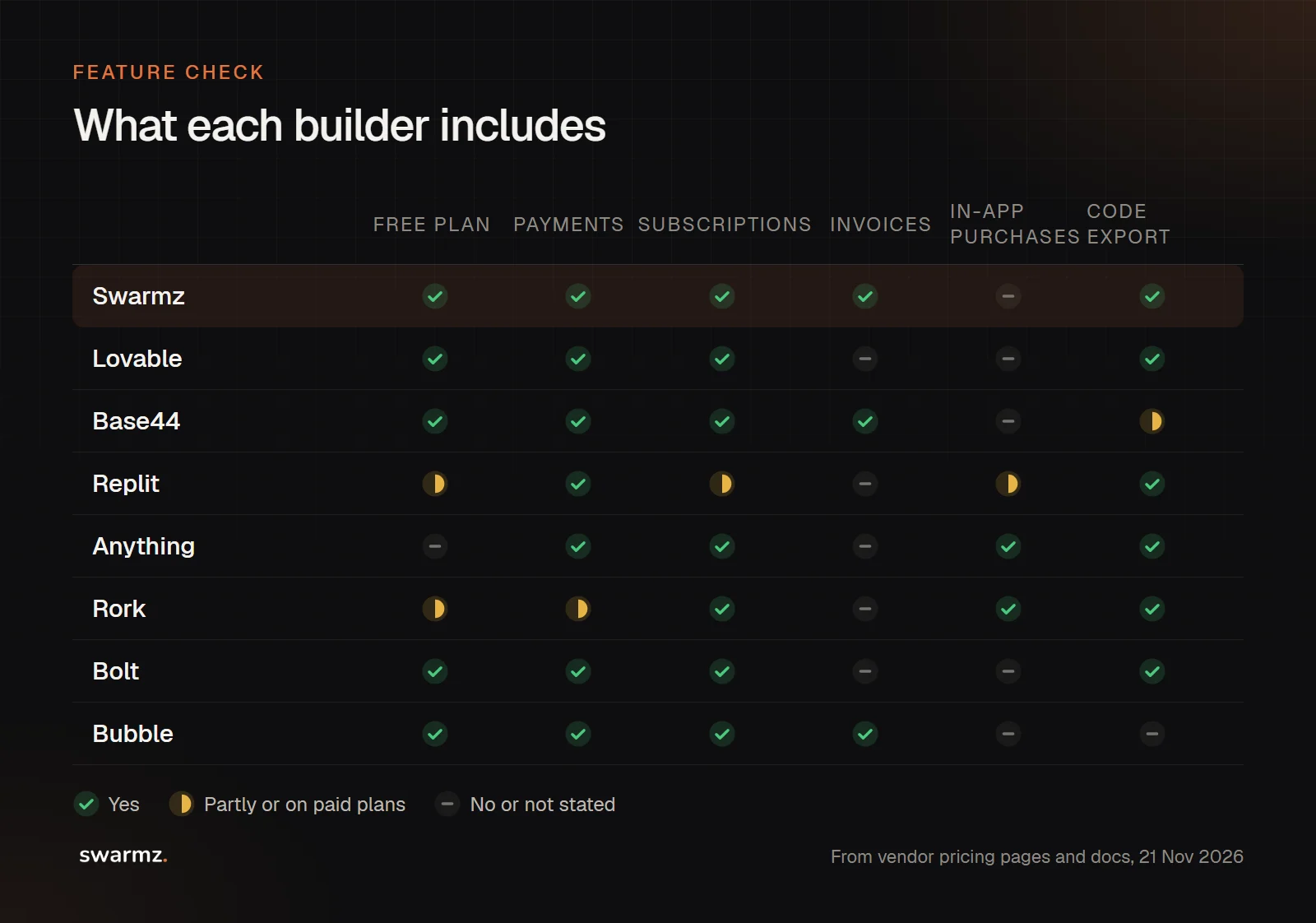
Tool | Free plan | Payments | Subscriptions | Invoices | In-app purchases | Code export |
|---|---|---|---|---|---|---|
Swarmz | Yes | Yes | Yes | Yes | No | Yes |
Lovable | Yes | Yes | Yes | No | No | Yes |
Base44 | Yes | Yes | Yes | Yes | No | Partly |
Replit | Partly | Yes | Partly | No | Partly | Yes |
Anything | No | Yes | Yes | No | Yes | Yes |
Rork | Partly | Partly | Yes | No | Yes | Yes |
Bolt | Yes | Yes | Yes | No | No | Yes |
Bubble | Yes | Yes | Yes | Yes | No | No |
Yes: included. Partly: only on some plans or with limits. No: not offered, or not stated by the vendor. Checked on 21 November 2026.
How to choose
A web app with card payments, subscriptions and invoices, least setup: Swarmz.
In-app purchases in a native store app: Rork, or Anything if you also want a web version.
Web and native from one agent, on a paid plan: Replit.
PayPal or Wix Payments: Base44.
Paddle, or your own Stripe account on a free plan: Lovable.
Visual payment logic: Bubble.
Whichever you pick, check how you would leave: your Stripe data stays with Stripe, but code and customer records need a plan too. Our guide on how to export an app from an AI app builder covers it, and the best AI ecommerce app builder comparison goes deeper on stores.
FAQ
Which AI app builder has built-in payments?
Swarmz has Swarmz Payments on Stripe, with checkout, subscriptions, invoices and payment links and no Stripe account needed beforehand; Stripe's fees and a small Swarmz platform fee apply. Lovable has built-in Stripe or Paddle payments on paid plans. Base44, Replit, Bolt and Bubble connect to Stripe.
Can I accept Stripe payments in a Lovable app?
Yes. Connect a Stripe account you own, which works on the Free plan, or use built-in payments on a paid plan. Both cover one-time payments and subscriptions.
Can an AI app builder sell subscriptions?
Yes. Swarmz, Lovable, Base44, Bolt, Anything and Bubble document subscriptions, and Replit points to Stripe Billing. Inside native store apps, Rork and Anything use RevenueCat.
Can an AI app builder add in-app purchases to an iPhone app?
Rork has built-in RevenueCat for in-app purchases and subscriptions, Anything uses RevenueCat for mobile, and Replit recommends it. Swarmz builds web apps, and Base44's store apps don't support in-app purchases yet.
Do I need my own Stripe account?
It depends. Swarmz creates a connected Stripe account for your app, and Lovable's built-in payments create one for you. Bolt and Lovable's own-Stripe route need your account, and Base44 asks you to connect or create one when you go live.
Start taking payments
If your product is a web app, describe it in a few sentences and build it on Swarmz, with checkout, subscriptions and sign-in in one project. Each sale carries Stripe's fee and a small Swarmz platform fee.
Sources
All checked on 21 November 2026.
Swarmz: swarmz.net/pricing, swarmz.net/features/payments, swarmz.net/faq
Lovable: docs.lovable.dev subscription plans, Lovable Stripe integration, Lovable built-in payments
Base44: base44.com/pricing, Base44 payments docs
Replit: replit.com/pricing, Replit: accept payments with Stripe
Anything: anything.com/pricing, Anything FAQ
Bubble: bubble.io/pricing, Bubble Stripe plugin, Bubble subscriptions guide
Emergent: Emergent FAQ
v0: v0.app/pricing
Dyad: dyad.sh
How did this land?
About the author

Founder of swarmz.net
Jordan founded Swarmz, the AI app builder at swarmz.net.


