7 Best v0 Alternatives in 2026, Compared
Seven v0 alternatives compared on price, free plan, code export, backend and payments, with prices checked on 21 November 2026 and a fair look at where v0 still wins.
The best v0 alternative for people who want a finished app rather than interface code is Swarmz, because the database, user sign-in, file storage and Stripe payments are built into the same platform that builds your screens, with two-way GitHub sync and a free plan of 5 credits a day. v0 by Vercel, now at v0.app, is still very good at producing Next.js interfaces inside a GitHub and Vercel workflow, so if that is all you need, you may already have the right tool. For native mobile apps, a local open-source setup or a design-first tool, Replit, Dyad and Figma Make fit better.
Swarmz is our product, so weigh our ranking with that in mind. Every price in this article was checked on the vendor's own pricing page or docs on 21 November 2026, and the sources are listed at the end.
v0 alternatives at a glance
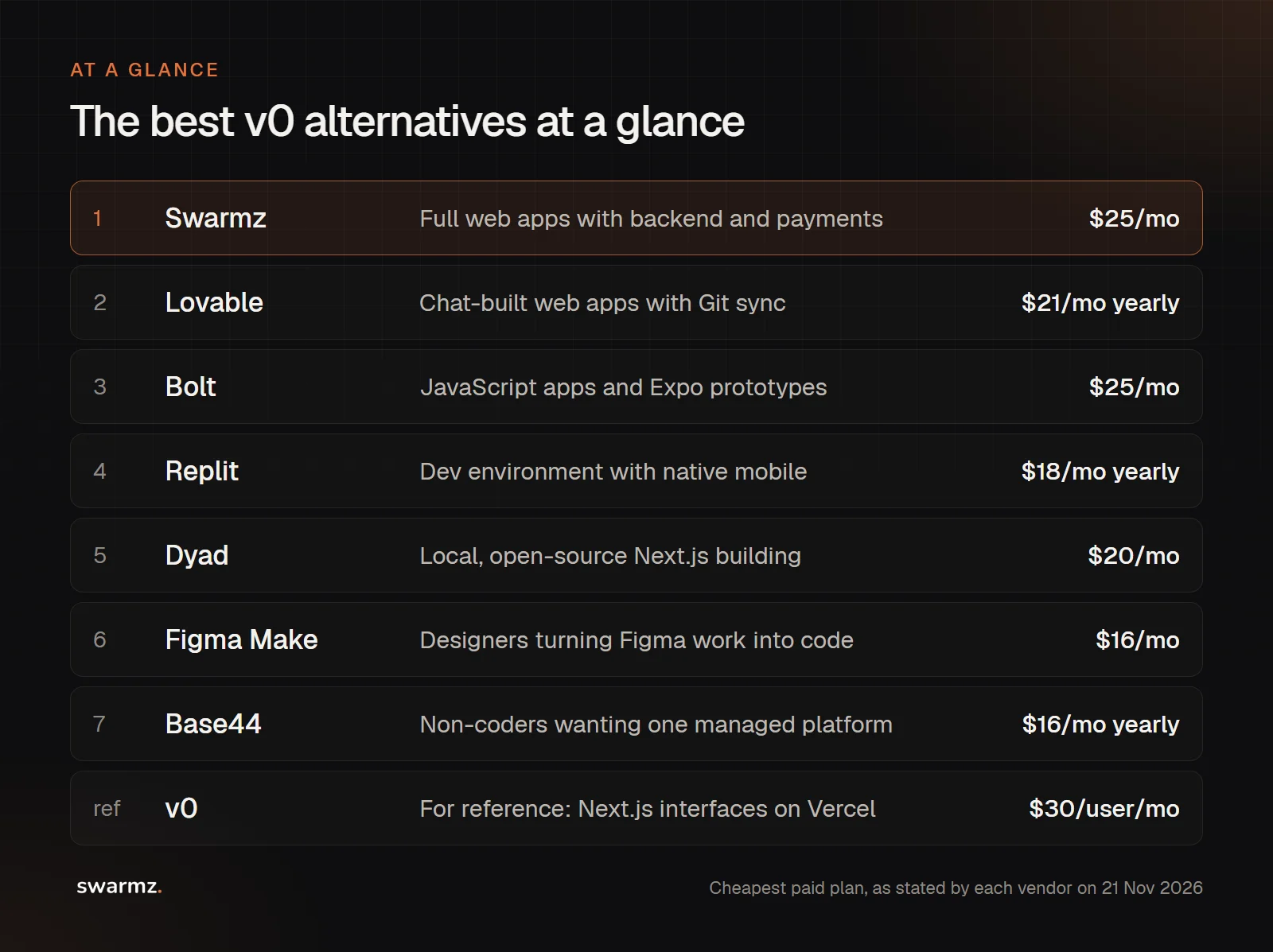
Tool | Best for | Starting paid price | Free plan | Code export | Backend and payments |
|---|---|---|---|---|---|
Swarmz | Full web apps with a backend and payments | $25/month (Pro), no per-seat fees | 5 credits a day, no card | Two-way GitHub sync | Built-in database, sign-in, storage; Stripe payments |
Lovable | Chat-built web apps with Git sync | $25/month (Pro), $21 billed yearly | 5 daily credits, up to 30 a month | Git sync; ZIP on paid plans | Lovable Cloud or your own Supabase; Stripe |
Bolt | JavaScript apps and Expo prototypes | $25/month (Pro) | 1M tokens a month, 300K daily cap | GitHub integration | Bolt Database or Supabase; Stripe announced as private beta |
Replit | A full dev environment with native mobile | $20/month (Core), $18 billed yearly | Yes, 1 published app that goes down after 30 days | GitHub or GitLab | Built-in PostgreSQL; Stripe connector on paid plans |
Dyad | Local, open-source Next.js building | Free app; Pro $20/month for credits | Yes, with your own AI API key | Plain Next.js code | Connect Supabase or Neon; payments not stated |
Figma Make | Designers turning Figma work into code | $16/month (Professional seat) | 150 AI credits a day, up to 500 a month | Partial; local use "coming soon" | Built-in CMS; payments not stated |
Base44 | Non-coders who want one managed platform | $16/month (Starter), billed yearly | 25 message credits, up to 5 apps | GitHub and ZIP from the Builder plan | Built-in backend; Stripe, Wix Payments, PayPal |
v0 (for reference) | Next.js interfaces on Vercel | $30 per user/month (Plus) | 7 messages a day | Two-way GitHub sync | Databases via Vercel Marketplace; Stripe listed as an integration |
Why people look for a v0 alternative
v0 is strong at what it was built for. It writes Next.js, React, TypeScript, Tailwind CSS and shadcn/ui code, syncs both ways with a private GitHub repository, works on branches instead of pushing to main, opens pull requests and gives each branch a Vercel preview. Design Mode lets you adjust the interface visually, even on the free plan. If you review changes in pull requests and deploy on Vercel, that workflow is hard to beat.
People look elsewhere for three main reasons:
The backend comes from separate services. v0 adds databases such as Neon, Supabase, Upstash or Vercel Blob through the Vercel Marketplace, and each one provisions a new account with that provider. Stripe is listed as a Marketplace integration, but v0's docs do not describe how it builds payments into your app.
The entry price went up for new users. The $20 Premium plan is being retired and is closed to new sign-ups, so a newcomer's cheapest paid plan is Plus at $30 per user a month.
It builds web apps, not native apps. The docs mention mobile-responsive apps, and the v0 iOS app is for prompting from your phone, not for building App Store apps.
For a side-by-side look at the best-known tools, see our Bolt vs Lovable vs Replit vs v0 comparison.
What v0 costs now, and what the alternatives cost
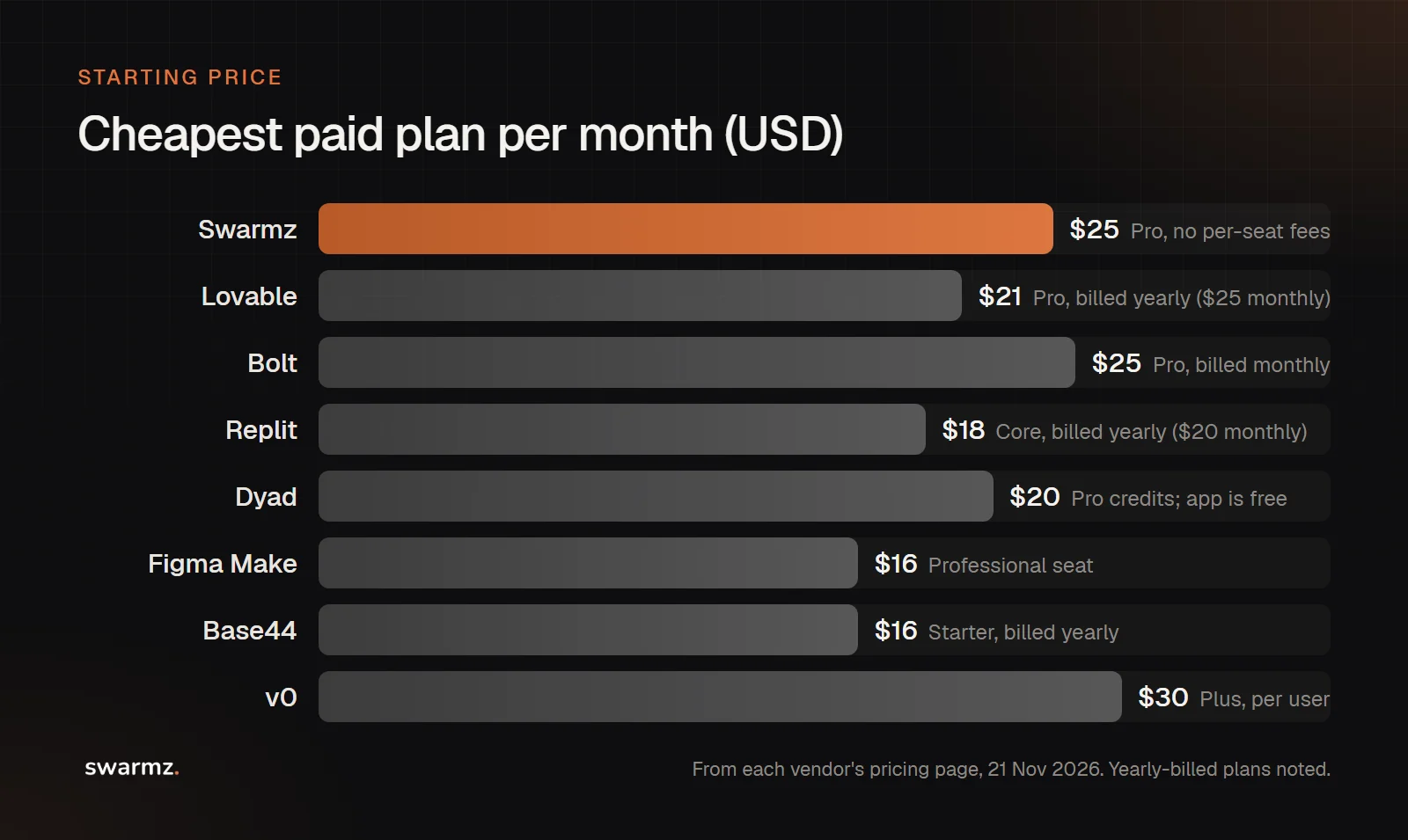
v0 lists Free, Plus at $30 per user a month, Business at $100 per user a month, and custom Enterprise pricing. Plus includes $30 of monthly credits per user plus $2 of daily login credits, and unused monthly credits lapse after 65 days. No yearly option is listed. Because paid plans are per user, a team of three on Plus pays $90 a month before extra credits.
Several alternatives price the account or workspace instead: Swarmz Pro is $25 a month with no per-seat fees, Lovable Pro is $25 with unlimited members, Bolt Pro is $25 and Replit Core is $20. Each meters usage differently, so the entry price is only the start.
1. Swarmz: best v0 alternative for a full app
Swarmz is an AI app builder for web apps. You describe what you want in chat, and Swarmz builds the screens, the data model and the sign-in, then publishes the app to a swarmz.cloud address with SSL in one click. The code is standard React, TypeScript and Tailwind, close to the stack v0 users know, and it syncs both ways with your own GitHub repository on every plan, Free included.
The real difference from v0 is where the backend lives. Every app gets a database, user sign-in, file storage and server functions through Swarmz Cloud, which is part of Swarmz itself and included on every plan. Sign-in supports email, phone, Google, Apple, GitHub, Microsoft, Discord, X and SAML SSO. Swarmz Payments runs on Stripe for checkout, subscriptions, invoices and payment links. More than 80 connectors, including Shopify, Slack, Notion, Airtable, HubSpot and Supabase, connect in one click.
Pros
Database, sign-in, storage and server functions on every plan including Free, plus built-in Stripe payments (Stripe's fees and a small Swarmz platform fee apply).
Two-way GitHub sync on the free plan, with React, TypeScript and Tailwind code.
Credits shared by the whole workspace with no per-seat fees, plus Admin, Editor and Viewer roles.
Account and main database hosted in the EU (Ireland), with 16 regions to choose from for your app's backend.
Cons
Web apps only. Swarmz does not build native iOS or Android apps.
There is no ZIP download; you get your code through GitHub.
Custom domains need the Pro plan, and private apps need Business.
Best for: founders, small businesses and agencies who want a working product with accounts, data and payments, not only the interface.
Pricing: Free with 5 credits every day and no card. Pro is $25 a month for 100 credits plus the daily credits, with 30-day rollover, top-ups and a custom domain. Business is $50 a month and adds private apps, SAML single sign-on, user groups and custom design systems. New accounts can also try Pro free for 3 days with 25 credits; the trial needs a card and becomes the $25 Pro plan unless you cancel.
2. Lovable: best for chat-built web apps with Git sync on every plan
Lovable builds web apps from chat, with Lovable Cloud for the database, sign-in, storage and functions, or your own Supabase project. Git sync to GitHub, GitLab or Bitbucket works on every plan, and paid plans can also download a ZIP.
Pros: Git sync on the free plan; a built-in backend; unlimited workspace members, priced by credits rather than seats.
Cons: no native mobile apps; credit use varies by task; Git sync creates a new repository rather than connecting an existing one.
Best for: people who want a chat builder like v0 with the backend included and a ZIP option.
Pricing: Pro is $25 a month, or $21 a month billed yearly. Business is $50 a month. Our Lovable alternatives guide goes deeper.
3. Bolt: best for JavaScript prototypes, including Expo mobile
Bolt runs in the browser and builds websites, web apps and Expo mobile apps when you mention "mobile app" in your first prompt. Projects get a managed Bolt Database through Bolt Cloud, or you can connect Supabase, and the GitHub integration commits your work and supports branches.
Pros: a free plan with hosting; an Expo route to mobile; two-way GitHub integration.
Cons: a 300K daily token cap and Bolt branding on free sites; JavaScript-only backends; Stripe was announced as a private beta.
Best for: developers who like v0's speed but also want a mobile prototype.
Pricing: Free with 1M tokens a month. Pro is $25 a month billed monthly; Teams is $30 per member a month.
4. Replit: best for a full dev environment and native mobile
Replit pairs an AI Agent with a full online development environment. It builds web apps and native iOS and Android apps, includes managed PostgreSQL with no keys to set up, offers Replit Auth or Clerk for sign-in, and has a Stripe connector on paid plans.
Pros: native mobile apps from the same agent; built-in Postgres; GitHub or GitLab connection and a real code workspace.
Cons: usage-based billing covers AI, publishing, data transfer and storage; the free plan's published app goes down after 30 days.
Best for: developers who want the agent plus a real workspace, and anyone who needs a native app.
Pricing: Core is $20 a month, or $18 a month billed yearly, per Replit's pricing page. Pro is $100 a month.
5. Dyad: best local, open-source option that still deploys to Vercel
Dyad is an open-source desktop app that writes standard Next.js code on your own computer, using your own AI API key or a local model. You connect Supabase or Neon for data and sign-in, and deploy through GitHub and Vercel or your own cloud.
Pros: free and open source; code and data stay on your machine; plain Next.js output with no lock-in.
Cons: a desktop install; no built-in hosting, domains or payments; mobile means wrapping the web app with Capacitor.
Best for: developers who like v0's Next.js output but want privacy and to pay their model provider directly.
Pricing: the app is free with your own key. Pro is $20 a month for 200 AI credits.
6. Figma Make: best for designers turning Figma work into code
Figma Make is Figma's prompt-to-app tool. Everything it builds is code-backed and visually editable, and it includes a built-in CMS powered by Payload. If you used v0 mainly to turn mockups into polished interfaces, Make keeps that work next to your designs.
Pros: works inside the Figma you already use; code you can also edit visually; a built-in CMS.
Cons: using Make in your own codebase is marked "coming soon"; publishing, domains and payments are not stated on Figma's pages; AI credits are shared across every Figma AI feature.
Best for: designers and product teams who want interactive prototypes from Figma designs.
Pricing: Starter is free with 150 AI credits a day, up to 500 a month. A Professional full seat is $16 a month with 3,000 AI credits.
7. Base44: best managed platform for non-coders
Base44, owned by Wix since 2025 and still run as its own product, builds full-stack apps, websites and AI agents with a managed backend, sign-in and hosting. Payments work through Stripe, Wix Payments or PayPal.
Pros: backend, database and sign-in on every plan, including Free; a custom domain from the cheapest paid plan; three payment options.
Cons: GitHub sync and code export need the Builder plan ($40 a month billed yearly) or higher; app store versions run in a web view, so features such as Face ID are not supported; the pricing page shows yearly prices only.
Best for: non-technical builders who want everything managed and do not need the code early.
Pricing: Starter is $16 a month billed yearly; Builder is $40 a month billed yearly. See our Base44 alternatives guide.
When Swarmz isn't the right pick
If you mainly want interface code in your own Next.js repository, reviewed in pull requests and deployed on Vercel, stay with v0: that is its strongest workflow. If you would rather work in your own editor, an AI code editor such as Cursor may suit you better; our guide to AI coding agents vs AI app builders explains the trade-off. If your app must be a native iOS or Android app, choose Replit, or Bolt with Expo for a prototype, and read whether AI can build a mobile app. For a fully local setup with your own model keys, use Dyad; for Figma-first prototypes, Figma Make. If you need a ZIP rather than a GitHub repository, Lovable's paid plans and Dyad give you one.
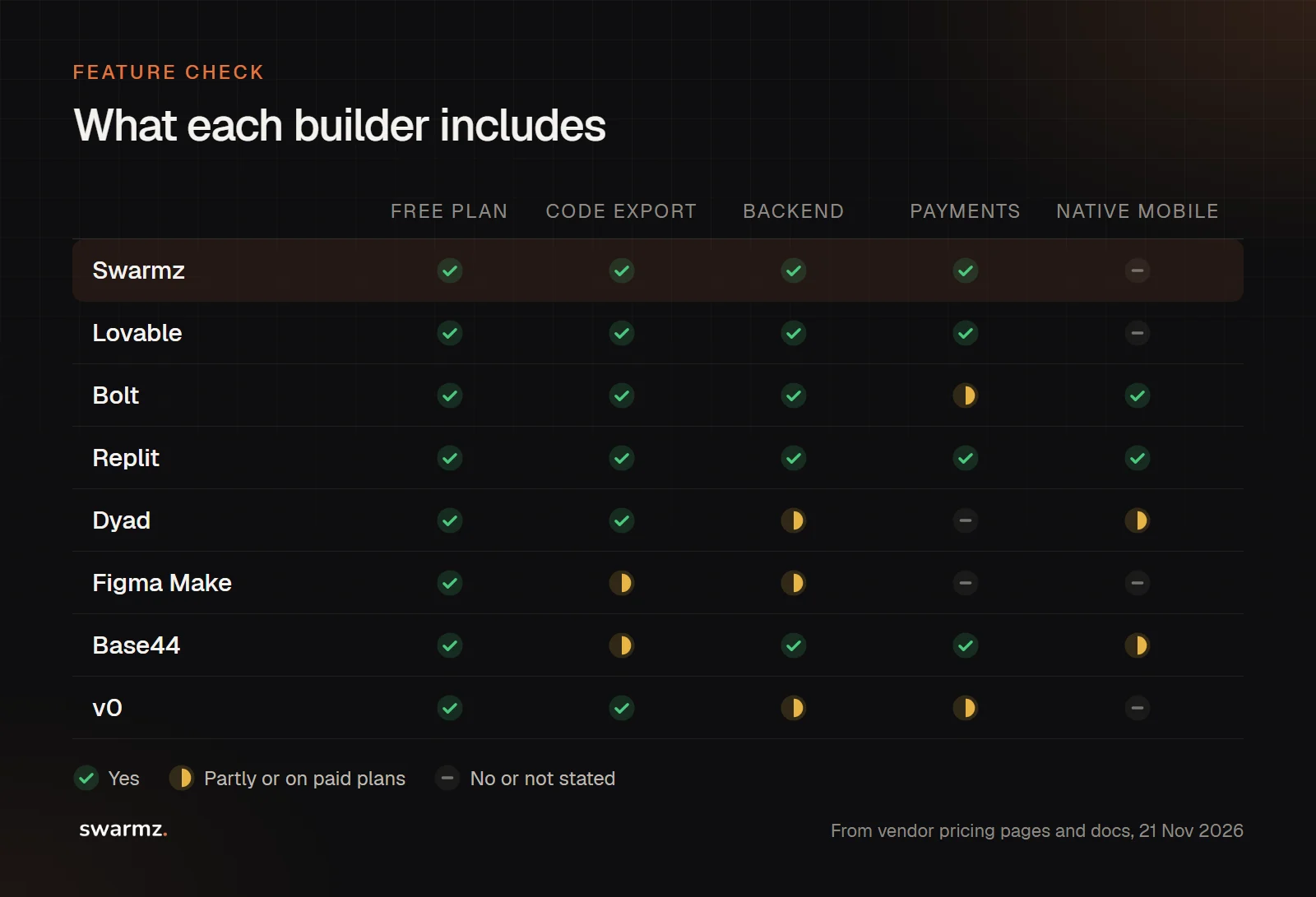
Tool | Free plan | Code export | Backend | Payments | Native mobile |
|---|---|---|---|---|---|
Swarmz | Yes | Yes | Yes | Yes | No |
Lovable | Yes | Yes | Yes | Yes | No |
Bolt | Yes | Yes | Yes | Partly | Yes |
Replit | Yes | Yes | Yes | Yes | Yes |
Dyad | Yes | Yes | Partly | No | Partly |
Figma Make | Yes | Partly | Partly | No | No |
Base44 | Yes | Partly | Yes | Yes | Partly |
v0 (reference) | Yes | Yes | Partly | Partly | No |
Yes: included. Partly: only on some plans or with limits. No: not offered, or not stated by the vendor. Checked on 21 November 2026.
How to choose
You want a full web app with sign-in, data and payments in one place: Swarmz.
You want a chat builder with Git sync on every plan and a ZIP option: Lovable.
You review code in pull requests and deploy on Vercel: keep v0.
You need a native mobile app: Replit, or Bolt for an Expo prototype.
You want local, open source and your own model keys: Dyad.
You design in Figma first: Figma Make.
You want everything managed and do not need the code yet: Base44.
Whichever you pick, check how you would leave before you commit. Our guide on how to export an app from an AI app builder covers what usually comes with you.
FAQ
What is the best v0 alternative?
For a full web app with a database, sign-in and payments built in, Swarmz. It builds from chat like v0, syncs code with GitHub on the free plan, and Pro is $25 a month for the whole workspace. For interface code in a GitHub and Vercel workflow, v0 is still strong; for native mobile, Replit fits better.
Is there a free alternative to v0?
Yes. Dyad is free and open source with your own AI API key. Swarmz has a free plan with 5 credits every day, no card, a built-in backend and GitHub sync. Lovable's free plan gives 5 daily credits and Bolt's gives 1M tokens a month. v0's own free plan allows 7 messages a day.
Is v0 better than Lovable?
It depends on what you build. v0 has the stronger developer workflow, with branches, pull requests and a Vercel preview per branch. Lovable includes its own backend, Lovable Cloud, while v0 adds databases from Vercel Marketplace providers. Lovable Pro is $25 a month with unlimited members; v0 Plus is $30 per user a month.
Does v0 have a backend or database?
Not one of its own. v0 connects databases from the Vercel Marketplace, such as Neon, Supabase, Upstash and Vercel Blob, in one click. Each integration creates an account with that provider and adds the environment variables to your project, and v0 can then write and run SQL to create your tables.
Is v0 still free?
Yes. The free plan allows 7 messages a day, new users get a one-time $5 credit, and it includes GitHub sync, Vercel deploys and Design Mode.
Can v0 build mobile apps?
v0 builds mobile-responsive web apps, and its iOS app lets you prompt and manage projects from your phone. Its docs do not mention native iOS or Android builds. For those, Replit builds native apps and Bolt builds Expo prototypes.
Ready to build the whole app?
If you want the backend, sign-in and payments built in alongside the screens, start building on Swarmz for free. Describe the app in a sentence, publish the first version, and connect GitHub whenever you want the code.
Sources
All checked on 21 November 2026.
Swarmz: swarmz.net/pricing, swarmz.net/faq, swarmz.net/features
v0: v0.app/pricing, v0 pricing docs, v0 GitHub docs, v0 databases docs, v0 agentic features docs, v0 FAQs
Lovable: docs.lovable.dev subscription plans, docs.lovable.dev FAQ
Bolt: bolt.new/pricing, Bolt supported technologies, Bolt GitHub integration
Replit: replit.com/pricing, Replit Starter plan docs, Replit mobile apps docs
Dyad: dyad.sh, Dyad mobile app guide
Figma Make: figma.com/make, figma.com/pricing
Base44: base44.com/pricing, Base44 mobile docs, Wix press release on Base44
How did this land?
About the author

Founder of swarmz.net
Jordan founded Swarmz, the AI app builder at swarmz.net.


