Best Website Builder for Small Business (2026)
Seven website builders compared on what a small-business site needs: contact and quote forms that save leads, bookings, pages Google can read, your own domain, easy edits, reviews and a map, and the real yearly cost. Prices checked on 21 November 2026.
The best website builder for a small business is Swarmz when your site has to bring in work, not just describe it: quote and contact forms that save every lead to your own database, bookings with a Stripe deposit, and pages you change by describing the change in chat, on your own domain from $25 a month on Pro. This guide is about the website itself, for owners of local and service businesses deciding where to build it. If your site is a classic brochure and you want ready-made templates and SEO tools, Squarespace or Wix is the easier choice, and WordPress.com suits a site built around a blog.
Swarmz is our product, so weigh our ranking with that in mind. Every price in this article was checked on the vendor's own pricing page or docs on 21 November 2026, and the sources are listed at the end.
Small business website builders at a glance
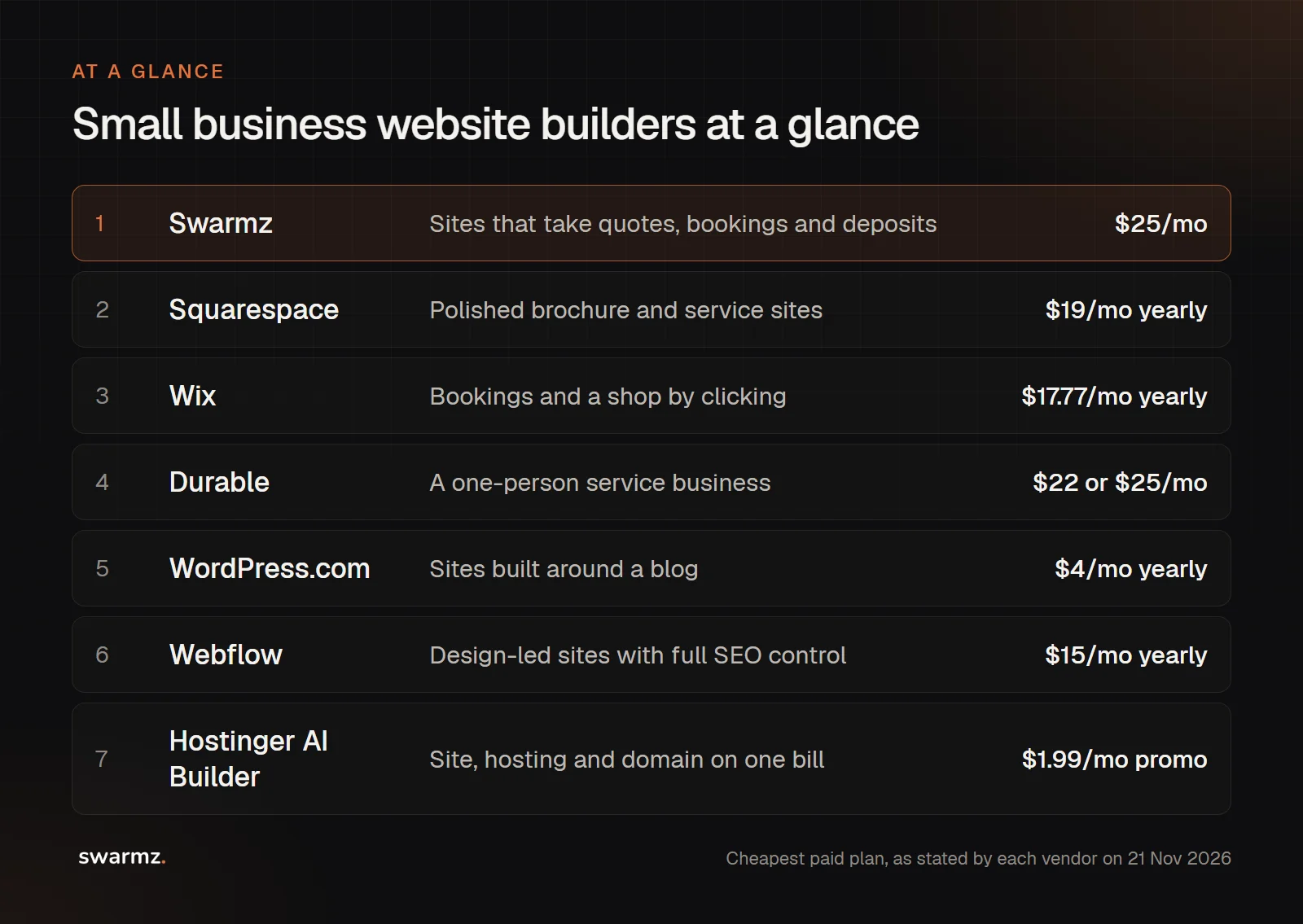
Tool | Best for | Starting paid price | Free plan | Forms that save leads | Bookings | SEO tools listed |
|---|---|---|---|---|---|---|
Swarmz | Sites that take quotes, bookings and deposits | $25/month (Pro) | 5 credits a day, no card | Your own database, with an admin view | Built from your description, Stripe deposits | Not listed |
Squarespace | Polished brochure and service sites | $19/month billed yearly, $25 monthly | No, free for 14 days | Form blocks on all plans | Acuity Scheduling, from $16/month extra | On all plans |
Wix | Bookings and a shop by clicking | $17.77/month, billed yearly | Yes | Submissions table, CSV export | From Core ($29.77/month) | Marketing and SEO suite |
Durable | A one-person service business | $22 or $25/month (Launch; the page shows both) | Yes, on a durable.site address | Custom forms and auto-replies on Launch | Synced to your calendar on Launch | On all plans |
WordPress.com | Sites built around a blog | $9/month, or $4 billed yearly | Yes, with ads | Forms dashboard with export | Through plugins | Advanced tools from Premium |
Webflow | Design-led sites with full SEO control | $15/month billed yearly | Yes, 50 form submissions | Unlimited from Basic, CSV | Not stated | Titles, sitemap, schema, redirects |
Hostinger AI Builder | Site, hosting and domain on one bill | $1.99/month promo, 48-month prepay | No, free trial credits | Databases in agentic mode | Not stated | Not stated |
What a good small business website needs
A small-business website has one job: turn people who find you into enquiries and bookings. We ranked every builder on seven points, using only what each vendor states on its own pages:
Contact and quote forms that save every lead, where you can search and export them, with the details you need to price a job.
Bookings, if you sell time, with a deposit for services where no-shows hurt.
Pages Google can read: a title and description per page, a sitemap, fast pages on phones, and a page for each service and area.
Your own domain, and its price after the free first year many plans include.
Easy edits: prices, opening hours and photos changed by you, in minutes.
Reviews and a map: real customer reviews, and your address, hours and a map where visitors expect them.
A cost you can predict: renewals, add-ons and transaction fees, not only the headline price.
Squarespace, Wix and WordPress.com are strongest on search-friendly pages and easy edits; Swarmz is strongest when the site has to capture leads and act on them. For the tools behind the site, such as a client portal, read the best AI app builder for small business; for sites built mostly by AI, see the best AI website builders.
What a year really costs
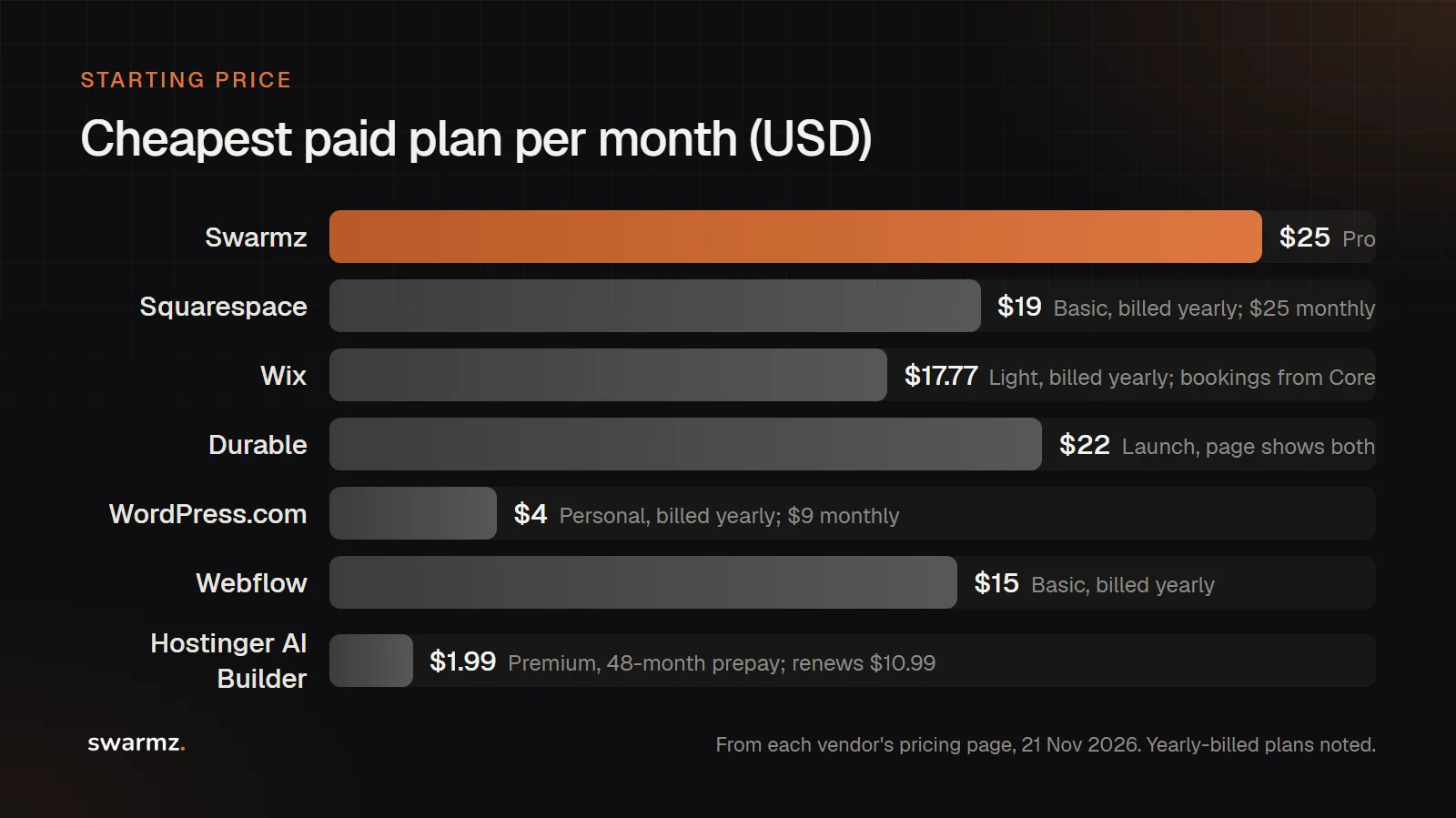
The entry price is rarely what you pay. WordPress.com Personal is $48 for the first year on yearly billing, but payment buttons and advanced SEO tools start on Premium at $8 a month billed yearly. Squarespace Basic is $228 a year, and bookings add Acuity Scheduling from $16 a month. Wix scheduling and payments start on Core at $29.77 a month, not Light. Webflow Basic has no CMS, so a blog needs Premium at $25. Hostinger's $1.99 needs $95.52 upfront for 48 months and renews at $10.99. Swarmz Pro is $25 a month with your own domain, plus Stripe's fees and a small Swarmz platform fee on any payments. Most free domains last only the first year, so add the renewal to year two.
1. Swarmz: best website builder for small businesses that take quotes and bookings
Swarmz builds websites as web apps from a plain-language description, so its forms are more than email forwarders: every quote request or enquiry is saved to the site's own database on Swarmz Cloud, and you can ask for an admin page, behind your sign-in, where you sort and answer them. The same site can take bookings and Stripe deposits. You publish in one click to a swarmz.cloud address with SSL, or your own domain on Pro.
How it handles the checklist:
Forms and leads: saved to the database, with file storage for photos customers upload; HubSpot and Google Sheets connectors send leads where you already work.
Bookings: services and slots live in the database, Swarmz Payments on Stripe takes a deposit or the full price, and Calendly connects in one click.
Pages Google can read: SEO tools are not a listed feature, so ask for a title and description per page in your prompt and check them after publishing. Analytics for visitors, sources, errors, session replays and speed starts the day you publish.
Easy edits and reviews: you change prices, hours, photos or a reviews section by describing the change in chat, and each reply shows how many credits it used.
Pros
Forms that save every lead, bookings and Stripe deposits in one site (Stripe's fees plus a small Swarmz platform fee apply).
Edits by chat, with no editor to learn.
Your code in your own GitHub repository from the free plan; account and main database hosted in the EU (Ireland).
No per-seat fees: staff get Admin, Editor or Viewer roles.
Cons
No built-in SEO tools listed, unlike Squarespace, Wix, WordPress.com and Webflow.
No drag-and-drop editor listed; every change goes through chat.
Your own domain and badge removal need Pro; no ZIP download of the code.
Best for: service businesses whose website should capture quote requests, take bookings or collect deposits.
Pricing: Free with 5 credits every day and no card. Pro is $25 a month for 100 credits plus the daily credits, with rollover for 30 days, your own domain and badge removal. Business is $50 a month. New accounts can also try Pro free for 3 days with 25 credits; the trial needs a card and becomes the $25 Pro plan unless you cancel.
2. Squarespace: best for a polished brochure or service site
Squarespace is known for its templates, and every plan includes form and newsletter blocks, built-in SEO tools with search keyword analysis, basic site metrics and an online store. Annual plans include a free domain for the first year. Bookings run through Acuity Scheduling, a separate subscription that takes deposits through Stripe, Square or PayPal and sends reminder emails.
Pros: polished templates; SEO tools on every plan; a free domain for year one on annual billing; unlimited contributors from Core.
Cons: no free plan, only free for 14 days; bookings mean a second subscription; Basic allows 2 contributors and charges 2% on store sales.
Best for: businesses whose site is mainly a shop window and has to look good.
Pricing: Basic is $19 a month billed yearly or $25 monthly; Core is $29 yearly or $39 monthly. These are US prices; Squarespace shows local prices by country. Acuity Scheduling starts at $16 a month billed yearly, or $20 monthly.
3. Wix: best for adding bookings and a shop by clicking
Wix's Harmony editor includes Aria, an AI agent for pages, content, design, SEO and settings, and AI creation tools come with every plan, Free included. Wix Forms saves every entry to a submissions table you can filter and export as CSV. Scheduling, payments and basic ecommerce start on Core, and every paid plan includes a free domain for one year.
Pros: forms, bookings, payments and a shop from one vendor; AI tools on the free plan; a free domain for year one.
Cons: Light lists neither payments nor scheduling; prices are yearly plans paid upfront and vary by location; code export is not stated.
Best for: owners who want standard business features added by clicking.
Pricing: Free plan. Light is $17.77 a month and Core $29.77 a month, as monthly equivalents of a yearly plan.
4. Durable: best for a one-person service business
Durable builds a small-business site with AI and adds a CRM, booking and lead capture. Free includes a site on a durable.site address, a CRM for 10 customers and a Google Business Profile connection. Launch adds your own domain, custom forms that capture and reply to leads automatically, booking synced to your calendar, blog posts and AI agents that help you collect more reviews. Paid plans can send invoices with Stripe payment links, with no separate Stripe account.
Pros: booking, CRM, reviews and listings in one ready-made kit; invoicing built in; a free plan.
Cons: Launch shows $25 on the plan card and $22 in the table; Durable says it is not designed for e-commerce; code export is not stated.
Best for: sole traders who want a site, bookings and a customer list with little setup.
Pricing: Free with 300 AI credits. Launch is $22 or $25 a month; Grow is $41 or $49 and adds unlimited team members.
5. WordPress.com: best for a site built around a blog
WordPress.com is managed WordPress: hosting, security and updates are handled for you, and every paid plan can install plugins from a library of more than 60,000, including WooCommerce and Yoast SEO. The Form block saves responses in a Forms dashboard you can search and export. Advanced SEO tools and payment buttons start on Premium, and only annual plans include a free domain for the first year.
Pros: a paid plan from $4 a month on yearly billing; plugins on every paid plan; built for publishing often.
Cons: a WordPress.com fee on payments, 8% on Personal and 4% on Premium, 0% on Commerce; ads and no custom domain on Free; bookings need a plugin you set up.
Best for: businesses that publish a lot: guides, news, recipes or case studies.
Pricing: Free with ads. Personal is $9 monthly or $4 a month billed yearly; Premium is $18 or $8; Business is $40 or $25.
6. Webflow: best for design-led sites with full SEO control
Webflow is a visual builder made for designers, with the most detailed SEO controls listed here: page titles and meta descriptions, alt text, canonical tags, an XML sitemap, schema markup and 301 redirects. From Basic, forms collect unlimited submissions you can download as CSV. Basic has no CMS, so a blog needs Premium, and ecommerce is a separate plan from $29 a month billed yearly with a 2% transaction fee. Booking tools are not stated on the pricing page.
Pros: precise design and SEO control; unlimited form submissions from Basic; Webflow AI on every plan.
Cons: built for designers, so there is more to learn; Basic has no CMS; site plans and Workspace seats are priced separately.
Best for: businesses with a designer or agency who want full control over how pages look and rank.
Pricing: Free Starter plan. Basic is $15 a month and Premium $25 a month, both billed yearly, in USD per site.
7. Hostinger AI Builder: best for one bill with hosting and a domain
Hostinger merged Horizons into AI Builder in August 2026. Manual mode is drag and drop with no AI credits; agentic mode generates a site with databases, user accounts and file storage. Hosting and a domain, free for the first year, come on one bill.
Pros: hosting, domain, SSL and CDN bundled; drag and drop for simple edits; code export on all plans, though not database records.
Cons: the headline price needs a 48-month prepay and renews higher; the page contradicts itself on Stripe for Premium; if the hosting plan expires, Hostinger says the project is deleted.
Best for: owners who want the lowest first bill and will commit for four years.
Pricing: Premium is $1.99 a month as a promotion on a 48-month prepay ($95.52 upfront), list $12.99, renewing at $10.99. No free plan, but 250 free credits to try building.
Build it on Swarmz: a prompt you can copy
A realistic first prompt for a local service business that wants leads and site visits from its website. Swap in your own trade, town and services; our guide on writing prompts for AI app builders shows how to add detail.
Build a website for my landscaping business, Greenline Gardens, in Bristol.
Pages: home, one page per service (garden design, lawn care, fencing, patios) with "from" prices, areas we cover, reviews, and contact.
Give every page its own title and description for Google, and show our address, phone, opening hours and a map on the contact page.
Add a quote request form (name, phone, email, postcode, service, garden size, up to 4 photos, budget) that saves every request.
Let customers book a free 30-minute garden visit from my available slots.
Give me an admin area, behind my own sign-in, to see and update quote requests, change prices and add reviews I approve.
Mobile first, natural greens, easy to read.
When the first version is ready, send yourself a quote request from your phone, book a visit, and check that both show up in the admin area. Read every page as a customer would, including each page's title and description, then connect your own domain on Pro.
When Swarmz isn't the right pick
A brochure site where templates and built-in SEO tools matter most: Squarespace or Wix.
A site built around a blog: WordPress.com, or Webflow Premium for a designer-built CMS.
A sole trader who wants a CRM, reviews and listings with little setup: Durable.
Every pixel and SEO setting under your control: Webflow.
A standard online shop: Squarespace, Wix, or WordPress.com Commerce with WooCommerce.
The lowest first bill, with a long commitment: Hostinger AI Builder.
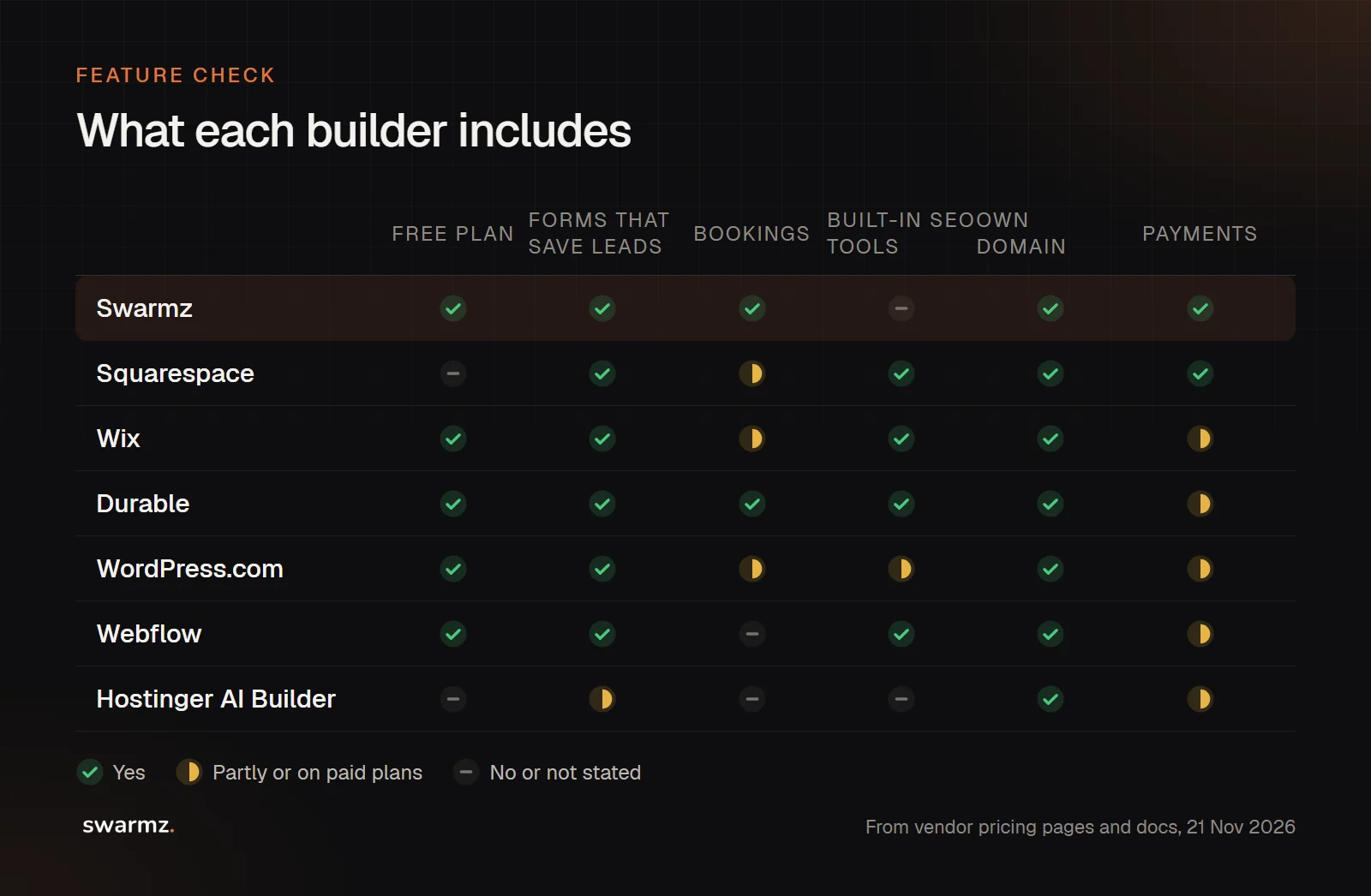
Tool | Free plan | Forms that save leads | Bookings | Built-in SEO tools | Own domain | Payments |
|---|---|---|---|---|---|---|
Swarmz | Yes | Yes | Yes | No | Yes | Yes |
Squarespace | No | Yes | Partly | Yes | Yes | Yes |
Wix | Yes | Yes | Partly | Yes | Yes | Partly |
Durable | Yes | Yes | Yes | Yes | Yes | Partly |
WordPress.com | Yes | Yes | Partly | Partly | Yes | Partly |
Webflow | Yes | Yes | No | Yes | Yes | Partly |
Hostinger AI Builder | No | Partly | No | No | Yes | Partly |
Yes: included. Partly: only on some plans or with limits. No: not offered, or not stated by the vendor. Checked on 21 November 2026.
How to choose
Your site should take quote requests, bookings or deposits: Swarmz.
A polished brochure site with SEO tools built in: Squarespace.
Bookings, payments and a shop added by clicking: Wix.
A one-person service business with a CRM and reviews: Durable.
Regular publishing: WordPress.com.
Design and SEO control in a designer's hands: Webflow.
Site, hosting and domain on one long-term bill: Hostinger AI Builder.
Whichever you pick, add up year two, not just year one, and keep your Google Business Profile complete, because local customers often see it before your website. If bookings drive your business, see the best AI booking app builder; for a solo coach or creator, the best AI app builder for entrepreneurs fits better.
FAQ
What is the best website builder for a small business?
For a site that takes quote requests, bookings or deposits, Swarmz: forms save every lead to your own database and Stripe payments are built in, with your own domain from $25 a month on Pro. For a classic brochure site, Squarespace or Wix is easier.
Which website builder is best for SEO?
Webflow lists the most detailed controls, including an XML sitemap, schema markup and 301 redirects. Squarespace and Durable include SEO tools on every plan, and WordPress.com from Premium. Swarmz does not list SEO tools, so check each page's title and description yourself.
Is Squarespace or Wix better for a small business?
Squarespace suits a site that has to look polished, but bookings need its separate scheduling plan. Wix suits owners who want bookings, payments and a shop from one vendor, all from Core at $29.77 a month billed yearly.
How much does a small business website cost per month?
Most plans here cost $4 to $40 a month: WordPress.com Personal is $4 billed yearly, Webflow Basic $15, Wix Light $17.77, Squarespace Basic $19 and Swarmz Pro $25. Hostinger's $1.99 needs a 48-month prepay.
Can my website take bookings and deposits?
Yes. Swarmz builds bookings with Stripe deposits from your description, Wix includes scheduling and payments from Core, Durable includes booking on Launch, and Squarespace uses its separate scheduling plan.
Can I move my website to another platform later?
Swarmz syncs your code to your own GitHub repository on every plan. Webflow exports HTML and CSS but not CMS content, and Hostinger exports code without database records. Squarespace, Wix and Durable do not state code export.
Build a website that brings in work
If your website should collect quote requests and bookings, not just list your services, start building on Swarmz for free. Paste the prompt above or describe your business, and see the first version before you pay anything.
Sources
All checked on 21 November 2026.
Swarmz: swarmz.net/pricing, swarmz.net/features, Swarmz Payments, swarmz.net/faq, swarmz.net/integrations
Squarespace: squarespace.com/pricing, Squarespace prices by currency, Squarespace Scheduling, Acuity Scheduling plans
Wix: wix.com/plans, Wix Forms submissions table, Wix Harmony AI tools
Durable: durable.com/pricing, Durable launch post
WordPress.com: wordpress.com/pricing, WordPress.com Form block
Webflow: webflow.com/pricing
Hostinger AI Builder: hostinger.com/horizons
How did this land?
About the author

Founder of swarmz.net
Jordan founded Swarmz, the AI app builder at swarmz.net.


