Best AI Booking App Builder in 2026
Six AI app builders compared for booking apps on time slots, customer sign-in, reminders, deposits, cancellation rules, calendar sync and domains, plus an honest look at when Calendly is enough.
The best AI booking app builder is Swarmz, because it gives a booking app the parts that are hardest to wire up yourself: a database for your services, staff and time slots, customer sign-in so people can see and cancel their own bookings, and Stripe payments for a deposit or the full price, with your own domain on Pro. If you only need a link where people pick a time with one person, a ready-made scheduler such as Calendly is often enough, and if the app has to be a native iPhone or Android app, start with Replit.
Swarmz is our product, so read our ranking with that in mind. We checked every price on the vendor's own pricing page or docs on 21 November 2026, and the sources are listed at the end.
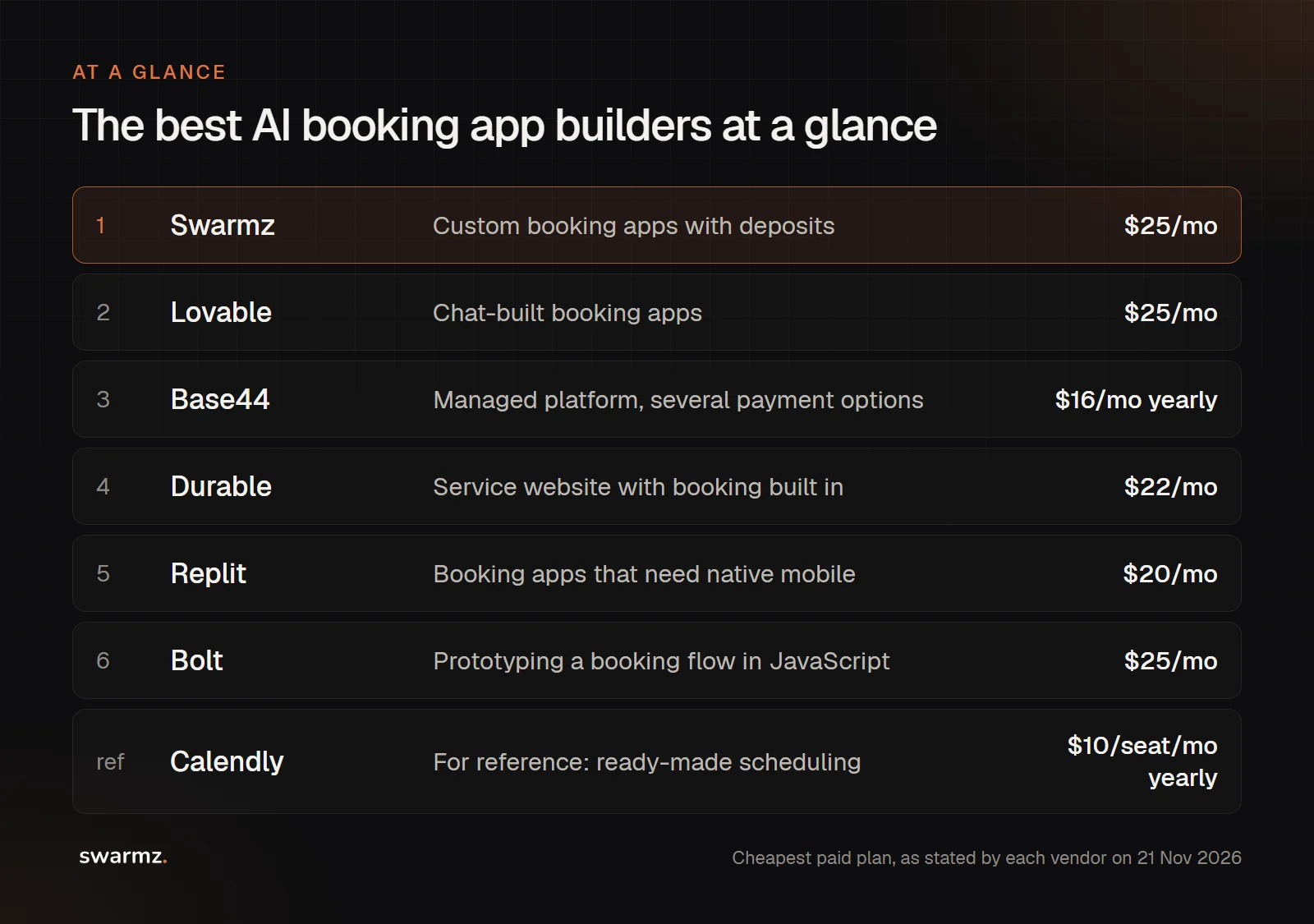
The best AI booking app builders at a glance
Tool | Best for | Starting paid price | Free plan | Customer sign-in | Payments at booking | Calendar sync |
|---|---|---|---|---|---|---|
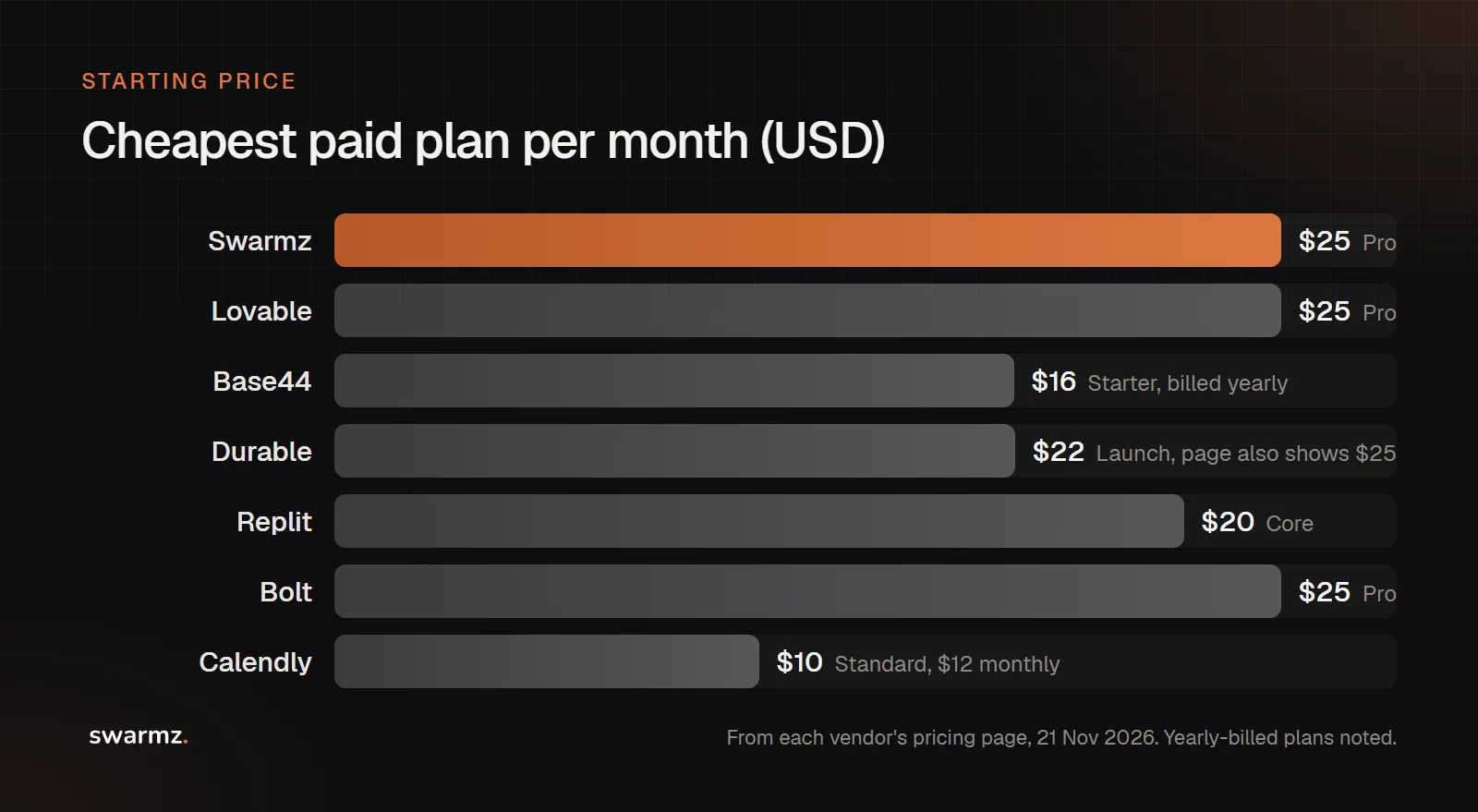
Swarmz | Custom booking apps with deposits | $25/month (Pro) | 5 credits a day, no card | Email, phone, Google, Apple and more | Deposit or full price on Stripe | Google Calendar and Calendly connectors |
Lovable | Chat-built booking apps | $25/month (Pro) | 5 daily credits, up to 30 a month | Built in | Stripe | Not covered in the docs we read |
Base44 | One managed platform, several payment options | $16/month, billed yearly | 25 message credits | Built in | Stripe, Wix Payments, PayPal | Not covered |
Durable | A service website with booking built in | $22 or $25/month (Launch) | Yes, booking from Launch | Not stated | Unclear on the page | Booking synced to your calendar |
Replit | Booking apps that also need native mobile | $20/month ($18 billed yearly) | Yes, app goes down after 30 days | Replit Auth or Clerk | Stripe on paid plans | Not covered |
Bolt | Prototyping a booking flow in JavaScript | $25/month (Pro) | 1M tokens a month | Announced as private beta | Announced as private beta | Not covered |
Calendly (ready-made, for reference) | Simple one-to-one scheduling | $10 per seat/month billed yearly, $12 monthly | 1 event type, 1 calendar | Not listed | Stripe or PayPal from Standard | 1 calendar on Free, 6 on Standard |
What a good booking app needs
Every booking app, from a hair salon to a physiotherapy clinic, has to get the same seven things right. We ranked the tools on this list, using only what each vendor states on its own pages; we did not run benchmarks. For the build itself, see our guide on how to build a booking app with AI.
Availability per staff member or room. Opening hours, service lengths, gaps between appointments, days off, and a calendar per stylist, practitioner or room, so nobody double-books a slot.
Customer sign-in. Returning customers see, move and cancel their bookings without phoning you; first-timers can book as guests.
Confirmations and reminders. An email when someone books, and a reminder before the appointment to cut no-shows.
Deposits and payments. A deposit or the full price at booking, through a processor such as Stripe.
Cancellation rules. A notice period, what happens to the deposit, and how rescheduling works.
Calendar sync. Bookings land in the calendar your staff already use.
Your own domain. The booking page looks like your business, not the builder's.
Do you need a custom booking app at all?
Not always. If you are one person taking simple appointments, a ready-made scheduler is quicker to set up and leaves nothing to maintain. Calendly's free plan gives you one event type and one calendar connection. Its Standard plan, $12 per seat a month or $10 billed yearly, adds unlimited event types, six calendar connections, automated reminders, a cancellation policy and payments at booking through Stripe or PayPal. Round-robin scheduling across a team starts on Teams at $20 per seat a month, or $16 billed yearly.
A custom app makes sense once the scheduler's shape stops fitting: several staff with different services, rooms that can only be booked once, customer accounts with a booking history, packages, your own domain, or bookings that feed the rest of your business. Our comparison of Calendly vs an AI-built booking app covers that decision in detail.
1. Swarmz: best AI booking app builder overall
Swarmz builds web apps from a plain-language description, and bookings are one of its listed use cases: classes, slots or tables that customers can book any time. You describe your services, staff and rules, and Swarmz builds the booking screens, the database and an admin view, then publishes the app to a swarmz.cloud link with SSL in one click.
How it handles the checklist:
Availability and staff: services, staff, hours and slots live in the app's own database on Swarmz Cloud, so per-stylist hours or rooms are things you describe in the prompt.
Customer sign-in: customers sign in with Google, Apple or email to see and cancel their bookings, and guests can book with just a name and email.
Confirmations and reminders: connect Resend or any SMTP provider and Swarmz adds the emails to your booking flow. Reminders are not described on Swarmz's bookings page, so ask for them and test that they arrive.
Deposits and payments: Swarmz Payments runs on Stripe, with test and live modes, and takes a deposit or the full price. Card details never touch your app.
Cancellation rules: you write the notice period and deposit rule into the prompt, then check them with test bookings.
Calendar sync: Swarmz lists one-click connectors for Google Calendar, which can "list, create, and update events", and Calendly, which can "read your availability, scheduled events, and invitees, and create bookings".
Your own domain: included on Pro.
Pros: database and sign-in on every plan, including Free, plus built-in Stripe payments (Stripe's fees and a small Swarmz platform fee apply); Google Calendar, Calendly, Gmail and Resend connectors; two-way GitHub sync on Free; account data in the EU (Ireland), and app data in a region you choose from 16.
Cons: web apps only, so customers book in the phone's browser, not a native app; reminders are not a documented ready-made feature; emails need your own service, such as Resend; custom domains need Pro; no ZIP download.
Best for: salons, clinics, studios and tutors who want their own booking app with deposits and customer accounts.
Pricing: Free with 5 credits every day and no card. Pro is $25 a month for 100 credits, with 30-day rollover and a custom domain. Business is $50 a month and adds private, invite-only apps and SAML single sign-on.
2. Lovable: best if you already build in Lovable
Lovable builds web apps from chat, and Lovable Cloud gives each app a database, authentication, storage and functions, or you can connect your own Supabase project. That covers services, staff, slots and customer accounts. Payments use Stripe with your own account, which works on Free; built-in payments need a paid plan, and webhooks are a manual step. Calendar sync and reminder emails are not covered in the docs we read.
Pros: built-in backend with sign-in; Stripe on Free; Git sync on every plan and a ZIP download on paid plans.
Cons: no native mobile apps; no custom domain on Free; credit use varies by task.
Best for: people who already know Lovable.
Pricing: Pro is $25 a month, or $21 billed yearly. Business is $50 a month.
3. Base44: best managed platform with several payment options
Base44, owned by Wix and run as its own product, includes a database, sign-in and user management on every plan. It documents three payment options: Stripe (test mode first), Wix Payments and PayPal, which helps if your customers expect PayPal. Backend function runs use credits. Calendar sync and reminders are not covered on the pages we read.
Pros: backend and sign-in on Free; a custom domain from the cheapest paid plan; three payment providers.
Cons: GitHub sync and code export need the Builder plan; the mobile app is a web view wrapper; yearly prices only.
Best for: non-technical owners who want PayPal or Wix Payments next to Stripe.
Pricing: Free with 25 message credits and up to 5 apps. Starter is $16 a month and Builder $40 a month, both billed yearly.
4. Durable: best for a simple service website with booking
Durable is an AI website builder for small businesses with a built-in CRM and online booking. Its Launch plan lists "unlimited booking, synced to your calendar", a quick route if you want a website with a booking button rather than a booking app you design. The pricing page does not mention reminders, deposits or staff scheduling, does not make clear which plans include paid bookings, and says Durable is not designed specifically for e-commerce.
Pros: booking and calendar sync on Launch; a CRM even on Free, for up to 10 customers; your own domain on Launch.
Cons: the booking flow is Durable's, not yours; reminders, deposits and staff calendars not stated; two different Launch prices on one page.
Best for: a solo service business that wants a website and a simple booking form in one place.
Pricing: Launch shows $25 a month on the plan card and $22 in the comparison table, next to a yearly toggle that saves 15%, without saying which is which.
5. Replit: best if you also need a native mobile app
Replit's AI Agent builds web apps and native iOS and Android apps, with built-in PostgreSQL, Replit Auth or Clerk for sign-in, and a Stripe connector on paid plans that starts in sandbox mode. If customers should book from an app on their home screen, this is the more direct route. Calendar sync and reminders are not covered in the docs we read.
Pros: native mobile apps; managed Postgres with no setup; custom domains supported.
Cons: Stripe needs a paid plan; usage-based billing; the free plan's published app goes down after 30 days.
Best for: businesses that want a booking app in the App Store and Google Play too.
Pricing: Core is $20 a month, or $18 billed yearly. Pro is $100 a month.
6. Bolt: best for prototyping a booking flow in JavaScript
Bolt builds web apps in the browser, plus mobile apps with Expo, with a Bolt Database in every project or a Supabase connection. Sign-in, file storage and Stripe were announced as a private beta in the Bolt Cloud post, so check their status before you plan deposits.
Pros: free plan with hosting; an Expo route to mobile; two-way GitHub integration.
Cons: a 300K daily token cap and Bolt branding on Free; JavaScript-only backends.
Best for: developers who want to prototype and keep working on the code.
Pricing: Pro is $25 a month billed monthly, with custom domains on paid plans.
Build it on Swarmz: a prompt you can copy
Paste this into Swarmz and change the details to match your salon or clinic. Our guide on writing prompts for AI app builders explains how to adapt it.
Build a booking app for my hair salon with 3 stylists, each with their own working hours and days off.
Services: haircut 45 min ($40), colour 2 h ($120), blow-dry 30 min ($30). Leave 10 minutes between appointments.
Customers pick a service, a stylist or "anyone available", and a free slot. Never allow two bookings for the same stylist at once.
Customers sign in with Google or email to see, move or cancel bookings. Guests can book with name, email and phone.
Take a $20 deposit at booking with Swarmz Payments. Free cancellation up to 24 hours before; later cancellations keep the deposit.
Send a confirmation email through Resend and add each booking to the stylist's Google Calendar.
Add an admin view to see today's bookings per stylist, block time off and edit services and prices.
For a clinic, swap stylists for practitioners and rooms, and only ask patients for details you actually need. After the first version, make a few bookings in Stripe test mode and check that the deposit, the email and the calendar event appear. Then try to book one slot from two browsers, cancel inside and outside the 24-hour window, and add reminder emails as a next step if you want them.
When Swarmz isn't the right pick
One person, simple appointments: a ready-made scheduler such as Calendly does the job with less to look after.
A native App Store or Google Play app: start with Replit, and read whether AI can build a mobile app first.
A website with a booking form, no deposits or accounts: Durable bundles that.
Customers who expect PayPal or Wix Payments: Base44 documents both.
A ZIP of the code instead of a GitHub repository: Lovable's paid plans give you one.
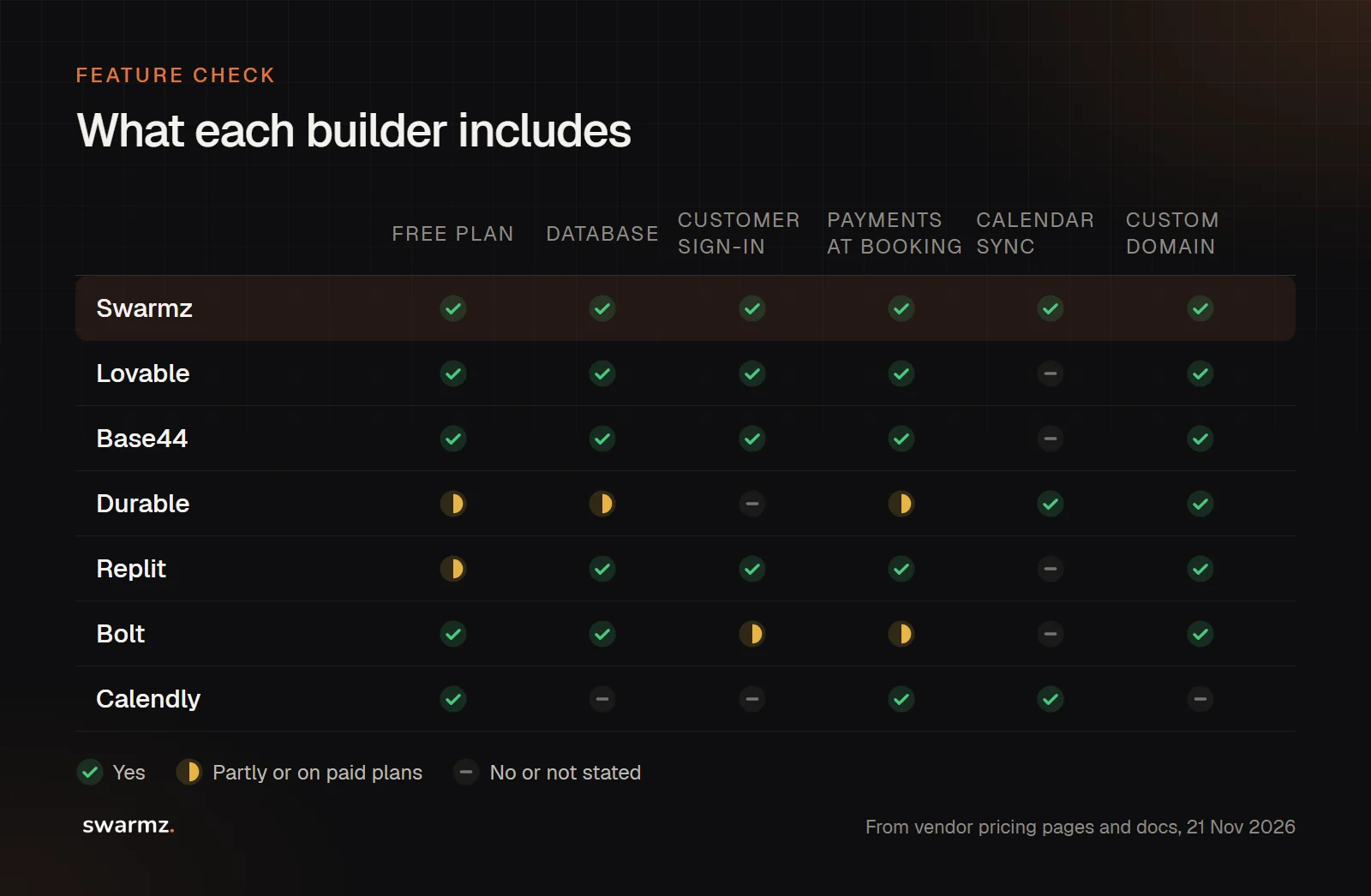
Tool | Free plan | Database | Customer sign-in | Payments at booking | Calendar sync | Custom domain |
|---|---|---|---|---|---|---|
Swarmz | Yes | Yes | Yes | Yes | Yes | Yes |
Lovable | Yes | Yes | Yes | Yes | No | Yes |
Base44 | Yes | Yes | Yes | Yes | No | Yes |
Durable | Partly | Partly | No | Partly | Yes | Yes |
Replit | Partly | Yes | Yes | Yes | No | Yes |
Bolt | Yes | Yes | Partly | Partly | No | Yes |
Calendly (reference) | Yes | No | No | Yes | Yes | No |
Yes: included. Partly: only on some plans or with limits. No: not offered, or not stated by the vendor. Checked on 21 November 2026.
How to choose
One person, one kind of appointment: Calendly.
Several staff, deposits, customer accounts and your own domain: Swarmz.
You already build in Lovable: Lovable, adding calendar sync and emails yourself.
PayPal at checkout: Base44.
A website with a booking button: Durable.
A native mobile app: Replit.
Whichever you pick, write your rules down first: services and durations, who can be booked, the deposit and the cancellation window. For other small business apps, see the best AI app builder for small business, and if payments are the main job, the best AI app builder with payments.
FAQ
What is the best AI booking app builder?
For most service businesses, Swarmz: it builds the booking app with a database, customer sign-in and Stripe deposits included, and publishes it to your own domain on Pro. For simple one-person scheduling Calendly is often enough, and for a native mobile app Replit fits better.
Can I take deposits in an AI-built booking app?
Yes, if the builder supports payments. Swarmz takes a deposit or the full price through Swarmz Payments on Stripe. Lovable and Base44 also support Stripe, Base44 adds PayPal and Wix Payments, and Replit's Stripe connector needs a paid plan.
Is Calendly enough for a small business?
Often, yes. For one kind of appointment with one person, Calendly's Standard plan covers reminders, a cancellation policy and payments. A custom app makes more sense with several staff and services, customer accounts, or rooms that can only be booked once.
Can an AI-built booking app sync with Google Calendar?
It depends on the builder. Swarmz lists a Google Calendar connector that can list, create and update events, plus a Calendly connector, and Durable's Launch plan syncs bookings to your calendar. The other builders here do not cover calendar sync on the pages we read.
Can I build a booking app for free?
You can build and test one on a free plan. Swarmz's free plan includes 5 credits a day, the database, sign-in and a swarmz.cloud link; your own domain needs Pro. Durable's booking and Replit's Stripe connector need paid plans.
Start building your booking app
If you need more than a scheduling link, build your booking app on Swarmz for free. Paste the prompt above, run a few test bookings, and add your own domain when you are ready to take real ones.
Sources
All checked on 21 November 2026.
Swarmz: swarmz.net/pricing, swarmz.net/faq, swarmz.net/use-cases/bookings, swarmz.net/integrations
Calendly: calendly.com/pricing
Lovable: docs.lovable.dev subscription plans, Lovable Cloud docs, Lovable Stripe docs
Base44: base44.com/pricing, Base44 payments docs
Durable: durable.com/pricing
Replit: replit.com/pricing, Replit Stripe docs, Replit Starter plan docs
How did this land?
About the author

Founder of swarmz.net
Jordan founded Swarmz, the AI app builder at swarmz.net.


