Best AI Tool to Build a Website in 2026: 6 Compared
Six AI tools that build a website from a description, compared on what the AI step actually produces, how much you can edit afterwards and who owns the result, with prices checked on 21 November 2026 and a prompt you can copy.
The best AI tool to build a website in 2026 is Swarmz, because its AI step produces a working site rather than a mock-up: pages, forms that save to a database, sign-in and Stripe payments when you ask for them. You keep refining it in the same chat, and the code stays in your own GitHub repository. This guide is for small business owners, freelancers and first-time site owners who want to type a description and get a website. If you would rather drag and drop after the AI's first draft, Wix is the better pick; for a design-led site, Framer.
Swarmz is our product, so read our ranking with that in mind. We checked every price on the vendor's own pricing page or docs on 21 November 2026, and the sources are listed at the end.
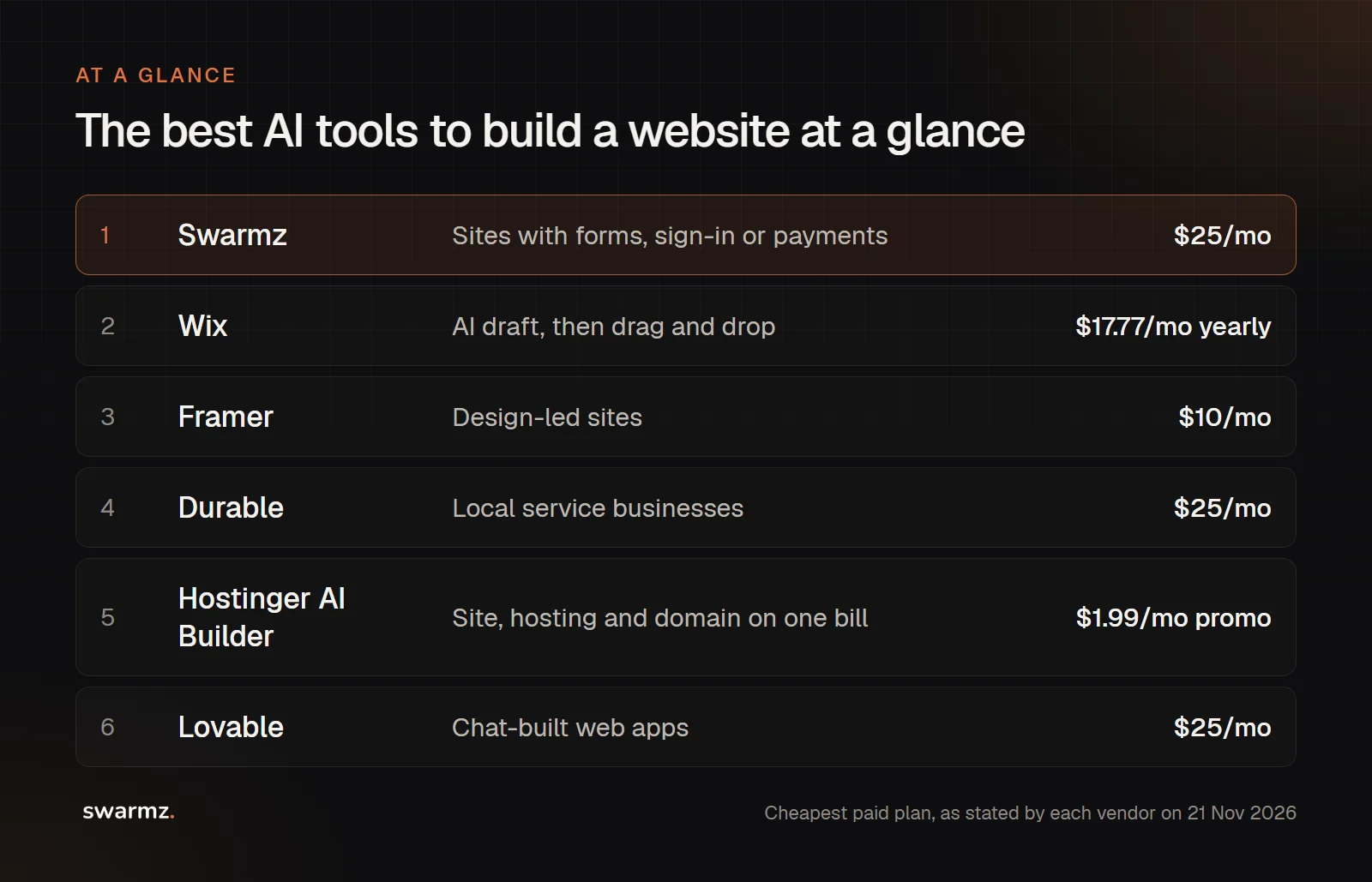
The best AI tools to build a website at a glance
Tool | Best for | Starting paid price | What the AI builds | How you edit afterwards | Who owns the result |
|---|---|---|---|---|---|
Swarmz | Sites with forms, sign-in or payments | $25/month (Pro) | Pages, database, sign-in; payments on request | Chat, or code via GitHub | Code in your GitHub repository |
Wix | An AI draft, then drag and drop | $17.77/month billed yearly (Light) | Pages, layouts, text and images | Aria chat or drag and drop | Stays on Wix; domain can move |
Framer | Design-led sites | $10/month (Basic) | Layouts and components on a canvas | Canvas or design agent | Code export not stated |
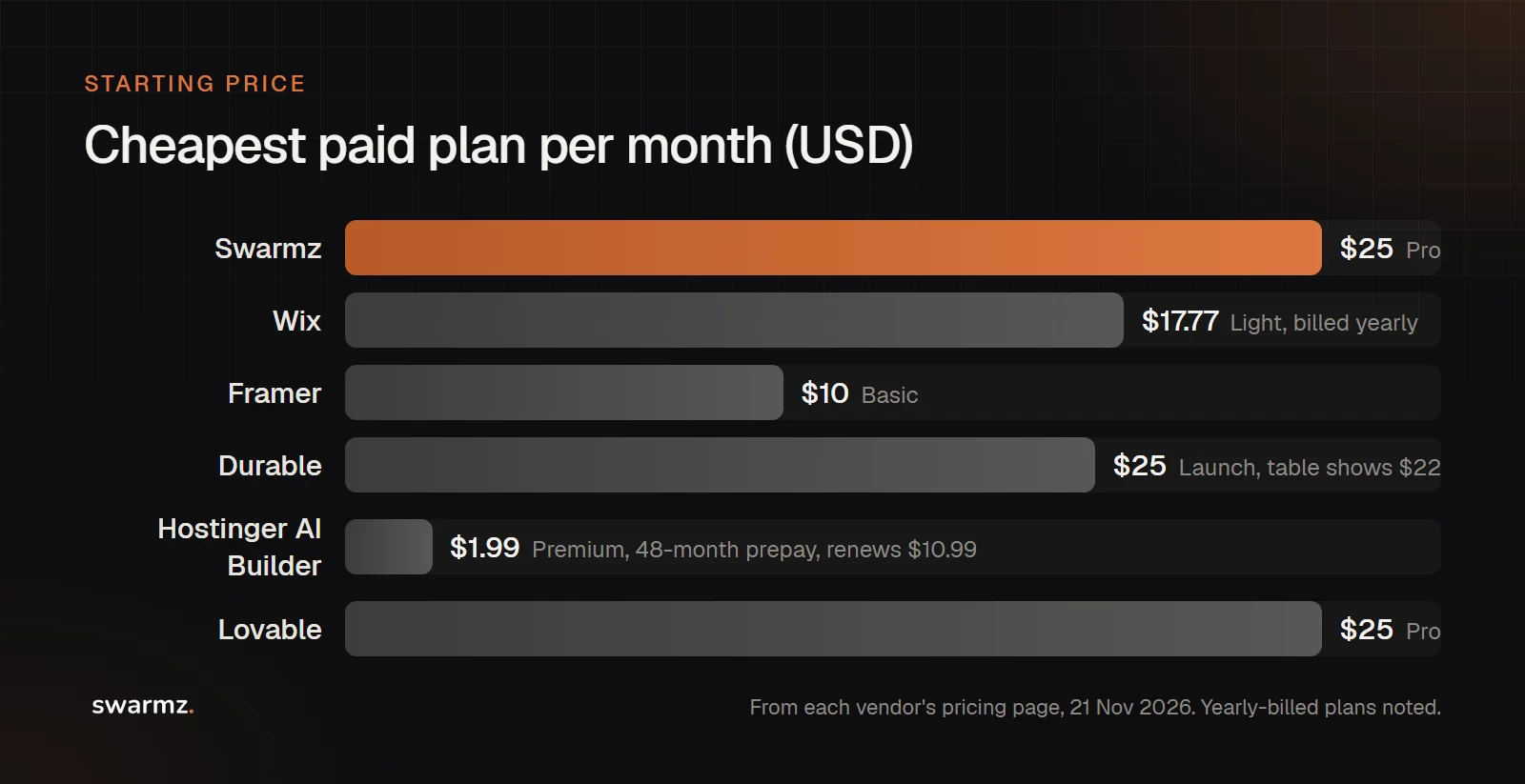
Durable | Local service businesses | $25/month card, $22 table (Launch) | Business site, CRM, booking | AI edits with credits | Export not stated |
Hostinger AI Builder | Site, hosting and domain on one bill | $1.99/month promo, 48-month prepay | Code, backend and logins (agentic) | Chat or drag and drop | Code export; data deleted if the plan lapses |
Lovable | Chat-built web apps | $25/month (Pro) | Web app with database and sign-in | Chat; free inline text edits | Git sync; ZIP on paid plans |
How we compared them
The differences show up after the first draft. Using only what each vendor states on its own pages, we asked: what does the AI step build, how do you change the result and at what cost, and who owns the site if you stop paying. We did not run benchmarks. For a feature-by-feature view, see our best AI website builders; this article is about the build-it-with-AI step.
What a good AI website tool needs
A complete first draft from a plain description: pages, navigation, copy and images that work on a phone.
Honest copy, with placeholders where it does not know your prices or hours. You still read every line.
Working parts, not only pages: forms that save entries, customer sign-in and payments.
Editing that suits you: prompts, drag and drop or code, with a clear cost per change.
Your own domain on a plan you can afford.
Ownership: code export or GitHub sync, and a clear answer on what happens if you stop paying.
A note on prices and AI credits
The AI step is rarely unlimited. Framer includes 500 AI credits a month on Free, 1,000 on Basic and 3,000 on Pro. Durable gives 300 on Free and 1,000 a month on Launch. Hostinger says a simple business page usually takes 250 to 500 of its credits, and its Premium plan includes a one-time 250. Swarmz and Lovable meter building in credits, and Swarmz shows the credits each prompt used on every reply. Wix lists AI tools on every plan without stating limits.
1. Swarmz: best AI tool to build a website overall
Swarmz is an AI app builder, so the website it builds is a web app with its own backend. You describe the site in chat, or start from one of 28 remixable templates.
What the AI builds. The pages, the data model and the sign-in. Swarmz Cloud gives every site a database, file storage and server functions on every plan, including Free. Ask for a booking form and entries save to the database; ask for a members area and visitors sign in with email, Google, Apple and more; ask for payments and Swarmz Payments adds Stripe checkout, subscriptions and invoices. Analytics is on from the moment you publish.
How you edit afterwards. You keep talking to it: shorten the headline, add a catering page. Every reply shows how many credits it used. The code also syncs both ways with GitHub, so a developer's edits there come back into Swarmz.
Who owns the result. The code is standard React, TypeScript and Tailwind in your own GitHub repository, on Free too. You publish in one click to a swarmz.cloud link with SSL, or your own domain on Pro. Your account and main database are hosted in the EU (Ireland).
Pros
The AI builds working parts, not only pages: database, sign-in, storage and Stripe payments (Stripe's fees plus a small Swarmz platform fee apply).
Two-way GitHub sync on Free, so the code is yours from day one.
Visible credit cost per prompt, and credits shared across the workspace with no per-seat fees.
Cons
Most edits happen in chat and each uses credits; if you like dragging elements around, Wix or Framer may suit you better.
No ZIP download; the code comes out through GitHub.
Custom domains and badge removal need Pro.
Best for: small businesses, freelancers and founders whose site takes bookings, sign-ups or payments, and anyone who wants to own the code.
Pricing: Free with 5 credits every day and no card. Pro is $25 a month for 100 credits plus the daily credits, with rollover for 30 days and your own domain. New accounts can also try Pro free for 3 days with 25 credits; a card is needed and it becomes the $25 Pro plan unless you cancel. Business is $50 a month.
2. Wix: best for an AI draft you then edit by drag and drop
What the AI builds. In Wix's Harmony editor, the Aria agent turns a business description or a template into pages, layouts and starter content, writes text and generates images. Forms, members, bookings and payments come from Wix's own apps, with bookings and payments from Core.
How you edit afterwards. You switch between prompting Aria and drag and drop. Wix's help page warns that Aria can produce inaccurate results, so review everything before you publish.
Who owns the result. The site stays on Wix, which says its architecture does not support outside hosting. Your domain can move.
Pros: AI and drag and drop in one editor; AI tools on every plan, including Free; bookings and a store from one vendor; a 14-day money-back guarantee.
Cons: no code export or outside hosting; payments start on Core; prices vary by location.
Best for: small businesses that want an AI first draft and then prefer to click and drag.
Pricing: Free plan, no card. Light is $17.77 a month and Core $29.77 a month, shown for yearly plans paid in full.
3. Framer: best for design-led sites
What the AI builds. Framer's design agent builds layouts, sections and components on an editable canvas from your description, and a CMS agent sets up content collections. Hosting and analytics are included.
How you edit afterwards. Everything stays editable by hand, from type to breakpoints and effects, or you keep prompting the agent, which uses AI credits.
Who owns the result. Framer hosts the site, with a custom domain from Basic. Code export is not stated on its pricing page or homepage. Forms send entries to email, Google Sheets or a webhook.
Pros: the strongest visual control here; a design agent that edits in place; a custom domain from $10 a month.
Cons: no custom domain on Free; code export, sign-in and payments not stated; extra editors cost $20 a month each.
Best for: designers, startups and creative businesses whose site has to look exceptional.
Pricing: Free with 500 AI credits a month. Basic is $10 a month and Pro $30 a month, billed on the cycle you pick at checkout.
4. Durable: best for local service businesses
What the AI builds. An SEO-ready business site with unlimited AI-generated pages and a built-in CRM. AI tools also write posts and reply to leads and Google reviews. Launch adds custom forms and calendar-synced booking, and the table lists paid bookings on paid plans.
How you edit afterwards. AI website changes use credits; the pricing table is unclear on whether Free includes them.
Who owns the result. The pricing page does not mention exporting the site. If you cancel, Durable says it will transfer your custom domain to you. It also says it is not designed specifically for e-commerce.
Pros: site, CRM and booking in one place; AI tools for reviews, leads and posts; a free plan with 10 CRM customers.
Cons: two different prices per plan on the same page; no export stated; not built for online stores.
Best for: local service businesses that want a site, a customer list and bookings without assembling tools.
Pricing: Free with 300 AI credits. Launch is $25 a month on the plan card and $22 in the comparison table; Grow is $49 or $41.
5. Hostinger AI Builder: best for a site bundled with hosting
What the AI builds. Hostinger folded Horizons into AI Builder in August 2026. In agentic mode the AI writes the code and backend, including logins and databases, from chat. Manual mode starts from an AI-generated site you customise with drag and drop.
How you edit afterwards. Agentic changes use credits per action. Manual mode and quick text and image edits use none.
Who owns the result. Agentic mode exports the complete source code for hosting elsewhere; the page does not say whether database records come with it. If your hosting plan expires, Hostinger says the project's data is permanently deleted.
Pros: hosting, domain, SSL and CDN on one bill; code export; a manual mode for edits without credits.
Cons: no free plan, only a free test with 250 credits; the headline price needs a 48-month prepay and renews higher; the page contradicts itself on whether Premium includes ecommerce.
Best for: people who want site, hosting and domain from one provider for years.
Pricing: Premium is $1.99 a month as a promotion, paid upfront for 48 months ($95.52); the list price is $12.99 and renewal $10.99 a month.
6. Lovable: best chat-built alternative with a code download
What the AI builds. Web apps from chat, much like Swarmz, with Lovable Cloud for the database, sign-in, storage and functions, and Stripe for payments.
How you edit afterwards. Mostly by prompting. Inline text edits in the preview are free for up to 100 a day; other visual requests use credits.
Who owns the result. Git sync works on every plan, and paid plans can download a ZIP. The database exports separately, without stored files, function code or secrets.
Pros: built-in backend; Git sync on Free; a ZIP download on paid plans.
Cons: no custom domain or code download on Free; credit use varies by task.
Best for: people who want a chat-built site and a ZIP of the code.
Pricing: Free with 5 daily credits, up to 30 a month. Pro is $25 a month, or $21 a month billed yearly.
Who owns what the AI builds
You can take the code from Swarmz, Lovable and Hostinger's agentic mode. With Wix and Durable you keep the domain, not the site, and Framer does not state a code export. Before you build, ask: can I get the code, can I get the data, and what happens if I stop paying? See how to export an app from an AI app builder.
Build it on Swarmz: a prompt you can copy
Build a website for Oak & Ember, a family-run bakery and café in Leeds.
Pages: Home, Menu, Catering, About and Contact, with opening hours and a map link in the footer.
Write the copy in a warm, plain tone, and use [placeholders] for prices, dates and any facts you do not know.
Add a catering enquiry form (name, email, phone, date, number of guests, message) that saves each enquiry to the database, and an admin page only I can open that lists enquiries with a status I can change.
Add a newsletter sign-up that saves email addresses to the database.
Use a cream and dark green design that reads well on phones, with large photos I can replace later.
After the first version, replace every placeholder, submit a test enquiry and check the admin page, and read the site on your phone. Ask for changes one at a time, then add your own domain on Pro. Our guide on writing prompts for AI app builders helps you write briefs like this.
When Swarmz isn't the right pick
Swarmz fits when you want the AI to build working parts and you want to own the code. Otherwise:
You want to drag and drop after the first draft: Wix, or Hostinger AI Builder's manual mode.
The design is the product: Framer.
A local service business that wants a CRM and booking in one place: Durable.
One bill for site, hosting and domain for years: Hostinger AI Builder.
You need a ZIP of the code: Lovable's paid plans, or Hostinger's export.
You need a native App Store app: none of these tools builds one; read whether AI can build a mobile app.
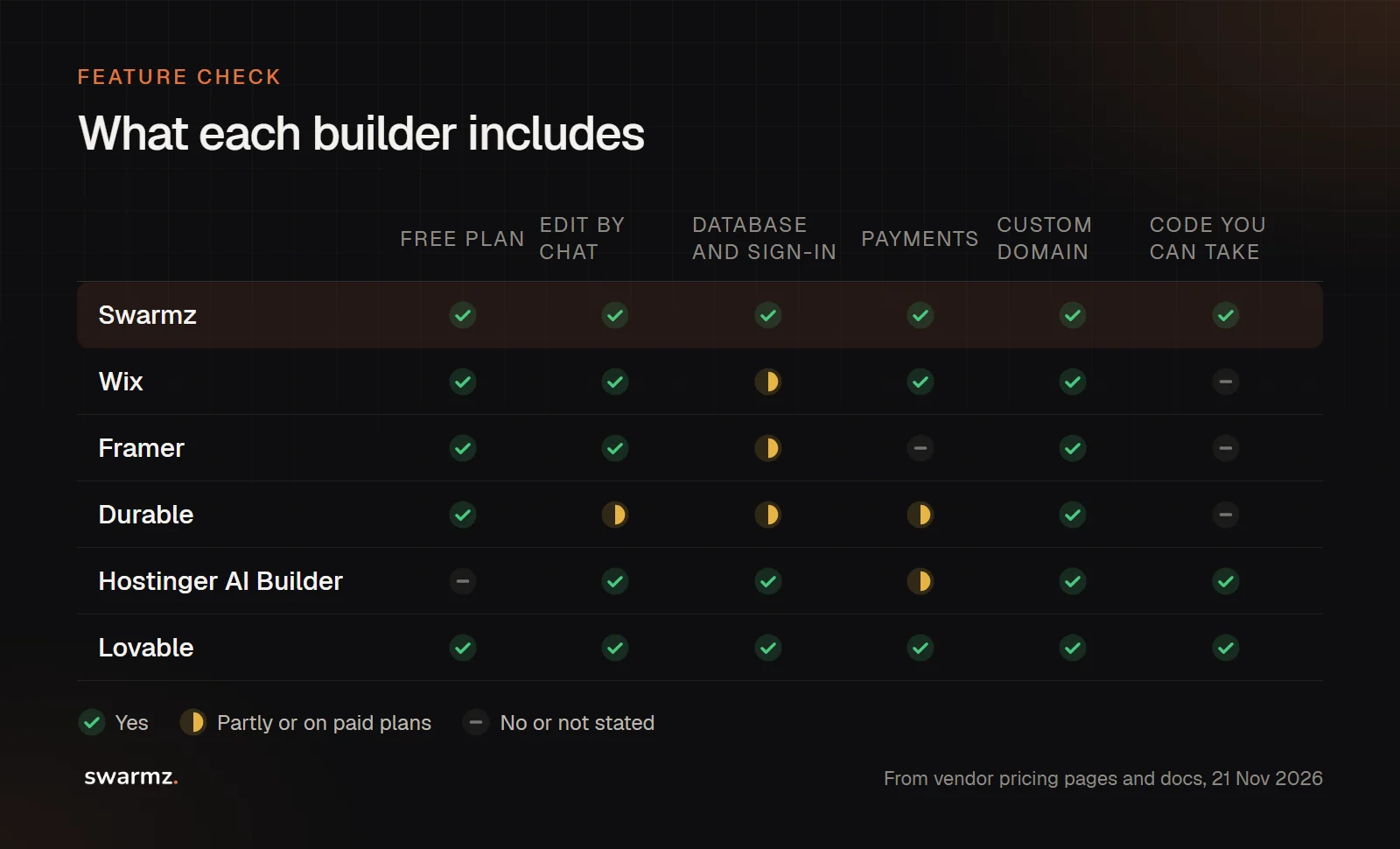
Tool | Free plan | Edit by chat | Database and sign-in | Payments | Custom domain | Code you can take |
|---|---|---|---|---|---|---|
Swarmz | Yes | Yes | Yes | Yes | Yes | Yes |
Wix | Yes | Yes | Partly | Yes | Yes | No |
Framer | Yes | Yes | Partly | No | Yes | No |
Durable | Yes | Partly | Partly | Partly | Yes | No |
Hostinger AI Builder | No | Yes | Yes | Partly | Yes | Yes |
Lovable | Yes | Yes | Yes | Yes | Yes | Yes |
Yes: included. Partly: only on some plans or with limits. No: not offered, or not stated by the vendor. Checked on 21 November 2026.
How to choose
Bookings, sign-ups or payments, and you want the code: Swarmz.
An AI draft, then drag and drop: Wix.
The best-looking result, refined by hand: Framer.
A local service business with a CRM: Durable.
Everything on one hosting bill: Hostinger AI Builder.
A chat-built site with a ZIP download: Lovable.
The first draft is a starting point, not a finished site. Read the honest limitations of AI app builders before you launch, and small businesses can also compare the best website builder for small business.
FAQ
What is the best AI tool to build a website?
For a site that has to do something, Swarmz: it builds pages, forms that save to a database, sign-in and Stripe payments from a description, and syncs the code to your GitHub repository. Wix is better if you want drag and drop afterwards, and Framer for a design-led site.
Can AI build my whole website for me?
It can build the first complete version, and Swarmz, Lovable and Hostinger's agentic mode also build working forms and sign-in. You still check every fact, add your own photos and test the forms before launch.
Is there a free AI tool to build a website?
Yes, with limits. Swarmz, Wix, Framer, Durable and Lovable have free plans, and Hostinger AI Builder offers a free test with 250 credits. Your own domain needs a paid plan on all of them.
Can I edit a website after AI builds it?
Yes. In Swarmz and Lovable you mostly describe changes in chat, and Swarmz also syncs the code with GitHub. Wix, Framer and Hostinger's manual mode let you edit by hand.
Do I own a website built with AI?
It depends on the tool. Swarmz and Lovable put the code in your Git repository, and Hostinger's agentic mode exports the source code. Wix sites cannot be hosted elsewhere, Durable does not mention an export, and Framer does not state one.
Is Wix or Framer better for building a website with AI?
Wix suits small businesses that want an AI draft, then drag and drop, with bookings and a store from its own apps. Framer suits design-led sites, with a custom domain from $10 a month. Neither states a code export.
Build a website you own
Describe your business in a few sentences and start building on Swarmz for free. Publish the first version on a swarmz.cloud link, keep the code in your own GitHub repository, and move to your own domain when you upgrade.
Sources
All checked on 21 November 2026.
Swarmz: swarmz.net/pricing, swarmz.net/features, swarmz.net/faq, Swarmz Payments
Wix: wix.com/plans, Wix Harmony AI tools, Exporting or embedding your Wix site
Framer: framer.com/pricing, framer.com, Framer help: adding a contact form
Durable: durable.com/pricing
Hostinger AI Builder: hostinger.com/horizons, Hostinger AI Builder announcement
Lovable: docs.lovable.dev subscription plans, Lovable FAQ, Lovable Cloud, Lovable visual edits
How did this land?
About the author

Founder of swarmz.net
Jordan founded Swarmz, the AI app builder at swarmz.net.


