Best AI App Builder for Agencies and Freelancers (2026)
Seven AI app and site builders compared on what agencies and freelancers need: many client projects, team roles, clean handover, seat-free pricing, private client apps and predictable bills. Prices checked on 21 November 2026.
The best AI app builder for agencies and freelancers is Swarmz, because it is priced per workspace rather than per person: your whole team shares one pool of credits with Admin, Editor and Viewer roles and no per-seat fees, you can run unlimited client projects, and each app hands over cleanly through two-way GitHub sync, the client's own domain and no Swarmz badge on Pro. If your clients mostly need design-led marketing sites with a CMS their own team edits, Webflow is the better fit, and Lovable is a close alternative with a similar feature set.
Swarmz is our product, so read our ranking with that in mind. We checked every price on the vendor's own pricing page or docs on 21 November 2026, and the sources are listed at the end. We did not benchmark the tools; the comparison uses what each vendor states.
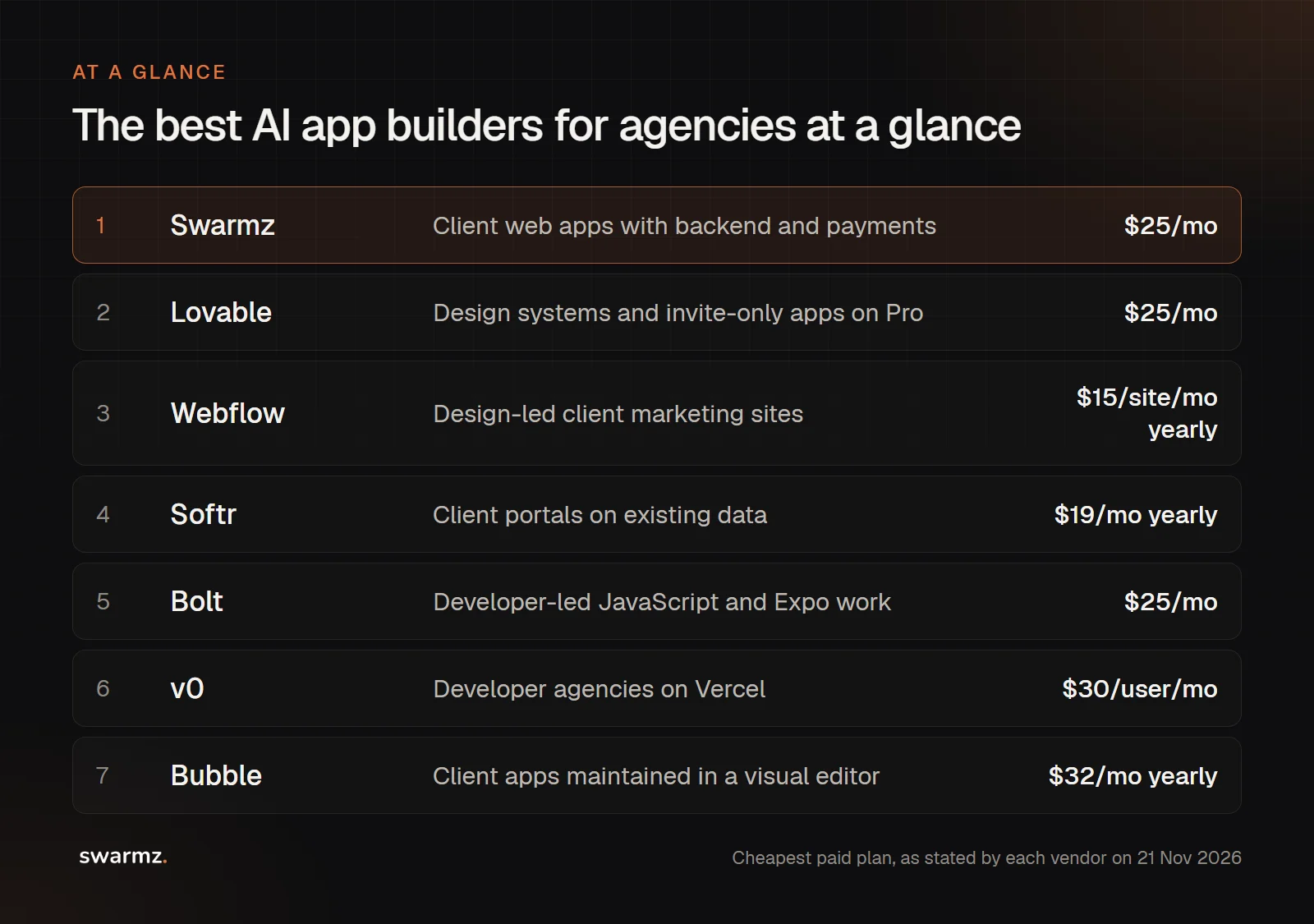
The best AI app builders for agencies at a glance
Tool | Best for | Starting paid price | How teams pay | Client handover | Private client apps |
|---|---|---|---|---|---|
Swarmz | Client web apps with a backend and payments | $25/month (Pro) | Per workspace, shared credits, no per-seat fees | Two-way GitHub sync; custom domain and badge removal on Pro | Invite-only apps on Business ($50/month) |
Lovable | Agencies that want design systems on Pro | $25/month (Pro), $21 billed yearly | Unlimited members, priced by credits | Git sync; code download, custom domain and badge removal on Pro | Invited people only: up to 10 per project, unlimited on Business |
Webflow | Design-led client marketing sites with CMS | $15/month per site (Basic), billed yearly | Site plan per site, plus a Workspace plan and seats | Site transfer; HTML and CSS export without CMS content | Password protection from Basic |
Softr | Client portals on existing data | $19/month (Basic) billed yearly, $25 monthly | By builders and app users | One custom domain per paid plan; code export not stated | Login, roles and client users built in |
Bolt | Developer-leaning JavaScript and Expo work | $25/month (Pro) | Teams $30 per member; tokens not shared | GitHub integration; custom domain and no branding on Pro | Private site sharing on Pro |
v0 | Developer agencies on Vercel | $30 per user/month (Plus) | Per user; extra credits shared | GitHub sync with branches and pull requests | Not stated on the pricing page |
Bubble | Client apps you will maintain in a visual editor | $32/month (Starter), billed yearly | Plan per app; Team plan has 5 app editors | No code export; custom domain from Starter | Not stated on the pricing page |
What a good AI app builder for agencies needs
Agency work runs many projects at once, people come and go, and every project ends with a client who has to own the result. We ranked the tools on seven things:
Room for many client projects. Starting a pitch, a prototype or a new client should not cost a new plan.
Team roles. Designers, developers, account managers and clients need different access: who can edit, who can only view.
A clean handover. At the end, the client gets the code in a repository, the app on their own domain and no builder badge.
Pricing that does not grow with every seat. Agencies add freelancers and client reviewers all the time, and per-seat fees punish that.
Private apps for client work. Unreleased work and internal client tools should open only for people you invite.
A design system per client. Each brand stays consistent across screens and projects without repeating the brief.
Predictable billing. A fixed monthly price, credits that do not vanish at month end, top-ups for busy weeks and limits per member.
Handover is where tools differ most; our guide on how to export an app from an AI app builder shows what usually comes with you.
What agency pricing actually looks like
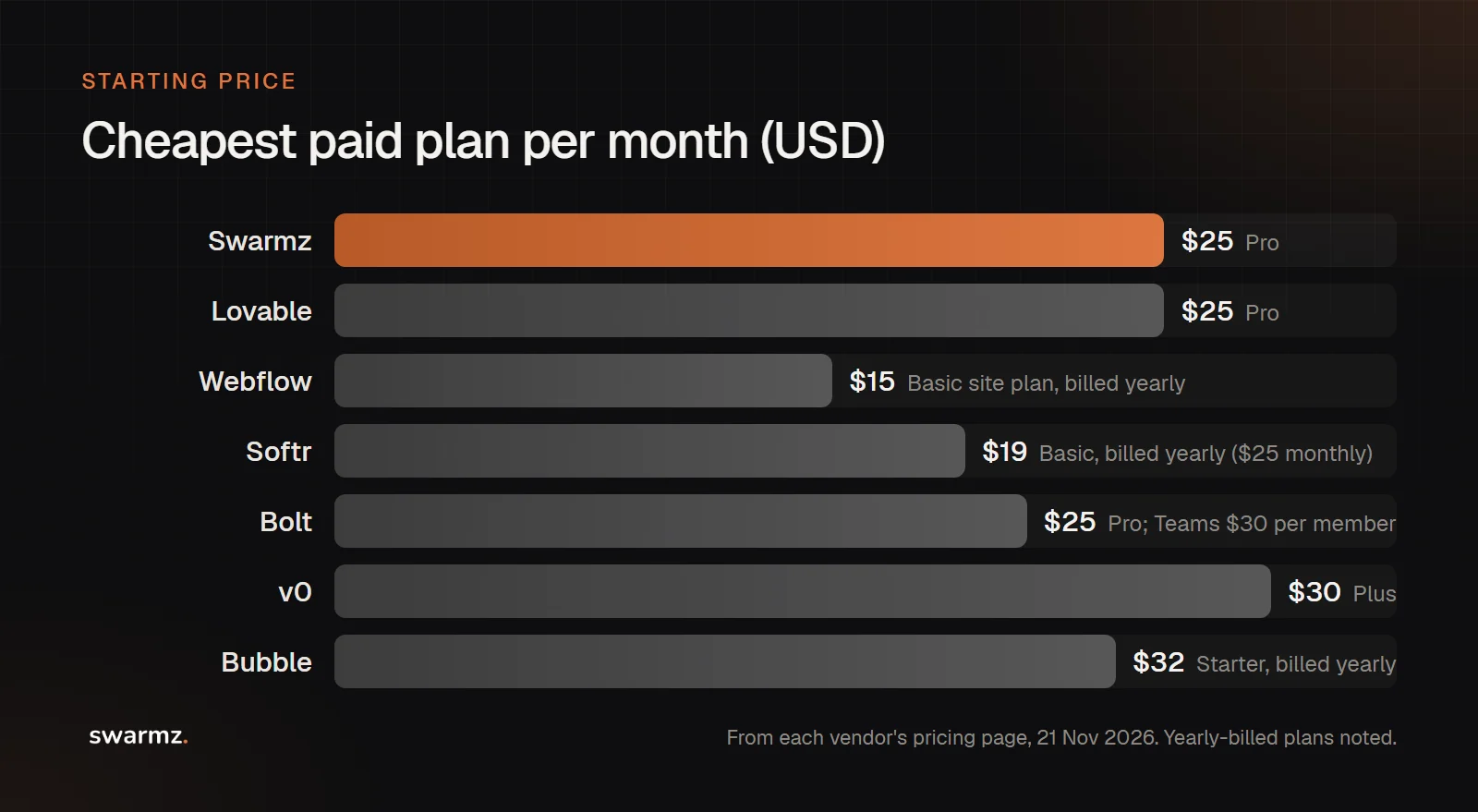
Sticker prices are close; the way they scale is not. Swarmz and Lovable Pro cost $25 a month whether two or ten people use them, because the team shares the credits, though a busy team will need a larger credit tier. Bolt Teams ($30 per member) and v0 Plus ($30 per user) cost a five-person team $150 a month before extra usage. Webflow charges a Site plan per client site on a custom domain (Basic $15 a month billed yearly) plus a Workspace plan (Freelancer $16 or Agency $35, billed yearly). Softr prices by builders and app users, and Bubble sells a plan per app from $32 a month billed yearly.
1. Swarmz: best AI app builder for agencies overall
Swarmz builds web apps from chat with the backend in place: Swarmz Cloud gives every app a database, user sign-in, file storage and server functions, Swarmz Payments runs on Stripe for checkout, subscriptions, invoices and payment links, and more than 80 connectors, including HubSpot, Salesforce, QuickBooks and Xero, connect in one click. That covers most client briefs: portals, booking tools, dashboards and internal tools.
How it handles the agency checklist:
Projects: unlimited, on every plan including Free.
Roles: Admin, Editor and Viewer on every plan. Business adds user groups, shared projects and SAML single sign-on.
Handover: Swarmz creates a private GitHub repository and keeps it in sync both ways, with standard React, TypeScript and Tailwind code. On Pro you connect the client's domain and switch off the Swarmz badge, which applies without republishing.
Seats: plans are priced per workspace, not per person. Everyone shares the credits, and you can set a credit limit for each member.
Private apps: only people in your workspace can open what you are building. On Business, the published app itself can be private and invite-only, by email, including people outside your team, such as a client.
Design: custom design systems and a branded workspace URL on Business.
Billing: Pro is billed monthly and you can cancel anytime; credits roll over for 30 days, you can top up, and every prompt's cost is shown in the chat.
Your account and main database are hosted in the EU (Ireland), and the Cloud region can be chosen from 16 regions, which helps when a client asks where their data lives.
Pros: no per-seat fees, with per-member credit limits; roles and GitHub sync on Free; backend and Stripe payments built in.
Cons: web apps only, no native iOS or Android; no ZIP download; private apps and custom design systems need Business, while Lovable includes design systems on Pro; the pages we read do not describe moving a project into a client's own Swarmz workspace, so handover runs through GitHub and the domain.
Best for: agencies and freelancers building client web apps with sign-in, data and payments.
Pricing: Free with 5 credits a day and no card. Pro $25 a month for 100 credits (tiers up to 15,000). Business $50 a month, twice Pro at each tier. Enterprise is custom.
2. Lovable: closest alternative, with design systems on Pro
Lovable builds web apps from chat with Lovable Cloud as the backend, and it is strong on the agency checklist. Every plan has unlimited workspace members, priced by credits rather than seats. Pro adds user roles and permissions, badge removal, custom domains, code download, credit rollover and design systems. Every plan can publish to invited people only, up to 10 per project, and Business lifts that limit and adds SSO, personal projects and design templates.
Pros: design systems on the $25 plan; invite-only publishing on every plan; unlimited members; Git sync to GitHub, GitLab or Bitbucket on every plan.
Cons: roles need Pro; credit use varies by task; Git sync cannot connect an existing repository; the database export leaves out stored files, Edge Function code and secrets.
Best for: agencies that want design systems without a Business plan, or that already build in Lovable. Our Swarmz vs Lovable comparison goes through each difference.
Pricing: Pro is $25 a month, or $250 a year ($21 a month). Business is $50 a month, or $500 a year.
3. Webflow: best for design-led client marketing sites
Webflow is a visual site builder with a CMS, hosting and Webflow AI, and it has the most developed agency tooling here. Its Freelancer and Agency Workspace plans include client seats per site (one on Freelancer, three on Agency), client payments, where the client adds their own card for their site plan, and Shared Libraries of components, variables and assets, the closest thing to a design system per client. Sites can be transferred to other Workspaces. It is a site builder first: user sign-in is not on the pricing page, and CMS content cannot be exported.
Pros: client seats and client payments built for agencies; site transfer; Shared Libraries across client sites.
Cons: two layers of pricing, Site plans and Workspace plans plus extra seats; HTML and CSS export only; app features such as sign-in are not stated.
Best for: agencies whose clients need marketing sites their own team edits. See the best AI website builders for more site-first options.
Pricing: Site plans: Basic $15 a month and Premium $25 a month, billed yearly. Workspace plans: Freelancer $16 a month and Agency $35 a month, billed yearly.
4. Softr: best for client portals on existing data
Softr is built for portals and internal tools. Its AI Co-Builder creates the database, pages, roles and logic from a description, and it connects to data a client already has, such as Airtable or Google Sheets. Plans count builders, team users and client users separately: Basic has 1 builder and 5 of each user type, while Pro has 2 builders, 50 client users (up to 250) and 3 user groups, and is the plan Softr suggests for fully branded apps with custom role-based permissions. Each paid plan includes one custom domain.
Pros: client users, roles and groups built in; works on top of a client's existing data; free plan for up to 3 builders.
Cons: cost grows with builders and client users; code export is not stated; Basic is capped at 5 client users.
Best for: agencies building portals or directories on a client's Airtable or Google Sheets data.
Pricing: Basic $19 a month billed yearly or $25 monthly; Pro $99 or $119; Business $329 or $395.
5. Bolt: best for developer-leaning teams on JavaScript and Expo
Bolt builds websites, web apps and Expo mobile apps in the browser. Pro has unlimited collaborators, no Bolt branding, a custom domain and private site sharing. Teams adds centralized billing and admin controls, but it is priced per member, tokens are not shared between members, and free members cannot send prompts.
Pros: centralized billing and admin controls on Teams; an Expo route to mobile apps for clients; GitHub integration with branches.
Cons: per-member pricing with unshared tokens; JavaScript-only backends; sign-in, storage and Stripe were announced as a private beta in Bolt Cloud.
Best for: small developer-led agencies prototyping in JavaScript, including mobile.
Pricing: Pro $25 a month billed monthly; Teams $30 per member a month.
6. v0: best for developer agencies on Vercel
v0 is Vercel's agent for code and full-stack apps. Handover is the developer kind: two-way GitHub sync into a private repository, branches, pull requests and a Vercel preview per branch. Plus and Business include centralized billing and shared chats, but credits are per user, with only extra purchased credits shared. SAML SSO and role-based access are Enterprise only.
Pros: a pull request flow that technical clients know; centralized billing; visual edits with Design Mode.
Cons: per-user pricing; roles only on Enterprise; database, payments, custom domains and private apps are not stated on the pricing page.
Best for: agencies with developers who hand clients Next.js code through pull requests.
Pricing: Plus $30 per user a month; Business $100 per user a month.
7. Bubble: best for client apps you will maintain long term
Bubble is a visual no-code platform with a database, workflows and an AI agent. Plans are bought per app: Growth includes 2 app editors and Team 5, and every paid plan has a custom domain. An agency account lets you build unlimited premium apps for clients, though its price is not on the pricing page. There is no code export, so the client stays on Bubble and data leaves as CSV.
Pros: an agency account for client work; visual logic a client's team can learn; web and mobile from one backend.
Cons: no code export, so handover means the client keeps a Bubble plan; usage metered in workload units; listed plans are billed yearly.
Best for: agencies that build and then maintain client apps on Bubble as an ongoing service.
Pricing: Starter $32 a month, Growth $119 and Team $349, all billed yearly.
Build it on Swarmz: a prompt you can copy
A client portal is a good first agency project because it uses sign-in, roles, files and payments in one app. Change the names and colours and paste this into the prompt box:
Build a client portal for my design agency, Brightline Studio.
Clients sign in with their email and see only their own company's projects.
Each project has a status (brief, in progress, in review, done), a due date, files we upload and a comment thread.
My team signs in too: admins create clients and projects, team members upload files and post updates.
Add an invoices page for each client with amount, due date and paid or unpaid, and a payment link on unpaid invoices.
Use dark navy, off-white and a coral accent, with a clean sans-serif font.
After the first version, create two test client accounts and check that neither can see the other's projects or files. Set up Swarmz Payments, which runs on Stripe, before you send a real invoice. At handover, sync the code to GitHub and connect the client's domain on Pro; if only invited people should open the portal at all, publish it as a private app on Business.
When Swarmz isn't the right pick
Your clients need design-led marketing sites they edit themselves. Webflow is built for that.
The portal sits on a client's Airtable or Google Sheets data with many client users. Softr fits better.
The client needs a native App Store app. Rork, Replit or Emergent build native apps; see whether AI can build a mobile app.
Your agency ships Next.js through pull requests on Vercel. v0 matches that workflow.
You want design systems without paying for Business. Lovable includes them on Pro.
The project must move into the client's own builder account. Webflow documents site transfer between Workspaces.
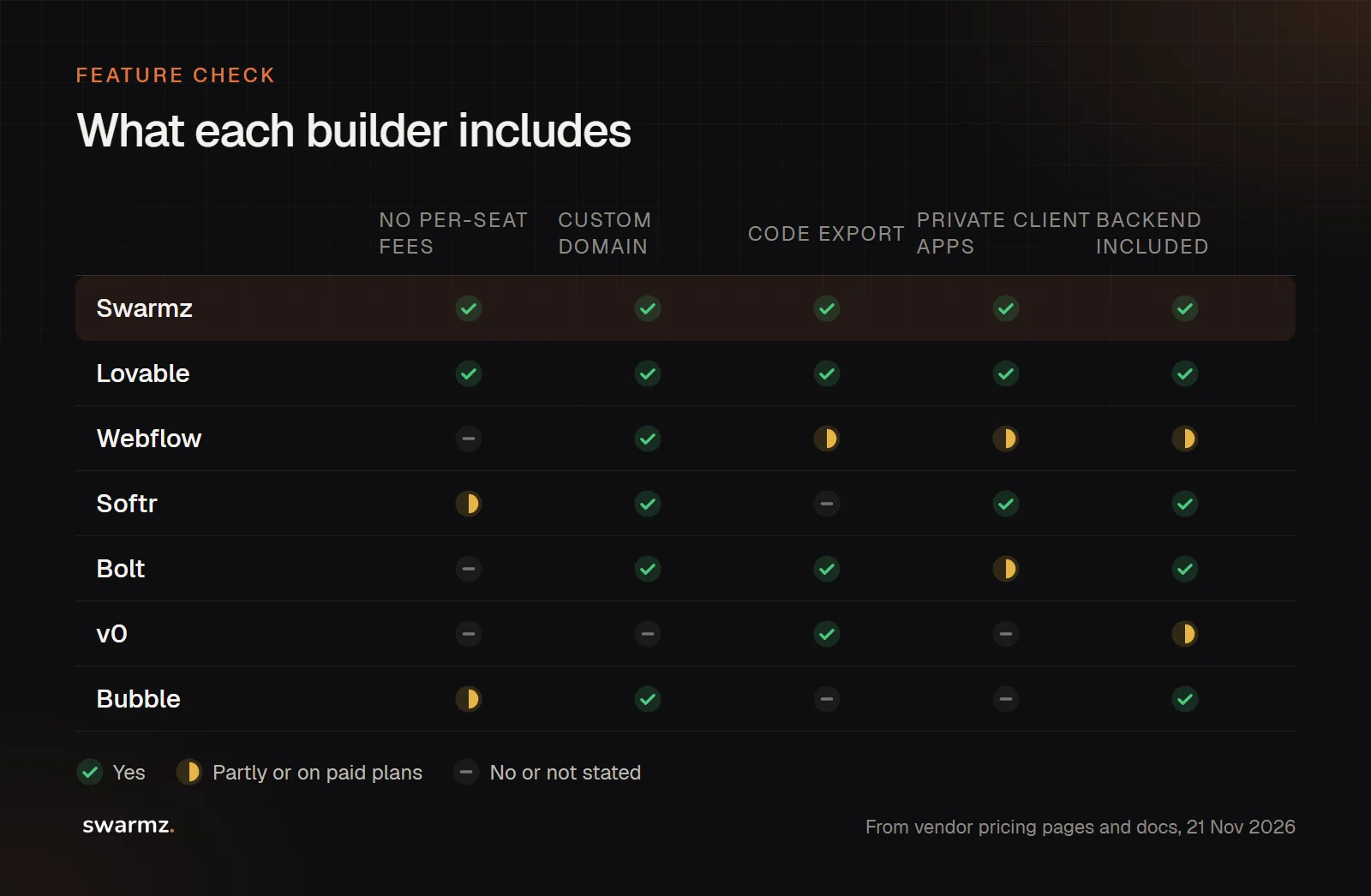
Tool | No per-seat fees | Custom domain | Code export | Private client apps | Backend included |
|---|---|---|---|---|---|
Swarmz | Yes | Yes | Yes | Yes | Yes |
Lovable | Yes | Yes | Yes | Yes | Yes |
Webflow | No | Yes | Partly | Partly | Partly |
Softr | Partly | Yes | No | Yes | Yes |
Bolt | No | Yes | Yes | Partly | Yes |
v0 | No | No | Yes | No | Partly |
Bubble | Partly | Yes | No | No | Yes |
Yes: included. Partly: only on some plans or with limits. No: not offered, or not stated by the vendor. Checked on 21 November 2026.
How to choose
Client web apps with sign-in, data and payments, and no per-seat fees: Swarmz.
Design systems and invite-only publishing on a $25 plan: Lovable.
Marketing sites with a CMS the client edits: Webflow.
Portals on a client's existing data: Softr.
Developer-led JavaScript work and Expo mobile: Bolt.
Next.js code delivered through pull requests: v0.
Apps you will keep maintaining in a visual editor: Bubble.
Build one real client project with your team on a free plan before you move every account. If a client compares your quote with a developer's, our breakdown of AI app builder vs hiring a developer costs helps frame it.
FAQ
What is the best AI app builder for agencies?
For most agencies building client web apps, Swarmz: unlimited projects, Admin, Editor and Viewer roles, shared credits with no per-seat fees, GitHub sync, and custom domains and badge removal on Pro. For design-led marketing sites, Webflow fits better.
Which AI app builder has no per-seat pricing?
Swarmz prices plans per workspace, so everyone shares the credits with no per-seat fees, and Lovable offers unlimited workspace members priced by credits. Bolt Teams and v0 charge per member or per user.
Can I white-label an AI app builder for clients?
Partly. On Swarmz Pro you can remove the Swarmz badge and use the client's own domain, and Business adds a branded workspace URL. Lovable and Bolt also remove their branding on Pro.
How do I hand over an app built with AI to a client?
Give the client the code and the domain. On Swarmz, the code syncs to a private GitHub repository, and on Pro the app runs on the client's domain without the badge. Webflow can transfer a site to another Workspace; Bubble apps stay on Bubble.
Can I keep client apps private?
Yes. On Swarmz Business, published apps can be invite-only, including for people outside your team. Lovable lets you publish to invited people on every plan, up to 10 per project below Business, and Webflow sites can be password protected from the Basic site plan.
Build your next client project
Invite your team, give each person a role and build the first client app on the free plan. Start on Swarmz, and upgrade when a client needs their own domain or a private app.
Sources
All checked on 21 November 2026.
Swarmz: swarmz.net/pricing, swarmz.net/faq
Lovable: docs.lovable.dev subscription plans, docs.lovable.dev FAQ
Webflow: webflow.com/pricing
Softr: Softr pricing and plans docs, softr.io
Bolt: bolt.new/pricing, Bolt GitHub integration, Bolt Cloud announcement
Bubble: bubble.io/pricing, Bubble data ownership
How did this land?
About the author

Founder of swarmz.net
Jordan founded Swarmz, the AI app builder at swarmz.net.


